BENFEI Laptop Stand Docking Station review: this is the kind of desk accessory that makes a workstation feel more intentional.
It combines an adjustable laptop riser with a USB-C hub, so you get better ergonomics and fewer cables.
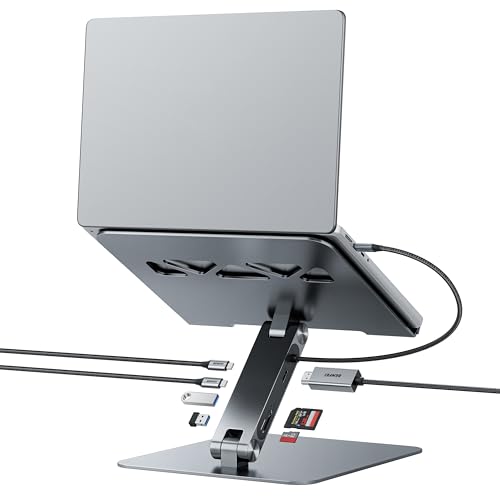
BENFEI Laptop Stand Review Summary
If you want a single accessory that raises your laptop and expands connectivity, the BENFEI Laptop Stand Docking Station makes a strong case.
It is especially appealing for remote workers, students, and creators who regularly connect an external monitor, SD cards, USB peripherals, and power delivery from one desktop location.
The main selling point is convenience.
Instead of buying a separate riser and docking station, you get an adjustable aluminum stand with built-in USB-C expansion, which is a smart setup for clutter-free desks.
For buyers with compatible USB-C laptops, this can streamline your whole workspace in a way a simple stand cannot.
Scorecard
| Category | Score | Why it matters |
|---|---|---|
| Ergonomics | 8.0 | Adjustable height and angle make it easier to raise the screen to a more comfortable viewing position for desk use. |
| Connectivity | 9.0 | Built-in docking features add HDMI, SD, microSD, USB-C, and USB-A expansion in one setup for cleaner desktop connectivity. |
| Display Output | 8.0 | HDMI output supports 4K at 60Hz, which is well suited for crisp external monitor use. |
| Charging Pass-through | 8.0 | Supports up to 100W power delivery input with pass-through charging to keep a connected laptop powered during use. |
| Transfer Speed | 8.0 | USB 3.2 ports and high-speed card reader support fast file transfers for everyday media and storage workflows. |
| Stability and Build | 8.0 | Aluminum alloy construction and anti-skid silicone are designed to improve stability and protect the laptop from sliding. |
Overall, this is a high-value desktop solution for USB-C laptop users who want better posture, monitor support, and expansion ports in one product.
It is not the lightest or simplest option, but it is one of the more practical all-in-one designs in this category.
Key Features and Specifications of BENFEI Laptop Stand
The BENFEI Laptop Stand Docking Station is built for desk use, not travel-first portability.
Its materials, footprint, and feature set all point toward a stable workstation accessory that replaces multiple separate items.
| Specification | Detail |
|---|---|
| Brand | BENFEI |
| Model | 000397grey |
| Color | Silver |
| Material | Aluminum |
| Style | Modern |
| Mounting Type | Tabletop |
| Weight | 1.22 kg |
| Product Dimensions | 250 x 240 x 53.3 mm |
| Height Adjustment | 68 mm to 178 mm |
| Display Output | HDMI with 4K 60Hz support |
| Ports | 1 USB-C 3.2, 2 USB-A 3.2, 1 SD, 1 microSD |
| Power Delivery | Up to 100W input, up to 85W pass-through charging |
| Data Transfer | Up to 10Gbps on USB A/C 3.2 ports |
| Card Reader | SD and microSD can be read and written simultaneously |
| Compatibility | USB-C laptops and some tablets/devices, including MacBook, Dell XPS, Surface, Chromebook, and others |
- Adjustable ergonomic viewing angle for better posture during long sessions
- Integrated docking station to reduce the need for separate adapters
- 4K 60Hz HDMI output for external displays
- USB-C and USB-A expansion for accessories, drives, and peripherals
- SD/microSD support for photographers, creators, and file transfer workflows
- Aluminum alloy build with anti-skid silicone for a sturdier desk feel
Pros and Cons of BENFEI Laptop Stand
Here is the practical BENFEI Laptop Stand Docking Station pros and cons breakdown from a buyer’s point of view.
Pros
- Two-in-one convenience combines a laptop stand and USB-C dock in one desktop accessory.
- Cleaner desk setup with fewer cables and fewer separate devices.
- Useful port selection for monitors, storage cards, and everyday USB accessories.
- 4K 60Hz HDMI is a meaningful upgrade for external display use.
- Pass-through charging support helps keep your laptop powered while connected to other peripherals.
- Sturdy aluminum construction should feel more durable than lightweight plastic alternatives.
- Adjustable height range gives you flexibility for screen positioning.
Cons
- Requires a compatible USB-C laptop to get the full dock functionality.
- Only one HDMI output limits multi-monitor flexibility compared with more advanced docks.
- Heavier than a basic stand, so it is not ideal if you move between locations often.
- Overkill for minimalists who only want a simple riser and do not need ports.
- Actual transfer and charging performance can vary with device support, cable quality, and the connected peripherals.
Who Should Buy BENFEI Laptop Stand?
The BENFEI Laptop Stand Docking Station is a good fit if you use your laptop as a desktop replacement and want a more polished, ergonomic setup.
It works especially well for people who dock a laptop to a monitor during the day and also need card readers and USB ports within easy reach.
Best for:
- Remote workers building a cleaner home office
- Students who want a raise-and-connect workspace
- MacBook and Windows USB-C laptop users who rely on one cable for dock-style use
- Creators who move photos or video assets from SD and microSD cards
- Anyone who wants better posture plus expansion ports without buying two accessories
This product also makes sense if your current setup is a mess of dongles, hubs, and stands.
In that case, the BENFEI Laptop Stand Docking Station can simplify the desktop while still adding useful functionality.
How the Docking Features Work
The best part of this design is how naturally the dock features fit into the stand format.
Because the USB-C hub is integrated, you can connect your laptop, external display, and peripherals in a more organized way than with a stand plus a loose hub sitting on the desk.
The HDMI output supports 4K at 60Hz, which is ideal if you want a crisp external monitor for productivity, coding, writing, or casual content work.
That refresh and resolution combination is much more comfortable than older 4K docks limited to 30Hz, especially for everyday scrolling and window management.
For charging, the dock supports up to 100W power delivery input and up to 85W pass-through charging.
In practical terms, that should be enough for many ultrabooks and productivity laptops while still leaving room for connected accessories.
Buyers should still verify their laptop’s power profile, because the full experience depends on device compatibility.
The 10Gbps USB 3.2 ports are another plus.
Those speeds are useful for flash drives, SSDs, cameras, and other modern peripherals where slower USB ports become frustrating.
It is not a replacement for a full workstation dock with every advanced expansion option, but it is strong for a compact setup.
Desk Setup and Cable Management
From a desk-management standpoint, this is where the BENFEI Laptop Stand Docking Station earns its keep.
A traditional laptop riser improves posture but does nothing for cable clutter.
A separate dock can add ports but may leave your laptop sitting lower than you’d like.
This product addresses both problems at once.
That combination is the real value proposition.
The laptop sits higher, the desk looks cleaner, and your main connections can stay centralized.
If your daily routine includes a monitor, external storage, a mouse, and maybe a keyboard or card reader, the setup becomes more efficient immediately.
The aluminum build also helps the stand feel like a permanent part of the workspace rather than a temporary accessory.
At 1.22 kg, it is not ultra-light, but the weight supports a more stable typing and viewing experience on a tabletop.
That is usually a good tradeoff for office use.
Device Compatibility Notes
Compatibility is one of the most important purchase factors for the BENFEI Laptop Stand Docking Station.
The stand itself can physically hold many laptops, but the docking features depend on USB-C support from the host device.
It is especially relevant for popular models such as MacBook Pro and Air, Dell XPS, Surface Book 2, Surface Go, HP Envy 13, Pixelbook, Galaxy Book, Chromebook, and Intel NUC setups.
Those are exactly the kinds of devices that benefit from a clean USB-C desktop hub.
Before buying, check three things: USB-C video output support, USB-C power delivery support, and whether your laptop’s port can handle the peripherals you want to use.
If your machine only supports charging but not display output over USB-C, you will not get the full dock experience.
Likewise, if you have a more basic Chromebook or older ultrabook, compatibility may be limited to only certain functions.
This is why the product is best suited to buyers who already know their laptop works well with USB-C docks.
If you are unsure, it is worth checking your model’s specifications before committing.
Port and Card Reader Performance
The port selection is a major reason to consider this model over a basic laptop stand.
You get one HDMI port, one USB-C 3.2 port, two USB-A 3.2 ports, one SD slot, and one microSD slot.
That is a practical mix for office, study, and light creative work.
The card reader is particularly useful because SD and microSD can be read and written simultaneously.
That matters for users moving files between cameras, drones, phones, and laptops.
The spec sheet also notes UHS-I mode support up to 160MB/sec for card reading, which is good enough for everyday transfer jobs and most casual media workflows.
As always, real-world speeds depend on the card, the device, and the cable.
If you regularly copy huge video files or need workstation-level throughput, dedicated premium docks may still be worth comparing.
But for everyday use, this setup should be fast enough and much more convenient than juggling dongles.
Comparable Alternatives to Consider
If you are comparing options, there are a few product paths worth looking at.
Each one serves a slightly different buyer.
- BENFEI Laptop Stand Docking Station if you want an all-in-one combination of stand and hub.
- basic aluminum laptop stand if you already own a dock and only need better ergonomics.
- USB-C docking station with HDMI if you care more about ports than screen height.
- laptop stand with built-in hub if you want a similar concept but want to compare designs.
- ergonomic laptop riser with pass-through charging if posture and charging are your top priorities.
Compared with a basic stand, the BENFEI is more capable.
Compared with a full-featured dock, it is simpler and often more elegant for a single-monitor desk.
That middle ground is exactly where many buyers will find the best value.
BENFEI Laptop Stand Review Summary
To put the BENFEI Laptop Stand Docking Station review into plain terms, this is a smart purchase if you want one accessory that improves posture, reduces cable mess, and adds useful USB-C connectivity.
It is especially well matched to USB-C laptop users who work at a desk every day and want an orderly, more productive setup.
The strongest reasons to buy are the adjustable ergonomic design, the 4K 60Hz HDMI output, the 100W power delivery input, and the combination of USB-A, USB-C, and card reader expansion.
The biggest drawbacks are compatibility dependence and limited multi-display flexibility.
Those are real limitations, but they are easy to accept if your use case is a single-monitor workstation.
Bottom line: BENFEI Laptop Stand Docking Station is a compelling all-in-one desk upgrade for the right buyer.
If you want a cleaner workspace and your laptop supports USB-C video and charging, it is absolutely worth serious consideration.
Who Should Skip This Stand
Not every buyer needs this level of functionality.
If you only need a simple riser for occasional laptop use, a basic aluminum stand will be cheaper and easier to carry.
If you already have a quality docking station and are happy with your current ergonomics, this product may duplicate what you own.
You should probably skip it if:
- You want a lightweight travel stand
- Your laptop lacks USB-C video output
- You need multiple monitor outputs
- You only want a bare-bones stand with no hub features
- Your desk setup changes constantly and you do not want a heavier tabletop accessory
For everyone else, the design makes sense because it solves more than one problem at once.
That is why the product stands out in a crowded accessories market.
Is BENFEI Laptop Stand Worth It?
Yes, for the right buyer, the BENFEI Laptop Stand Docking Station is worth it. It delivers a practical mix of ergonomics, connectivity, and desk organization that makes everyday laptop use more comfortable and efficient.
If your workflow includes an external monitor, USB peripherals, and memory cards, this product can simplify your setup in a meaningful way.
Its value is strongest for users who want a clean, stationary workstation rather than a portable accessory.
The aluminum construction, adjustable height range, USB-C charging support, and 4K 60Hz HDMI output make it feel thoughtfully designed for modern laptop desks.
The main caveat is compatibility, so confirm your device supports USB-C video and power delivery before buying.
Final recommendation: choose the BENFEI Laptop Stand Docking Station if you want an ergonomic laptop riser with real docking usefulness.
If you only need a stand, buy a simpler one.
If you want a desk upgrade that replaces several accessories at once, this is a strong pick.