TobenONE DisplayLink Docking Station 4 Monitor review buyers will care about if they need serious desk expansion.
It is built for multi-monitor productivity, not casual charging.
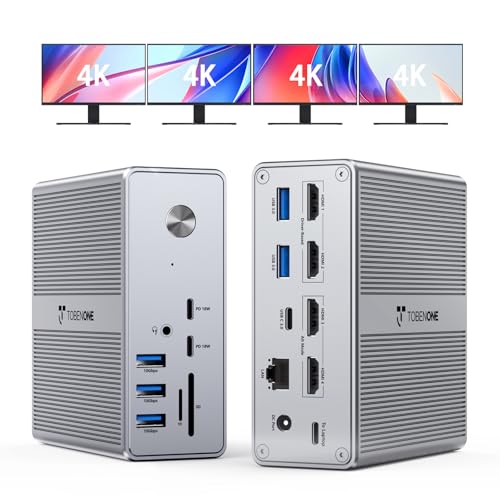
TobenONE Dock Review Summary
The TobenONE DisplayLink Docking Station 4 Monitor is best for Windows power users, MacBook owners who need more screen space, and anyone trying to turn a USB-C laptop into a real workstation. It combines quad-display support, a very wide port selection, and up to 100W laptop charging in a compact desktop footprint.
If you want one dock to handle monitors, networking, storage cards, audio, peripherals, and charging, this is exactly the kind of device that can clean up a crowded setup.
From a buyer’s perspective, the biggest reason to choose this dock is simple: it solves the “not enough ports” problem while also unlocking a serious multi-monitor setup.
That makes it especially attractive for remote workers, analysts, programmers, content managers, and office users who bounce between spreadsheets, browser tabs, messaging apps, and video calls all day.
The tradeoff is that DisplayLink adds setup steps, and Mac users will not get the same display behavior as Windows users.
Scorecard
| Category | Score | Why it matters |
|---|---|---|
| Multi-monitor support | 9.0/10 | Supports up to 4 external displays on Windows and up to 3 displays on Mac, with 4 HDMI outputs for a strong productivity-focused setup. |
| Display quality | 9.0/10 | Promises up to 4K at 60Hz across supported multi-display configurations, making it suitable for sharp office, creative, and multitasking use. |
| Port selection | 10/10 | Very broad 18-port layout with 4 HDMI, multiple USB-A and USB-C data ports, Ethernet, SD/microSD, and audio, reducing the need for extra hubs. |
| Compatibility | 8.0/10 | Works with Thunderbolt 5/4/3, USB4, and full-featured USB-C on Windows, Mac, Chrome OS, Android, and Ubuntu, though macOS has display limitations and Linux/Unix are not supported. |
| Charging capability | 8.0/10 | Includes a 120W power adapter and up to 100W laptop charging plus front USB-C charging for phones, making it practical for dock-and-charge workflows. |
| Setup and software | 7.0/10 | Requires the latest DisplayLink driver and performance depends on host device, cable, and monitor configuration, so setup is not entirely plug-and-play. |
| Size and desk fit | 8.0/10 | Compact footprint and moderate weight make it easier to place on a desk than larger enterprise docks while still offering extensive connectivity. |
Bottom line: this is a strong productivity dock with excellent hardware value, but it is not the simplest option for users who want native video output with zero software dependency.
Key Features and Specifications of TobenONE Dock
The TobenONE DisplayLink Docking Station 4 Monitor packs a large amount of I/O into a small desktop body, which is one of its most practical strengths.
The model number is UDS033C, and the design is clearly aimed at desk users who want one cable to do most of the work.
| Spec | Detail |
|---|---|
| Brand | Tobenone |
| Model | UDS033C |
| Color | Grey-120W power adapter |
| Product dimensions | 1.7 x 4.3 x 4.5 in |
| Item weight | 17.6 oz |
| Number of ports | 18 |
| Total USB ports | 8 |
| Total HDMI ports | 4 |
| Wattage | 100W |
| Input voltage | 120V AC |
| Minimum required OS | Mac OS 10.15 Catalina, Windows 10 |
| Warranty | 24 months manufacturer |
- 4 HDMI outputs for multi-monitor use
- Supports up to 4 external displays on Windows laptops
- Supports up to 3 displays on MacBook Pro/Air/Neo
- Up to 4K at 60Hz on supported display configurations
- 18 total ports including USB, Ethernet, card readers, and audio
- 8 USB ports total with a mix of USB-A and USB-C data connections
- SD and microSD card slots for creators and office users
- Ethernet port for wired networking stability
- 3.5mm audio port for headphones or speakers
- 120W power adapter included
- Up to 100W laptop charging
- Front USB-C charging up to 18W for phones
- Compatible with Thunderbolt 5/4/3, USB4, and full-featured USB-C
- Works with Windows 10 or later, macOS 11+, Chrome OS 100+, Android, and supported Ubuntu setups
This is a good example of smart dock design.
Instead of focusing only on display output, TobenONE gives you enough connectivity to replace several smaller accessories at once.
That matters if you are building a workstation around one laptop.
Pros and Cons of TobenONE Dock
Every serious dock has tradeoffs, and the TobenONE DisplayLink Docking Station 4 Monitor pros and cons are easy to understand once you know how DisplayLink works.
Pros
- Excellent multi-monitor support for demanding productivity setups.
- Large port count reduces the need for separate hubs and adapters.
- Sharp 4K@60Hz capability on supported configurations.
- Useful laptop charging with a 120W adapter and up to 100W output to the host machine.
- Phone charging from front USB-C is a nice everyday convenience.
- Compact desktop footprint for a dock with this much connectivity.
- Broad device compatibility across modern USB-C and Thunderbolt laptops.
Cons
- Requires DisplayLink driver installation, so it is not completely plug-and-play.
- macOS display support is more limited than Windows performance.
- Linux and Unix are not supported, which narrows the audience.
- Actual resolution and refresh results depend on host hardware and cables.
- Mac users cannot use all HDMI outputs the same way Windows users can.
For many buyers, the pros outweigh the cons because the dock solves a real desk problem.
But if you want zero software overhead, a native Thunderbolt dock may be a better fit.
Who Should Buy TobenONE Dock?
This dock makes the most sense for people who need a single, high-density workstation hub. It is especially compelling for users who run multiple apps and multiple screens all day and want fewer cables on the desk.
- Remote workers who want a cleaner desk and a more desktop-like laptop setup.
- Windows laptop users who want a true multi-monitor DisplayLink dock.
- MacBook users who need expanded display support plus lots of ports, while accepting the macOS limitations.
- Analysts, traders, editors, and developers who benefit from multiple screens and reliable wired peripherals.
- Office users who want Ethernet, card readers, USB peripherals, and charging in one place.
Who should skip it?
If you only use one external monitor, if your work depends on Linux or Unix, or if you want the simplest possible out-of-the-box setup, this dock may be more machine than you need.
In those cases, a lighter USB-C dock or a native Thunderbolt dock may be the better purchase.
DisplayLink setup and driver requirements
The most important technical detail in any TobenONE DisplayLink Docking Station 4 Monitor review is the software layer.
DisplayLink is what enables the dock to push beyond the native display limits of many laptops, especially when you want multiple monitors from a single USB-C connection.
That power comes with a catch: you need the latest DisplayLink driver installed before expecting full functionality.
Buyers who ignore this step often assume the dock is faulty when the real issue is software.
This is not a criticism of the hardware itself; it is simply the reality of DisplayLink-based docks.
In practical use, the setup process is still manageable for most people.
But if you are buying for a workplace where IT restrictions are strict, or for a device you plan to move between machines often, the driver dependency should be part of your decision.
Mac versus Windows display limits
The gap between Mac and Windows support is one of the most important buying considerations.
On Windows laptops, the TobenONE Dock can support up to four external displays, which is a major advantage for productivity-heavy roles.
On Mac systems, the dock still offers real value, but display behavior is more limited.
The dock supports up to three displays on certain MacBook Pro, Air, and Neo configurations, but macOS does not treat all HDMI outputs the same way Windows does.
That means Mac buyers need to think carefully about their exact monitor plan before purchasing.
If you are using an M-series MacBook and want a dock specifically for expanded screens, this product is still appealing because it offers practical workarounds that many simpler hubs cannot match.
Just do not assume Windows-style quad-monitor behavior on macOS.
Port layout and peripheral compatibility
One of the strongest reasons to buy the TobenONE DisplayLink Docking Station 4 Monitor is the port layout.
With 18 total ports, it is clearly built for people who connect more than just displays.
The mix includes 4 HDMI ports, 8 USB ports, Ethernet, SD, microSD, and 3.5mm audio.
That combination is especially useful if you use wired keyboards, mice, webcams, hard drives, card readers, speakers, or a headset.
Instead of adding a separate hub for each category, you can let the dock handle the whole desk.
USB-C ports are particularly helpful for newer accessories, while the USB-A ports preserve compatibility with older peripherals.
That balance makes the dock more flexible than many single-generation hubs that force you to choose between legacy and modern devices.
For creators, the card readers can be a time-saver.
For office users, Ethernet and audio are just as valuable because they reduce clutter and improve reliability.
Charging performance in daily use
The dock’s charging setup is practical rather than flashy, and that is a good thing.
The included 120W power adapter gives the dock enough power to support the host laptop while also feeding attached devices.
TobenONE lists up to 100W laptop charging, which is strong enough for many modern productivity laptops.
In day-to-day use, this matters because it lets the dock act like a real desk base.
You can arrive, connect one cable, and start working without hunting for a separate charger.
The front USB-C charging support for phones is also a nice detail, especially if you want to keep a mobile device topped off during the workday.
The main buying tip here is straightforward: check your laptop’s charging expectations.
Some larger laptops want more power than a dock can provide under heavy load, and users who run intensive tasks may still see battery drain while plugged in.
For typical office workloads, though, this should be more than sufficient.
Desk setup and cable management
A dock like this should make a desk feel simpler, not more complicated.
Fortunately, the TobenONE Dock’s compact size helps it fit more easily than many larger multi-monitor stations.
At 1.7 x 4.3 x 4.5 inches and 17.6 ounces, it is small enough to place near the back edge of a desk, beside a monitor stand, or in a cable tray area.
Because the dock consolidates displays, networking, data, audio, and charging, it can significantly reduce cable mess.
That is one of the underrated reasons people buy workstation docks in the first place.
Cleaner cable management usually means faster desk changes and fewer connection problems when you dock and undock every day.
The one thing to remember is that a full four-monitor setup naturally creates more cabling than a basic USB hub.
So while the dock simplifies the system, you still need to plan the cable route carefully if you want the desk to stay tidy.
Comparable alternatives to consider
If you are comparing the TobenONE DisplayLink Docking Station 4 Monitor to other popular Amazon options, a few alternatives are worth a look:
- CalDigit multi-monitor dock — a premium alternative if you want a strong reputation and are comfortable paying for a more polished ecosystem.
- Anker USB-C docking station for dual monitors — better if you only need dual displays and prefer a simpler setup.
- Dell WD22TB4 Thunderbolt dock — a solid enterprise-style dock for users who want native Thunderbolt behavior.
- Mac-focused DisplayLink dock — useful if you are shopping primarily for a MacBook workstation and want to compare feature balance.
- Thunderbolt docking station with native display output — the best comparison if you want fewer software requirements.
Compared with these alternatives, the TobenONE stands out for its very broad port mix and quad-monitor ambition.
It is less about prestige and more about getting a lot of practical hardware into one box.
Is TobenONE Dock Worth It?
Yes, the TobenONE DisplayLink Docking Station 4 Monitor is worth it for the right buyer. If you need multiple monitors, a wide range of wired ports, and laptop charging from a single connection, this dock offers a very strong feature set for a productivity workstation.
The best-case user is a Windows laptop owner who wants a true quad-monitor dock without buying a more expensive enterprise setup.
Mac users can still benefit, but they should read the display limitations carefully and decide whether the software-based approach fits their workflow.
If you understand the DisplayLink requirement and value port density, this is a smart purchase.
Final verdict: buy the TobenONE DisplayLink Docking Station 4 Monitor if you want a compact, high-capability dock that can replace multiple adapters and support a serious desk setup.
Skip it only if you need native display output with no driver dependence or if your system falls outside the supported ecosystem.