If you need to digitize posters, artwork, blueprints, or ledger-sized pages on a Mac, a standard scanner often falls short. Large-format flatbed models give you the extra glass area and resolution needed for cleaner, more usable scans.
This roundup focuses on Mac-friendly options that balance scan size, image quality, speed, and practical software support for home, studio, school, and office use.
Best 10 Large Format Flatbed Scanner for Mac Picks for 2026
A3 Detail Scanner
Plustek OpticPro A320L for Large Artwork
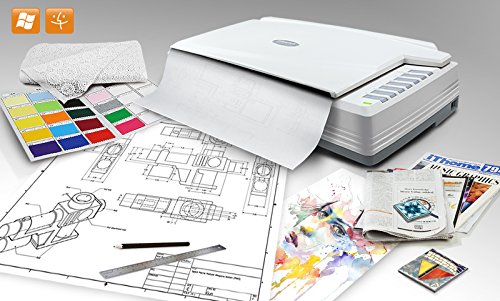
- 12" x 17" scan area for A3 and wide-format originals
- 1600 dpi optical resolution with CCD sensor
- Mac support plus TWAIN and OCR features
Best For: Scanning oversized artwork and documents on Mac with high detail
Premium Photo Scanner
Epson Perfection V850 Pro for Archival Scans

- 6400 dpi resolution for detailed imaging
- 4.0 Dmax and dual lens system for tonal accuracy
- Mac support listed for older OS X versions
Best For: High-detail photo and archival scanning on Mac
Fast Large-Format Pick
Plustek OpticSlim 1680 for Mac Documents

- 11.7" x 17" scan area for tabloid, ledger, and A3 paper
- 3-second gray and 5-second color scans at 300 dpi
- ICA support and one-key operation for Mac workflows
Best For: Quick large-format document scanning on Mac
Portable Book Scanner
CZUR Aura Pro for Books and Documents

- Works with macOS 10.13+ and Apple Silicon noted
- Auto-flatten and deskew for curved pages
- 2-second scans with OCR and searchable PDF support
Best For: Portable Mac scanning for books and documents with page correction
Large-Format A3 Value Pick
Plustek OS1180 for Tabloid and A3 Documents

- A3/tabloid scanning up to 11.7 x 17 inches
- LED light source with no warm-up time
- OCR and document-sharing software included
Best For: Libraries, schools, and small offices
Compact Photo Scanner
Epson Perfection V19 II for Books and Photos

- 4800 dpi optical resolution for detailed scans
- USB-powered and only 3.1 lb
- High-rise lid supports books and albums
Best For: Home users scanning photos and letter-size documents
Fast A3 Workhorse
VIISAN VF3240 for CAD and Large Documents

- A3 flatbed with up to 2400 x 2400 DPI
- MacOS support via native ICA driver
- Frameless glass and auto-scan features
Best For: CAD, office, and school users scanning large flat documents
Refurbished A3 Workhorse
VIISAN VF3240 Large Format Scanner
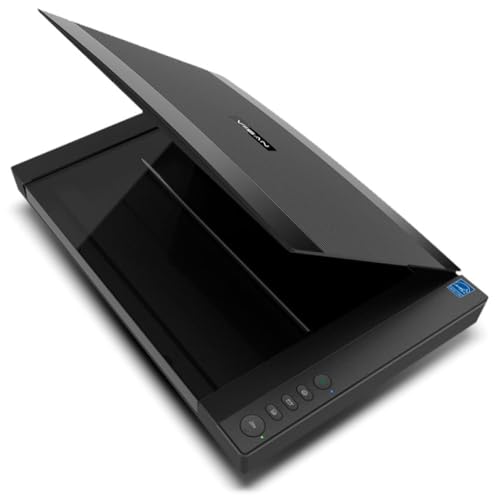
- A3 scanning up to 297 × 420 mm
- 2400 dpi optical resolution, 48-bit color
- Fast 4-second A3 scans at 200 dpi
Best For: Mac users needing an affordable A3 scanner for documents, books, and artwork
Best Heavy-Duty Pick

- 4800 dpi optical resolution for detailed scans
- USB-powered and easy to move around
- High-rise removable lid for books and pages
Best For: Mac users scanning photos and documents in a compact home setup
Budget A3 Scanner
VIISAN 3120 Large Format Flatbed

- A3 scanning up to 304 × 426 mm
- 1200 dpi optical resolution with 48-bit color
- Auto-scan and one-touch workflow buttons
Best For: Mac users wanting a budget-friendly A3 scanner for books, documents, and artwork
A3 Detail Scanner – Plustek OpticPro A320L for Large Artwork
If you need a large format flatbed scanner for Mac that can handle oversized originals, the Plustek OpticPro A320L is built for A3-sized paper, drawings, maps, and bound books. Its 12″ x 17″ scan area and 1600 dpi optical resolution make it a strong pick when image detail matters more than speed.
Best For: Artists, designers, and office users scanning oversized documents on Mac with a focus on detail.
Pros:
- 12″ x 17″ scan area handles A3 and other wide-format originals.
- 1600 dpi optical resolution with a Sony ILX560K CCD sensor for high-detail scans.
- TWAIN support and Mac compatibility make it easier to fit into existing workflows.
- Doc Action includes save destinations plus OCR for searchable PDFs.
Cons:
- Best suited to quality-focused scanning rather than quick everyday batches.
- Mac support is limited to macOS 10.12 through 13.x in the supplied notes.
- It is a sizable unit, so desk space matters.
For users who want maximum scan area and strong image fidelity, this model is a practical large-format flatbed choice. It stands out when your Mac workflow calls for detailed scans of artwork, oversized paperwork, or odd-shaped originals.
Premium Photo Scanner – Epson Perfection V850 Pro for Archival Scans
The Epson Perfection V850 Pro is a photo scanner first, but it can still appeal to Mac users who want high-quality flatbed scanning from a trusted desktop device. With 6400 dpi resolution, a 4.0 Dmax tonal range, and a dual lens system, it is designed for fine detail and smooth gradations.
Best For: Photographers and archivists on Mac who need premium image quality from a flatbed scanner.
Pros:
- 6400 dpi resolution supports highly detailed photo and film-style scanning.
- 4.0 Dmax helps preserve shadow detail and tonal gradations.
- Dual lens system selects the best lens for the job.
- Mac compatibility is listed across several older Mac OS X versions.
Cons:
- It is a photo scanner, not a large-format document scanner.
- Standard sheet capacity is only 10, so it is not built for bulk jobs.
- Mac support in the notes is limited to older OS X versions.
If your priority is scan quality over page size, the V850 Pro is a compelling option. It is better suited to precision imaging than to oversized office documents, but it remains a strong flatbed choice for Mac-based photo workflows.
Fast Large-Format Pick – Plustek OpticSlim 1680 for Mac Documents
For buyers seeking a large format flatbed scanner for Mac with a focus on speed, the Plustek OpticSlim 1680 is built for tabloid, ledger, and A3-size paper. Its USB connection, ICA compliance for macOS, and quick 300 dpi scan times make it a practical fit for document-heavy workflows.
Best For: Mac users who need quick tabloid and A3 scanning for documents and forms.
Pros:
- 11.7″ x 17″ scan area covers tabloid, ledger, and A3 paper.
- Fast scan times: 3 seconds for 300 dpi gray and 5 seconds for color.
- ICA support on Mac helps with software compatibility.
- Four preset buttons streamline common scan tasks.
Cons:
- CIS sensor and 1200 dpi resolution are aimed more at speed than top-end image quality.
- Single-sheet design means it is not made for batch feeding.
- Best results appear centered around routine document scanning rather than archival imaging.
This is a sensible pick when you want large-format scanning without a slow workflow. It makes the most sense for Mac users who care more about efficiency and page size coverage than maximum optical detail.
Portable Book Scanner – CZUR Aura Pro for Books and Documents
The CZUR Aura Pro is a portable book and document scanner that works well for Mac users who want A3 and A4 capture without a traditional flatbed. It uses AI-assisted software, auto-flatten and deskew features, and a fast 2-second-per-page workflow for output in JPG, Word, PDF, or searchable PDF.
Best For: Mac users scanning books and documents who want portability and automatic page correction.
Pros:
- Compatible with macOS 10.13 or later, including Apple Silicon support noted in the specs.
- Auto-flatten and deskew help handle curved book pages.
- 2-second-per-page scanning keeps the workflow moving.
- OCR supports 180+ languages and can create searchable PDFs.
Cons:
- It is not a traditional flatbed scanner.
- Mac support has version requirements in the supplied notes.
- OCR language support excludes some languages such as Thai, Hebrew, and Arabic.
For portable capture and book-friendly processing, the Aura Pro offers a very different approach from a flatbed. It is a strong alternative for Mac users who want fast, corrective scanning and do not need a glass bed.
Large-Format A3 Value Pick – Plustek OS1180 for Tabloid and A3 Documents
If you need a large format flatbed scanner for Mac-style document digitizing and big paper handling, the Plustek OS1180 is built around A3 scanning with a practical, office-friendly workflow. It covers tabloid and A3 sheets up to 11.7 x 17 inches, uses an LED light source with no warm-up time, and includes shortcut buttons for faster everyday use.
Best For: Libraries, schools, and small offices that need quick A3 or tabloid scanning with simple controls.
Pros:
- Scans A3/tabloid documents up to 11.7 x 17 inches.
- LED light source means no warm-up hassle and lower energy use.
- One-touch buttons and bundled software help streamline frequent scanning.
- Includes ABBYY FineReader OCR plus DocAction/PageManager tools.
Cons:
- Compatible devices are listed as PC, so Mac support is not stated in the notes.
- At 9.52 pounds, it is not a compact portable scanner.
- Designed for flat documents rather than mixed-media scanning.
This is a straightforward choice if your priority is dependable large-format document scanning over premium photo features. The OS1180 focuses on speed, size, and office workflow features rather than portability.
Compact Photo Scanner – Epson Perfection V19 II for Books and Photos
The Epson Perfection V19 II is a compact flatbed scanner for Mac users who want a simple, USB-powered way to scan photos, books, and documents. Its 4800 dpi optical resolution is aimed at image detail, while the high-rise removable lid makes it easier to scan books and photo albums.
Best For: Home users who want a lightweight scanner for photos, books, and letter-size documents.
Pros:
- 4800 dpi optical resolution for detailed photo and artwork scans.
- USB powered and lightweight at 3.1 lb for easy setup.
- High-rise, removable lid helps with books and photo albums.
- Includes ScanSmart software plus searchable PDF and OCR features.
Cons:
- It scans letter-sized documents, not large-format sheets.
- Best suited to flat originals rather than oversized media.
- Windows 7 is listed in the minimum system requirements; Mac support is not specified in the notes.
If your workflow is centered on photos and regular documents, this model offers strong image quality in a very small footprint. It is less about oversized scanning and more about convenience, portability, and detail.
Fast A3 Workhorse – VIISAN VF3240 for CAD and Large Documents
The VIISAN VF3240 is a large-format flatbed scanner for Mac users who need fast A3 scanning for drawings, documents, and archival work. It supports full A3 output with MacOS native ICA driver support, offers a frameless glass design for edge-to-edge scanning, and is built for flat materials like blueprints and legal-size originals.
Best For: CAD users, offices, and schools that need quick A3 scanning with MacOS support.
Pros:
- Up to 2400 x 2400 DPI optical resolution with 48-bit color.
- Fast A3 scanning in about 4 seconds at 200 DPI under stated conditions.
- MacOS 10.15+ support via ICA driver, plus Windows compatibility.
- Frameless glass and auto-scan improve large-document workflow.
Cons:
- Full A3 at 2400 DPI requires MacOS native ICA driver support.
- Designed for flat materials only, not 3D objects or mixed media.
- Some Windows scanning resolutions are limited by WIA restrictions.
For buyers focused on speed and oversized document handling, this model stands out as the most workflow-oriented option here. It is especially appealing when you need a scanner that can handle blueprints, presentations, and large paper formats without slowing down.
Refurbished A3 Workhorse – VIISAN VF3240 Large Format Scanner
If you need a large format flatbed scanner for Mac that can handle oversized documents without a lot of fuss, the VIISAN VF3240 is built for practical A3 scanning. It supports up to 297 × 420 mm, delivers 2400 dpi optical resolution, and is designed for documents, photos, books, magazines, CAD drawings, and artworks.
Best For: Mac users who want a refurbished A3 flatbed scanner for documents, books, and design work.
Pros:
- Supports A3 scans up to 11.7″ x 16.7″ for large documents and books
- 2400 dpi optical resolution with 48-bit color depth
- Fast A3 scanning at 200 dpi in as little as 4 seconds
- macOS compatible via ICA, with drivers available from VIISAN
Cons:
- Refurbished unit may show minor cosmetic signs of prior use
- Drivers must be downloaded from the official VIISAN website
- USB connection only, so it is not a wireless scanner
Overall, the VF3240 is a strong value pick if you want a large format flatbed scanner for Mac and care more about A3 coverage and speed than buying brand-new hardware.
Best Heavy-Duty Pick – Epson Perfection V39 II
The Epson Perfection V39 II is a compact flatbed option for buyers who want a simple scanner for photos and documents on a Mac-friendly desk setup. It focuses on 4800 dpi optical resolution, USB power, and easy scanning for photos, artwork, books, and letter-sized documents.
Best For: Home users who want a lightweight scanner for photos, documents, and cloud-friendly workflows.
Pros:
- 4800 dpi optical resolution for detailed photo scans
- USB-powered design keeps setup simple and portable
- High-rise removable lid helps with books and thicker pages
- ScanSmart software supports oversized stitching and cloud storage
Cons:
- Best suited to letter-size work, not large format scanning
- Listed optical resolution is for photo scanning, not A3-sized jobs
- Not the right choice if your main need is oversized flatbed coverage
For Mac buyers who mainly need a compact scanner for photos and everyday documents, the V39 II is convenient and capable, but it is not a true large format flatbed scanner for Mac.
Budget A3 Scanner – VIISAN 3120 Large Format Flatbed
If your priority is a large format flatbed scanner for Mac with A3 coverage and straightforward operation, the VIISAN 3120 is a practical choice. It scans up to 304 × 426 mm, includes frameless design and auto-scan, and is aimed at books, magazines, newspapers, artworks, and CAD drawings.
Best For: Mac users who need an affordable A3 scanner for school, office, or library workflows.
Pros:
- Scans large originals up to 11.98″ x 16.8″
- 1200 dpi optical resolution with 48-bit color depth
- Auto-scan and one-touch buttons streamline repetitive tasks
- MacOS ICA support, with 1200 dpi available through VIISAN software
Cons:
- CIS sensor is limited to flat items only
- Mac setup relies on ICA driver and supplied software for full resolution
- Slower than higher-end large-format models when scanning at top detail
The VF3120 is a sensible middle-ground option if you want a large format flatbed scanner for Mac without stepping up to a pricier professional unit.
How We Picked the Best Large Format Flatbed Scanner for Mac
We prioritized scanners that can handle oversize originals, offer solid image quality, and make sense for Mac users. That means looking at usable scan area, optical resolution, software compatibility, scan speed, lid design, and whether the scanner is better for photos, documents, books, or mixed workloads.
For a Large Format Flatbed Scanner for Mac, the most important factor is not just maximum size on paper, but how reliably it scans that size without awkward setup or poor edge quality.
Quick Comparison
In this category, the main tradeoffs are simple: higher resolution usually helps photos and artwork, faster scanning helps office work, and A3-class beds are the sweet spot for oversized documents. Some models lean toward precision and color detail, while others favor speed, portability, or budget-friendly everyday use.
At a Glance
- Best for artwork and photo detail: higher optical resolution and strong color fidelity
- Best for office and CAD documents: large scan bed, fast throughput, and easy batch use
- Best for Mac users with limited space: compact designs and simple USB connectivity
- Best for books and mixed media: removable or high-rise lids and flexible software tools
Key Buying Factors for Large Format Flatbed Scanner for Mac
Scan Size and Document Coverage
Make sure the scan bed matches what you actually need to digitize. A3 and tabloid sizes are ideal for most oversize documents, while artists and archivists may want the largest practical bed to avoid stitching multiple scans.
Optical Resolution Vs. Interpolated Resolution
Optical resolution matters most. Higher numbers help preserve fine detail in photos, line art, and texture, but they do not automatically improve every scan. For documents and CAD drawings, speed and accuracy often matter more than extreme resolution.
Mac Compatibility and Software
Confirm that the scanner works smoothly with macOS and your preferred apps. Look for reliable drivers, TWAIN or Image Capture support where applicable, and software that makes cropping, deskewing, and file naming easy.
Speed, Lid Design, and Ease of Use
If you scan often, speed and convenience become important. A removable or high-rise lid helps with books and thick originals, while auto-flatten and deskew features can save time on mixed media jobs.
Who Should Buy Which Large Format Flatbed Scanner for Mac?
If you scan photos or artwork, choose the model with the strongest optical resolution and best color handling. If you work with office documents, school materials, or CAD sheets, prioritize faster scans and reliable A3 coverage. If you need a versatile Large Format Flatbed Scanner for Mac for books, archives, and occasional oversized pages, look for the most flexible lid design and simple Mac setup. For buyers on a budget, a smaller or refurbished option can still be a smart fit if the scan area matches the job.