Choosing the right Thunderbolt CFexpress card reader for Mac can make a huge difference in your post-production workflow. The best options deliver fast transfers, stable performance, and dependable compatibility with modern MacBook Pro and Mac Studio setups.
Below, we focus on readers that make sense for real-world Mac use, from Thunderbolt-ready USB4 models to more affordable 10Gbps picks for lighter workloads.
Best 10 Thunderbolt CFexpress Card Reader for Mac Picks for 2026
Delkin Devices USB4 Pick
Delkin USB4 CFexpress Type B Reader

- 40Gbps USB4 performance
- Mac and Windows compatible
- Includes USB-C cable and USB-A adapter
Best For: Mac users needing a portable Type B reader with USB4 speed
Lexar Dual-Slot Choice
Lexar CFexpress Type B / SD Reader

- CFexpress Type B and SD slots
- Up to 10Gbps transfer speed
- Works with Mac and Windows
Best For: Mac users who need a compact dual-slot CFexpress and SD reader
Thunderbolt Multi-Card Pick
ORICO 4-in-1 Thunderbolt Reader

- Thunderbolt-only 40Gbps connection
- Reads CFexpress A/B, SD, and TF
- Cooling-focused aluminum build
Best For: Thunderbolt Mac users needing a versatile multi-card reader
OWC Performance Pick
OWC Atlas USB4 CFexpress 4.0 Reader

- USB4 and Thunderbolt 4 compatible
- Supports CFexpress Type A and B
- Up to 5000MB/s rated ingest
Best For: Mac users who prioritize top ingest speed and CFexpress 4.0 support
Dual-Slot USB4 Option
2-in-1 Type A/B CFexpress Reader for USB4 Macs

- Reads CFexpress Type A and Type B cards
- Claims up to 40Gbps over USB4.0 Gen2
- Aluminum alloy body with braided nylon cable
Best For: Users who want one high-speed reader for both CFexpress formats
Dual-Slot CFexpress + SD
CFexpress Type B and SD Reader for Mac

- Supports CFexpress Type B plus UHS-II/UHS-I SD
- USB-C 3.2 Gen 2 with up to 10Gbps speeds
- Aluminum housing for better cooling
Best For: Mac users who want one reader for CFexpress Type B and SD cards
Compact Type B Pick
Acer CFexpress Type B Reader for Mac

- CFexpress Type B only for a focused workflow
- Up to 10Gbps with USB 3.2 Gen 2
- Compact aluminum shell with USB-C and USB-A
Best For: Users who only need CFexpress Type B support on Mac
Best 3-in-1 Value
10Gbps CFexpress/XQD/SD Reader

- Reads CFexpress Type B, XQD, and SD cards
- 10Gbps USB 3.2 Gen 2 transfer speed
- Includes USB-C and USB-A cables
Best For: Mac users who want one reader for mixed-card workflows
Best Dual-Slot Pick
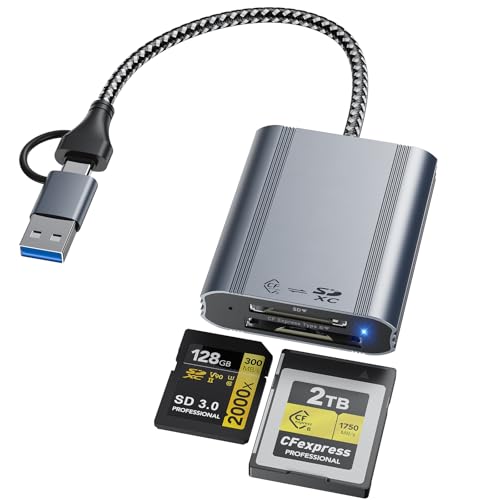
- Dual slots for CFexpress Type B and SD
- 10Gbps USB 3.2 Gen 2 performance
- USB-C and USB-A built in
Best For: MacBook users who want a simple dual-slot reader
Best Travel-Ready Choice

- Reads CFexpress Type B, XQD, and SD cards
- Dual-card read/write support for backups
- USB-C and USB-A cables included
Best For: Mac users who need a compact all-in-one reader for travel
Delkin Devices USB4 Pick – Delkin USB4 CFexpress Type B Reader
If you want a Thunderbolt CFexpress card reader for Mac that keeps up with fast ingest, the Delkin Devices USB4 reader is built around 40Gbps USB4 performance and broad Mac compatibility. It focuses on CFexpress Type B transfers, with a compact aluminum design that is easy to carry between studio and location work.
Best For: Mac users who need a portable CFexpress Type B reader with 40Gbps USB4 speeds and USB-C/USB-A flexibility.
Pros:
- 40Gbps USB4 performance for fast file transfers
- Compatible with macOS and Windows
- Includes USB-C to USB-C cable and USB-C to USB-A adapter
- Compact aluminum build with built-in card storage
Cons:
- Single-slot design for CFexpress Type B only
- No SD card support
- Best speeds depend on a USB4-capable connection
This is a strong pick if your workflow is centered on CFexpress Type B and you want a simple, travel-friendly reader that does not add clutter. It balances speed, portability, and cross-platform support well for Mac-based creators.
Lexar Dual-Slot Choice – Lexar CFexpress Type B / SD Reader
For buyers comparing a Thunderbolt CFexpress card reader for Mac against more affordable USB options, the Lexar Professional reader is a practical dual-slot pick. It supports CFexpress Type B and SD cards, reaches up to 10Gbps, and is sized for both studio desks and on-location work.
Best For: Mac users who want one compact reader for CFexpress Type B and SD cards.
Pros:
- Two slots: CFexpress Type B and SD
- Up to 10Gbps transfer speeds
- Compatible with macOS and Windows systems
- Includes USB-C cable and USB-C to USB-A adapter
Cons:
- Slower than USB4 or Thunderbolt-focused readers
- Not designed for CFexpress Type A
- Two-year warranty is shorter than some rivals
If you need mixed-card support and do not require top-end 40Gbps speeds, this Lexar reader covers the basics cleanly. It is a sensible everyday ingest tool for creators who move between CFexpress and SD media on Mac.
Thunderbolt Multi-Card Pick – ORICO 4-in-1 Thunderbolt Reader
If you specifically want a Thunderbolt CFexpress card reader for Mac, the ORICO 4-in-1 is the most feature-rich option here. It is limited to Thunderbolt interfaces, but it supports CFexpress Type A, CFexpress Type B, SD, and TF cards, making it a versatile choice for mixed-camera workflows.
Best For: Thunderbolt-equipped Mac users who need one reader for CFexpress Type A, Type B, SD, and microSD cards.
Pros:
- Supports CFexpress Type A and Type B
- Also reads SD and TF cards simultaneously
- Thunderbolt-only 40Gbps compatibility for Mac and Windows
- Aluminum housing with cooling film to help maintain performance
Cons:
- Only compatible with Thunderbolt interfaces
- Not a fit for standard USB-C ports without Thunderbolt
- Single-year warranty is shorter than some alternatives
This is the best match if your Mac has Thunderbolt and your workflow spans multiple card formats. The cooling-focused design and quad-card support make it especially useful for heavy transfer days and professional camera setups.
OWC Performance Pick – OWC Atlas USB4 CFexpress 4.0 Reader
For a Thunderbolt CFexpress card reader for Mac with a speed-first focus, the OWC Atlas USB4 reader is built for high-performance ingest. It supports CFexpress 4.0 Type B and Type A cards, works with USB4 and Thunderbolt 4 Macs, and is rated for up to 5000MB/s ingest performance.
Best For: Mac users who want maximum ingest performance and CFexpress Type A/B support in one reader.
Pros:
- Compatible with USB4 and Thunderbolt 4 Macs
- Supports CFexpress Type B and Type A
- Up to 5000MB/s rated ingest speed
- Fanless design with LED status indicator
Cons:
- Single-slot design for one card at a time
- Best performance depends on compatible high-speed cards
- Speed-focused design may be more than casual users need
This is the strongest performance pick if your Mac setup can take advantage of USB4 or Thunderbolt 4. It is a good fit for demanding workflows where transfer speed and broad CFexpress compatibility matter more than extra slots.
Dual-Slot USB4 Option – 2-in-1 Type A/B CFexpress Reader for USB4 Macs
If you want a Thunderbolt CFexpress card reader for Mac-style high-speed workflows, this 2-in-1 reader is built for CFexpress Type A and Type B cards and advertises USB4.0 Gen2 40Gbps support. Just make sure your Mac’s port can actually deliver USB4.0 Gen2 speeds, since the reader’s top performance depends on the host connection as much as the card.
Best For: Mac users who need one reader for both CFexpress Type A and Type B cards and have a USB4-capable setup.
Pros:
- Supports both CFexpress Type A and Type B in one device
- Advertises up to 40Gbps USB4.0 Gen2 transfer speeds
- Works with Mac, Windows, Linux, Chrome OS, and Android
- Aluminum alloy housing and braided nylon cable for added durability
Cons:
- Needs a USB4.0 Gen2-capable port to reach maximum speed
- May be more reader than you need if you only use one CFexpress format
This is the most flexible pick in the group if you switch between CFexpress formats and want the fastest spec on paper. The main tradeoff is that its headline speed only makes sense on a matching high-speed Mac connection.
Dual-Slot CFexpress + SD – CFexpress Type B and SD Reader for Mac
This CFexpress card reader for Mac is a practical dual-slot choice if you work with CFexpress Type B and SD cards. It uses USB-C 3.2 Gen 2 and is rated for up to 10Gbps, making it a straightforward option for moving RAW photos and large video files without stepping up to a more expensive USB4 reader.
Best For: Mac photographers and videographers who need CFexpress Type B plus SD support in one compact reader.
Pros:
- Dual-slot design for CFexpress Type B and SD cards
- Up to 10Gbps transfer speed over USB-C 3.2 Gen 2
- Aluminum housing helps with cooling during longer transfers
- Plug-and-play compatibility with macOS, Windows, Linux, and Android
Cons:
- Only supports CFexpress Type B, not Type A
- Top speed depends on a USB 3.2 Gen 2 host connection
For mixed card workflows, this model is easier to justify than a single-format reader because it handles both CFexpress Type B and SD. It is not the fastest option here, but it covers the basics well and keeps setup simple.
Compact Type B Pick – Acer CFexpress Type B Reader for Mac
If you only need a Thunderbolt CFexpress card reader for Mac workflows with CFexpress Type B, this compact Acer reader keeps things simple. It supports USB 3.2 Gen 2 speeds up to 10Gbps and is built for fast transfers from 4K and 8K video cards, but it is strictly Type B only, so it is best for users who know exactly what they need.
Best For: Mac users who only shoot on CFexpress Type B and want a small, plug-and-play reader.
Pros:
- Exclusive support for CFexpress Type B cards
- Up to 10Gbps transfer speed via USB 3.2 Gen 2
- USB-C and USB-A connectors broaden device compatibility
- Compact aluminum alloy design with nylon cord
Cons:
- Does not support CFexpress Type A, SD, or other card types
- Requires OTG support on compatible devices
- Needs a USB 3.2 Gen 2 port for full-speed performance
This is the simplest and most focused option here if your workflow is strictly Type B. Its value comes from being compact, widely compatible, and easy to use without extra slots or features you may not need.
Best 3-in-1 Value – 10Gbps CFexpress/XQD/SD Reader
If you want a Thunderbolt CFexpress card reader for Mac that also covers older and everyday cards, this 3-in-1 model is built to keep a compact workflow moving. It supports CFexpress Type B, XQD, and SD cards, and its 10Gbps USB 3.2 Gen 2 connection is aimed at fast handling of 4K/8K footage, RAW photos, and large media files.
Best For: Mac users who need one portable reader for CFexpress, XQD, and SD cards on set or in the studio.
Pros:
- 3-in-1 design reads CFexpress Type B, XQD, and SD cards in one compact unit
- 10Gbps transfer speed helps move high-resolution video and RAW files quickly
- Includes both USB-C to USB-C and USB-A to USB-C cables for flexible hookup
- Aluminum-alloy body is designed for travel and sustained transfers
Cons:
- XQD compatibility excludes N/S/H series cards
- Product notes specify Windows compatibility clearly; Mac support is mentioned, but not detailed beyond Mac OS and above
- Best fit is for users who actually need the extra SD and XQD slots, not just CFexpress
This is a practical pick if you want fewer adapters and a single reader that can handle mixed-card shoots. The combination of dual-card operation, included cables, and compact metal build makes it especially useful for mobile editing setups.
Best Dual-Slot Pick – CFexpress Type B & SD Reader
If you need a Thunderbolt CFexpress card reader for Mac that stays simple and fast, this dual-slot model focuses on the essentials: CFexpress Type B and SD. Its USB 3.2 Gen 2 10Gbps connection is designed for quick transfers of 4K/8K video and high-resolution RAW photos, and the built-in USB-C/USB-A support makes it easy to connect to MacBooks and other systems.
Best For: MacBook users who want a straightforward CFexpress Type B and SD reader with broad device compatibility.
Pros:
- Dual-slot layout reads CFexpress Type B and SD cards simultaneously
- 10Gbps transfer speed suits large photo and video files
- USB-C and USB-A connectivity reduces the need for extra adapters
- Works across Windows, Mac, Linux, and Android according to the notes
Cons:
- Does not include XQD support
- Less versatile than 3-in-1 readers if you still use older card formats
- Best for users who prioritize simplicity over multi-format expansion
This is the cleaner option if your workflow centers on CFexpress Type B and SD cards only. It pairs a compact aluminum build with plug-and-play operation, making it a sensible everyday reader for mixed-device setups.
Best Travel-Ready Choice – 10Gbps 3-in-1 Black Reader
For buyers shopping for a Thunderbolt CFexpress card reader for Mac, this black 3-in-1 version offers the same core format support in a compact, work-ready shell. It handles CFexpress Type B, XQD, and SD cards, supports simultaneous read/write on two cards, and uses a 10Gbps USB 3.2 Gen 2 connection for fast offloads of 4K/8K clips, RAW photos, and other large files.
Best For: Mac users who want a compact 3-in-1 reader for field work, editing, and backups.
Pros:
- Supports CFexpress Type B, XQD, and SD cards in one reader
- 10Gbps transfer speed is aimed at large media transfers
- Dual-card read/write support helps with quick backups
- Includes both USB-C to USB-C and USB-A to USB-C cables
Cons:
- XQD support excludes N/S/H series cards
- Mac compatibility is listed broadly rather than with Mac-specific performance details
- Not ideal if you only need a single-purpose CFexpress reader
This is a good fit if you want the flexibility of a multi-format reader without adding much bulk to your bag. The aluminum-alloy design, plug-and-play setup, and dual-cable package make it easy to use with mobile Mac workflows.
How We Picked the Best Thunderbolt CFexpress Card Reader for Mac
We prioritized Mac compatibility, connection type, practical transfer speed, and build quality. For a Thunderbolt CFexpress Card Reader for Mac, the most important question is whether your workflow actually benefits from USB4 or Thunderbolt-class bandwidth, or whether a well-made 10Gbps reader is enough for your card and project size.
We also looked for bus-powered designs, aluminum housing for heat management, and multi-format flexibility where it adds real value without making the reader less reliable.
Quick Comparison
USB4 and Thunderbolt-compatible readers are the best fit for heavy ingest, especially with CFexpress Type B cards and large video files. Dual-slot or multi-format readers are more convenient if you also use SD or XQD, but they can trade a bit of simplicity for versatility. If you mainly offload stills or smaller clips, a solid 10Gbps reader can be the smarter buy.
Key Buying Factors for Thunderbolt CFexpress Card Reader for Mac
Speed and Interface
Match the reader to your fastest workflow. Thunderbolt and USB4 readers can better handle high-bitrate footage and large transfers, while USB 3.2 Gen 2 models are usually sufficient for many photographers and lighter content creators.
Card Type Support
Make sure the reader supports your exact format: CFexpress Type B is the most common, but Type A support matters for some cameras. If you also shoot on SD or XQD, a combo reader may reduce desk clutter.
Mac Compatibility
Look for plug-and-play support on macOS, plus a USB-C or Thunderbolt connection that works cleanly with modern Macs. Some readers advertise broad compatibility, but the best choices are the ones that stay stable with macOS and do not require extra drivers.
Thermals and Build
Fast readers can get warm. Aluminum enclosures and smart cooling designs help maintain consistent performance during long offloads, which is especially useful on a Thunderbolt CFexpress Card Reader for Mac used in professional workflows.
Who Should Buy Which Thunderbolt CFexpress Card Reader for Mac?
If you regularly move large video files and want the fastest, most future-proof option, choose a USB4 or Thunderbolt-compatible reader. If you want the best value for mixed photo and video work, a 10Gbps CFexpress Type B reader is often the sweet spot. Creators who use multiple card formats should lean toward a 2-in-1 or 3-in-1 model, while Mac users who prioritize simplicity and portability should stick with a compact, bus-powered design.
In short, the best reader is the one that matches your card format, your file sizes, and how quickly you need footage on your Mac.