A reliable UPS can save a Mac from sudden shutdowns, file corruption, and data loss when the power flickers. If you work from home, edit media, or keep a desktop Mac online for long sessions, line interactive protection is a smart upgrade.
Below, we’ve rounded up ten strong options chosen for Mac-friendly power handling, outlet layout, runtime value, and practical features like AVR and LCD status displays.
Best 10 Line Interactive UPS for Mac Picks for 2026
Best Overall
CyberPower 1500VA PFC Sinewave LCD UPS

- Pure sine wave output for active PFC systems
- 12 outlets with 6 battery-backed
- Color LCD, AVR, USB-A and USB-C charging
Best For: Mac desktops needing higher-capacity, clean-power backup
Best Compact APC
APC 950VA Line Interactive UPS
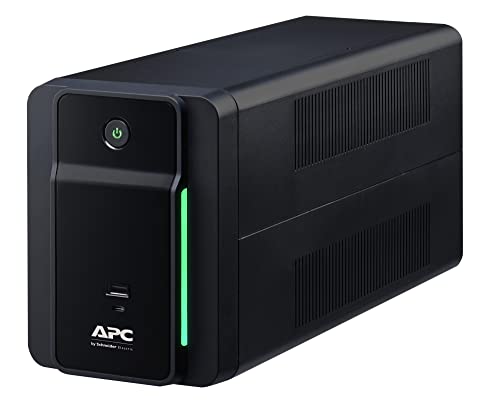
- 950VA/480W line-interactive backup with AVR
- 6 battery-backed outlets plus USB-C and USB-A
- Mac OS works with native Energy Saver settings
Best For: Smaller Mac setups that need compact backup and charging
Best Value High-Capacity

- 1500VA/900W with AVR for larger setups
- 12 outlets, including 6 battery-backed
- LCD shows runtime, battery, and load details
Best For: Mac users wanting high capacity without pure sine wave output
Best Budget APC
APC 750VA Line Interactive UPS
- 750VA/410W compact line-interactive backup
- 4 battery-backed outlets with surge protection
- USB-C and USB-A charging ports included
Best For: Basic Mac setups needing compact, short-runtime backup
Compact AVR Backup for Everyday Mac Setups

- 685VA/390W line-interactive UPS with AVR
- 8 outlets: 4 battery backup, 4 surge-only
- Compact design with 3-year warranty
Best For: Smaller Mac desks needing basic battery backup and surge protection
Ultra-Compact 900VA Home and Office Backup
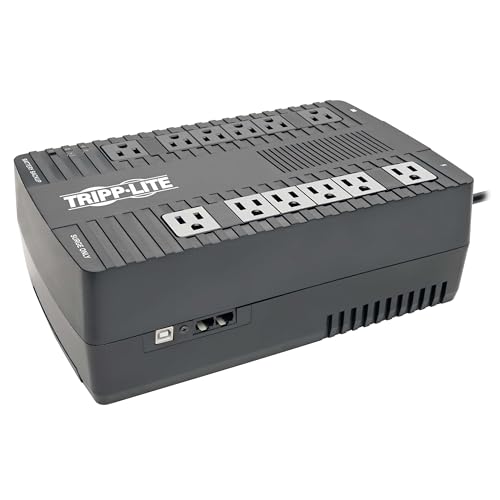
- 900VA/480W line-interactive UPS with AVR
- 12 outlets total with 6 battery-backed
- USB port supports safe shutdown software
Best For: Mac users wanting compact backup with extra outlets and shutdown support
LCD Monitoring Backup for Mac Workstations

- 825VA/450W line-interactive UPS with AVR
- LCD shows runtime, battery, and load info
- 8 outlets with 4 battery-backed ports
Best For: Mac users who want visible power monitoring and battery backup
Compact Quiet Backup

- Line interactive with AVR for basic power correction.
- USB management works with Mac, Windows, and Linux.
- 8 outlets with both backup and surge-only protection.
Best For: Mac desktops and small accessory setups needing quiet, simple backup power.
Lithium Power Upgrade

- LiFePO4 battery is rated for 10+ years and 3,000+ cycles.
- 1500VA/1000W line-interactive pure sine wave design.
- Eight outlets plus front USB-A and USB-C charging.
Best For: Mac workstations and multi-device setups that need long-life battery backup.
Higher-Capacity Desktop Shield

- 900W line-interactive UPS with AVR and LCD status display.
- 10 outlets include 5 battery backup and 5 surge-only.
- USB management works with Mac, Windows, and Linux.
Best For: Mac desktops with multiple peripherals that need more outlets and runtime.
Best Overall – CyberPower 1500VA PFC Sinewave LCD UPS
If you need a line interactive UPS for Mac that can handle a more demanding desktop setup, the CyberPower CP1500PFCLCD is a strong fit. Its pure sine wave output, AVR, and 1500VA/1000W capacity make it well suited for active PFC power supplies and everyday Mac workstation protection.
Best For: Mac users who want a higher-capacity line interactive UPS with pure sine wave output and a clear LCD.
Pros:
- 1500VA/1000W pure sine wave output supports active PFC and conventional power supplies.
- 12 outlets total, with 6 battery backup and surge protected.
- Color LCD panel shows detailed battery and power status, and tilts up to 22 degrees.
- Includes AVR, USB-A and USB-C charging ports, and a 3-year warranty with battery coverage.
Cons:
- Heavier mini tower design at 24.9 pounds.
- More capacity than smaller Mac setups may need.
For Mac owners prioritizing clean power and higher headroom, this model stands out as the most versatile option in the group. It adds useful monitoring and charging features without losing the core line-interactive UPS benefits.
Best Compact APC – APC 950VA Line Interactive UPS
This APC line interactive UPS for Mac is a practical pick if you want a straightforward backup unit for a smaller desk setup. With 950VA/480W capacity, AVR, and six battery-backed outlets, it covers the basics cleanly while adding USB charging ports.
Best For: Mac users who want a compact APC backup with AVR and simple everyday protection.
Pros:
- Line-interactive design with AVR helps correct minor power fluctuations.
- Six outlets all provide battery backup and surge protection.
- Includes USB-C and USB-A charging ports for phones and tablets.
- Mac OS uses native Energy Saver settings, so no Windows-only software setup is required.
Cons:
- 480W output is best for lighter setups, not power-hungry workstations.
- Only six outlets, so expansion is limited.
If you want a simple UPS for a Mac desk, this APC model keeps the feature set focused and easy to use. It is a solid fit for users who value compact size and reliable line-interactive protection over maximum capacity.
Best Value High-Capacity – CyberPower 1500VA LCD UPS
For buyers comparing a line interactive UPS for Mac, the CyberPower CP1500AVRLCD offers a strong balance of capacity and useful everyday features. It provides 1500VA/900W output, AVR, and a multifunction LCD, making it a practical option for workstation-style setups that do not require pure sine wave output.
Best For: Mac users who want a high-capacity line interactive UPS with an informative LCD and broad outlet count.
Pros:
- 1500VA/900W capacity suits larger desktop and accessory setups.
- 12 outlets total, with 6 battery backup and surge protected.
- Multifunction LCD shows runtime, battery capacity, and load information.
- Includes AVR, a 3-year warranty, and connected equipment guarantee.
Cons:
- Uses simulated sine wave output instead of pure sine wave.
- Heavier mini-tower form factor may take more desk or floor space.
This model makes sense when you want more capacity and status visibility without moving up to a pure sine wave unit. It is a dependable line-interactive choice for Mac users with several devices to support.
Best Budget APC – APC 750VA Line Interactive UPS
If your Mac setup is modest, this line interactive UPS for Mac gives you the core protection you need without extra bulk. The APC BVK750M2 delivers 750VA/410W, AVR, and four battery-backed outlets in a compact desktop form factor.
Best For: Mac users looking for a smaller APC UPS for basic backup and surge protection.
Pros:
- Line-interactive design with AVR helps smooth minor voltage fluctuations.
- All 4 outlets offer battery backup and surge protection.
- Includes USB-C and USB-A charging ports.
- Compact desktop form factor is easier to place near a workstation.
Cons:
- 410W output is suited to lighter loads only.
- Runtime is listed at 10 minutes, so it is mainly for short backup windows.
For smaller Mac desks, this APC model is a simple way to add line-interactive battery backup and charging. It focuses on the essentials, making it easier to choose if you do not need a larger UPS.
Compact AVR Backup for Everyday Mac Setups – CyberPower CP685AVRG UPS
If you want a practical line interactive UPS for Mac protection without adding much bulk, the CyberPower CP685AVRG is a straightforward option for smaller desks and home offices. Its 685VA/390W capacity, AVR support, and eight outlets make it a solid fit for keeping a Mac, display, and essential accessories powered through brief outages and minor voltage changes.
Best For: Mac users who need compact battery backup for a desktop, router, or a few essential peripherals.
Pros:
- Automatic voltage regulation helps correct minor power fluctuations without using battery power.
- Eight NEMA 5-15R outlets include four battery-backed and four surge-only connections.
- Compact design and six-foot cord make it easier to place near a Mac setup.
- Includes a 3-year warranty with batteries and a $125,000 connected equipment guarantee.
Cons:
- Simulated sine wave output may not be the first choice for users seeking a pure sine wave model.
- 390W maximum output is best suited to modest loads rather than larger workstation rigs.
Overall, this CyberPower model is a sensible budget-friendly choice if your Mac needs basic line-interactive battery backup, surge protection, and AVR in a compact package.
Ultra-Compact 900VA Home and Office Backup – Tripp Lite AVR900U
The Tripp Lite AVR900U is a strong pick if you need a line interactive UPS for Mac setups that value more outlet count and a bit more runtime room. With 900VA/480W capacity, AVR correction, and USB connectivity for shutdown support, it covers a desktop Mac and connected gear without taking up much space.
Best For: Mac users who want a compact UPS with plenty of outlets and software-based shutdown support.
Pros:
- 12 outlets total, with six battery-backed and surge-protected outlets.
- Automatic voltage regulation corrects minor input fluctuations without switching to battery.
- USB connection supports safe shutdown using included PowerAlert software.
- Easy-to-replace internal battery and wall-mount tabs add flexibility.
Cons:
- Uses a lead-acid battery, which may not appeal to every buyer.
- Its compact form still weighs 15.3 pounds, so it is not the lightest option.
For Mac owners who want a practical line-interactive UPS with more outlets than many compact models, this Tripp Lite is a well-rounded everyday protection choice.
LCD Monitoring Backup for Mac Workstations – CyberPower CP825AVRLCD
The CyberPower CP825AVRLCD is a practical line interactive UPS for Mac users who want more visibility into power conditions. Its LCD panel shows estimated runtime, battery capacity, and load information, while AVR helps smooth minor fluctuations and the 825VA/450W rating is well suited to a desktop-focused setup.
Best For: Mac users who want an LCD-equipped UPS for clear runtime and load monitoring.
Pros:
- Multifunction LCD provides detailed battery and power status at a glance.
- Automatic voltage regulation helps preserve battery life during minor fluctuations.
- Eight outlets include four battery backup and surge-protected connections.
- 3-year warranty includes the battery, plus a $200,000 connected equipment guarantee.
Cons:
- Simulated sine wave output may not suit every sensitive setup.
- The stated runtime in the supplied details is very short, so it is better for graceful shutdown than extended use.
If you want a line-interactive UPS for Mac that is easier to monitor than a basic unit, this CyberPower model stands out for its LCD and useful protection features.
Compact Quiet Backup – Eaton 5S550 for Mac
Eaton 5S550 UPS Battery Backup & Surge Protector, 550VA / 330W, AVR, Line Interactive
Check Price On AmazonIf you want a line interactive UPS for Mac that stays compact and straightforward, the Eaton 5S550 is built for basic desktop protection with AVR, surge defense, and USB integration for automatic management on Mac, Windows, and Linux. Its quiet operation is especially useful in a home office or studio, and the 8-outlet layout gives you a simple mix of backup and surge-only connections.
Best For: Mac users who need a small, quiet UPS for a desktop and a few essential peripherals.
Pros:
- Line interactive design with AVR helps correct voltage variations.
- USB port supports plug-and-play power management with Mac, Windows, and Linux.
- 8 outlets include 4 battery backup and 4 surge-only connections.
- Network data line surge protection adds extra coverage for connected gear.
Cons:
- 330W capacity is suited to lighter setups, not larger workstations.
- Uses lead-acid batteries rather than newer lithium chemistry.
- No LCD display for at-a-glance status checks.
This is a practical pick if you want dependable, low-noise protection without a lot of complexity. For a Mac setup with modest power needs, it covers the essentials well and keeps integration simple.
Lithium Power Upgrade – GOLDENMATE 1500VA for Mac
The GOLDENMATE 1500VA/1000W is a line interactive UPS for Mac-friendly workstation setups that need more headroom, longer battery life, and pure sine wave output. Its LiFePO4 battery pack is rated for over 10 years and 3,000+ cycles, while AVR and sinewave output are designed to handle common power problems for computers, network devices, and telecom gear.
Best For: Mac users who want a higher-capacity UPS with long-life lithium batteries and pure sine wave output.
Pros:
- LiFePO4 battery is rated for over 10 years and 3,000+ charge cycles.
- 1500VA/1000W capacity suits more demanding desktop and network setups.
- Pure sine wave line-interactive design with AVR supports cleaner power handling.
- Eight outlets plus front USB-A and USB-C charging ports add convenience.
Cons:
- Windows shutdown support is specifically mentioned in the notes, not Mac.
- More advanced features may be more than a basic Mac setup needs.
- Large capacity and lithium design likely come at a higher cost than simpler UPS units.
If you want a more future-proof backup solution, this model stands out for battery longevity and stronger output capacity. It makes the most sense for Mac users with multiple devices or a more serious home office setup.
Higher-Capacity Desktop Shield – Eaton 5S1500LCD for Mac
The Eaton 5S1500LCD is a line interactive UPS for Mac users who want more runtime, more outlets, and an LCD for quick status checks. With AVR, USB-based power management, and ECO control for shutting down non-essential peripherals, it is designed to support a fuller desktop setup while keeping operation straightforward.
Best For: Mac users who need a higher-capacity UPS with an LCD display and multiple protected outlets.
Pros:
- 900W capacity is a strong step up for larger desktop setups.
- 10 outlets include 5 battery backup and 5 surge-only connections.
- LCD display shows battery time remaining, power consumption, and outage tracking.
- USB port supports automatic integration with Mac, Windows, and Linux.
Cons:
- Uses lead-acid batteries rather than lithium.
- At 26.1 pounds, it is heavier than smaller UPS models.
- Internal fan and audible alerts may be noticeable during battery use.
This model is a solid choice when you want a Mac-compatible UPS with more outlets and better visibility into runtime. It is especially useful for users who want to protect a desktop plus several accessories from the same unit.
How We Picked These Line Interactive UPS for Mac Models
We focused on UPS units that make sense for Mac desktops, displays, and essential peripherals. That means clean line interactive regulation, enough wattage headroom, and useful features such as automatic voltage regulation, USB monitoring, and clear battery-status feedback.
We also favored models with broader compatibility for modern Mac setups, including pure sine wave options where they matter most and higher-capacity units for users running an iMac, Mac Studio, external drives, and networking gear together.
Quick Comparison: Which Type Fits Your Setup?
Smaller units are best for a MacBook dock, router, or a single desktop setup where you mainly need time to save work and shut down safely. Midrange models work well for a Mac mini or iMac with a display and accessories. Higher-capacity picks are better for professionals who need longer runtime or who want to support multiple devices from one UPS.
Key Buying Factors for Line Interactive UPS for Mac
Capacity and Wattage
Look at wattage first, not just VA. A UPS may list a high VA rating while offering less real output than your Mac setup needs. Add up your Mac, monitor, external drives, and any networking gear, then choose a model with extra headroom.
Waveform and Compatibility
For many Macs, a standard line interactive UPS is enough, but some power supplies and sensitive accessories work better with a pure sine wave output. If you run a premium desktop Mac or a demanding studio setup, this is worth checking carefully.
AVR and Battery Behavior
Automatic voltage regulation helps smooth out brownouts without draining the battery, which is especially useful in areas with unstable power. That can extend battery life and reduce unnecessary transfers to battery power.
Outlets, Ports, and Layout
Make sure there are enough battery-backed outlets for your Mac and any critical gear. Some units include USB charging ports, but those are a bonus rather than a replacement for proper protected outlets.
Monitoring and Runtime
LCD panels and USB connectivity make it easier to verify load, battery health, and remaining runtime. For a Line Interactive UPS for Mac, that visibility is often more valuable than extra nonessential features.
Who Should Buy Which Line Interactive UPS for Mac?
If you want the simplest backup for a MacBook dock or compact desk, choose a smaller APC, CyberPower, Tripp Lite, or Eaton unit with AVR. If you need balanced protection for a desktop Mac and accessories, a midrange CyberPower or Eaton model is a strong fit. If your priority is longer runtime, more output, or a more robust power supply for a full workstation, step up to a 1500VA class unit or a lithium-battery model.
In short, the best choice depends on how much gear you need to keep alive, how unstable your power is, and whether your Mac setup benefits from pure sine wave output. Matching those factors will matter more than chasing the biggest spec sheet.