Choosing the right capture card can make a big difference in how smoothly your Mac handles streaming and recording. The best options balance 4K60 support, low latency, and reliable macOS compatibility.
Below, we’ve rounded up standout picks for creators, gamers, and educators who want clean video capture without unnecessary setup headaches.
Best 10 4K60 Capture Card for Mac Picks for 2026
Premium HDMI 2.1 pick
Live Gamer Ultra 2.1 4K60 capture card

- 4K60 capture for streaming and recording
- HDMI 2.1 passthrough up to 4K144 HDR/VRR
- Low-latency setup with party chat support
Best For: Advanced console streamers who want top-tier passthrough and 4K60 capture
Professional USB capture option
Magewell USB Capture HDMI 4K Plus

- Works on macOS, Windows, Linux, and Chrome OS
- HDMI loop-through for live monitoring
- Onboard processing reduces CPU load
Best For: Creators who want a reliable cross-platform capture device with pro-grade workflow features
Internal HDR gaming card
GC573 Live Gamer 4K internal capture card

- 4K60 HDR10 capture with ultra-low latency
- Zero-lag passthrough for gameplay
- Works with OBS, Twitch, YouTube, and Streamlabs
Best For: Windows desktop users who want an internal 4K60 HDR capture card for console gaming
Budget Mac-friendly choice
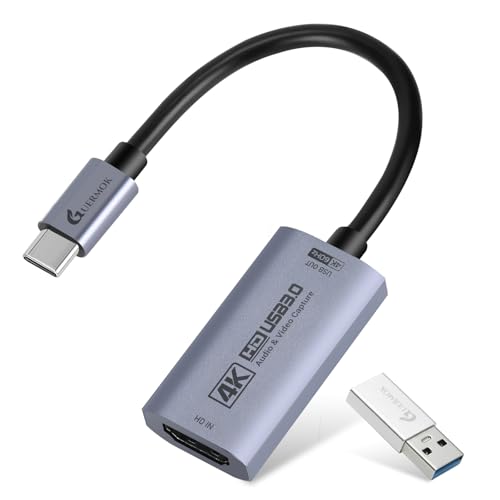
- 4K60 input with low-latency capture
- Works with macOS, iPadOS, Windows, and Linux
- Compatible with OBS, Zoom, and Streamlabs
Best For: MacBook and iPad users who want a simple, affordable capture card
Classic 4K pass-through pick
AVerMedia Live Gamer Ultra GC553

- 4K60 HDR pass-through
- Captures up to 4K30
- Works with macOS 10.13
Best For: Mac users who need 4K pass-through and can live with 4K30 capture
Best all-around Mac-friendly pick

- Captures in 4K60
- Supports 1440p120/1080p240 passthrough
- Works with macOS 13+
Best For: Mac users who want true 4K60 capture and high-refresh passthrough
Low-latency plug-and-play option
AVerMedia Live Gamer Ultra S GC553Pro

- 4K60 HDR/VRR pass-through
- Plug-and-play, no external power
- Works with Mac 13/14
Best For: Streamers who want easy setup and low-latency 4K pass-through on Mac
Editor’s Pick
Elgato HD60 S+ for Mac capture

- 1080p60 HDR10 capture on Mac
- 4K60 HDR10 zero-lag passthrough
- Instant Gameview and flashback recording
Best For: Mac users wanting a dependable external console capture solution
Best Plug-and-Play
AVerMedia StreamLine MINI+ for Mac

- 4K60 HDR passthrough with 1080p60 recording
- Plug-and-play USB setup, no drivers
- Works with newer macOS versions and OBS
Best For: Beginners who want a simple Mac-friendly streaming setup
Best Internal Option
Elgato 4K60 Pro MK.2 for Mac workflow
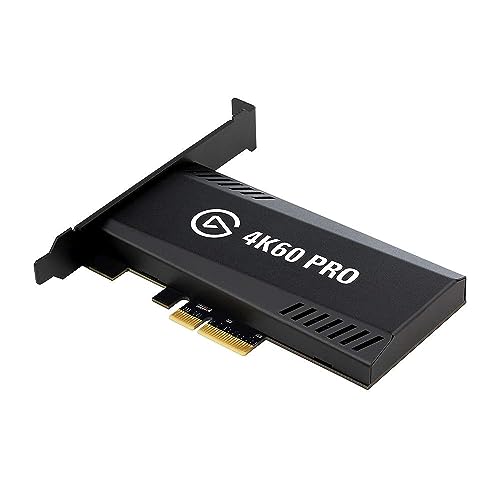
- Up to 4K60 HDR10 capture and passthrough
- Internal PCIe card with lag-free HDMI
- HEVC/H.265 and AVC/H.264 encoding
Best For: PC creators seeking an internal high-end capture card
Premium HDMI 2.1 pick – Live Gamer Ultra 2.1 4K60 capture card
If you want a 4K60 capture card for Mac-adjacent streaming workflows, the AVerMedia Live Gamer Ultra 2.1 is built around high-end passthrough and low-latency capture. It captures 4K60 gameplay for streaming in OBS and Streamlabs, while its HDMI 2.1 passthrough supports up to 4K144 HDR/VRR for smooth play on compatible consoles and PCs.
Best For: Streamers who want 4K60 capture with HDMI 2.1 passthrough, especially for PS5, Xbox, and OBS-based setups.
Pros:
- Captures and streams gameplay in 4K60 for Twitch, YouTube, OBS, and Streamlabs
- HDMI 2.1 passthrough supports up to 4K144 HDR/VRR for smooth play
- Low-latency design helps keep audio and video synced during live sessions
- Includes party chat support and 5.1-channel audio capture
Cons:
- OS support in the notes is Windows 10/11, so it is not clearly presented as a native Mac capture solution
- Features like RGB lighting are nice extras rather than core capture benefits
This is a strong pick if your priority is premium passthrough and dependable 4K60 capture for live content creation. It leans more toward advanced console streaming than simple plug-and-play recording.
Professional USB capture option – Magewell USB Capture HDMI 4K Plus
The Magewell USB Capture HDMI 4K Plus is a practical 4K60 capture card for Mac users who want a reliable USB workflow and broad OS support. It accepts HDMI input up to 4K DCI and captures up to 4K30, with built-in loop-through for monitoring and onboard processing to reduce CPU load.
Best For: Mac, Windows, Linux, and Chrome OS users who need a stable pro-style USB capture device with loop-through.
Pros:
- Works on macOS without drivers or external power
- Built-in HDMI loop-through lets you monitor the source in real time
- Flexible audio support with embedded audio, mic/line input, and headphone output
- On-board FPGA processing handles scaling, cropping, de-interlacing, and color conversion
Cons:
- Although it accepts up to 4K60 input, capture is listed up to 4K30
- More of a professional capture tool than a simple console-focused gaming card
If you need dependable cross-platform capture and care more about workflow quality than headline gaming specs, this Magewell model is a strong fit. It is especially appealing for creators who want monitoring, audio flexibility, and low-CPU operation.
Internal HDR gaming card – GC573 Live Gamer 4K internal capture card
The AVerMedia GC573 is an internal 4K60 capture card aimed at users who want high-quality HDR game capture in a desktop PC build. It records 4K60 HDR10 with ultra-low latency and zero-lag passthrough, making it a strong choice for next-gen console streaming and recording.
Best For: Desktop streamers who want an internal 4K60 HDR10 capture card for Windows-based setups.
Pros:
- Captures 4K60 HDR10 with ultra-low latency
- Zero-lag pass-through supports smooth gameplay while recording
- Works with OBS, Streamlabs, XSplit, Twitch, and YouTube
- Supports PS5 and Xbox Series X/S along with RGB lighting customization
Cons:
- Designed for Windows 10/11 and PCIe installation, so it is not a Mac capture option
- Internal card form factor limits it to desktop builds
This is the pick for builders who want an internal card and care about HDR performance as much as capture quality. It is less flexible than USB options, but it delivers a strong desktop-focused feature set.
Budget Mac-friendly choice – Guermok 4K60 USB capture card
If you want a budget-friendly 4K60 capture card for Mac, the Guermok USB 3.0 HDMI-to-USB-C model is built for broad compatibility and simple plug-and-play use. It supports 4K@60Hz input and output, works with macOS, and is meant for capture workflows in OBS, Zoom, and other common apps.
Best For: MacBook and iPad users who want an affordable, driver-free USB capture card for streaming and recording.
Pros:
- Supports up to 4K@60Hz input with low-latency capture
- Plug and play on macOS, Windows, Linux, Android, and iPadOS 17+
- Works with OBS, Zoom, Streamlabs, QuickTime, and more
- Includes USB-A to USB-C adapter for flexible connections
Cons:
- Capture is one-way only from HDMI to USB-C
- Some formats drop to lower frame rates depending on resolution
- Requires USB 3.0 or higher for best results
This card is attractive if your priority is compatibility and ease of use rather than pro-tier hardware features. It covers a wide range of devices and software, which makes it a practical starter option for Mac-based setups.
Classic 4K pass-through pick – AVerMedia Live Gamer Ultra GC553
If you want a 4K60 capture card for Mac with proven basics, the AVerMedia Live Gamer Ultra GC553 is a straightforward option. It supports macOS 10.13 and uses USB-C, with 4K60 HDR pass-through and capture up to 4K30, plus lower-res modes for high-frame-rate recording.
Best For: Mac users who need reliable 4K pass-through and are okay capturing at 4K30.
Pros:
- 4K60 HDR pass-through for smooth gameplay on an external display
- Captures up to 4K30, plus 1440p60 and 1080p120
- USB 3.1 Type-C connection and low-latency monitoring
- Compatible with Windows 11 and macOS 10.13
Cons:
- Does not capture 4K60; max recording is 4K30
- 4K, HDR, or high-frame-rate recording notes mention NVIDIA graphics support
- Older macOS minimum support compared with newer models
This is a practical pick if your priority is pass-through performance and solid recording modes rather than full 4K60 capture. It fits well for Mac setups where 4K30 is enough and low-latency gameplay matters.
Best all-around Mac-friendly pick – Elgato 4K S Capture Card
The Elgato 4K S is a strong 4K60 capture card for Mac if you want modern support and higher capture flexibility. It records in 4K60, supports 1440p120 or 1080p240 passthrough, and is listed for macOS 13 or later with USB-C connectivity.
Best For: Mac users who want true 4K60 capture plus high-refresh passthrough.
Pros:
- 4K60 capture with crisp detail and vivid colors
- Supports 1440p120 and 1080p240 passthrough
- HDR10 support with tone mapping on Windows
- USB-C design with near-zero latency
Cons:
- Minimum Mac requirement is macOS 13 or later
- Video capture resolution is listed as 1080p in the details section
- HDR tone mapping is specifically noted for Windows
For a Mac setup, this is the most future-facing choice in the group because it explicitly supports 4K60 capture and modern OS requirements. It makes the most sense if you want a compact USB-C card that can handle both high-resolution capture and high-refresh passthrough.
Low-latency plug-and-play option – AVerMedia Live Gamer Ultra S GC553Pro
The AVerMedia Live Gamer Ultra S GC553Pro is a useful 4K60 capture card for Mac if you want simple setup and low-latency streaming support. It works with Mac 13/14, uses USB, and offers 4K60 HDR/VRR pass-through for PS5/Pro, Xbox, and PC gameplay.
Best For: Streamers and gamers who want easy setup, low latency, and 4K60 pass-through on Mac.
Pros:
- 4K60 HDR/VRR pass-through for smooth gameplay
- Plug-and-play setup with no extra drivers or external power
- Compatible with Windows 10/11, Mac 13/14, and iPadOS 17+
- Supports ultra-wide resolutions and true-to-life RGB 24 color
Cons:
- Capture resolution is not stated as 4K60 in the supplied notes
- Best suited to mainstream streaming and recording, not specialty workflows
- Mac support starts at macOS 13, so older Macs are excluded
This is a practical pick if you value quick setup and real-time gameplay capture over more advanced configuration. Its low-latency design and wide platform support make it a solid fit for a Mac streaming desk.
Editor’s Pick – Elgato HD60 S+ for Mac capture
If you want a 4K60 capture card for Mac that balances ease of use with solid performance, the Elgato HD60 S+ is a practical choice. It supports 1080p60 HDR10 capture with 4K60 HDR10 zero-lag passthrough, so you can play in full quality while recording clean gameplay on macOS.
Best For: Mac users who want a reliable external capture card for streaming and recording console gameplay with low latency.
Pros:
- Works with Mac and Windows.
- 4K60 HDR10 zero-lag passthrough for lag-free play.
- 1080p60 HDR10 capture for streaming and recording.
- Instant Gameview, unlimited capture, and flashback recording.
Cons:
- Records at 1080p60 rather than 4K capture.
- Requires USB 3.0 and a capable Mac setup.
For Mac buyers, this model makes sense when passthrough quality and dependable software-friendly capture matter more than raw recording resolution. It covers the basics well and adds useful convenience features for gameplay creators.
Best Plug-and-Play – AVerMedia StreamLine MINI+ for Mac
The AVerMedia StreamLine MINI+ is a strong pick if you need a 4K60 capture card for Mac with a simple setup. It offers 4K60 HDR passthrough and 1080p60 recording, with plug-and-play USB operation and support for macOS 14/15 or later.
Best For: Beginners and streamers who want a straightforward external capture card with modern Mac support.
Pros:
- Plug-and-play USB capture with no drivers needed.
- 4K60 HDR passthrough with ultra-low latency.
- Works with macOS 14/15 or later, plus OBS and other apps.
- Flexible output formats: NV12, YUY2, and MJPEG.
Cons:
- Records at 1080p60, not 4K.
- Mac support requires newer macOS versions.
This is the easiest option in the group if your priority is fast setup over advanced recording specs. It fits well for live streaming workflows where low latency and broad software compatibility matter.
Best Internal Option – Elgato 4K60 Pro MK.2 for Mac workflow
If you are looking for a 4K60 capture card for Mac-style workflow but plan to capture on a compatible PC, the Elgato 4K60 Pro MK.2 is built for high-end internal use. It records and passes through up to 2160p60 HDR10 with low latency, making it well suited for serious console capture setups.
Best For: PC-based creators who want internal 4K60 HDR10 capture with lag-free passthrough.
Pros:
- Supports up to 4K60 HDR10 pass-through and recording.
- Lag-free HDMI passthrough for real-time play.
- HEVC/H.265 HDR and AVC/H.264 encoding support.
- Works with PS5, PS4 Pro, Xbox Series X/S, and Xbox One X.
Cons:
- Requires a desktop PC with a PCIe interface.
- Not listed as a Mac-compatible capture solution.
This model stands out for users who want the internal-card route and maximum 4K60 HDR10 capability. It is not the Mac-friendly pick in this roundup, but it is a strong option if your capture workstation is a PC.
How We Picked the Best 4K60 Capture Card for Mac
We focused on cards that offer dependable 4K60 capture or pass-through performance, strong macOS support, and practical features like low latency, HDR support, and simple USB or internal connectivity. We also considered whether a card makes sense for portable MacBook workflows versus a desktop Mac setup.
Quick Comparison: What Matters Most
If you want the simplest setup, an external USB model is usually the easiest way to get started. If you want the most stable long-term rig and use a desktop Mac, an internal card may be worth the extra installation effort. For most buyers, the best choice comes down to whether you need true 4K60 recording, 4K60 pass-through, or just a smooth 1080p streaming workflow with 4K input support.
Key Buying Factors for a 4K60 Capture Card for Mac
MacOS Compatibility
Check that the card supports your Mac model and version of macOS. Some capture cards work best with current Apple Silicon systems, while others are better known for broad USB compatibility across Mac laptops and desktops.
Capture Versus Pass-Through
Not every card that advertises 4K60 pass-through can also record at 4K60. If your priority is archival-quality capture, confirm the recording spec separately from the output spec.
Latency and Workflow
Low latency matters if you plan to monitor gameplay or switch live sources while streaming. External cards are often easier to move between setups, while internal cards may deliver a more permanent, polished studio build.
Audio Support and HDR
Look for support for embedded HDMI audio, analog audio input if needed, and HDR10 if you want a more future-ready setup. These features can affect both convenience and final image quality.
Who Should Buy Which 4K60 Capture Card for Mac?
If you use a MacBook and want a flexible plug-and-play setup, choose an external USB capture card. If you stream regularly from a desktop Mac and want a cleaner dedicated rig, an internal PCIe model may be the smarter investment. If your main goal is console streaming with simple setup, prioritize dependable macOS software support over extra format claims. And if you need the most robust creator workflow, a premium 4K60 Capture Card for Mac with strong pass-through and low latency is usually the safest choice.