If you edit in Final Cut Pro regularly, the right keyboard setup can save real time on every cut, trim, and export. From shortcut covers to dedicated control consoles, today’s options make common actions faster and easier to remember.
This roundup focuses on the best editing keyboard for Final Cut Pro options in 2026, balancing shortcut access, Mac compatibility, typing feel, and workflow efficiency for editors at different skill levels.
Best 10 Editing Keyboard for Final Cut Pro Picks for 2026
Shortcut Cover
Final Cut Pro Shortcut Guide for MacBook

- Over 90 Final Cut Pro shortcuts printed on the cover
- Ultra-thin 0.3mm silicone helps protect against spills and dust
- Fits recent MacBook Air, Pro, and Neo models with US layout
Best For: MacBook users who want shortcut reference and protection together
Control Pad
Custom Shortcut Pad for Final Cut Pro

- 9 customizable LCD keys plus dial and roller
- Supports Final Cut Pro and several other creative apps
- Bluetooth or USB-C with flexible stand placement
Best For: Creators who want app-specific shortcut control beyond the keyboard
ANSI Cover
Color-Coded Final Cut Pro MacBook Cover

- Over 50 Final Cut Pro shortcuts printed on the cover
- Ultra-thin TPU design offers a responsive typing feel
- Protects against dust, spills, dirt, and wear
Best For: MacBook editors using US ANSI layouts who want a thin shortcut overlay
Shortcut Hub
Pale Grey Shortcut Hub for Final Cut Pro

- Works with Final Cut Pro and other creative apps
- 9 LCD keys plus dial, roller, and Actions Ring support
- Includes Bluetooth, USB-C, stand, and Adobe membership offer
Best For: Multi-app creators who want a programmable console for editing
Shortcut Learning Cover
XSKN Final Cut Pro Keyboard Cover for MacBook

- Printed Final Cut Pro shortcut labels on keys
- Soft silicone cover protects from dust and spills
- Fits select 2026-2021 MacBook Pro, Air, and Neo models
Best For: MacBook users who want shortcut visibility and keyboard protection
Dedicated Workstation Keyboard
KB Covers Backlit Final Cut Pro Aluminum Keyboard

- Wired USB-C keyboard with no charging or pairing
- 150+ color-coded Final Cut Pro shortcuts
- Backlit aluminum build for studio editing
Best For: Mac editors who want a dedicated shortcut keyboard for a fixed workstation
Magic Keyboard Shortcut Skin
XSKN Final Cut Pro Magic Keyboard Cover

- For Apple Magic Keyboard A2520 with numeric keypad
- Adds visible Final Cut Pro shortcut labels
- Protects against spills, dust, and dirt
Best For: Apple Magic Keyboard owners who want shortcut help on the keypad model
Wireless Shortcut Hub
JCPAL Dash Final Cut Pro Keyboard
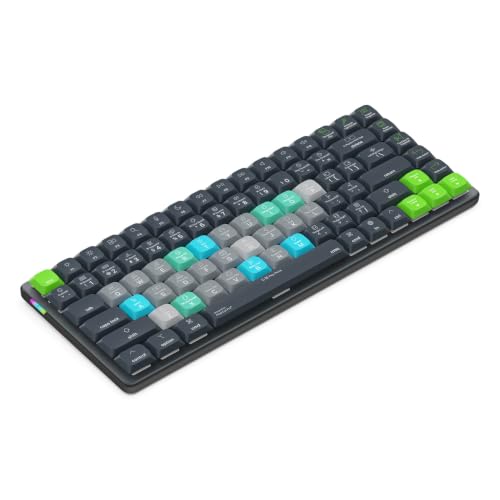
- Preprogrammed Final Cut Pro shortcuts
- 20 interchangeable shortcut keycaps
- Bluetooth, 2.4GHz, and USB-C connectivity
Best For: Editors who want a customizable wireless shortcut keyboard
Protective Laptop Cover
Editors Keys Final Cut Pro Cover for MacBook Pro

- 100+ Final Cut Pro shortcut keys
- Protects against food and drink spills
- Fits 14-inch and 16-inch MacBook Pro 2021+
Best For: MacBook Pro users who want shortcut help and spill protection
Best Simple Pick
Editors Keys Final Cut Pro Cover

- 100+ color-organized Final Cut Pro shortcuts
- Washable silicone construction
- Fits Magic Keyboard Touch ID and non-Touch ID
Best For: Apple Magic Keyboard users wanting a shortcut overlay
Shortcut Cover – Final Cut Pro Shortcut Guide for MacBook
If you want an editing keyboard for Final Cut Pro without replacing your laptop keyboard, this JCPal cover is a practical add-on. It prints over 90 essential shortcuts directly on an ultra-thin silicone protector, so you can reference commands while building muscle memory and still keep your MacBook protected from dust and spills.
Best For: MacBook editors who want a shortcut guide and keyboard protection in one low-profile accessory.
Pros:
- Shows over 90 Final Cut Pro shortcuts with up to 3 shortcuts per key.
- Color-coded multi-key shortcuts and recognizable primary key icons make it easier to learn commands.
- Ultra-thin 0.3mm silicone design protects against dust and liquid spills.
- Fits multiple recent MacBook Air, MacBook Pro, and MacBook Neo models with US layout.
Cons:
- Only works with supported US English keyboard layouts.
- It is a keyboard cover, not a dedicated hardware shortcut controller.
For editors who mainly work on a MacBook, this is a straightforward way to speed up Final Cut Pro access while adding everyday protection. It is a good fit if you prefer shortcut legends printed directly on the keys instead of learning commands from memory alone.
Control Pad – Custom Shortcut Pad for Final Cut Pro
For an editing keyboard for Final Cut Pro that goes beyond printed shortcuts, the Logitech MX Creative Console is a more hands-on control surface. It combines 9 customizable LCD keys with a tactile dial, roller, and Actions Ring overlay, letting you map editing actions and switch between app profiles more quickly than hunting through menus.
Best For: Editors who want a customizable control pad for Final Cut Pro and other creative apps.
Pros:
- Supports Final Cut Pro along with apps like Premiere Pro, Photoshop, Lightroom, Figma, and DaVinci Resolve.
- 9 customizable LCD keys plus dial and roller give you multiple ways to access actions.
- Up to 15 keypad pages per profile allow deep customization.
- Includes Bluetooth and USB-C connectivity, plus a stand for flexible placement.
Cons:
- Built for Windows systems, so compatibility is not broad across every platform.
- Uses 2x AAA batteries for wireless use, which adds another maintenance item.
This is a strong choice if you want a more tactile editing workflow than a keyboard cover can offer. It is especially useful for creators who jump between multiple apps and want one control surface that can adapt.
ANSI Cover – Color-Coded Final Cut Pro MacBook Cover
If you want an editing keyboard for Final Cut Pro that stays low-profile, this KB Covers option focuses on speed and simplicity. It prints more than 50 popular shortcuts directly on a form-fitting TPU cover, giving you a quick reference for editing, trimming, timeline navigation, and post-production while also protecting the keyboard underneath.
Best For: MacBook editors who want a durable shortcut cover with a softer typing feel.
Pros:
- Includes over 50 Final Cut Pro shortcuts for common editing tasks.
- Color-coded legends help users find important commands faster.
- Form-fitting thermoplastic polyurethane construction is ultra-thin and responsive.
- Helps protect against dust, spills, dirt, and daily wear.
Cons:
- Designed specifically for US ANSI layout MacBook models.
- Covers fewer shortcuts than some higher-density alternatives.
This is a practical pick if you want a simpler shortcut overlay without adding bulk to your MacBook. It suits editors who value protection, durability, and a clean on-key reference for the most-used commands.
Shortcut Hub – Pale Grey Shortcut Hub for Final Cut Pro
As an editing keyboard for Final Cut Pro, the Logitech MX Creative Console acts more like a programmable shortcut hub than a traditional keyboard. It offers customizable LCD keys, a low-friction control dial, a roller, and on-screen Actions Ring support, so you can trigger Final Cut Pro actions and other app commands from one compact setup.
Best For: Creators who want a pale grey customizable console for Final Cut Pro and other creative tools.
Pros:
- Integrates with Final Cut Pro plus Adobe apps, Figma, DaVinci Resolve, Spotify, and Zoom.
- 9 customizable LCD keys with up to 15 keypad pages per profile.
- Control dial, roller, and Actions Ring support provide multiple workflow options.
- Includes Bluetooth, USB-C cable, stand, and 3-month Adobe Creative Cloud membership.
Cons:
- Built around Windows compatibility, so it is not a universal Mac-only editing solution.
- Depends on batteries for wireless use.
This model is best if you want a highly customizable console that can handle more than just Final Cut Pro shortcuts. It makes sense for editors who also work in Adobe or other creative apps and want one central control surface.
Shortcut Learning Cover – XSKN Final Cut Pro Keyboard Cover for MacBook
If you want an editing keyboard for Final Cut Pro without replacing your MacBook keyboard, this XSKN silicone cover adds shortcut labels directly onto the keys. It is designed for specific 2026-2021 MacBook Pro, MacBook Air, and MacBook Neo models, so it can help editors learn commands faster while also protecting the built-in keyboard from dust and spills.
Best For: MacBook users who want a shortcut-printed Final Cut Pro cover for learning and faster editing
Pros:
- Prints Final Cut Pro shortcut guidance directly on the keys for easier memorizing
- Soft silicone construction is washable and built to resist wear and tear
- Provides full keyboard protection against dust and liquid spills
- Individually molded keys are designed for a precise 1:1 fit on supported MacBooks
Cons:
- Fit is limited to specific MacBook model numbers and keyboard layouts
- Requires checking the A-number carefully before buying
- US version layout is needed because the Return key shape matters
This is a practical pick if you want a low-cost way to make Final Cut Pro shortcuts more visible on a compatible MacBook. Just verify your exact model first, since compatibility is very specific.
Dedicated Workstation Keyboard – KB Covers Backlit Final Cut Pro Aluminum Keyboard
This editing keyboard for Final Cut Pro is built for editors who want a dedicated, wired Mac keyboard with shortcut labels already printed on the keys. The backlit aluminum design and full-size US layout make it a strong fit for desks, studios, classrooms, and long editing sessions where reliability matters more than portability.
Best For: Editors who want a wired, backlit Mac keyboard with clearly labeled Final Cut Pro shortcuts
Pros:
- Made in Los Angeles, USA for Final Cut Pro and creative editing workflows
- Wired USB-C connection avoids pairing, charging, and battery interruptions
- 150+ color-coded shortcuts help organize editing, trimming, playback, and timeline commands
- Backlit full-size aluminum body suits low-light studios and daily workstation use
Cons:
- Wired design is less portable than a wireless keyboard
- Designed for Mac computers and macOS workflows, not general cross-platform use
- May be more keyboard than casual users need if they only edit occasionally
If you want a purpose-built Final Cut Pro keyboard rather than a cover, this model offers the most workstation-ready setup in the group. Its value is in the clear shortcut layout, stable wired connection, and premium build.
Magic Keyboard Shortcut Skin – XSKN Final Cut Pro Magic Keyboard Cover
If you already use Apple’s Magic Keyboard with numeric keypad, this Final Cut Pro silicone cover adds shortcut labels without changing your keyboard setup. It is aimed at 2021-2023 A2520 keyboards and is designed to help users learn shortcut positions while also adding spill and dust protection.
Best For: Magic Keyboard users who want Final Cut Pro shortcut labels on an existing keypad model
Pros:
- Designed for Apple Magic Keyboard with Touch ID and numeric keypad, model A2520
- Shortcut labels help users learn and remember Final Cut Pro commands faster
- Soft silicone material is washable and made to withstand wear
- Offers protection from spills, dust, liquid, and dirty fingers
Cons:
- Not compatible with the 2024 Magic Keyboard with numeric keypad A3119
- Also not compatible with the iMac Magic Keyboard with numeric keypad MQ052LL/A A1843
- Compatibility depends on the exact Apple keyboard version and key layout
This is a useful option if your editing desk already has the right Apple Magic Keyboard and you only want clearer Final Cut Pro shortcut labeling. The key advantage is convenience, but only if your model matches exactly.
Wireless Shortcut Hub – JCPAL Dash Final Cut Pro Keyboard
If you want an editing keyboard for Final Cut Pro that cuts down menu diving and repetitive clicks, the JCPAL Dash is built around speed. It comes preprogrammed with Final Cut Pro shortcuts, color-coded keycaps, and a compact low-profile layout that keeps your workspace tidy while helping you stay focused on the edit.
Best For: Editors who want a wireless, customizable shortcut keyboard for Final Cut Pro and multi-device workflows.
Pros:
- Preprogrammed Final Cut Pro hotkeys help streamline common editing tasks.
- Fully customizable keys with 20 interchangeable shortcut keycaps and saved onboard profiles.
- Tri-mode connectivity supports Bluetooth, 2.4GHz wireless, and USB-C wired use.
- Compact, low-profile design with color-coded, easy-to-read labels.
Cons:
- Designed for shortcut efficiency rather than a full-size typing layout.
- Requires learning the labeled editing workflow to get the most benefit.
The Dash is a practical pick if you want dedicated Final Cut Pro controls without adding software complexity. Its portability, customization, and broad device support make it a strong fit for editors working across different setups.
Protective Laptop Cover – Editors Keys Final Cut Pro Cover for MacBook Pro
This editing keyboard for Final Cut Pro is a keyboard cover rather than a standalone board, so it makes sense if you already edit on a 14-inch or 16-inch MacBook Pro. It adds over 100 functional shortcut keys for video editing while also protecting the laptop from food and drink spills.
Best For: MacBook Pro editors who want a shortcut overlay plus spill protection in one slim accessory.
Pros:
- Over 100 Final Cut Pro shortcut keys are built into the cover.
- Helps protect MacBook Pro keyboards from food and drink spills.
- Made for 14-inch and 16-inch MacBook Pro 2021+ models.
- Lightweight, slim design keeps the laptop portable.
Cons:
- Only works as a cover, not as a separate keyboard.
- Limited to specific MacBook Pro sizes and model years.
If you want a simple way to speed up Final Cut Pro editing on a compatible MacBook Pro, this cover is a straightforward option. It combines shortcut guidance with basic keyboard protection, which is useful for mobile or desk-based editing setups.
Best Simple Pick – Editors Keys Final Cut Pro Cover
For editors using Apple Magic Keyboard models, this Final Cut Pro keyboard cover adds a color-organized shortcut layout without replacing your existing setup. It gives you over 100 shortcuts at a glance and uses washable silicone material to help guard against spills, dust, and dirt.
Best For: Apple Magic Keyboard users who want a washable Final Cut Pro shortcut cover.
Pros:
- Includes over 100 Final Cut Pro shortcuts for faster editing access.
- Made from washable silicone for easy cleaning.
- Helps protect against spills, dust, and dirt.
- Designed for Magic Keyboard with Touch ID and non-Touch ID numeric models.
Cons:
- Works only as a keyboard cover, not a dedicated editing keyboard.
- Best suited to Apple Magic Keyboard layouts rather than broader compatibility.
This is a smart accessory if you already like Apple’s keyboard feel and just want Final Cut Pro shortcuts printed where you need them. Its washable, slip-resistant design makes it a practical everyday add-on for editing desks.
How We Picked the Best Editing Keyboard for Final Cut Pro
We prioritized Final Cut Pro-friendly layouts, clear shortcut labeling, Mac compatibility, and practical build quality. Because an Editing Keyboard for Final Cut Pro can mean different things to different users, we included simple shortcut covers, full keyboards, and hardware control surfaces.
Quick Comparison
For the fastest learning curve, shortcut covers are the easiest upgrade. For a more permanent setup, backlit or wired keyboards offer better visibility and stability. If you want deeper control over timelines, tools, and macros, a dedicated console or shortcut pad is the most flexible choice.
Key Buying Factors for Editing Keyboard for Final Cut Pro
Compatibility
Check your Mac model, keyboard size, and layout first. Many covers are made for specific MacBook and Magic Keyboard versions, while some devices support both Mac and PC workflows.
Shortcut Coverage
Look for color-coded legends or printed function keys that match the commands you actually use. The best options surface trimming, blade, ripple edit, timeline navigation, and media organization shortcuts without clutter.
Input Style
Choose based on how you edit. Covers are ideal if you like your current keyboard. Backlit keyboards help in low light. Control consoles suit editors who want tactile dials, programmable buttons, and faster repeated actions.
Typing Feel and Portability
If you travel or work on a laptop, a lightweight cover may be the most convenient. For a stationary desk setup, a sturdier wired keyboard or desktop controller can improve comfort and consistency over long sessions.
Who Should Buy Which Editing Keyboard for Final Cut Pro?
Beginners should start with a shortcut cover to learn Final Cut Pro faster. Freelancers and daily editors may benefit from a dedicated keyboard with clearer legends or backlighting. Motion-heavy creators, colorists, and power users should consider a control console for more hands-on workflow control.
The best choice is the one that matches your editing habits, desk setup, and how much muscle memory you want to build. If you want the most practical upgrade, focus on compatibility first, then choose the shortcut style that fits your workflow.