Choosing between handheld 3D scanners can be tricky because specs like accuracy, tracking, and scan range matter more than brand names alone.
This roundup focuses on practical picks for different users, from beginners scanning small parts to makers and professionals who need faster, more detailed results.
Best 10 Handheld 3d Scanners Picks for 2026
Flagship Detail Scanner

- 0.02mm accuracy with 0.1mm fine-detail resolution
- Blue laser and NIR for objects from 5mm to 2000mm
- 24-bit full-color capture with anti-shake tracking
Best For: High-detail scanning for parts, figures, and large objects
Budget-Friendly Medium Scanner

- 0.07mm accuracy with 0.10mm resolution
- Markerless AI tracking helps recover during handheld scans
- JMStudio handles scanning, editing, and optimization
Best For: Beginners who want an approachable medium-format scanner
Versatile All-Surface Scanner

- Dual-lens design scans objects from 10mm to 2000mm
- Up to 20fps with anti-shake one-shot imaging
- Works with black/metal objects and captures 24-bit color
Best For: All-purpose scanning across small parts, props, and large objects
Simple Starter Scanner

- 0.07mm accuracy with safe NIR scanning
- Markerless tracking and anti-shake support handheld use
- Designed for 40mm to 1200mm object sizes
Best For: STEM, DIY prototyping, and beginner 3D printing workflows
Wireless Range Scanner
Creality Otter Lite Handheld Scanner
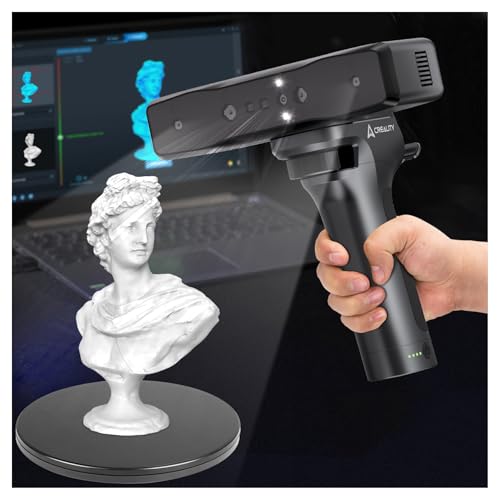
- 0.05mm accuracy with infrared structured light
- Wi‑Fi and mobile control for cable-free scanning
- Handles tiny parts up to large objects
Best For: Portable scanning across a very wide object size range
High-Detail Indoor Pick
3DMakerpro Moose Medium-Format Scanner

- Up to 0.03mm accuracy with blue LED light
- 24-bit color scanning for realistic models
- Built for medium-size objects indoors
Best For: Detailed indoor scans of medium-format objects
Beginner-Friendly Marker-Free
3DMakerpro Moose Lite Premium Scanner

- 0.05mm precision with 10FPS scanning
- AI tracking and anti-shake support
- Marker-free scanning with lifetime OTA updates
Best For: First-time users who want an easier handheld scanning workflow
Wireless Precision Pick

- Up to 0.1mm accuracy with 30FPS scanning
- WiFi 6 improves wireless transfer stability
- Supports iOS, Android, Windows, and Mac
Best For: People who want a portable wireless scanner for detailed everyday projects
Fast Starter Scanner

- Dual-mode scanning for large and detailed objects
- Up to 30FPS point cloud capture with ASIC processing
- Full-color RGB texture capture for realistic models
Best For: Beginners who want a fast handheld scanner with color capture
Portable All-in-One
Creality CR-Scan Ferret Pro Kit

- Wireless WiFi 6 scanning across major platforms
- Up to 0.1mm accuracy with full-color capture
- Includes tripod, power bank, phone holder, and case
Best For: Entry-level makers who want a lightweight wireless kit with useful accessories
Flagship Detail Scanner – Creality CR-Scan Raptor
For buyers comparing handheld 3d scanners, the Creality CR-Scan Raptor stands out as a feature-rich option for users who want fine detail, fast capture, and flexible object-size support. Its blue laser and NIR setup is built to handle everything from tiny parts to large components, while the anti-shake tracking and autofocus help keep handheld scans stable.
Best For: Industrial design, reverse engineering, miniatures, automotive parts, and users who want high-detail scans across a wide size range.
Pros:
- 7 parallel blue laser lines and NIR scanning for small, medium, and large objects
- Up to 0.02mm accuracy and 0.1mm fine-detail resolution for sharp geometry
- Blue laser scanning up to 60fps for faster workflows
- 24-bit full-color capture with 12 circular LED texture lights
Cons:
- Higher-end system requirements may limit some computers
- Best results depend on compatible software and setup
The Raptor is a strong pick if you want one scanner that can cover a lot of use cases without giving up detail. It is especially appealing for users who value professional-grade scanning quality and smoother handheld operation.
Budget-Friendly Medium Scanner – 3DMakerpro Fox Entry-Level
If you are shopping handheld 3d scanners on a budget, the 3DMakerpro Fox Entry-Level model is aimed at beginners who want a practical way to digitize medium-format objects. It combines markerless AI visual tracking with JMStudio software, making the workflow more approachable for first-time users who still want usable scan detail.
Best For: Beginners, hobbyists, and entry-level users who want a medium-format scanner with guided software support.
Pros:
- 0.07mm accuracy and 0.10mm resolution for useful scan detail
- Markerless AI visual tracking can relock after a fast handheld pass
- JMStudio combines scanning, editing, and optimizing in one workflow
- Accessible entry-level design for hobby and learning projects
Cons:
- Achieving great results may take patience and a learning curve
- More advanced PC setup is helpful for smooth performance
The Fox Entry-Level makes sense if you want a scanner that is easier to approach than pro-tier models. It is best treated as a learning-friendly tool that can deliver solid results when you take time to get comfortable with the workflow.
Versatile All-Surface Scanner – Creality CR-Scan Otter
The Creality CR-Scan Otter is a versatile choice in handheld 3d scanners for users who need broad object-size support and strong everyday usability. With dual lenses, multiple cameras, and anti-shake one-shot imaging, it is designed to handle both small items and large subjects while keeping the scan process steady.
Best For: Users scanning everything from small parts to large objects, especially those who want color capture and broad device compatibility.
Pros:
- Scans objects from 10mm to 2000mm, from coins to cars
- Up to 20fps with one-shot 3D imaging for smoother handheld capture
- Can scan black and metal objects without scanning spray
- 24-bit full-color output with RGB color mapping
Cons:
- Direct Android connection is not supported; wireless use needs an accessory
- Performance requirements are fairly demanding on some systems
Otter is a practical all-rounder if you want one scanner that can cover a wide variety of scanning jobs. Its strength is flexibility: it supports different object sizes, decent speed, and good color capture without making the workflow feel specialized.
Simple Starter Scanner – 3DMakerpro Fox 0.07mm
For shoppers comparing handheld 3d scanners for entry-level use, the 3DMakerpro Fox 0.07mm focuses on accessible scanning with markerless tracking and NIR-based capture. It is sized for small to medium objects and is positioned as a budget-friendly tool for users who are willing to learn the workflow and refine results.
Best For: STEM education, DIY prototyping, miniatures, and small-to-medium objects where a manageable entry point matters more than pro-level speed.
Pros:
- 0.07mm accuracy using safe NIR light
- Markerless tracking and anti-shake support simplify handheld scanning
- Suitable for objects from 40mm to 1200mm in size
- JMStudio supports scanning, editing, fusion, and export to common formats
Cons:
- Requires a learning curve and some CAD or 3D modeling knowledge
- Needs a capable PC, with a dedicated GPU strongly recommended
This Fox model is a sensible starting point if you want a low-friction scanner with real 3D printing utility. It is best for users who understand that entry-level scanning still rewards patience, setup, and post-processing skill.
Wireless Range Scanner – Creality Otter Lite Handheld Scanner
If you want handheld 3D scanners that can move from tiny parts to larger objects without feeling tied to a desk, the Creality Otter Lite is built for that kind of flexible workflow. It combines 0.05mm accuracy, Wi‑Fi connectivity, and mobile control, so it fits well for users who need portable scanning in different environments.
Best For: Engineers, designers, and hobbyists who want a wireless handheld scanner for everything from small parts to larger objects.
Pros:
- 0.05mm accuracy with infrared structured light for detailed captures
- Scans a wide size range, from 20mm³ to 2000mm³
- Wi‑Fi and battery-powered handle reduce cable clutter
- 30fps real-time scanning with anti-shake support
Cons:
- Requires Windows or macOS for use
- Best performance depends on using the recommended system specs
Overall, the Otter Lite stands out if portability and range matter as much as precision. Its outdoor-ready lighting, app-based display, and export options make it a practical choice for users who want a versatile scanner rather than a single-purpose tool.
High-Detail Indoor Pick – 3DMakerpro Moose Medium-Format Scanner
Among handheld 3D scanners, the 3DMakerpro Moose is aimed at users who want very fine detail on medium-size objects. Its blue LED structured light system, 0.03mm accuracy, and 24-bit color support make it a strong pick for indoor scanning where detail matters more than speed.
Best For: Users scanning medium-format objects indoors who want high accuracy and full-color capture.
Pros:
- Up to 0.03mm accuracy and 0.07mm resolution
- 24-bit full-color scanning for more realistic models
- Handles objects from 15mm to 1500mm
- JMStudio software includes visual tracking, error correction, and auto-alignment
Cons:
- Best used indoors for optimal results
- Has a learning curve and needs a relatively powerful PC
The Moose is a good fit if you can spend time learning the workflow and want precision over convenience. With multiple kit options and free software updates, it offers a scalable setup for serious printing and modeling work.
Beginner-Friendly Marker-Free – 3DMakerpro Moose Lite Premium Scanner
If you’re comparing handheld 3D scanners for easier first-time use, the 3DMakerpro Moose Lite Premium focuses on reducing common pain points like shaky hands and marker setup. It offers 0.05mm precision, AI visual tracking, and marker-free scanning, making it a more approachable option for users who want a smoother entry into 3D capture.
Best For: Beginners and casual users who want a marker-free handheld scanner with guided software features.
Pros:
- 0.05mm precision with 10FPS scanning speed
- AI visual tracking helps with automated model repair
- Optical anti-shake module improves beginner-friendly use
- Marker-free scanning saves setup time
Cons:
- Limited details were provided on supported object size or color capture
- Package weight is relatively substantial at 3.65 pounds
The Moose Lite Premium is best viewed as a convenience-first scanner for users who value easier operation over advanced technical tuning. With lifetime free OTA software updates and re-scanning support, it aims to make the learning process less frustrating.
Wireless Precision Pick – Creality CR-Scan Ferret Pro
If you want handheld 3D scanners that balance portability with accuracy, the Creality CR-Scan Ferret Pro is built for practical everyday scanning. It combines up to 0.1mm accuracy, 30FPS capture, and WiFi 6 transmission, making it a strong fit for creators who want smoother scans and less cable hassle.
Best For: Users who want wireless handheld scanning with strong accuracy for 3D printing, design, and general reverse-engineering tasks.
Pros:
- Up to 0.1mm accuracy and 0.16mm resolution for detailed models
- WiFi 6 wireless transmission for faster, more stable data transfer
- Anti-shake tracking and one-shot imaging help improve scan stability
- Works with iOS, Android, Windows, and Mac, with USB support for PC use
Cons:
- Best results require avoiding reflective, transparent, or very dark surfaces
- Needs fairly specific system requirements across desktop and mobile devices
- Wireless mobile scanning depends on compatible devices and the bridge setup
This is a well-rounded choice if you value mobility and smoother workflow more than absolute specialty features. Its outdoor performance support and flexible export options make it easy to slot into common 3D printing and modeling tasks.
Fast Starter Scanner – Creality CR-Scan Ferret
The Creality CR-Scan Ferret is a practical option among handheld 3D scanners if you want fast capture and flexible scanning modes without stepping up to a more complex setup. It offers up to 0.1mm precision in high-accuracy mode, 30FPS point cloud capture, and full-color output for realistic 3D models.
Best For: Beginners and hobbyists who want a fast, color-capable handheld scanner for both larger objects and finer detail work.
Pros:
- Dual-mode scanning covers both wide-range and high-accuracy use cases
- Up to 0.1mm precision and 0.16mm resolution in detail mode
- ASIC chipset speeds processing for smoother scanning
- Built-in RGB camera captures full-color textures
Cons:
- Mobile scanning is limited to Android; it does not support phone scanning on all platforms
- Requires specific OS and RAM requirements for each supported system
- Battery and portability benefits depend on compatible power or device setups
If you want a straightforward scanner that still delivers strong speed and color capture, this model hits a useful middle ground. The latest firmware improvements also make it a more capable choice for smaller objects than a basic entry-level unit.
Portable All-in-One – Creality CR-Scan Ferret Pro Kit
For buyers comparing handheld 3D scanners, the Creality CR-Scan Ferret Pro stands out as a portable kit with wireless scanning and beginner-friendly operation. It targets users who want full-color scans, anti-shake tracking, and enough flexibility to work across Windows, macOS, Android, and iOS.
Best For: Entry-level users and 3D printing enthusiasts who want a lightweight wireless scanner with an included accessory kit.
Pros:
- WiFi 6 wireless scanning supports flexible cross-platform use
- Up to 0.1mm accuracy with full-color 24-bit scanning
- Lightweight 105g design makes it easy to carry and use on the go
- Includes practical accessories like a WiFi box, tripod, power bank, phone holder, and carrying case
Cons:
- Not suitable for very small or highly detailed items like jewelry or precision parts
- Best results require avoiding reflective, transparent, or very dark surfaces
- Needs specific system requirements, including Wi-Fi 6 support on Android and iOS compatibility limits
This kit is a strong pick if convenience matters as much as scan quality. The bundled accessories and wireless setup make it easier to get started and stay mobile, while still keeping the scan specs grounded in real 3D printing use.
How We Picked These Handheld 3d Scanners
We prioritized real-world scan quality, stated accuracy, tracking stability, capture speed, and how easy each unit is to set up and use. We also looked at scan range, color capture, wireless options, and software compatibility so the list covers both casual and more demanding workflows.
Because Handheld 3d Scanners vary widely in performance, we weighed specs against likely use cases rather than chasing the highest number on paper. That helps separate versatile all-around options from models better suited to small objects, larger items, or budget-conscious buyers.
Quick Comparison
In general, higher-precision models are better for detailed parts, reverse engineering, and clean prints, while entry-level scanners are usually easier to start with and more affordable. Wireless models can improve mobility, but cable-free convenience should still be balanced against tracking consistency and software support.
If you want the simplest buying shortcut, match the scanner to your object size and required detail level first, then compare speed, color capture, and platform compatibility.
Key Buying Factors for Handheld 3d Scanners
Accuracy and Resolution
Accuracy is the most important spec when you need dimensional fidelity. Fine mechanical parts, fitting components, and detailed figurines benefit from tighter accuracy ratings, while hobby scanning can often tolerate looser tolerances.
Object Size and Working Distance
Not every scanner handles the same size range well. Smaller objects need better close-range detail, while larger objects require stronger tracking and a more forgiving capture field. Check the scanner’s recommended size range before buying.
Tracking and Anti-Shake Features
Stable tracking reduces dropped frames and patchy meshes. Features like anti-shake processing, marker support, or improved optical tracking are especially helpful for beginners and for scanning reflective or complex shapes.
Speed, Color, and Software Support
Faster frame rates can shorten scan sessions, but only if tracking remains reliable. Full-color capture is useful for presentation, archiving, and visual reference, while software compatibility with Windows, Mac, Android, or iOS can determine how flexible the scanner is in daily use.
Who Should Buy Which Handheld 3d Scanners?
Beginners should usually favor easy-to-use Handheld 3d Scanners with forgiving tracking and broad compatibility. Makers and print-focused users may want a balanced model that handles small-to-medium parts well without a steep learning curve. Advanced users, product designers, and reverse-engineering workflows should lean toward higher-accuracy options with stronger detail capture and steadier performance.
If you are mostly scanning on the move, consider wireless convenience and fast setup. If your priority is dimensional precision, choose the model with the best accuracy and tracking you can comfortably budget for.