If you need to copy flash drives quickly and reliably without tying up a computer, a standalone duplicator can save a lot of time. The best models balance speed, target count, and media compatibility while staying under budget.
This roundup of USB duplicators under 1000 focuses on practical options for small offices, event teams, IT departments, and anyone who needs consistent multi-drive duplication or secure erasing.
Best 10 USB Duplicators Under 1000 Picks for 2026
Standalone 1:2 USB Cloner
BestDuplicator UB300 1:2 USB 2.0 Flash Drive Duplicator

- Copies one drive to two targets at once
- Quick copy and whole media cloning modes
- Includes test, erase, and LCD status tools
Best For: Small-batch USB duplication with simple standalone operation
High-Capacity 1:15 Duplicator
Systor 1 to 15 USB Duplicator & Sanitizer

- Duplicates one source to 15 targets
- Standalone with synchronous and asynchronous modes
- Includes bit-by-bit copying and sanitizing
Best For: Large-batch USB duplication and sanitization
Touchscreen USB Copier
EZ Dupe SOHO Touch 1 to 10 USB Duplicator

- 1-to-10 duplication with touchscreen control
- Copy, compare, format, and erase functions
- Up to 35MB per second transfer speed
Best For: Routine USB cloning with an easy touchscreen interface
Modular 1:9 USB Duplicator
U-Reach UB910S 1-9 Port USB Duplicator

- Copies up to nine drives at once
- Supports USB 2.0/3.0/3.1 and USB HDDs
- Modular sockets help reduce downtime
Best For: Flexible standalone duplication with broad device support
Compact 1:2 Cloner
StarTech Standalone USB Duplicator

- 1-to-2 standalone cloning and erasing
- Copy & Compare verification included
- Quick erase and 3-pass overwrite support
Best For: Technicians and IT pros needing a compact two-drive duplicator
High-Capacity 7-Target Cloner

- Duplicates to 7 targets simultaneously
- Standalone operation with no PC required
- Smart copy, secure erase, and prescan tools
Best For: Batch cloning workflows that need more simultaneous targets
Multi-Target Mini Cloner
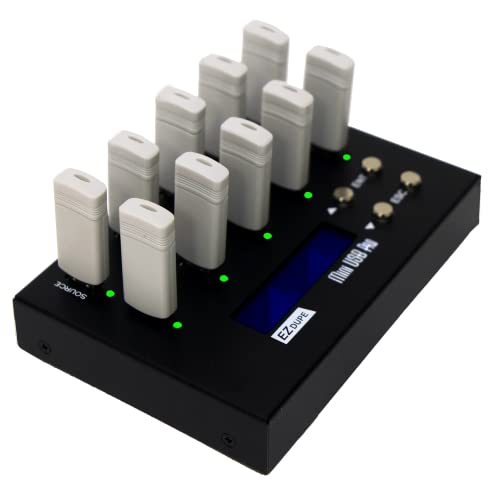
- Copies up to 9 USB drives at once
- Quick copy and whole-media copy modes
- Includes two erase functions for sanitizing
Best For: Small production runs needing up to nine simultaneous copies
High-Capacity Pick
Vinpower 15-Target Standalone USB Duplicator

- 15-target standalone USB duplicator
- Asynchronous duplication for independent copies
- Secure erase plus Smart Copy/Raw Mode
Best For: High-volume teams needing a standalone multi-drive cloner
Most Flexible Pick
Vinpower USBShark 11-Target USB and HDD Duplicator

- Handles USB flash drives and external hard drives
- Standalone operation with asynchronous duplication
- Includes Smart Copy, Raw Mode, and secure erase
Best For: Mixed-media users who need USB and external drive copying
Compact Pick
Vinpower 3-Port Standalone USB Mini Duplicator

- Lightweight 1-to-3 standalone USB duplicator
- Smart Copy, Raw Copy, and DoD secure erase
- Compact choice for smaller workflows
Best For: Small offices needing a lightweight USB cloner and eraser
Standalone 1:2 USB Cloner – BestDuplicator UB300 1:2 USB 2.0 Flash Drive Duplicator
If you want usb duplicators under 1000 for small-batch flash drive jobs, the BestDuplicator UB300 is a straightforward 1-to-2 standalone option. It copies one source drive to two targets at once without a computer, and it includes quick copy, whole media copy, and built-in test and erase tools for basic deployment workflows.
Best For: IT teams, schools, and field technicians who need simple two-drive duplication and verification in a portable unit.
Pros:
- Duplicates one USB drive to two targets simultaneously without a PC
- Supports quick copy and whole media bit-for-bit cloning
- Includes capacity check, speed test, and erase functions
- Compact standalone design with LCD and per-port LED indicators
Cons:
- Limited to a 1:2 copy ratio, so it is not for larger batches
- Best performance depends on source and target media being similar in capacity
- Optimized for USB 1.1 and USB 2.0 flash media
This is a good fit if you value portability and simple operation over high-volume throughput. For two-drive jobs, it covers the essentials cleanly and without software overhead.
High-Capacity 1:15 Duplicator – Systor 1 to 15 USB Duplicator & Sanitizer
Among usb duplicators under 1000, the Systor SYS-USBD-15 stands out for much larger output capacity. It is a fully standalone 1-to-15 duplicator and sanitizer with synchronous and asynchronous copy modes, bit-by-bit duplication, and a stated transfer rate up to 2GB per minute.
Best For: Users who need to duplicate and sanitize many USB drives in one run without connecting to a computer.
Pros:
- Copies one source to up to 15 target drives
- Standalone operation with no software or computer required
- Supports synchronous and asynchronous copy modes
- Includes bit-by-bit duplication and sanitizer functions
Cons:
- Bulkier and more specialized than smaller desktop duplicators
- Limited warranty details may matter for frequent commercial use
- Designed around USB flash drive workflows rather than general storage tasks
If your workflow centers on repeated multi-drive runs, this model offers a lot of capacity in one machine. It is a practical choice when batch size matters more than portability.
Touchscreen USB Copier – EZ Dupe SOHO Touch 1 to 10 USB Duplicator
If you are comparing usb duplicators under 1000 and want a modern interface, the EZ Dupe SOHO Touch is built around a touchscreen menu and pro-level copy tools. It handles 1-to-10 USB duplication at up to 35MB per second, with copy, compare, format, and erase functions for everyday media workflows.
Best For: Office and production users who want a simple touchscreen duplicator for routine USB cloning and cleanup.
Pros:
- Copies one source to up to 10 USB drives
- Touchscreen interface simplifies copy, compare, format, and erase tasks
- Supports USB flash media with all file formats, file sizes, and capacities
- Delivers up to 35MB per second copy speed
Cons:
- Focuses on flash media rather than broader storage types
- More advanced than basic two-port duplicators, which may be unnecessary for small jobs
- Heavy-duty design may be more than casual users need
This model makes sense if usability is as important as throughput. The touchscreen and broad media support make it a strong middle ground for regular duplication tasks.
Modular 1:9 USB Duplicator – U-Reach UB910S 1-9 Port USB Duplicator
For buyers shopping usb duplicators under 1000, the U-Reach UB910S offers a balanced 1-to-9 standalone setup with broad file-system support. It can copy USB 2.0/3.0/3.1 devices and external USB-powered HDD devices, and it includes bit-by-bit copying plus erase modes for more complete media handling.
Best For: Users who need a flexible standalone duplicator with stronger compatibility and modular maintenance.
Pros:
- Supports 1-to-9 duplication without a computer
- Handles USB 2.0/3.0/3.1 devices and external USB-powered HDDs
- Bit-by-bit copy supports multiple file systems, including proprietary formats
- Modular socket design makes port replacement quicker
Cons:
- Heavier than smaller desktop units at 11 pounds
- Optional adapters are needed for eUSB support
- Erasure options are useful, but the feature set is more specialized than basic copiers
This is a strong pick if compatibility and serviceability matter more than compact size. It is built for practical duplication work with fewer workflow compromises.
Compact 1:2 Cloner – StarTech Standalone USB Duplicator
If you want usb duplicators under 1000 for simple two-drive workflows, this StarTech model is a practical pick for small IT teams and technicians. It works without a computer, supports USB 3.0/2.0 flash media, and includes copy, verify, and wipe options for everyday deployment or cleanup jobs.
Best For: Technicians who need a compact standalone 1-to-2 USB cloning and erasing tool.
Pros:
- Standalone 1:2 duplication and erasing, so no PC is required.
- Supports system/file copy and sector-by-sector cloning, plus quick erase and multi-pass overwrite.
- Copy & Compare verification helps confirm cloned drives against the source.
- Asynchronous copy mode lets you swap in new drives without stopping the process, if the source is under 64 MB.
Cons:
- Only duplicates to two drives at a time.
- Asynchronous copy mode is limited to source content under 64 MB.
- Supports USB 2.0/1.1 flash drives, so compatibility is narrower than newer USB media.
This is a straightforward option when reliability, erase features, and verification matter more than high target count. For compact field use or office maintenance, it covers the core cloning jobs well.
High-Capacity 7-Target Cloner – Vinpower Digital USBShark
Vinpower Digital USBShark Standalone USB Flash Drive Duplicator - 7 Targets (High Speed)
Check Price On AmazonFor buyers comparing usb duplicators under 1000 that can handle more output at once, this Vinpower Digital USBShark is built around seven-target duplication. It runs fully standalone, supports a wide range of USB versions, and adds smart copy, secure erase, and prescan tools for more controlled workflows.
Best For: Users who need a standalone seven-target duplicator with broad USB compatibility.
Pros:
- Copies to up to 7 targets at once for higher throughput.
- Standalone operation means no PC is required.
- Supports USB 3.0, 2.0, and 1.0 devices.
- Includes smart copy, secure erase, and USB prescan features.
Cons:
- Bulkier and heavier than compact duplicators.
- Notes do not list a detailed copy speed for all use cases.
- May be more machine than needed for small-volume jobs.
This model makes sense when you need more simultaneous targets and want a dedicated appliance rather than a PC-based setup. It is a stronger fit for regular batch cloning than for light occasional use.
Multi-Target Mini Cloner – EZ Dupe 1 to 9 USB Duplicator
If you are shopping usb duplicators under 1000 and want a compact unit with a larger target count, this EZ Dupe model stands out with up to nine simultaneous copies. It supports USB 1.0 through 3.0 flash media, offers quick copy and whole-media copy modes, and also includes erase functions for basic sanitizing.
Best For: Small production runs and teams that need up to 9 USB copies from one source.
Pros:
- Copies up to 9 flash drives at the same time.
- Supports quick copy of essential files and whole-media sector-by-sector copying.
- Works as a data sanitizer with two erase functions.
- Can handle external USB-powered hard drives up to 2TB with their own power source.
Cons:
- Uses USB 2.0 hardware interface, which is older than the media it supports.
- External hard drives need their own power source.
- Compact size is useful, but it may not suit very heavy-duty production environments.
This is a flexible middle-ground choice for users who need more simultaneous outputs without jumping to a much larger system. It balances capacity, basic sanitizing, and broad media support in a small footprint.
High-Capacity Pick – Vinpower 15-Target Standalone USB Duplicator
If you’re comparing usb duplicators under 1000 for larger batch jobs, this 15-target Vinpower unit is built for standalone operation with no PC required. It supports asynchronous duplication, so each drive can copy independently, and it includes Smart Copy plus Raw Mode for either accessible files or bit-for-bit cloning.
Best For: Teams that need a standalone 15-port USB cloner for bulk flash drive duplication and secure erase tasks.
Pros:
- 15-target layout suits higher-volume duplication runs
- Standalone design works without connecting to a computer
- Asynchronous duplication helps maintain speed and reliability
- Secure erase function can fully wipe USB drives
Cons:
- Large 11-pound unit is less portable than smaller cloners
- May be more than needed for small one-off jobs
- Interface adapter modules are required for SD, microSD, and CF support
For users who need a high-capacity duplicator rather than a basic desktop tool, this model offers strong flexibility and workflow speed. Its combination of standalone operation, erase capability, and multi-format support makes it a practical fit for recurring production work.
Most Flexible Pick – Vinpower USBShark 11-Target USB and HDD Duplicator
Among usb duplicators under 1000, this Vinpower USBShark stands out if you want one standalone unit that can handle both USB flash drives and external USB hard drives. It uses asynchronous duplication, so sources copy independently, and it offers Smart Copy or Raw Mode depending on whether you want accessible content or full bit-by-bit duplication.
Best For: Buyers who need a standalone duplicator for both USB flash drives and external HDD or SSD media.
Pros:
- Copies USB flash drives and external USB hard drives
- Standalone operation does not require a PC
- Asynchronous duplication supports efficient multi-drive workflows
- Secure erase is included for drive sanitizing
Cons:
- 11-pound chassis is not especially portable
- USB 1.1 interface listing suggests an older connectivity spec
- Likely overkill for simple low-volume duplication needs
This is a good choice when your workflow includes mixed media and you want a single machine to manage both duplication and secure erase. Its standalone design and dual-format support make it more flexible than a basic flash-only cloner.
Compact Pick – Vinpower 3-Port Standalone USB Mini Duplicator
If you want usb duplicators under 1000 for smaller jobs, this 1-to-3 Vinpower model is a compact standalone option that keeps the workflow simple. It supports Smart Copy for accessible files and Raw Copy for bit-by-bit cloning, and it also includes DoD 5220.22-M secure erase for wiping drives before reuse or disposal.
Best For: Small teams and offices that need a lightweight standalone USB cloner with erase capability.
Pros:
- Compact 3-port design is easier to place on a desk
- Standalone operation keeps it independent from a computer
- Smart Copy and Raw Copy cover different duplication needs
- DoD-style secure erase adds data sanitizing capability
Cons:
- Only supports 1-to-3 copying, so it is limited for larger batches
- Not as scalable as higher-target duplicators
- Best suited to basic production or office workflows rather than high-volume runs
This model makes sense when portability and simplicity matter more than raw capacity. The lightweight build and erase tools make it a practical entry-level pick for organizations that duplicate small numbers of USB drives regularly.
How We Picked the Best USB Duplicators Under 1000
We focused on standalone units that deliver strong value for small-batch production. Priority went to models with dependable copy speeds, clear menus or displays, broad USB media support, and enough target ports to match common workflows. We also considered whether the unit can duplicate and erase drives, since that adds flexibility for IT and support use.
Quick Comparison
The main tradeoff is target count versus speed. Lower-port models are usually simpler and better for one-off jobs, while higher-capacity duplicators suit teams that need to clone many drives at once. Some USB Duplicators Under 1000 also support USB hard drives or include sanitizing features, which can be useful if you need more than basic flash-drive copying.
Key Buying Factors for USB Duplicators Under 1000
Target Count
Choose the number of copies you need per run, not just the maximum available. A 1-to-2 or 1-to-3 unit is ideal for occasional duplication, while 1-to-9 and 1-to-15 systems make more sense for recurring production work.
Speed and Workflow
Transfer speed matters most when you are copying larger files or running repeated batches. Look for clear throughput ratings, but also consider whether the interface and menu system are easy enough to use under time pressure.
Media Compatibility
Not every duplicator handles the same drives equally well. Check support for USB 2.0, 3.0, and 3.1 flash drives, plus any support for external USB hard drives if you need that flexibility.
Erase and Sanitize Functions
If you manage used or sensitive media, erase and sanitizing features can be as important as cloning. These tools help prepare drives for reuse and can simplify IT asset workflows.
Who Should Buy Which USB Duplicators Under 1000?
Choose a smaller 1-to-2 or 1-to-3 model if you mainly need simple, occasional copying with minimal setup. Go for a 1-to-7, 1-to-9, or 1-to-11 option if you handle training kits, event giveaways, software deployment, or regular office distribution. High-capacity 1-to-15 units are best for teams that need to push out many identical drives in fewer cycles.
For most buyers, the best USB Duplicators Under 1000 are the ones that match your daily workload, support the media you already use, and keep operation simple enough that anyone on the team can run them confidently.