Wireless drawing tablets make it easier to sketch, edit, and teach without cable clutter. For many artists, Bluetooth convenience and a responsive pen are enough to simplify the whole setup.
In this roundup, we focus on practical options for beginners, students, and digital creatives who want a tablet that feels natural at the desk or on the go.
Best 10 Wireless Drawing Tablets Picks for 2026
Editor’s Pick
Wacom Intuos Small Bluetooth Drawing Tablet

- Bluetooth plus USB-A connectivity
- Battery-free pen with 4096 pressure levels
- Includes software, training, and 4 ExpressKeys
Best For: Students and creators who want a compact wireless tablet for everyday drawing and note-taking
Best for Beginners
XP-Pen Deco 01 V3 10x6 Drawing Tablet

- 10 x 6.25-inch drawing area
- 16K battery-free stylus with tilt support
- 8 shortcut keys and broad compatibility
Best For: Beginners who want a large, easy-to-use drawing tablet with strong pen performance
Best Mid-Size Pick
Wacom Intuos Medium Bluetooth Tablet

- Bluetooth and USB-A connectivity
- Medium-size active area for more drawing room
- Battery-free pen plus included software
Best For: Users who want a balanced mid-size wireless tablet for creative work and everyday productivity
Best Large Workspace
HUION Inspiroy H1060P Graphics Tablet

- Large 10 x 6.25-inch workspace
- 8192 levels and 60-degree tilt support
- 12 press keys plus 16 soft keys
Best For: Artists who want a large, highly customizable tablet and do not need Bluetooth wireless
Wireless Freedom for Bigger Workspaces
XPPen Deco LW 10x6 Bluetooth Tablet
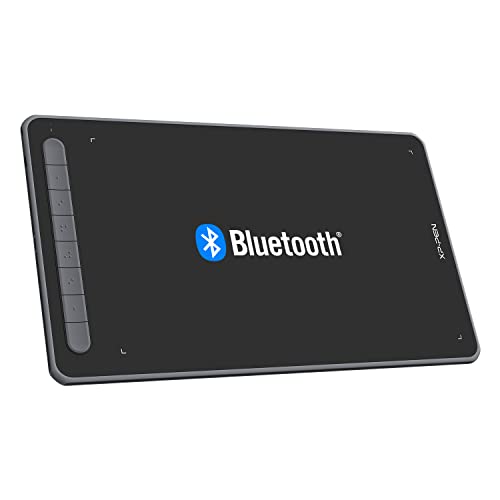
- Bluetooth 5.0 wireless with wired backup
- Large 10x6 inch active drawing area
- X3 stylus: 8192 levels and 60° tilt
Best For: Artists and students who want a roomy wireless pen tablet
Compact Everyday Pick
HUION Inspiroy H640P 6x4 Tablet

- Ultra-portable 6x4 inch active area
- Battery-free stylus with 8192 pressure levels
- Six customizable shortcut keys
Best For: Beginners and students who want a compact pen tablet
Shortcut-Friendly Wireless Option
XPPen Deco MW 8x5 Bluetooth Tablet

- Bluetooth 5.0 wireless connection
- Eight customizable shortcut keys
- X3 stylus with 8192 levels and tilt
Best For: Creators who want a compact wireless tablet with extra shortcut control
Wireless Bluetooth Pick
GAOMON WH851 8x5 Drawing Tablet

- Bluetooth 5.0 wireless plus USB-C wired option
- 16,384 pressure levels with tilt support
- Dial and 8 customizable shortcut keys
Best For: Students and hobbyists who want wireless control and quick shortcuts
Compact Travel Option
XPPen Deco mini7W Wireless Tablet
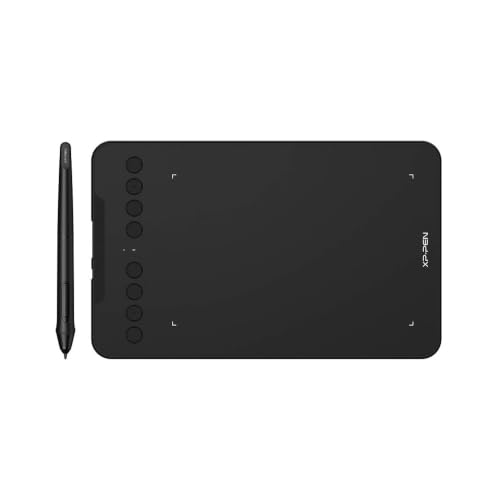
- Bluetooth 5.0 plus USB dongle connection
- Battery-free pen with 16,384 pressure levels
- 8 shortcut keys and wide OS compatibility
Best For: Teachers and students who need a compact, portable tablet
Mobile-Friendly Upgrade
XPPen Deco mini7W V2 Wireless Tablet
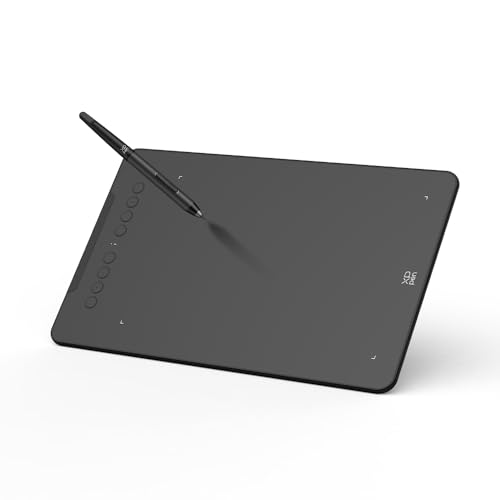
- Bluetooth 5.0 with wired USB-C backup
- Up to 13 hours of battery life
- Mobile mapping feature for Android screen ratios
Best For: Android artists and multi-device users who need better mobile mapping
Editor’s Pick – Wacom Intuos Small Bluetooth Drawing Tablet
If you want wireless drawing tablets that feel dependable day to day, the Wacom Intuos Small is a practical compact option. It pairs Bluetooth freedom with Wacom’s battery-free pen, so you can sketch, edit, and mark up documents without worrying about charging the stylus.
Best For: Students, teachers, and creators who want a small, wireless tablet for drawing, note-taking, and general digital work.
Pros:
- Bluetooth connectivity plus USB-A wired use gives you flexible setup options.
- Battery-free Wacom Pen 4K offers 4096 pressure levels and EMR control.
- Includes 4 ExpressKeys for quick shortcuts during creative or productivity tasks.
- Software and online training are included with registration.
Cons:
- Small active area may feel limited for larger hand movements.
- Pressure sensitivity is 4096 levels, which is lower than some newer rivals.
Overall, this is a compact, reliable wireless drawing tablet for users who value portability and Wacom’s familiar pen feel. It makes the most sense if you want a simple, well-supported starter tablet rather than the largest drawing surface.
Best for Beginners – XP-Pen Deco 01 V3 10×6 Drawing Tablet
Among wireless drawing tablets, the XP-Pen Deco 01 V3 stands out for beginners who want a larger work area and a straightforward setup. It uses a battery-free stylus with 16K pressure levels, and the tablet supports USB-C connections plus Android compatibility for flexible everyday use.
Best For: Beginners and casual artists who want a roomy drawing surface and a battery-free pen for sketching across multiple devices.
Pros:
- Large 10 x 6.25-inch active area gives you more room to draw comfortably.
- 16,384 pressure levels and 60-degree tilt support help create smoother lines and shading.
- 8 customizable shortcut keys make the workflow easy to personalize.
- Works with Windows, macOS, Chrome OS, Linux, and Android 10.0+.
Cons:
- Connectivity is USB-C based rather than built-in Bluetooth wireless.
- Some users may prefer a more compact tablet for travel.
This model is a strong pick if you want an affordable-feeling entry point with a generous drawing area. It is especially appealing for new users who want precision, portability, and broad device support without a steep learning curve.
Best Mid-Size Pick – Wacom Intuos Medium Bluetooth Tablet
If you need wireless drawing tablets with a bit more room to work, the Wacom Intuos Medium offers a practical step up from compact models. It keeps the same battery-free pen and Bluetooth flexibility, while giving you a larger active surface for drawing, photo editing, and other creative tasks.
Best For: Creators, students, and office users who want a medium-size wireless tablet for drawing, editing, and document markup.
Pros:
- Bluetooth and USB-A connectivity support both wireless and wired use.
- Medium 8.50″ x 5.31″ active area gives more working space than the Small version.
- Battery-free Wacom Pen 4K and 4 ExpressKeys keep control simple.
- Works with Windows, Mac, and Chromebook, with software included.
Cons:
- Pressure sensitivity is 4096 levels, which is modest by current standards.
- May be more tablet than casual users need if portability is the top priority.
For people who want a balanced wireless tablet that is still easy to carry, this is a strong middle-ground choice. It makes sense when you want Wacom’s familiar pen feel but need more space than a small tablet provides.
Best Large Workspace – HUION Inspiroy H1060P Graphics Tablet
The HUION Inspiroy H1060P is a good fit for buyers comparing wireless drawing tablets that prioritize a large work area and lots of shortcuts. It is a wired tablet rather than Bluetooth-based, but its big 10 x 6.25-inch surface, battery-free stylus, and extensive hotkey layout make it a strong productivity-focused choice.
Best For: Artists and hobbyists who want a large, shortcut-rich drawing tablet for Windows, Mac, Android, or Linux use.
Pros:
- Large 10 x 6.25-inch working area gives plenty of room to draw.
- Battery-free pen supports 60-degree tilt and 8192 pressure levels.
- 12 programmable press keys plus 16 soft keys offer lots of customization.
- Supports Windows, macOS, Android, and Linux compatibility.
Cons:
- Uses USB connectivity, so it does not offer built-in Bluetooth wireless use.
- Mac connection requires a USB adapter.
If your priority is space and shortcut control over true wireless operation, this HUION model is worth a close look. It is well suited to users who want a roomy tablet for drawing, painting, and writing with a highly customizable workflow.
Wireless Freedom for Bigger Workspaces – XPPen Deco LW 10×6 Bluetooth Tablet
If you want wireless drawing tablets that give you room to work, the XPPen Deco LW is built around a 10×6 inch active area and Bluetooth 5.0 connectivity. It keeps cables out of the way while still offering a wired option, so it fits artists who want a cleaner desk without giving up connection flexibility.
Best For: Artists, students, and creators who want a larger wireless pen tablet for drawing, design, or online work.
Pros:
- Bluetooth 5.0 and wired support provide flexible connection options.
- 10×6 inch active area gives a roomy surface for drawing and workflow.
- X3 stylus offers 8192 pressure levels and 60° tilt support.
- Customizable shortcut keys can speed up common creative tasks.
Cons:
- No built-in display, so you draw on the tablet while looking at your screen.
- Some Android and OTG setups may require adapter use.
- Larger size may be less convenient for very tight travel setups.
This is a strong pick if you want a practical wireless drawing tablet with a generous work area, broad compatibility, and a stylus designed for natural line control. It balances portability and comfort better than many compact models.
Compact Everyday Pick – HUION Inspiroy H640P 6×4 Tablet
The HUION Inspiroy H640P is a compact pen tablet for buyers who want a simple, portable alternative to a mouse. While it is not wireless, it still earns a place in wireless drawing tablets roundups for people comparing lightweight tablet options, especially if workspace size and easy transport matter more than cable-free use.
Best For: Beginners, students, and creators who want a small, portable drawing tablet for sketching, notes, and everyday digital tasks.
Pros:
- 6×4 inch size is easy to carry and fits crowded desks.
- Battery-free PW100 stylus includes 8192 pressure levels.
- Six customizable press keys help streamline common commands.
- Works with Mac, Windows, Linux, and Android devices.
Cons:
- Requires a wired connection rather than Bluetooth.
- Smaller active area may feel limited for broad strokes.
- Does not support iPhone or iPad.
If you want a low-profile tablet for drawing, note-taking, and general productivity, the H640P is easy to recommend. Its biggest strengths are portability, pen responsiveness, and straightforward setup.
Shortcut-Friendly Wireless Option – XPPen Deco MW 8×5 Bluetooth Tablet
The XPPen Deco MW is a solid choice if you want wireless drawing tablets with a balanced size and a strong shortcut layout. Its Bluetooth 5.0 connection, 8×5 inch active area, and eight programmable keys make it appealing for artists who want a tidy desktop and faster navigation through creative software.
Best For: Creators who want a compact wireless tablet with plenty of shortcut control for drawing, design, and online work.
Pros:
- Bluetooth 5.0 wireless design reduces cable clutter.
- Eight customizable shortcut keys can replace many keyboard actions.
- X3 stylus provides 8192 pressure levels and 60° tilt support.
- Compatible with Windows, Mac, Linux, Chrome OS, and Android.
Cons:
- 8×5 inch active area is smaller than larger pen tablets.
- No display, so it is not a pen display tablet.
- Best used with supported driver and software setup.
For buyers who value shortcuts as much as pen feel, the Deco MW offers a very practical mix of wireless convenience and workflow control. It is especially appealing if you want something smaller than a full-size tablet but still versatile enough for everyday creative use.
Wireless Bluetooth Pick – GAOMON WH851 8×5 Drawing Tablet
If you want wireless drawing tablets that still keep a practical workspace, the GAOMON WH851 is built around Bluetooth 5.0, an 8 x 5 active area, and an included dial for faster navigation. It’s a good fit for artists who want a battery-free pen, shortcut control, and broad compatibility without moving up to a display tablet.
Best For: Students, hobbyists, and creators who want a wireless pen tablet with a dial and strong shortcut control.
Pros:
- Bluetooth 5.0 wireless support plus USB-C wired use
- 16,384 pressure levels with 60° tilt support and a battery-free stylus
- Intuitive dial and 8 customizable keys for faster workflow
- Works with Windows, Mac, and Android
Cons:
- No built-in screen
- 8 x 5 area may feel compact for larger drawing styles
- Driver-based ratio settings may take some setup
The WH851 is a sensible pick if you value a comfortable pen feel, wireless convenience, and quick access to common actions. Its dial-and-key layout makes it especially appealing for people who want to work efficiently rather than customize everything around a display.
Compact Travel Option – XPPen Deco mini7W Wireless Tablet
Among wireless drawing tablets, the XPPen Deco mini7W stands out as a compact 7 x 4 inch option for people who need portability and flexible device support. It uses Bluetooth 5.0 or the included USB dongle, and its battery-free pen keeps the setup simple for teaching, note-taking, sketching, or everyday creative work.
Best For: Teachers, students, and mobile users who want a small wireless tablet that can move between devices easily.
Pros:
- Bluetooth 5.0 wireless connection with included USB dongle
- Battery-free pen with 16,384 pressure levels and tilt response
- 8 customizable press keys for workflow shortcuts
- Wide compatibility with Windows, Mac, Android, Chrome OS, and Linux
Cons:
- Smaller 7 x 4 inch size may feel limited for some artists
- No built-in display
- Portable form factor may be less comfortable for long, detailed sessions
This model makes sense if you want a lightweight tablet that travels well and connects to a wide range of systems. It’s especially attractive for users who need wireless convenience more than a large drawing surface.
Mobile-Friendly Upgrade – XPPen Deco mini7W V2 Wireless Tablet
If you’re comparing wireless drawing tablets for both desktop and mobile use, the XPPen Deco mini7W V2 adds Bluetooth 5.0, an L-shaped USB-C cable, and a mobile mapping feature designed to better match Android screen ratios. It keeps the compact 7 x 4.37 inch footprint but focuses on smoother mobile artwork, shortcut access, and a battery-free pen experience.
Best For: Android artists and multi-device users who want a compact wireless tablet with better mobile mapping.
Pros:
- Bluetooth 5.0 wireless operation with wired USB-C fallback
- Up to 13 hours of battery life on a charge
- Exclusive mobile mapping app helps reduce distortion on Android devices
- 8 customizable keys and broad compatibility across major operating systems
Cons:
- Compact active area may be small for expansive workflows
- No built-in display
- Some advanced mobile features are aimed primarily at Android use
The Deco mini7W V2 is a smart choice if your workflow includes Android drawing or note-taking and you want a tablet that can adapt more cleanly to mobile screens. It balances portability with practical shortcut support and dependable wireless use.
How We Picked the Best Wireless Drawing Tablets
We prioritized Bluetooth stability, pen responsiveness, pressure sensitivity, working area size, shortcut controls, and overall value. We also looked for models that suit different use cases, from compact travel tablets to larger deskside options.
Because Wireless Drawing Tablets are often used for both art and productivity, we favored tablets with battery-free pens, reliable driver support, and enough shortcut controls to reduce hand movement.
Quick Comparison
Smaller tablets are easier to carry and fit well in tight spaces, while 10-inch-class models usually provide a more comfortable drawing area for illustration and retouching. If you work long sessions, consider whether you want more shortcut keys, a dial, or a larger active area.
Key Buying Factors for Wireless Drawing Tablets
Active Area and Portability
A compact tablet is ideal for beginners, students, and travelers. A larger surface is better for broad strokes, detailed line work, and a more spacious hand movement.
Pen Technology and Pressure Levels
Look for a battery-free pen with solid pressure sensitivity and low lag. More pressure levels can help with fine control, but overall pen feel and consistency matter more than the number alone.
Bluetooth and Connection Reliability
Wireless performance should be stable enough for everyday work. If you switch between laptops or desktops, make sure the tablet supports your operating system and has straightforward pairing.
Shortcuts and Workflow Features
Express keys, a dial, or customizable buttons can speed up common actions like undo, brush size changes, zooming, and switching tools. These features are especially useful for frequent creators.
Software and Compatibility
Check driver support for Windows, macOS, and any creative apps you use most. Good compatibility is important if you plan to use the tablet for drawing, note-taking, editing, or remote work.
Who Should Buy Which Wireless Drawing Tablets?
Beginners and casual users should look for compact, easy-to-learn models with Bluetooth and a simple button layout. Students and hobbyists may prefer a mid-size tablet for more room without giving up portability. Serious illustrators and multitaskers should lean toward larger Wireless Drawing Tablets with more shortcut controls and a more comfortable working area.
If you want the most balanced experience, choose the tablet that matches your workspace first, then compare pen feel, shortcuts, and software support. That approach usually leads to the best long-term fit.