Choosing a drawing tablet with pen pressure can make a big difference in line control, shading, and overall comfort. The right model should feel natural, respond accurately, and fit the way you create.
Below, we’ve rounded up 10 strong options for beginners, hobbyists, and growing artists, with a practical buying guide to help you compare pressure sensitivity, size, shortcuts, and connectivity.
Best 10 Drawing Tablet with Pen Pressure Picks for 2026
Portable Starter Pick

- 8192 pressure levels with battery-free pen
- 6 customizable shortcut keys
- Slim, lightweight design for travel
Best For: Beginners and students who want a compact pen tablet
Beginner-Friendly Large Pad
XP-Pen Deco 01 V3 16K Pressure

- 16,384 pressure levels with tilt support
- 10 x 6.25-inch drawing area
- 8 shortcut keys and USB-C connection
Best For: Beginners who want a roomy tablet with strong pen response
Trusted Compact Classic
Wacom Intuos Small 4096 Pressure

- Battery-free Wacom Pen 4K
- Works with Mac, Windows, Android, and Chromebook
- Includes software and online training
Best For: Students and teachers who want a compact, reliable pen tablet
Workhorse Mid-Size Choice
HUION H1060P 10x6.25 8192 Pressure

- 10 x 6.25-inch active area
- 8192 pressure levels with tilt support
- 12 press keys plus 16 soft keys
Best For: Artists who want a larger tablet with lots of shortcut control
Portable Bluetooth Pick
XPPen Deco mini7W 7 x 4 inch Bluetooth Graphic Tablet
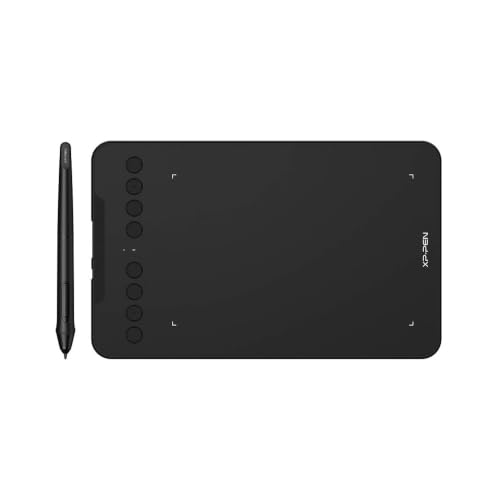
- 16,384 pressure levels with tilt support
- Bluetooth 5.0 and USB-C connectivity
- 8 customizable shortcut keys
Best For: Teachers and students who need a compact wireless pen tablet
Budget Shortcut Option
VEIKK VK640 6x4 Inch Pen Tablet

- 8,192 pressure levels with tilt support
- Battery-free pen and six shortcut keys
- Compact 6 x 4 inch portable design
Best For: Beginners and students wanting a simple, portable pen tablet
High-Pressure Compact Pick
XPPen IT640 6 x 4 Inch Drawing Tablet

- 16,384 pressure levels with 60° tilt
- 8 customizable soft keys
- Android support with OTG adapter
Best For: Users who want strong pen pressure in a compact tablet
Ultra-Compact Pick
HUION H420X 8192 Pressure Tablet

- 8192 pressure levels
- Battery-free stylus
- Ultra-slim, portable design
Best For: Students and beginners who want a tiny, portable tablet for drawing and notes
Feature-Rich Value Pick

- 16,384 pressure levels
- 10 x 6.25-inch active area
- 8 programmable shortcut keys
Best For: Beginners and students who want a larger, flexible tablet with strong stylus control
Balanced Everyday Pick
HUION H950P 16K Pressure Tablet

- 16,384 pressure levels
- 8 customizable shortcut keys
- Portable 8-inch design
Best For: Creators who want a compact, versatile tablet for drawing and daily digital tasks
Portable Starter Pick – HUION H640P 6×4 8192 Pressure
If you want a compact drawing tablet with pen pressure for sketching, note-taking, and everyday creative work, the HUION H640P keeps things simple and practical. Its 8192-level battery-free pen, six shortcut keys, and slim 6×4-inch active area make it a strong fit for small desks, travel bags, and quick workflow changes.
Best For: Beginners, students, and creators who want a lightweight pen tablet for drawing, notes, and editing on the go.
Pros:
- 8192 levels of pen pressure with a battery-free PW100 stylus
- 6 customizable keys for undo, zoom, brush switching, and more
- Very portable at 0.3 inches thin and 0.61 lbs
- Works with Mac, Windows, Linux, and Android devices
Cons:
- 6×4-inch active area is smaller than full-size tablets
- Does not support iPhone or iPad
- Requires driver setup for shortcut profiles and left-handed use
The H640P is a straightforward pick if you care more about responsive pen input and portability than a large workspace. It replaces the mouse well and gives you enough pressure sensitivity to sketch naturally without adding complexity.
Beginner-Friendly Large Pad – XP-Pen Deco 01 V3 16K Pressure
The XP-Pen Deco 01 V3 is a drawing tablet with pen pressure built for beginners who want more room to draw without a steep learning curve. Its 16,384-level battery-free stylus, 10 x 6.25-inch active area, and 8 customizable shortcuts make it easy to sketch, shade, and work comfortably from the start.
Best For: New digital artists who want a larger drawing area, strong pressure sensitivity, and easy setup.
Pros:
- 16,384 pressure levels and up to 60 degrees of tilt support
- Large 10 x 6.25-inch active area for freer strokes
- 8 customizable shortcuts for left- or right-handed use
- USB-C connectivity and Android 10.0+ support
Cons:
- Best Android support requires the XPPen Tools app
- Works with Android 10.0+ only, not older devices
- Still a pen tablet, so it does not have a built-in display
This model stands out for giving beginners a bigger canvas and a higher-pressure stylus than many entry-level tablets. If you want a roomy, portable pad that feels easy to grow with, the Deco 01 V3 is a smart choice.
Trusted Compact Classic – Wacom Intuos Small 4096 Pressure
The Wacom Intuos Small is a practical drawing tablet with pen pressure for users who want dependable control in a compact form. Its battery-free Wacom Pen 4K, 4 ExpressKeys, and broad software compatibility make it well suited for drawing, editing photos, marking up documents, and everyday creative work.
Best For: Students, teachers, and creators who want a compact Wacom tablet with reliable pen performance.
Pros:
- Battery-free EMR pen technology that feels like pen on paper
- Works with Mac, Windows, Android, and Chromebook
- Includes software and training with registration
- Compact 6″ x 3.7″ active area for smaller workspaces
Cons:
- 4096 pressure levels are lower than some newer rivals
- Small active area may feel limiting for larger strokes
- Only 4 ExpressKeys for shortcuts
If you want a trusted name and a simple setup more than maximum features, the Intuos Small delivers. It is a solid everyday pen tablet for learning digital art, editing, and portable use.
Workhorse Mid-Size Choice – HUION H1060P 10×6.25 8192 Pressure
The HUION H1060P is a drawing tablet with pen pressure for artists who want more workspace and more shortcut control. With a 10 x 6.25-inch active area, 8192-level battery-free stylus, tilt support, and 12 programmable press keys plus 16 soft keys, it is built for longer sessions and more detailed workflows.
Best For: Artists and hobbyists who want a larger pen tablet with plenty of shortcut control.
Pros:
- 10 x 6.25-inch working area gives more room for drawing
- 8192 pressure levels with a battery-free stylus
- ±60° tilt support for more natural line variation
- 12 programmable press keys plus 16 soft keys
Cons:
- USB adapter is required for Mac connectivity
- iPhone and iPad are not supported
- Android phone support may vary by device, such as Samsung Galaxy S cursor behavior
For users who want a larger active area without moving to a display tablet, the H1060P offers a strong balance of space, pressure response, and shortcut customization. It is especially appealing if you like building a streamlined workflow around hardware keys.
Portable Bluetooth Pick – XPPen Deco mini7W 7 x 4 inch Bluetooth Graphic Tablet
If you want a drawing tablet with pen pressure that can move easily between your desk, classroom, and travel bag, the XPPen Deco mini7W is built around flexibility. It pairs a battery-free pen with 16,384 levels of pressure sensitivity, 60° tilt support, and Bluetooth 5.0 wireless use, while still offering USB-C connection options for wired setups.
Best For: Teachers, students, and creators who want a compact wireless tablet for drawing, online teaching, and everyday creative work.
Pros:
- 16,384 pressure levels and 60° tilt support for natural line control
- Bluetooth 5.0 plus USB-C options for flexible wired or wireless use
- 8 customizable press keys for faster shortcuts
- Wide compatibility with Windows, Mac, Android, Chrome OS, and Linux
Cons:
- 7 x 4 inch active area may feel small for users who prefer more space
- It is a pen tablet, so it does not include a built-in display
The Deco mini7W stands out if you value portability and multiple connection methods over a larger work surface. Its pressure response and shortcut controls make it a practical entry point for sketching, teaching, note-taking, and remote work.
Budget Shortcut Option – VEIKK VK640 6×4 Inch Pen Tablet
The VEIKK VK640 is a compact drawing tablet with pen pressure designed for simple, practical use across drawing, sketching, photo editing, and e-signatures. Its battery-free pen offers 8,192 pressure levels and 60° tilt support, and the tablet adds six customizable shortcut keys to help speed up common actions.
Best For: Beginners, students, and budget-minded users who want a lightweight tablet for everyday drawing and teaching tasks.
Pros:
- 8,192 pressure levels and 60° tilt support
- Battery-free pen for uninterrupted use
- Six customizable shortcut keys for workflow control
- Compact 6 x 4 inch design is easy to carry
Cons:
- Smaller active area may be limiting for users who like larger strokes
- Wired USB connection only, with no wireless option listed
This model makes sense if you want a straightforward tablet that keeps the essentials in place without adding complexity. It is especially appealing for first-time digital artists who want portability, shortcut control, and broad software compatibility.
High-Pressure Compact Pick – XPPen IT640 6 x 4 Inch Drawing Tablet
The XPPen IT640 is a drawing tablet with pen pressure built for users who want a compact surface but more responsive pen control. It uses a battery-free stylus with 16,384 levels of pressure sensitivity and 60° tilt support, and it also includes 8 customizable soft keys plus Android support through the included OTG adapter.
Best For: Beginners, students, and gamers who want a small tablet with high pressure sensitivity and OSU-friendly responsiveness.
Pros:
- 16,384 pressure levels for fine control over lines and shading
- 60° tilt support with a battery-free stylus
- 8 customizable soft keys for faster shortcuts
- Works with Windows, Mac, Android, Chrome OS, Harmony OS, and Linux
Cons:
- 6 x 4 inch active area is compact for detailed work sessions
- Not a standalone tablet; it must connect to a computer or supported device
If pressure sensitivity is your top priority, this model delivers a strong feature set in a small footprint. It is a smart pick for portable sketching, document annotation, and rhythm-game use where accuracy matters.
Ultra-Compact Pick – HUION H420X 8192 Pressure Tablet
If you want a drawing tablet with pen pressure that is easy to carry and simple to set up, the HUION H420X is a practical entry-level option. Its 8192-level battery-free stylus, slim body, and plug-and-play setup make it a good fit for quick sketching, note-taking, and everyday digital pen use.
Best For: Students, beginners, and anyone who needs a very small tablet for drawing, annotating, or online work.
Pros:
- 8192 pressure levels with a battery-free stylus for natural pen input
- Ultra-slim, lightweight design that is easy to travel with
- Works with Windows, Mac, Android, and many creative apps
- Includes 60-degree tilt support and side buttons on the pen
Cons:
- Very small active area may feel limited for larger artwork
- Not compatible with iOS
- Best for basic work rather than spacious drawing workflows
Overall, the H420X is a straightforward choice if portability matters more than workspace size. It delivers the core pen-pressure experience without charging hassles, but the compact surface will suit quick tasks better than detailed illustrations.
Feature-Rich Value Pick – XPPen Deco 01 V3 16K Tablet
The XPPen Deco 01 V3 is a strong drawing tablet with pen pressure if you want a larger work area and more advanced stylus response. With 16,384 pressure levels, 60-degree tilt support, and a battery-free pen, it is built for smoother shading, cleaner lines, and more natural sketching across art and teaching tasks.
Best For: Beginners, students, and hobbyists who want a spacious tablet with lots of shortcut control and broad device support.
Pros:
- 16,384 pressure levels and 60-degree tilt for natural shading
- Large 10 x 6.25-inch active area for comfortable drawing
- 8 customizable shortcut keys to speed up workflow
- Compatible with Windows, macOS, Android, Chrome OS, and Linux
Cons:
- Larger footprint may be less ideal for very tight desks
- Android setup may require aspect ratio adjustment for best results
- Feature set may be more than casual users need
For artists who want more room and more control, the Deco 01 V3 offers a compelling mix of pressure sensitivity, shortcuts, and device compatibility. It stands out as a flexible all-around tablet for drawing, animation, and remote teaching.
Balanced Everyday Pick – HUION H950P 16K Pressure Tablet
The HUION Inspiroy H950P is a well-rounded drawing tablet with pen pressure for artists who want more control without moving to a huge tablet. Its 16,384 pressure levels, battery-free stylus, and eight customizable keys make it a useful everyday tool for drawing, editing, signing, and remote work.
Best For: Creators who want a medium-sized tablet that balances portability, pressure sensitivity, and shortcut control.
Pros:
- 16,384 pressure levels for precise pen input
- 8 programmable press keys for faster workflows
- Compact, slim design that is easy to carry
- Works with Windows, Mac, Linux, and Android devices
Cons:
- 8-inch screen size may still feel modest for some illustrators
- Not a pen display, so you draw on the tablet while looking at your screen
- Best results depend on app and driver setup
H950P is a sensible middle-ground choice if you want pen-pressure precision and shortcut convenience in a portable format. It is especially appealing for users who need one tablet for art, note-taking, and general computer control.
How We Picked the Best Drawing Tablet with Pen Pressure
We focused on tablets that offer dependable pen pressure response, good value for the feature set, and broad compatibility with common creative workflows. We also prioritized options that suit different desk sizes, hand preferences, and experience levels.
Quick Comparison
Smaller tablets are easier to carry and work well for basic sketching, note-taking, and OSU. Medium-sized tablets usually provide more natural arm movement and are better for drawing sessions. Shortcut keys, wireless support, and battery-free pens can also improve day-to-day usability.
Key Buying Factors for Drawing Tablet with Pen Pressure
Pressure Levels
Higher pressure counts can help with subtle strokes, but the real test is consistency. A responsive Drawing Tablet with Pen Pressure should track light and heavy strokes smoothly without lag or jumpy input.
Active Area Size
A larger working area gives you more room for sweeping lines and detailed illustration, while compact tablets are better if portability matters more than broad brush control.
Pen Features
Look for battery-free pens, tilt support, and comfortable grip design. These features can make long sessions feel easier and reduce maintenance.
Shortcut Keys and Workflow
Customizable buttons are useful for zoom, undo, brush changes, and switching tools. If you work quickly, shortcut-heavy models can save time.
Connection and Compatibility
USB tablets are simple and reliable, while Bluetooth can reduce cable clutter. Make sure the tablet works with your operating system and the apps you actually use.
Who Should Buy Which Drawing Tablet with Pen Pressure?
Beginners and students often do best with compact, affordable tablets that cover the basics well. Digital illustrators may prefer a medium-sized model with stronger shortcut support and a wider drawing area. If you want portability for classes or travel, a small wireless option can be the most practical choice. For desk-based creators who sketch daily, a larger tablet with a stable connection and strong pen sensitivity is usually the better long-term pick.
In short, choose the tablet that matches your workspace, workflow, and comfort level—not just the highest pressure number on the box.