Choosing the right photo printer at home comes down to more than just resolution. You also need to think about print size, running costs, wireless convenience, and how often you’ll actually print.
This roundup of the best photo printers for home use in 2026 highlights compact, all-in-one, and wide-format models for different budgets and needs.
Best 10 Photo Printers for Home Use Picks for 2026
Portable App-Driven Pick

- Ships with 100 sheets and 3 cartridges
- Built-in hotspot for simple wireless printing
- Liene app offers edits and ID/Visa photo support
Best For: Families and smartphone users who want an all-in-one 4x6 printing kit
Home All-in-One Choice
Epson Expression Premium XP-7100
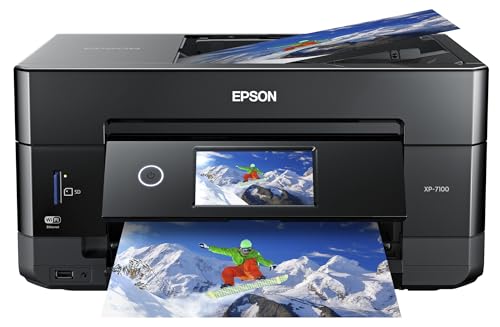
- Print, scan, and copy in one home machine
- Borderless photos up to 8 x 10 inches
- Wireless, Ethernet, USB, and SD card support
Best For: Households that want one wireless all-in-one printer for photos and documents
Dock-and-Print Favorite
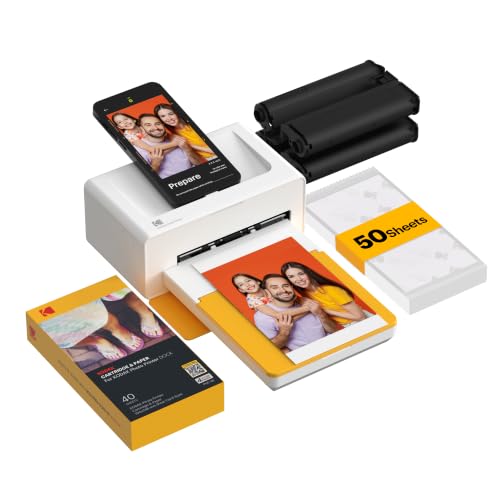
- Docking station charges your phone while printing
- 4PASS prints resist fingerprints, water, and fading
- Bluetooth and app-based printing are simple to use
Best For: Casual home printing, gifts, and easy phone-to-print workflow
Home Photo All-in-One
Epson XP-6100 Wireless Color All-in-One Inkjet Printer

- 5-color ink system for photos and sharp text
- Dedicated photo tray and DVD tray
- Fast 4" x 6" prints and wireless sharing
Best For: Households wanting a compact printer for photos and everyday documents
Portable Phone Photo Printer
Liene Amber M110 Bluetooth Photo Printer

- Bluetooth setup is quick and simple
- Prints 4x6 photos plus 3x3 sticky-backed paper
- Portable design with app-based editing tools
Best For: Anyone who wants easy phone printing and small-format photo stickers
Budget Ink Tank All-in-One
Canon MegaTank G3270 Wireless Color Printer

- Very high ink yield with up to 2 years included
- Supports glossy photo paper and borderless printing
- Wireless print, copy, and scan in one unit
Best For: Frequent home printers who want lower ink costs and photo support
Wide-Format Photo Pick
Epson XP-15000 Wide-Format Photo Printer
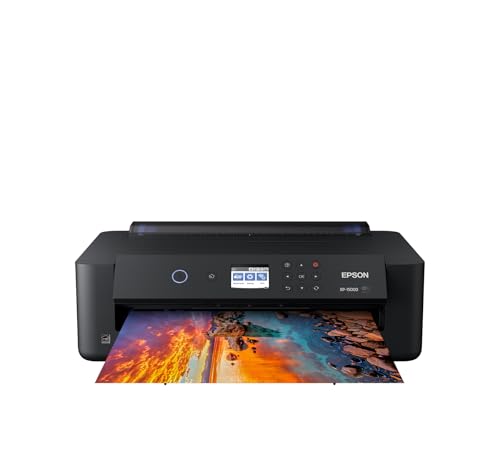
- Borderless prints up to 13 x 19 inches
- 6-color Claria Photo HD ink with red and gray
- Rear tray handles cardstock and specialty media
Best For: Home photo printing with larger borderless sizes
Family All-in-One Pick
HP Envy Photo 7975 Home Printer

- Print, scan, copy, and auto duplex in one machine
- Borderless photos with a separate photo tray
- Wireless, mobile, and touchscreen controls
Best For: Families needing one wireless printer for photos and everyday use
Low-Cost Ink Pick
Epson EcoTank ET-8550 Photo Tank Printer
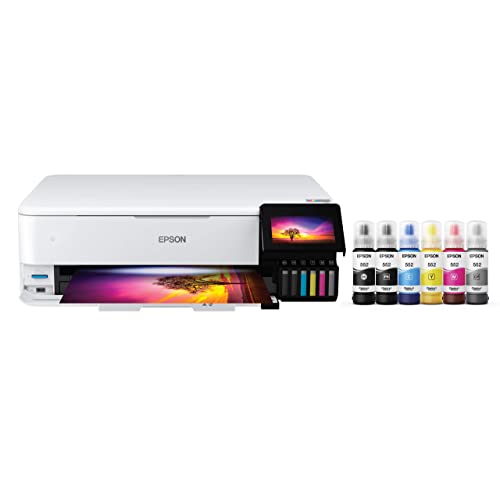
- Cartridge-free refillable ink tank system
- 4 x 6 photos for about 4 cents each
- All-in-one with print, scan, and copy
Best For: Frequent home photo printing with lower ink costs
Compact Dye-Sub Pick – Canon SELPHY CP1500
If you want a compact option among photo printers for home use, the Canon SELPHY CP1500 keeps things simple while still offering useful extras like Wi-Fi, USB, and memory card support. Its dye-sublimation process produces color prints that are instantly dry and water resistant, and the 3.5-inch display makes it easy to review and edit photos before printing.
Best For: Home users who want a portable 4×6 photo printer with flexible device connections.
Pros:
- Small footprint and portable design make it easy to move or store.
- Wi-Fi, USB, memory card, and USB flash drive support add flexibility.
- Built-in 3.5-inch display lets you edit and apply basic filter effects.
- Photos are instantly dry, water resistant, and rated to last up to 100 years.
Cons:
- Prints are limited to 4 x 6-inch size.
- Designed as a print-only model, so it does not scan or copy.
Overall, the CP1500 is a practical pick if you want straightforward, durable photo prints without a large footprint or complicated setup.
Portable App-Driven Pick – Liene M100 4×6 Photo Printer
The Liene M100 is a strong choice if you want photo printers for home use that focus on easy smartphone printing and ready-to-go supplies. It uses thermal dye sublimation for vibrant 4×6 prints, includes 100 sheets and 3 cartridges, and its built-in hotspot keeps the connection simple without relying on outside networks.
Best For: Families and smartphone users who want an all-in-one 4×6 printing kit with app control.
Pros:
- Includes 100 sheets of paper and 3 color cartridges in the box.
- Built-in hotspot simplifies printing from iPhone, Android, or PC.
- Prints are water resistant, scratch resistant, fingerprint resistant, and fade resistant.
- Liene app supports borders, filters, contrast, brightness, and photo ID/Visa prints.
Cons:
- Print size is limited to 4 x 6 inches.
- It is a print-only device with no scanning or copying features.
For a home setup centered on mobile printing, the M100 stands out for convenience, bundled consumables, and low-friction wireless use.
Home All-in-One Choice – Epson Expression Premium XP-7100
If you need photo printers for home use that do more than print snapshots, the Epson XP-7100 adds scanning, copying, and document handling to its photo-focused feature set. It offers borderless photos up to 8 x 10 inches, a 4.3-inch touchscreen, Wi-Fi Direct, ethernet, and support for printing from smartphones, tablets, USB, or SD cards.
Best For: Households that want one wireless all-in-one printer for photos, documents, and everyday tasks.
Pros:
- All-in-one design adds copy and scan functions plus a 30-page ADF.
- Borderless photo printing up to 8 x 10 inches expands creative use.
- 4.3-inch touchscreen and media slots make direct printing easier.
- Wireless, Ethernet, and Wi-Fi Direct support add flexible connectivity.
Cons:
- Larger and heavier than compact dedicated photo printers.
- Uses Epson genuine cartridges, so supply choices are more specific.
The XP-7100 is best when your home printer needs to handle both family photo printing and routine office-style jobs in one machine.
Dock-and-Print Favorite – KODAK Dock Plus 4×6 Printer
The KODAK Dock Plus is a straightforward pick among photo printers for home use if you want quick 4×6 prints from a smartphone. Its docking design can charge your phone while you print, and the 4PASS dye-sublimation process adds a protective lamination layer for prints that resist fingerprints, water, and fading.
Best For: Casual home printing, gifts, and easy phone-to-print workflow.
Pros:
- Integrated docking station helps with connection and charges your phone while printing.
- 4PASS prints are designed to resist fingerprints, water, and fading.
- Simple setup via Bluetooth and the KODAK app keeps operation easy.
- Compact desktop design suits home printing stations and photo album use.
Cons:
- Prints are limited to 4 x 6-inch size.
- It is a print-only model with no scanning or copying.
If you want an easy, desktop-friendly way to make keepsake prints from your phone, the Dock Plus delivers a simple and familiar workflow.
Home Photo All-in-One – Epson XP-6100 Wireless Color All-in-One Inkjet Printer
If you want photo printers for home use that can handle both family snapshots and everyday paperwork, the Epson Expression Premium XP-6100 is built for that mixed workload. Its 5-color ink system is designed for sharp text and vivid photos up to 8″ x 10″, and the dedicated photo tray helps make quick 4″ x 6″ printing feel less of a hassle.
Best For: Home users who want a compact all-in-one with stronger photo printing than a basic office printer.
Pros:
- 5-color inks for high-quality photo output and sharp document text
- Dedicated photo and DVD trays for creative projects
- Fast 4″ x 6″ photo printing in as little as 15 seconds
- Wireless printing with Wi-Fi Direct, plus USB and memory card slots
Cons:
- Uses Epson Genuine Cartridges exclusively, which limits third-party ink options
- Best photo size tops out at 8″ x 10″
- Single-sheet capacity is modest for heavy-volume use
Overall, the XP-6100 is a practical home photo printer if you want a slim all-in-one that balances photo quality, document printing, and convenient wireless features. It is especially appealing when you print a lot of 4″ x 6″ photos and want a machine that still handles standard household tasks well.
Portable Phone Photo Printer – Liene Amber M110 Bluetooth Photo Printer
For photo printers for home use that focus almost entirely on snapshots, the Liene Amber M110 is a compact Bluetooth model made for easy phone printing. It uses thermal dye sublimation for vibrant 4×6 photos, and the dual tray design adds flexibility for both standard photo paper and 3-inch sticky-backed prints.
Best For: People who want a small, phone-friendly photo printer for quick 4×6 prints and sticker-style images.
Pros:
- Compact portable design that is easy to store at home
- Bluetooth pairs in about 13 seconds for simple setup
- Dual trays support 4×6 paper and 3×3 sticky-backed paper
- Liene app offers borders, filters, brightness and contrast controls
Cons:
- Print-only device with no scanning or copying functions
- Designed for small photo formats rather than larger prints
- Uses Liene-specific cartridges
The M110 makes sense if your priority is fast, convenient photo printing from a phone rather than a full-featured all-in-one. Its strength is simplicity: small size, easy Bluetooth connectivity, and glossy 4×6 output that is ready to display or share.
Budget Ink Tank All-in-One – Canon MegaTank G3270 Wireless Color Printer
If you are comparing photo printers for home use and want something that keeps ink costs under control, the Canon MegaTank G3270 stands out for its refillable tank system and high page yields. It supports glossy photo paper along with a range of common paper sizes, so it can handle family prints, homework, and everyday scanning or copying in one device.
Best For: Home users who print often and want lower long-term ink expense with occasional photo printing.
Pros:
- Includes up to 2 years of ink and very high page yields
- Supports glossy photo paper and borderless printing
- Wireless print, copy, and scan functions in one machine
- Wide media support, including square and 4×6 photo sizes
Cons:
- Single-sided printing only
- Not as fast as a dedicated photo printer for quick snapshot runs
- Uses a 1.35″ square LCD rather than a larger display
The G3270 is a strong fit if you care more about ink economy and flexible home use than specialized photo-printing speed. It offers practical photo support without giving up the convenience of a wireless all-in-one.
Wide-Format Photo Pick – Epson XP-15000 Wide-Format Photo Printer
If you want photo printers for home use that can handle bigger prints, the Epson Expression Photo HD XP-15000 is built for borderless output up to 13 x 19 inches. Its 6-color Claria Photo HD ink set, including red and gray, is aimed at richer color and stronger black-and-white prints, while the compact wide-format design is easier to place on a desk than many A3+ models.
Best For: Home users who want wide-format photo printing with borderless sizes up to 13 x 19 inches.
Pros:
- Prints borderless photos up to 13 x 19 inches
- 6-color ink system includes red and gray for a wider gamut
- Rear tray supports specialty media like cardstock
- Auto 2-sided document printing and a 200-sheet front tray
Cons:
- Print-only design, so it does not scan or copy
- Uses Epson Genuine Cartridges exclusively
- Larger than a standard compact home printer
This is a strong choice if your home printing leans toward larger photos, creative projects, and occasional documents. It offers more format flexibility than basic home inkjets, but buyers should be comfortable with cartridge-based running costs and Epson-only ink.
Family All-in-One Pick – HP Envy Photo 7975 Home Printer
The HP Envy Photo 7975 is a practical option if you want photo printers for home use that also cover everyday family tasks. It prints borderless photos, handles scanning and copying, and adds a separate photo tray plus automatic two-sided printing, so it fits both creative projects and routine household paperwork.
Best For: Families who want one wireless all-in-one printer for photos, homework, and home office tasks.
Pros:
- Prints high-quality borderless photos and everyday documents
- Includes print, scan, copy, and automatic 2-sided printing
- Separate photo tray helps simplify photo jobs
- Wireless and mobile printing support for easy sharing
Cons:
- Maximum media size is limited to 8.5 x 11.7 inches
- Paper capacity is 125 sheets, which is modest for heavy use
- Best results depend on HP-compatible cartridges and supplies
If you want a home printer that can do more than photos, this model strikes a good balance. It is especially useful for households that need a simple all-in-one with a touchscreen and modern wireless features, rather than a dedicated photo-only machine.
Low-Cost Ink Pick – Epson EcoTank ET-8550 Photo Tank Printer
For buyers comparing photo printers for home use, the Epson EcoTank Photo ET-8550 stands out for cartridge-free printing and wide-format flexibility. It is designed for lab-quality photos and creative projects, with a refillable ink tank system that can lower the cost of 4 x 6 photo printing and reduce how often you need to replace ink.
Best For: Home users who print photos often and want lower ink costs over time.
Pros:
- Cartridge-free refillable tank system cuts recurring ink hassles
- Prints 4 x 6 photos for about 4 cents each, per supplied notes
- Wide-format support up to 13 x 19 inches
- Printer, scanner, and copier in one device
Cons:
- Much larger and heavier than a typical compact home printer
- Only 100-sheet maximum capacity
- Uses a wide tank system that may be more than casual users need
This is the best fit if you print frequently and want to focus on long-term ink savings rather than the lowest upfront footprint. It brings strong photo features and broad media support, but it makes the most sense in a home setup with room for a larger printer.
How We Picked These Photo Printers for Home Use
We focused on real-world home printing needs: print quality for photos, ease of setup, wireless and mobile printing support, paper handling, and ongoing ink or cartridge costs. We also looked at whether each printer fits casual family snapshots, school projects, or more ambitious photo printing.
Quick Comparison
Compact dye-sublimation and dock-style printers are best for quick 4×6 prints and simple sharing from phones. All-in-one inkjet models add scanning and copying, while tank printers can lower long-term cost for households that print often. Wide-format printers are the better choice if you want larger borderless prints or creative projects.
Key Buying Factors for Photo Printers for Home Use
Print Size
Most home users should decide first whether they only need 4×6-inch prints or want larger 8×10, 11×17, or borderless wide-format output. Bigger print sizes usually mean more versatility, but also a larger printer footprint.
Ink Cost and Frequency
If you print occasionally, cartridge-based models can make sense. If you print regularly, a tank printer may save money over time. Dye-sublimation models often use bundled media packs, which simplify cost planning for small photo batches.
Connectivity and Ease of Use
For family use, Wi-Fi, Bluetooth, app printing, and easy mobile setup matter a lot. The best home printer should make it simple to send photos straight from a phone without a complicated workflow.
Extra Functions
If you need scanning, copying, or document printing too, an all-in-one model is usually the smartest pick. If your focus is photos only, a dedicated photo printer may deliver a smaller size and a more straightforward experience.
Who Should Buy Which Photo Printers for Home Use?
If you mainly print snapshots from your phone, a compact portable printer is the easiest option. If you want one machine for photos and everyday documents, choose an all-in-one inkjet. If low running costs matter most, a tank printer is the strongest long-term value. And if you want gallery-style prints or creative projects, a wide-format model is the best fit.
For most households, the right choice depends on how often you print and how large you want your photos to be. Narrow that down first, and the best option becomes much easier to identify.