The right projector screen can make charts, presentations, video calls, and training content easier to see from every seat. For conference rooms, screen size, viewing angle, installation, and reliable operation matter as much as image quality.
We compared 10 popular screens across motorized, manual, fixed-frame, and portable designs to help you match your room, projector, and presentation style.
Best 10 Projector Screens for Conference Rooms Picks for 2026
Best Motorized Screen
Elite Screens Spectrum 2 100-Inch Electric Screen
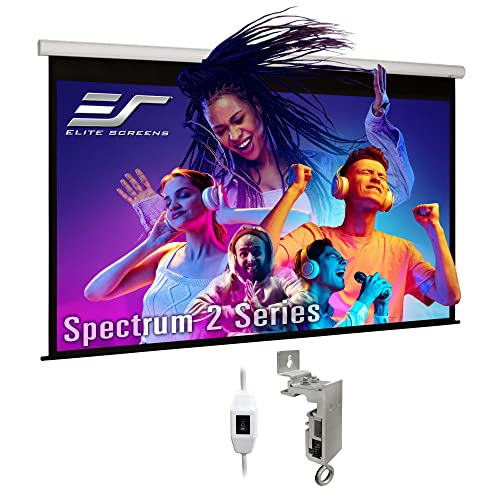
- Quiet motorized operation with wall/ceiling mounting
- 1.1-gain material supports 4K/8K and HDR
- 180° viewing angle for group presentations
Best For: Standard-throw projector conference rooms needing convenient operation
Best Fixed-Frame Screen
Silver Ticket STR Series 120-Inch Screen

- Large 120-inch 16:9 viewing area
- 160° viewing angle with 1.1-gain white surface
- Black velvet-wrapped aluminum frame
Best For: Dedicated rooms needing a large permanent presentation screen
Best Budget Motorized Screen
Kshioe 92-Inch Wireless Screen

- Remote-controlled 92-inch 16:9 format
- Wall or ceiling installation
- 160° viewing angle for group use
Best For: Smaller offices and conference rooms needing simple motorized operation
Best Large Manual Screen
Elite Screens Manual B 135-Inch Screen

- Large 135-inch 16:9 viewing area
- Auto-lock height adjustment for flexible setup
- 1.1-gain material with 180° viewing angle
Best For: Large dedicated rooms using standard long-throw projectors
Quiet Motorized Convenience

- 100-inch 16:9 format for presentations
- Quiet motor with RF remote control
- Wall or ceiling mounting; 160° viewing angle
Best For: Permanently mounted conference rooms needing electric operation
Simple Retractable Value
84-Inch Manual Pull-Down Screen

- 84-inch matte white viewing surface
- Auto-locking height adjustment
- Wall or ceiling mounting options
Best For: Offices and classrooms wanting simple manual operation
Portable Presentation Flexibility
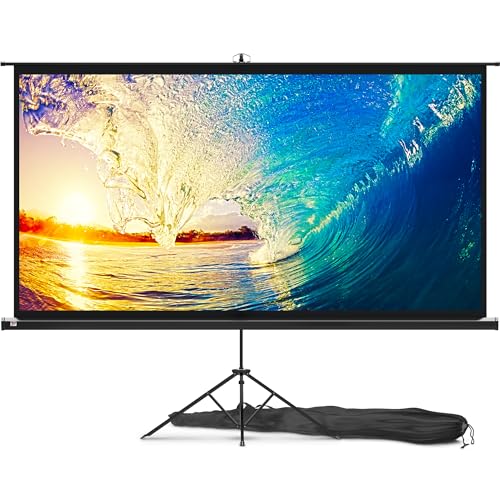
- Portable 100-inch 16:9 screen
- Wide-leg tripod with adjustable height
- Three-step setup and carry bag
Best For: Mobile meetings, classrooms, conferences, and events
Best Motorized Large-Screen Pick
150-Inch Electric Rising Projector Screen

- 150-inch 16:9 screen with 1.2 gain
- Wireless or wired automatic controls
- Four-layer, wrinkle-resistant scrubbable fabric
Best For: Large, multipurpose conference rooms needing a retractable screen
Best Permanent Installation
KHOMO GEAR 100-Inch Fixed Frame Screen

- 100-inch 16:9 matte screen
- Aluminum frame with black velvet border
- Supports 4K, 8K, HDR, and active 3D
Best For: Dedicated conference rooms with a permanent presentation wall
Best Space-Saving Drop-Down
DINAH 120-Inch Electric Projector Screen

- 120-inch motorized drop-down design
- Remote-controlled smooth, quiet operation
- 160-degree viewing angle for group viewing
Best For: Rooms needing a large retractable screen between meetings
Best Motorized Screen – Elite Screens Spectrum 2 100-Inch Electric Screen
For conference rooms that need a clean, convenient setup, the Elite Screens Spectrum 2 is a motorized option among projector screens for conference rooms. Its 100-inch 16:9 viewing area, quiet operation, and wall-or-ceiling mounting make it practical for recurring presentations.
Best For: Conference rooms using standard-throw projectors and needing push-button screen operation.
Pros:
- Motorized 100-inch 16:9 screen with a quiet tubular motor.
- 1.1-gain MaxWhite FG material supports 4K/8K, HDR, and Active 3D content.
- 180-degree viewing angle and black backing help maintain image consistency.
- Includes floating wall/ceiling brackets and a three-way wall switch.
Cons:
- Designed for standard-throw projectors and is not compatible with UST or short-throw projectors.
- Optional remote-control kit is sold separately.
This screen is a strong fit when a conference room benefits from a retractable display without sacrificing a wide viewing area. Confirm that your projector is standard throw before purchasing.
Best Fixed-Frame Screen – Silver Ticket STR Series 120-Inch Screen
The Silver Ticket STR Series provides a permanently mounted, cinema-style solution for projector screens for conference rooms. Its large 120-inch 16:9 image and black velvet-wrapped aluminum frame are suited to dedicated presentation spaces.
Best For: Dedicated conference rooms that can accommodate a large fixed-frame screen.
Pros:
- Large 120-inch diagonal viewing area for presentations and shared visuals.
- 1.1-gain white surface offers a 160-degree viewing angle.
- Compatible with long-, short-, and ultra-short-throw projectors, subject to compatibility checks.
- Black velvet frame helps absorb stray light around the image.
Cons:
- Fixed wall-mounted design cannot be retracted when the room is used for other purposes.
- The standard material is not acoustically transparent.
- Some UST projectors may not be compatible with this STR frame.
Choose this model when image size and a permanent installation matter more than flexibility. Its frame requires sufficient wall space, so verify the 109.25-inch width and projector compatibility first.
Best Budget Motorized Screen – Kshioe 92-Inch Wireless Screen
The Kshioe motorized screen is a compact, straightforward choice among projector screens for conference rooms. Its 92-inch 16:9 format, wireless remote, and dual wall/ceiling installation support everyday presentations in offices and training spaces.
Best For: Smaller conference rooms, classrooms, and offices seeking remote-controlled screen operation.
Pros:
- 92-inch 16:9 screen with an 80-by-45-inch viewing area.
- Wireless remote allows operation from anywhere in the room.
- Supports wall or ceiling installation and has a 160-degree viewing angle.
- Listed for conference rooms, office presentations, classrooms, and public displays.
Cons:
- Smaller viewing area than the 100-, 120-, and 135-inch alternatives in this roundup.
- The supplied notes identify a glossy screen finish rather than a matte finish.
- Projector compatibility details are less specific than for the other listed screens.
This model makes sense when room size and simple remote operation are priorities. Measure the available wall space and confirm the screen’s 92-inch overall width before installation.
Best Large Manual Screen – Elite Screens Manual B 135-Inch Screen
For a large room that does not need powered operation, the Elite Screens Manual B offers a practical pull-down option among projector screens for conference rooms. Its 135-inch 16:9 image, auto-lock height adjustment, and wall/ceiling mounting suit presentations and training sessions.
Best For: Large conference rooms using standard long-throw projectors and manual screen control.
Pros:
- Large 135-inch diagonal viewing area for presentations and group viewing.
- 1.1-gain MaxWhite 2 material has a 180-degree viewing angle and black backing.
- Auto-lock mechanism provides variable screen-height adjustment.
- Supports 4K/8K, HDR, and Active 3D content.
Cons:
- Manual pull-down operation is less convenient than a motorized screen.
- Designed for standard long-throw projectors only.
- Optional 6-inch and 12-inch L-brackets are sold separately.
This is a sensible choice when a dedicated presentation room needs maximum image size without adding motorized controls. Check the 124-inch overall width and ensure the projector is standard long throw.
Quiet Motorized Convenience – 100-Inch Electric 16:9 Screen
For conference rooms that need a large, polished display without manual setup, this 100-inch motorized screen is a practical option. Its 16:9 format, wall- or ceiling-mount design, and remote-controlled operation suit presentations, training sessions, and other projector screens for conference rooms applications.
Best For: Conference rooms and presentation spaces that benefit from a permanently mounted, retractable screen.
Pros:
- 100-inch 16:9 screen provides a large presentation area.
- Quiet motor operates below 42dB and supports convenient electric retraction.
- Includes a long-distance RF remote and wall-mountable control panel.
- 160-degree viewing angle, 1.2 gain, and black backing help support consistent image viewing.
Cons:
- At 25.4 pounds, it requires a suitable mounting surface and installation.
- Its motorized design is less portable than a tripod screen.
With plug-and-play assembly and both wall and ceiling mounting options, this Aoxun model is a strong fit when convenience and a clean installation matter more than portability.
Simple Retractable Value – 84-Inch Manual Pull-Down Screen
This 84-inch manual pull-down screen is a straightforward choice for offices, classrooms, and meeting rooms that want projector screens for conference rooms without electrical controls. Its auto-locking height adjustment lets you set the viewing position, while wall or ceiling mounting keeps the screen ready when needed.
Best For: Offices, classrooms, and smaller conference rooms seeking an easy-to-use retractable screen.
Pros:
- Manual roll-down operation avoids the need for a motor or power connection.
- Auto-locking adjustment lets the screen stop at different heights.
- Matte white surface and black border support clear, aligned presentations.
- Can be mounted to a wall or ceiling and retracts for tidy storage.
Cons:
- Manual operation is less convenient than a remote-controlled screen.
- The 84-inch screen is smaller than the 100-inch alternatives in this roundup.
Pyle’s screen emphasizes uncomplicated daily use and flexible placement. It is a sensible pick when a meeting space needs a reliable pull-down surface without adding motorized hardware.
Portable Presentation Flexibility – 100-Inch Tripod Screen
For teams that move between meeting rooms, classrooms, and event spaces, this portable 100-inch tripod screen offers a flexible alternative to fixed projector screens for conference rooms. It assembles in three steps, adjusts in height, and packs into the included bag for transport.
Best For: Mobile presentations, conferences, classrooms, offices, and indoor or outdoor events.
Pros:
- 100-inch 16:9 format supports presentations and movie viewing.
- Tripod stand with wide legs provides a stable freestanding setup.
- Tight straps, adjustable height, and a carry bag improve portability.
- 160-degree viewing angle and 1.1 gain support broad audience viewing.
Cons:
- Requires floor space and setup each time it is used.
- A freestanding tripod is less streamlined than a wall- or ceiling-mounted screen.
PropVue’s main advantage is mobility: it can travel from a conference to a classroom or backyard and set up without permanent installation. Choose it when flexibility is more important than a fixed, always-ready display.
Best Motorized Large-Screen Pick – 150-Inch Electric Rising Projector Screen
For conference rooms that need a large image without a permanently visible screen, this 150-inch motorized model offers a retractable setup with wireless or wired controls. Its 16:9 matte screen supports 3D, 1080p, 4K, and Full HD projection, making it a flexible choice among projector screens for conference rooms.
Best For: Large conference rooms, presentations, training sessions, and multipurpose spaces where a retractable screen is useful.
Pros:
- Large 150-inch, 16:9 viewing area for immersive presentations.
- Remote-controlled automatic operation with adjustable stopping position.
- Four-layer polyester fabric is designed to resist wrinkles and is scrubbable.
- 160-degree viewing angle and 1.2 gain support broad-room visibility.
Cons:
- The very large screen requires substantial wall or ceiling space.
- It has no stated warranty in the supplied details.
- Motorized installation may require more planning than a manual screen.
Choose this model when room coverage and convenient retractability matter most. The metal casing, extended power cord, and quiet motor add practical installation benefits, but its 150-inch size should be matched carefully to the room and projector.
Best Permanent Installation – KHOMO GEAR 100-Inch Fixed Frame Screen
If your conference room has a dedicated presentation wall, this 100-inch fixed-frame screen provides a ready-to-use viewing surface without repeated setup. Its 16:9 matte display, aluminum frame, and black velvet border are designed for presentations, classroom instruction, and compatible 4K, 8K, HDR, and active 3D projection.
Best For: Dedicated conference rooms, training spaces, classrooms, and offices where the screen can remain installed.
Pros:
- Permanent fixed-frame design eliminates repeated setup and breakdown.
- 100-inch 16:9 viewing area with a 150-degree viewing angle.
- Black velvet frame helps absorb projector overshoot and improve perceived contrast.
- Includes mounting hardware and uses a tension-rod system for a uniform surface.
Cons:
- Manual fixed installation cannot be retracted when the wall is needed for another use.
- Requires a dedicated wall area measuring about 90.7 by 52.5 inches.
- Its 1.1 gain may be less bright than higher-gain alternatives in some rooms.
This is a strong choice for a professional-looking conference setup that stays in place. Its durable PVC surface is easy to clean, while the fixed format makes it less suitable for rooms that need a frequently cleared presentation wall.
Best Space-Saving Drop-Down – DINAH 120-Inch Electric Projector Screen
The DINAH 120-inch electric screen is designed for conference rooms that need a large display surface but want to clear it after meetings. Its ceiling- or wall-mounted drop-down design, remote control, and support for 4K 3D HD projection make it a practical option among projector screens for conference rooms.
Best For: Offices, classrooms, and conference rooms that need a large screen that can retract between presentations.
Pros:
- 120-inch screen provides a large viewing area for group presentations.
- Remote-controlled motor lowers and retracts the screen smoothly and quietly.
- Drop-down design helps preserve wall space when the screen is stored.
- 160-degree viewing angle supports visibility across the room.
Cons:
- The supplied model details identify the format as 4:3 rather than widescreen 16:9.
- At 11.79 kg, installation may require sturdy mounting and assistance.
- Ceiling or wall installation adds setup considerations compared with a portable screen.
This model suits rooms where retractability and broad viewing coverage take priority. Before buying, confirm that the 4:3 format fits the projector and presentation content, especially if the room primarily uses widescreen laptops or video.
How We Picked the Best Projector Screens for Conference Rooms
We focused on screen types that suit business presentations, training sessions, hybrid meetings, and shared office spaces. Our comparison considers image format, advertised gain, installation method, operating convenience, portability, and compatibility with common HD, 4K, and widescreen projectors. We also looked for practical differences between electric screens, pull-down models, fixed frames, and freestanding options.
Product specifications can vary by seller and configuration, so confirm the exact screen size, aspect ratio, mounting hardware, power requirements, and included accessories before ordering.
Quick Comparison
| Screen type | Best suited for | Main advantage | Potential drawback |
|---|---|---|---|
| Motorized | Permanent conference rooms | Fast, convenient deployment | Needs power and installation |
| Manual pull-down | Budget-conscious offices | Simple and affordable | Requires manual lowering |
| Fixed frame | Dedicated presentation rooms | Flat, consistently tensioned surface | Less flexible once installed |
| Portable or stand-mounted | Shared rooms and mobile teams | Easy to relocate | Needs storage and setup space |
Key Buying Factors for Projector Screens for Conference Rooms
Screen Size and Viewing Distance
Choose a size that lets people in the back row read text without forcing viewers near the front to turn their heads. A 100- to 120-inch diagonal screen often suits medium rooms, while larger models may be useful in deep rooms or for larger groups. Measure the wall, ceiling height, projector throw distance, and seating layout first.
Aspect Ratio and Projector Compatibility
Most business and home-theater projectors use 16:9, but some presentation systems use 16:10 or 4:3. A matching ratio avoids unused borders and helps preserve the intended layout. Check whether your projector is standard throw, short throw, or ultra-short throw before selecting a screen surface.
Surface, Gain, and Viewing Angle
Matte white surfaces generally provide balanced brightness and broad viewing angles, making them a safe choice for conference rooms with seating spread across the room. Higher gain can increase brightness near the center but may narrow the ideal viewing area. For rooms with ambient light, prioritize projector brightness, light control, and a suitable surface rather than relying on gain alone.
Installation and Operation
Motorized screens are convenient for frequently used rooms and can reduce setup time, while manual screens are simpler and usually less expensive. Fixed-frame models provide a permanently flat surface but require a dedicated wall. Look for dependable mounting hardware, a suitable drop length, quiet operation, remote controls, and easy access to power.
Who Should Buy Which Projector Screens for Conference Rooms?
- Choose a motorized screen if the room has a regular presentation schedule and you want quick, polished setup.
- Choose a fixed-frame screen for a dedicated boardroom, training room, or media space where the screen can remain installed.
- Choose a manual pull-down screen if you want a practical budget solution for occasional presentations.
- Choose a portable screen with a stand for organizations that share equipment between rooms or present at multiple locations.
- Choose a larger screen only after confirming projector brightness, throw distance, wall clearance, and comfortable viewing angles.
For most offices, the best balance comes from matching the screen format to the projector, sizing it for the farthest seats, and selecting an installation style that employees will actually use consistently.