The best wireless smart home hubs make it easier to connect devices from different brands, automate routines, and control your home from one place. The right choice depends on your preferred ecosystem, wireless standards, and tolerance for setup complexity.
We compared 10 noteworthy hubs across compatibility, automation features, connectivity, and value to help you choose a dependable foundation for your smart home.
Best 10 Wireless Smart Home Hubs Picks for 2026
Versatile Connectivity

- Supports Matter, Zigbee, Z-Wave Plus, and SmartThings
- Works with Alexa and Google Home
- Uses Wi-Fi or Ethernet
Best For: Multi-brand homes needing broad compatibility
Camera-Centered Control

- Supports up to 64 switches, sensors, or buttons
- Built-in chime and smart alarm functions
- Optional microSD storage up to 512GB
Best For: Tapo camera, doorbell, and sensor systems
At-a-Glance Control

- 8-inch customizable smart home dashboard
- Built-in support for Zigbee, Matter, Thread, and more
- Controls compatible devices, cameras, and security systems
Best For: Alexa households wanting a dedicated control panel
Private Advanced Automation

- Home Assistant comes preinstalled
- Keeps home data stored locally
- Expandable with Z-Wave, Zigbee, and Thread USB adapters
Best For: Privacy-focused users and automation enthusiasts
Best IR and Matter Hub

- Controls 8,000+ IR brands and 18 appliance types
- Matter, app, voice, and automation support
- Built-in 93 dB alarm for Tapo sensor alerts
Best For: Homes combining legacy infrared appliances with newer smart devices
Best Lighting-Focused Hub

- Supports up to 75 Caseta devices
- Works with Alexa, HomeKit, Google, Ring, and Sonos
- Uses Clear Connect technology alongside Wi-Fi
Best For: Expanding a Lutron Caseta lighting and shade system
Best Garage-Specific Hub
Chamberlain Smart Garage Control

- Remote garage control through the myQ app
- Supports schedules, shared access, and Amazon Key
- Bluetooth-assisted setup with an included door sensor
Best For: Compatible US sectional garage doors needing app-based access
Advanced Local Automation Hub

- Matter bridge with Zigbee and Thread support
- Local automations, encrypted storage, and IR control
- PoE, dual-band Wi-Fi, and broad platform support
Best For: Aqara users building a Matter-connected smart home with local control
Tuya Multi-Protocol Gateway

- Combines Zigbee 3.0 and Bluetooth mesh
- Remote control through Tuya or Smart Life
- Supports up to 128 compatible devices
Best For: Tuya and Smart Life homes needing a compact multi-protocol gateway
Local Matter Bridge Hub
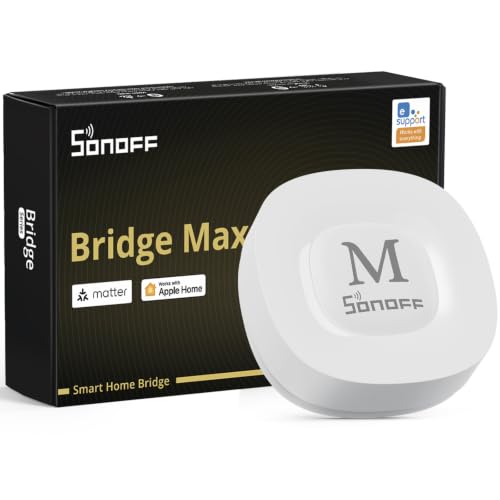
- Bridges Zigbee, BTHome, and eWeLink to Matter
- Local web console with Wi-Fi and Ethernet
- Supports Home Assistant and local security automations
Best For: DIY users wanting local Zigbee control and flexible Matter integration
Versatile Connectivity – Aeotec Smart Home Hub
For shoppers comparing wireless smart home hubs, the Aeotec Smart Home Hub stands out for broad protocol support and SmartThings-based automation. It connects through Wi-Fi or Ethernet and works with Matter, Zigbee, Z-Wave Plus, Alexa, and Google Home.
Best For: Homes that need wide device compatibility and flexible SmartThings automations.
Pros:
- Supports Matter, Zigbee, Z-Wave Plus, Wi-Fi, and SmartThings devices.
- Works with Amazon Alexa and Google Home for voice control.
- Supports wired Ethernet or Wi-Fi setup.
- Many automations can run locally for improved speed and reliability.
Cons:
- Designed for use in North America.
- Some features depend on compatible devices and the SmartThings app.
The Aeotec hub is a strong all-around choice when your smart home includes devices from several ecosystems. Its combination of local automation and extensive protocol support makes it particularly practical for a growing setup.
Camera-Centered Control – Tapo H200 Smart Hub
The Tapo H200 is a focused option among wireless smart home hubs, built to coordinate Tapo sensors, buttons, cameras, and doorbells. It requires 2.4GHz Wi-Fi and adds a built-in chime, alarm functions, and optional local video storage.
Best For: Tapo users who want a central hub for cameras, doorbells, sensors, and alerts.
Pros:
- Connects up to 64 switches, sensors, or buttons plus four cameras or doorbells.
- Acts as a smart alarm or chime for compatible Tapo devices.
- Supports microSD video storage up to 512GB, with the card sold separately.
- Low-power wireless protocol can extend sensor and button battery life.
Cons:
- Requires 2.4GHz Wi-Fi.
- Compatibility is centered on Tapo devices.
- microSD card is not included.
If your home already uses Tapo cameras or doorbells, the H200 offers useful consolidation in a small package. It is less suited to shoppers seeking a broadly open, multi-brand hub.
At-a-Glance Control – Amazon Echo Hub
The Amazon Echo Hub combines an 8-inch customizable touchscreen with a built-in smart home hub. For shoppers seeking wireless smart home hubs, it offers dashboard-based device control, camera viewing, routines, security management, and Alexa voice control.
Best For: Alexa households that want a dedicated wall-mounted control panel.
Pros:
- Customizable dashboard with sections and resizable controls.
- Supports Wi-Fi, Bluetooth, Zigbee, Matter, Sidewalk, and Thread devices.
- Controls compatible cameras, locks, alarms, sensors, and routines.
- Can be wall mounted and also supports an optional tabletop stand.
Cons:
- Wall cable pass-throughs, power-over-Ethernet adapter, and tabletop stand are sold separately.
- Some Ring-related features require Alexa+ and a compatible Ring subscription.
- Its experience is centered on the Alexa ecosystem.
The Echo Hub is especially convenient for families who want smart home controls visible in one location. Its screen makes daily device access more immediate than relying only on a phone or voice commands.
Private Advanced Automation – Home Assistant Green
Home Assistant Green | Smart Home hub with Advanced Automation | Official Home Assistant Hardware
Check Price On AmazonHome Assistant Green is a compact foundation for advanced, locally managed smart home control. Unlike many wireless smart home hubs, it arrives with Home Assistant installed and keeps home data on the device while supporting automation across compatible systems.
Best For: Privacy-conscious users and enthusiasts who want powerful Home Assistant automation.
Pros:
- Comes with Home Assistant OS preinstalled for straightforward setup.
- Stores home data locally on the hub.
- Fanless, silent design uses only a couple of watts of power.
- USB ports allow expansion with Z-Wave, Zigbee, and Thread adapters.
Cons:
- Initial setup requires Ethernet and the included power supply.
- Z-Wave, Zigbee, and Thread connectivity requires separate USB devices.
- Its advanced automation platform may be more involved than app-focused hubs.
Home Assistant Green is a compelling choice when local data ownership and automation flexibility matter more than plug-and-play wireless protocol support. Plan on adding USB adapters if you need direct Z-Wave, Zigbee, or Thread connectivity.
Best IR and Matter Hub – Tapo H110 Universal Remote
The Tapo H110 is a versatile choice for anyone comparing wireless smart home hubs that can bring older infrared appliances into a connected-home setup. It supports more than 8,000 IR brands, Matter integration, app and voice control, schedules, location-based automations, and a built-in 93 dB alarm.
Best For: Homes that need one hub for legacy IR appliances, Tapo devices, and Matter-compatible platforms.
Pros:
- Controls TVs, air conditioners, fans, projectors, and other devices across 18 appliance categories.
- Supports Alexa, Google Assistant, Siri through Matter, and remote access in the Tapo app.
- Includes schedules, GPS-based control, and a built-in alarm for sensor alerts.
- Can learn or map remote buttons for compatible older appliances.
Cons:
- Requires 2.4 GHz Wi-Fi and a corded power connection.
- Infrared devices need to be within the hub’s operating range.
- Some connected features depend on Tapo sensors or other accessories.
Choose this hub if broad appliance compatibility matters more than focusing on a single device category. Its Matter support and automation tools also leave room to expand the system over time.
Best Lighting-Focused Hub – Lutron Caseta Smart Hub
The Lutron Caseta Smart Hub is a focused option among wireless smart home hubs, designed primarily to connect Caseta lighting with major platforms such as Alexa, Apple HomeKit, and Google Assistant. It plugs into an outlet, connects to your router, and supports up to 75 Caseta devices.
Best For: Homes building a larger Lutron Caseta lighting system with voice assistants and selected smart-home integrations.
Pros:
- Supports Alexa, Apple HomeKit, Google Assistant, Ring, Serena shades, and Sonos.
- Uses Lutron Clear Connect technology separately from Wi-Fi-connected devices.
- Supports up to 75 Caseta devices for future expansion.
- Setup involves connecting the hub to a router and following the Lutron app instructions.
Cons:
- Caseta dimmers and switches are sold separately.
- Its main strength is Lutron lighting and compatible ecosystem devices rather than universal appliance control.
- It requires a wired connection to your router and an outlet.
This is a sensible pick when your priority is dependable Caseta lighting control and ecosystem compatibility. It is less suitable if you want one hub for a wide range of legacy remotes or unrelated appliances.
Best Garage-Specific Hub – Chamberlain Smart Garage Control
The Chamberlain Smart Garage Control is a specialized pick for shoppers seeking wireless smart home hubs for garage access. It connects compatible sectional garage doors to the myQ app over 2.4 GHz Wi-Fi, allowing remote operation, schedules, guest access, and status checks from a smartphone.
Best For: US homes with a compatible sectional garage door opener that need smartphone-based garage control.
Pros:
- Lets you open or close the garage and check its status from the myQ app.
- Supports close schedules and access sharing for family or friends.
- Works with Amazon Key In-Garage Delivery for eligible Prime members.
- Bluetooth helps simplify setup, and an additional sensor can control a second door.
Cons:
- Requires 2.4 GHz 802.11 b/g/n Wi-Fi and a router within 50 feet.
- Compatibility excludes certain openers, including specified yellow-learn-button Chamberlain models and Linear openers.
- It is intended for sectional garage doors and is certified for use in the US only.
Unlike general-purpose hubs, this product is built around one task: connected garage access. Verify opener compatibility and the required Wi-Fi placement before buying.
Advanced Local Automation Hub – Aqara M3
The Aqara Smart Home Hub M3 is a strong option for wireless smart home hubs if you want Matter bridging, local automations, and broad connectivity in one device. It supports Aqara Zigbee and Thread products, works with platforms such as Apple Home, Alexa, SmartThings, and Home Assistant, and adds wired Ethernet through PoE.
Best For: Aqara households seeking local automation, Matter integration, Thread support, and flexible wired or wireless networking.
Pros:
- Supports Aqara Zigbee, Thread, Matter bridging, Bluetooth, Wi-Fi, and PoE.
- Prioritizes local control and can migrate Zigbee devices from older Aqara hubs.
- Includes a 360-degree IR blaster with feedback and learning capabilities.
- Uses encrypted local storage and has no microphone or camera.
Cons:
- Its Zigbee capacity applies to Aqara Zigbee devices, not third-party Zigbee products.
- A USB-C power adapter is not included.
- Some cloud-based notifications still require an internet connection.
The M3 is especially compelling when local reliability and multi-platform Matter support matter more than simple plug-and-play use. Just confirm that your devices fit Aqara’s compatibility limits.
Tuya Multi-Protocol Gateway – Smart Multi-Mode Hub
This compact gateway is one of the more straightforward wireless smart home hubs for homes built around Tuya or Smart Life devices. It combines Zigbee 3.0 and Bluetooth mesh connectivity, allowing compatible sub-devices to connect through one 2.4GHz network and be managed remotely in the app.
Best For: Tuya and Smart Life users who need a compact Zigbee-and-Bluetooth gateway with app control and voice commands.
Pros:
- Combines Zigbee 3.0 and Bluetooth mesh in one gateway.
- Supports remote management, device grouping, and automation through the Smart Life or Tuya app.
- Works with Alexa and Google Home voice control.
- Supports up to 128 Tuya smart home devices.
Cons:
- Supports Tuya and Smart Life devices only.
- Uses 2.4GHz networking rather than dual-band Wi-Fi.
- Its compatibility is narrower than hubs designed for multiple ecosystems.
This hub makes sense when your existing devices already use the Tuya ecosystem. It is less suitable for shoppers who want broad third-party compatibility or advanced platform independence.
Local Matter Bridge Hub – SONOFF Bridge Max
The SONOFF Bridge Max is a practical choice among wireless smart home hubs for users who want to connect Zigbee, BTHome, and eWeLink devices to Matter platforms. With both Wi-Fi and Ethernet, a local web console, and Home Assistant support, it is designed for flexible setup without requiring cloud-based management.
Best For: DIY smart home users who want a local Zigbee gateway, Matter bridging, Ethernet, and Home Assistant integration.
Pros:
- Bridges Zigbee, BTHome, and eWeLink devices to Apple Home, Alexa, and Google Home.
- Offers local web-console management without requiring an app or cloud service.
- Supports third-party Zigbee devices and Home Assistant through MQTT or bridging.
- Can support local security automations with a built-in 90dB alarm.
Cons:
- Its setup may appeal more to technically comfortable users than beginners.
- Security functions require compatible Zigbee sensors.
- It requires a 5V power source.
The Bridge Max stands out for local control and ecosystem flexibility. It is a particularly good fit if you already use Zigbee or Home Assistant and want Matter connectivity without depending entirely on cloud services.
How We Picked the Best Wireless Smart Home Hubs
We focused on hubs that add meaningful control beyond a basic app or voice assistant. Our selection considers supported protocols such as Matter, Zigbee, Z-Wave, Bluetooth, infrared, and Wi-Fi; compatibility with major platforms; automation depth; installation requirements; and the types of devices each hub can manage.
We also included options for different priorities. Some hubs are designed for broad, advanced automation, while others specialize in lighting, security sensors, garage doors, or convenient control of existing infrared appliances.
Quick Comparison
For broad device compatibility, the Aeotec and Aqara hubs are strong starting points, particularly for households adopting Matter alongside established protocols. Home Assistant Green is better suited to users who want powerful, highly customizable automations and are comfortable investing time in setup. Amazon Echo Hub emphasizes touchscreen control and Alexa integration.
Tapo hubs are practical for Tapo-centric homes and selected Matter or infrared devices. Lutron Caseta is the focused choice for reliable smart lighting, while Chamberlain’s myQ hub is purpose-built for compatible garage doors. The multi-mode Zigbee/Bluetooth gateway and SONOFF Bridge Max are attractive for budget-conscious users building around compatible sensors and switches.
Key Buying Factors for Wireless Smart Home Hubs
Protocol and Device Compatibility
Check which wireless standards your existing and planned devices use. Matter can simplify cross-platform support, but it does not replace every Zigbee, Z-Wave, Bluetooth, or proprietary feature. Confirm compatibility before buying, especially for locks, sensors, switches, and security products.
Platform Support
Choose a hub that fits your preferred control platform, such as Alexa, Google Home, Apple Home, SmartThings, or Home Assistant. Multi-platform support offers flexibility, but features may differ between platforms.
Automation and Local Control
Basic hubs may handle scenes and scheduled routines, while advanced platforms support conditions, scripts, presence detection, and complex device relationships. Local processing can improve responsiveness and reduce dependence on cloud services, though it may require more configuration.
Connectivity and Placement
Review whether the hub requires 2.4GHz Wi-Fi, Ethernet, or a nearby router connection. Place it centrally and away from heavy interference. For larger homes, consider mesh networking or additional bridges where supported.
Who Should Buy Which Wireless Smart Home Hubs?
Choose Aeotec or Aqara for broad protocol support and a growing mixed-brand installation. Pick Home Assistant Green for maximum control and advanced customization. Amazon Echo Hub suits Alexa households wanting an always-visible dashboard.
Lutron Caseta is ideal for dependable lighting control; Chamberlain is the focused garage-door solution. Tapo hubs work best when most of your accessories already come from Tapo. Choose the multi-mode or SONOFF option for compatible Zigbee and Bluetooth devices on a tighter budget, while the Tapo infrared hub is useful for adding remote-controlled appliances.