The best high-speed Blu-ray drives make it easier to burn large discs, archive important files, and watch Blu-ray or 4K UHD media on a compatible computer. This roundup covers fast internal and external models for Windows and Mac users, including USB, SATA, slim, and desktop designs.
Before choosing, check the drive’s maximum writing speed, UHD support, connection type, operating-system compatibility, and whether playback or burning software is included. The right model depends as much on your computer and intended discs as on raw speed.
Best 10 High Speed Blu Ray Drives Picks for 2026
Top High-Speed Pick
ASUS BW-16D1X-U 16x Blu-ray Drive

- 16x Blu-ray read/write speed with BDXL support
- USB 3.0 connectivity for Mac and Windows
- M-DISC support and optional disc encryption
Best For: Fast external Blu-ray burning and large-capacity backups
Best Internal Burner Bundle
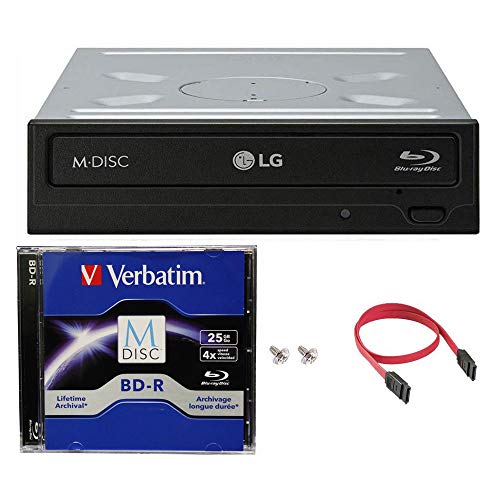
- 14x BD-R, 16x DVD, and 48x CD-R writing
- Includes 25GB M-DISC and SATA installation accessories
- Internal design with under-run prevention
Best For: Desktop PC installations and durable M-DISC backups
Best UHD External Option
archgon Aluminum 4K Blu-ray Writer

- Reads UHD 4K Blu-ray and writes regular Blu-ray
- USB 3.0 external design with aluminum body
- M-DISC BD-R support
Best For: PC-based UHD playback and premium external media access
Most Versatile Desktop Hub
MthsTec Multifunction Blu-ray Drive

- Up to 16x Blu-ray reading speed
- Built-in enclosure for 2.5- and 3.5-inch SATA drives
- Two-port USB 3.0 hub with Type-C support
Best For: Workstations needing optical media, storage expansion, and USB ports
Best Slim External Burner

- USB 3.1 Type-A and Type-C connectivity
- Supports BDXL and MDisc media
- Ultra-slim 240 g external design
Best For: Portable Blu-ray burning with flexible USB connections
Best Internal Slim Drive

- Slim 9.5 mm SATA design
- Includes two front bezels
- Reads Blu-ray, DVD, and CD media
Best For: Slim SATA-equipped computers and cases
Best USB 3.0 Value

- USB 3.0 and Type-C connectivity
- Extra USB cable supports stable power
- Works with Windows, macOS, and Linux
Best For: Portable Blu-ray access on compatible laptops and PCs
Best Internal UHD Pick
BU40N 6X Slim 4K Blu-ray Drive

- 6x Blu-ray read/write performance
- Supports 4K UHD and BDXL discs
- Three-year after-service warranty
Best For: Windows laptops with a compatible 9.5mm SATA bay
Best External Plug-and-Play Pick
USB 3.0 External Blu-ray Burner

- USB-A and Type-C cable included
- Up to 6x Blu-ray and 24x CD speed
- Works with Windows, macOS, and Linux
Best For: Portable Blu-ray burning on compatible computers
Best High-Capacity Internal Bundle
JOTEC BU40N/BU50N Blu-ray Drive

- Supports discs up to 128GB
- Includes USB 3.0 Micro SATA cable
- Reads BD at up to 6x
Best For: Compatible 9.5mm SATA systems needing large-capacity media support
Top High-Speed Pick – ASUS BW-16D1X-U 16x Blu-ray Drive
For shoppers comparing high speed blu ray drives, the ASUS BW-16D1X-U stands out with 16x Blu-ray read and write speeds, BDXL support, and a USB 3.0 connection for Mac and Windows computers. Its external design is practical for adding fast optical storage without opening a desktop case.
Best For: Users who want a fast, portable Blu-ray burner with broad Mac and Windows compatibility.
Pros:
- 16x Blu-ray reading and writing with BDXL support up to 128GB.
- USB 3.0 connectivity works with compatible Mac and Windows systems.
- Includes M-DISC support and optional disc encryption through Power2Go 8.
- Distinctive diamond-shaped enclosure with included power adapter and USB cable.
Cons:
- The 2.6-pound external enclosure is less compact than slim portable drives.
- Its listed operating-system support may not cover newer systems beyond the supplied specifications.
The BW-16D1X-U is a strong fit when speed matters most, especially for frequent Blu-ray burning and large BDXL backups. Confirm software and operating-system compatibility before purchase.
Best Internal Burner Bundle – LG WH14NS40 14x Blu-ray Drive
This LG internal drive bundle is a practical choice among high speed blu ray drives for desktop builders who need a SATA Blu-ray burner. It combines 14x BD-R writing with DVD and CD burning, plus an included M-DISC and installation accessories.
Best For: Windows desktop users installing an internal SATA Blu-ray burner with archival media support.
Pros:
- Burns BD-R at up to 14x, DVD media at 16x, and CD-R at 48x.
- Includes a 25GB M-DISC BD, SATA cable, power cable, and mounting screws.
- M-DISC support is designed for durable, long-term data storage.
- Under-run prevention and a 4MB buffer support more reliable writing.
Cons:
- Requires a desktop with a 3.5-inch drive bay and SATA interface.
- Listed operating-system compatibility is limited to Windows XP through Windows 8.
- Not suitable as a portable external drive without additional hardware.
The WH14NS40 makes sense for a compatible desktop PC and offers useful value through its included M-DISC and mounting accessories. Check your case, SATA connections, and operating system before ordering.
Best UHD External Option – archgon Aluminum 4K Blu-ray Writer
archgon Premium Aluminum External USB 3.0 UHD 4K Blu-Ray Writer Super Drive for PC and Mac
Check Price On AmazonThe archgon Premium Aluminum drive adds UHD 4K Blu-ray support to the external-drive category. It can read UHD Blu-ray and read or write regular Blu-ray, DVD, and CD media over USB 3.0, although playback software and computer compatibility are important parts of the setup.
Best For: PC users seeking an aluminum external drive for UHD Blu-ray playback and regular disc writing.
Pros:
- Supports UHD 4K Blu-ray reading and regular Blu-ray, DVD, and CD media.
- External USB design works with PC and Mac for supported regular media tasks.
- Aluminum enclosure provides a premium, sturdy desktop presentation.
- Supports M-DISC BD-R for archival recording.
Cons:
- UHD playback requires compatible PC hardware and additional CyberLink PowerDVD software.
- Mac users cannot use this drive for UHD Blu-ray playback according to the supplied notes.
- Its listed Blu-ray read speed is 6x, below the fastest drives in this roundup.
This is the specialized choice for buyers prioritizing UHD capability over maximum recording speed. Use the Ultra HD Blu-ray Advisor and verify software requirements before purchase.
Most Versatile Desktop Hub – MthsTec Multifunction Blu-ray Drive
The MthsTec multifunction drive goes beyond disc burning by combining a Blu-ray drive, hard-drive enclosure, and two-port USB 3.0 hub. For shoppers seeking high speed blu ray drives with extra desktop utility, it offers up to 16x Blu-ray reading, broad Windows and macOS support, and connections for additional storage or peripherals.
Best For: Desktop users who want optical media access alongside SATA drive expansion and extra USB ports.
Pros:
- Advertised Blu-ray reading speeds reach up to 16x, with DVD up to 16x and CD up to 40x.
- Top enclosure accommodates 2.5-inch and 3.5-inch SATA I, II, and III hard drives.
- Two USB 3.0 hub ports provide data transfer speeds up to 5Gbps.
- Includes USB-A cable, Type-C adapter, power accessories, and user manual.
Cons:
- The multifunction enclosure is larger and more complex than a standard external optical drive.
- Disc playback requires a computer that supports Blu-ray or 3D playback.
- The supplied details do not specify a maximum Blu-ray writing speed.
The MthsTec is best viewed as a workstation accessory rather than a simple disc drive. Its combination of optical media, SATA storage access, and USB expansion can reduce desk clutter, provided your computer supports the required playback functions.
Best Slim External Burner – ASUS SBW-06D5H-U
ASUS SBW-06D5H-U BDXL External Ultra Slim Blu-ray and MDisc Burner USB 3.1 USB-C 2 Cables Black
Check Price On AmazonIf you need a portable option among high speed blu ray drives, the ASUS SBW-06D5H-U combines an ultra-slim enclosure with USB 3.1 connectivity. It includes both USB Type-A and USB Type-C cables, supports BDXL and MDisc media, and offers Blu-ray reading up to 8x.
Best For: Laptop and desktop users who want a slim external Blu-ray burner with flexible USB connectivity.
Pros:
- Includes USB 3.1 Type-A and Type-C interfaces and cables.
- Supports BDXL and MDisc media.
- Offers multiple write speeds, including up to 10x for supported media.
- Compact ultra-slim form factor with a 240 g listed weight.
Cons:
- Listed Blu-ray read speed is up to 8x.
- Operating-system information specifically lists macOS, so compatibility should be checked for your setup.
The ASUS is a well-rounded choice when portability and connection flexibility matter more than maximum reading speed. Its dual-cable design and MDisc support make it especially practical for modern laptops and archival media.
Best Internal Slim Drive – SilverStone SST-SOB03
The SilverStone SST-SOB03 is an internal 9.5 mm slot-loading Blu-ray drive for compatible slim computers and cases. Its SATA interface provides data transfer rates up to 150 MB/s, while the drive reads Blu-ray discs at up to 5x and CDs and DVDs at up to 8x.
Best For: Slim computer cases, laptops, and notebooks with an available SATA optical-drive connection.
Pros:
- Designed for 9.5 mm slim optical-drive mounting requirements.
- Includes two front bezels for 9.5 mm or 12.7 mm slots.
- Slot-loading design provides smooth disc handling.
- Supports Blu-ray, DVD, and CD reading and up to 8x Blu-ray writing.
Cons:
- Requires a compatible SATA interface and internal installation.
- Blu-ray read speed is listed at up to 5x.
- It is not an external USB drive.
For a compatible slim chassis, the SST-SOB03 offers a tidy internal installation and useful mounting flexibility. Confirm the bay height, SATA connection, and bezel requirements before buying.
Best USB 3.0 Value – Dainty External Blu-ray Drive
The Dainty external drive is a versatile pick among high speed blu ray drives for users who need USB 3.0 and Type-C connectivity. It reads Blu-ray discs at up to 6x, DVDs at up to 8x, and CDs at up to 24x, while its extra USB power cable helps provide more stable operation.
Best For: Windows, macOS, and Linux laptop or PC users who want a portable external Blu-ray reader and burner.
Pros:
- Supports USB 3.0 and Type-C computer connections.
- Includes an additional USB power cable for more stable operation.
- Reads and writes compatible Blu-ray, DVD, and CD media.
- Supports Windows, macOS, and Linux, with a compact portable design.
Cons:
- Blu-ray playback and writing software is required and not included.
- Not compatible with TVs, tablets, PS4, iPads, Chromebooks, projectors, or vehicles.
- Maximum Blu-ray write speed is listed at 6x, with some BD formats limited to 2x.
The Dainty stands out for broad computer compatibility and its supplemental power cable. It is a practical travel-friendly option, provided you already have suitable Blu-ray software and a supported laptop or PC.
Best Internal UHD Pick – BU40N 6X Slim 4K Blu-ray Drive
For laptop owners seeking high speed blu ray drives with native 4K UHD support, this slim SATA model combines 6x Blu-ray performance with disc writing capability. It fits compatible 9.5mm SATA tray-loading optical bays and also handles regular DVDs and CDs.
Best For: Windows laptop upgrades requiring internal 4K UHD Blu-ray playback and burning.
Pros:
- Supports 4K UHD Blu-ray playback with recommended CyberLink PowerDVD software on Windows.
- Reads and burns Blu-ray, DVD, and CD media.
- Supports BDXL 100GB triple-layer discs and 3D Blu-ray.
- Includes a three-year after-service warranty.
Cons:
- Requires a compatible 9.5mm SATA optical-drive bay.
- UHD Blu-ray playback is not supported on Mac according to the supplied notes.
- Playback software is not indicated as included.
This is a strong fit when internal installation and 4K UHD playback matter most. Verify your laptop’s bay dimensions and plan on obtaining compatible Windows playback software.
Best External Plug-and-Play Pick – USB 3.0 External Blu-ray Burner
This external option is one of the more flexible high speed blu ray drives for mixed-computer households. Its built-in USB 3.0 and Type-C connectivity reaches up to 6x Blu-ray, 8x DVD, and 24x CD speeds, while the compact enclosure is easy to carry.
Best For: Users who need a portable Blu-ray burner for Windows, macOS, or Linux computers.
Pros:
- Includes both USB-A and Type-C connectivity without requiring an adapter.
- Reads and writes 50GB Blu-ray discs.
- Supports 3D Blu-ray playback and offers plug-and-play operation.
- Compatible with Windows, macOS, and Linux systems.
Cons:
- Does not support 4K Ultra HD Blu-ray discs.
- Playback and burning software is not included.
- Not compatible with Chromebooks, smartphones, tablets, TVs, or car players.
Choose this model for broad computer compatibility and straightforward external use rather than UHD playback. Its dual-connector cable and slim design make it practical for desks, travel, and backup tasks.
Best High-Capacity Internal Bundle – JOTEC BU40N/BU50N Blu-ray Drive
For shoppers comparing high speed blu ray drives with large-media support, this super-slim JOTEC bundle pairs an internal SATA optical drive with a USB 3.0 Micro SATA cable. It supports CD, DVD, and Blu-ray formats, including discs up to 128GB, for compatible PC and Mac installations.
Best For: Users upgrading a compatible 9.5mm SATA system who want high-capacity and 4K/3D Blu-ray support.
Pros:
- Supports 4K and 3D Blu-ray discs along with capacities up to 128GB.
- Includes a USB 3.0 Micro SATA 6+7-pin cable for connection flexibility.
- Offers 6x BD-ROM, 8x DVD, and 24x CD read speeds.
- Supports Windows, Mac OS, and Linux systems as listed.
Cons:
- Requires a compatible 9.5mm SATA tray-loading optical-drive interface.
- Playback software must be purchased separately.
- Warranty coverage is limited to 180 days.
The included cable adds value for systems that need an external-style connection, while the 128GB support suits archival use. Confirm the connector and bay requirements before ordering, and budget for separate media software.
How We Picked the Best High Speed Blu Ray Drives
We selected these high-speed Blu-ray drives by comparing their advertised read and write speeds, connection standards, disc-format support, physical design, and likely use cases. The list includes external USB models for simple plug-and-play installation, internal SATA drives for desktop upgrades, and slim options for compact systems or replacement bays.
We also considered practical features such as BDXL and M-DISC support, USB-C availability, 4K UHD compatibility, included cables or mounting hardware, and whether a drive is designed primarily for data burning, movie playback, or both. Always confirm software requirements before buying, particularly for commercial Blu-ray and UHD playback.
Quick Comparison
| Drive type | Best for | What to check |
|---|---|---|
| External desktop | Easy installation and frequent burning | USB 3.0 or newer, power requirements, software |
| External slim | Portable use and smaller workspaces | USB-C or adapter needs, sustained speed |
| Internal SATA | Desktop upgrades and permanent installation | Bay size, SATA connections, mounting hardware |
| UHD-capable drive | 4K Blu-ray playback or authoring | UHD compatibility, firmware, playback software |
Key Buying Factors for High-Speed Blu-Ray Drives
Writing and Reading Speed
A higher stated speed can reduce burning time, but actual performance depends on the disc, files, software, and connection. A 16x Blu-ray writer is attractive for large archives, while 6x to 8x models may be sufficient for occasional use. Use quality, compatible media rather than choosing speed alone.
Connection and Installation
USB 3.0 and USB 3.1 provide convenient external connectivity, while USB-C can simplify newer laptop setups. Check whether the drive includes the correct cable and whether it needs a separate power adapter. Internal drives require an available SATA data and power connection plus a compatible 5.25-inch or slim 9.5mm bay.
Disc and Format Support
Look for BDXL support if you need high-capacity discs, and M-DISC support for long-term archival media. For movie playback, verify Blu-ray, 3D, and 4K UHD compatibility separately; a drive’s ability to read a disc does not always guarantee that your operating system includes suitable playback software.
Computer Compatibility
Confirm support for your version of Windows or macOS, especially when using older drives with newer computers. Mac compatibility may cover basic reading and writing but not every bundled application. For UHD playback, hardware, display, software, and protected-content requirements may all apply.
Who Should Buy Which High Speed Blu Ray Drives?
Choose a fast external desktop writer if you burn large batches of discs or want a stable drive for a home office. A slim USB or USB-C model is better for laptops, travel, and occasional backups. Select an internal SATA drive when you are upgrading a desktop and want a clean, permanent installation with fewer external cables.
For archival work, prioritize BDXL and M-DISC support over maximum headline speed. For movie enthusiasts, focus on confirmed 4K UHD and 3D support, compatible playback software, and your computer’s video output. If you mainly need occasional data transfers, a reasonably priced USB 3.0 Blu-ray writer will usually offer the best balance of convenience and capability.