The best USB MIDI interfaces make it easier to connect keyboards, synthesizers, digital pianos, and other MIDI hardware to a computer or mobile setup. The right choice depends on your device ports, MIDI connection type, latency needs, and whether you need basic control or advanced routing.
We selected 10 options ranging from straightforward USB-to-MIDI cables to multi-port interfaces, wireless adapters, and models with USB host functionality. Use the guide below to narrow the list by compatibility, features, and intended workflow.
Best 10 USB Midi Interfaces Picks for 2026
Best All-Around Pick

- 5-pin MIDI input and output plus flexible audio inputs
- Includes Loopback, USB hub, and creative software bundle
- Five-year warranty and compact recording-focused design
Best For: Home studios needing MIDI and audio recording in one interface
Best Compact MIDI Cable

- One-in/one-out MIDI with Roland FPT processing
- Integrated cables and USB bus-powered operation
- LED indicators monitor MIDI signal activity
Best For: Simple single-device computer MIDI connections
Best Budget Plug-and-Play Option

- One MIDI input and one MIDI output with 16 channels
- Plug-and-play setup with power and signal LEDs
- 6.5-foot cable supports Windows, macOS, iOS, and Android
Best For: Affordable single-device MIDI connections and basic recording
Best for MIDI Routing

- 3-in/3-out MIDI with standalone routing and merging
- Filter and map MIDI through UxMIDI Tools software
- Broad macOS, Windows, mobile, Linux, and Chrome OS support
Best For: Multi-device MIDI rigs requiring flexible signal routing
Best Wireless Option

- 3ms advertised latency
- Wireless 5-pin MIDI connection
- USB dongle for computer use
Best For: Cable-free MIDI setups with computers, iOS devices, and stage gear
Best Advanced Cable

- Plug-and-play across major operating systems
- Filtering, mapping, and routing tools
- Supports all 16 MIDI channels
Best For: Computer-based production and performances needing MIDI signal control
Best USB-C Pick
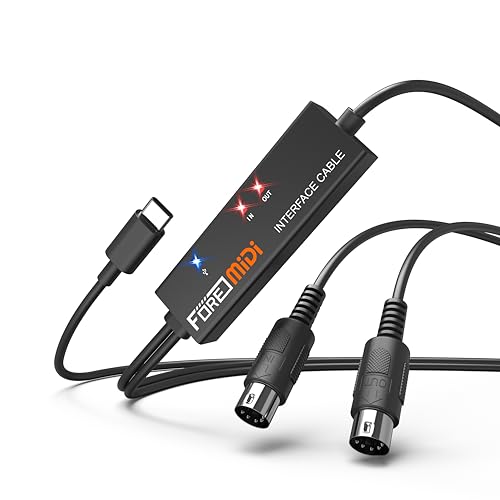
- USB-C MIDI connection
- 16-channel input and output
- Plug-and-play LED status indicators
Best For: USB-C phones, tablets, and computers connected to one 5-pin MIDI setup
Best Wireless Upgrade

- Adds Bluetooth MIDI to compatible USB MIDI gear
- Supports SysEx, MPE, and up to five-device groups
- Delivers low latency with broad OS support
Best For: Wireless studio setups and live MIDI performance
Best Plug-and-Play Cable

- Provides one MIDI input and one MIDI output
- Includes power and signal LED indicators
- Works with Windows, macOS, and iPad setups
Best For: Straightforward wired recording and editing
Best All-Around Pick – Arturia MiniFuse 2
The Arturia MiniFuse 2 is a versatile choice among USB MIDI interfaces for musicians who also need high-quality audio recording. It combines 5-pin MIDI input and output with two combo microphone/instrument/line inputs, balanced outputs, headphone monitoring, phantom power, and a USB hub in a compact interface.
Best For: Home-studio musicians, vocalists, guitarists, and creators who want MIDI connectivity alongside audio recording.
Pros:
- Includes 5-pin MIDI input and output for synths, controllers, and drum machines.
- Offers two combo inputs with 48V phantom power, plus balanced line outputs and headphone volume control.
- Includes Loopback functionality and a substantial software bundle with Ableton Live Lite, Analog Lab Intro, and other creative tools.
- Backed by a five-year warranty and extensive reliability testing.
Cons:
- Its audio-interface features may be more than needed if you only require basic MIDI-to-USB conversion.
- The included USB hub is rated at 250mA, which may limit power-hungry accessories.
The MiniFuse 2 is the most complete option here for users building a compact recording setup. Choose it when you need both dependable MIDI connections and flexible microphone or instrument inputs rather than a MIDI-only adapter.
Best Compact MIDI Cable – Roland UM-ONE-MK2
The Roland UM-ONE-MK2 is a straightforward USB MIDI interface for connecting one MIDI device to a computer or compatible iPad setup. Its integrated USB and MIDI cables, bus-powered design, and status indicators make it a convenient option when you want a compact connection without a separate power supply.
Best For: Players who need a simple one-in/one-out MIDI connection for a keyboard, controller, or other MIDI device.
Pros:
- Provides one MIDI input and one MIDI output with Roland’s FPT processing.
- Integrated cable design avoids extra adapters and external power.
- LED indicators show MIDI input and output activity.
- Works with Mac and Windows, with iOS support via an Apple iPad Camera Connection Kit.
Cons:
- Offers only one MIDI input and one MIDI output, limiting larger setups.
- iPad use requires the Apple iPad Camera Connection Kit.
- Its one-year parts and 90-day labor warranty is shorter than some alternatives.
The UM-ONE-MK2 keeps the job simple: connect one MIDI device, monitor activity, and work without a wall adapter. It is a practical pick for basic keyboard or controller setups, but users needing routing, multiple ports, or expanded connectivity should look elsewhere.
Best Budget Plug-and-Play Option – FORE MIDI USB Interface
This FORE MIDI USB interface is a budget-friendly cable-style option for connecting 5-pin MIDI equipment to a computer, phone, or tablet. It provides one MIDI input and one MIDI output, plug-and-play operation, LED status indicators, and a 6.5-foot integrated cable for recording and editing tracks.
Best For: Budget-conscious users connecting a single MIDI keyboard, synthesizer, electronic drum, or similar 5-pin device.
Pros:
- Supports one MIDI input and one MIDI output across 16 MIDI channels.
- Plug-and-play design uses a built-in driver and includes red power and blue signal indicators.
- Compatible with Windows, macOS, iOS, and Android when used with a suitable USB connection or adapter.
- Supports common music software including GarageBand, FL Studio, Cubase, and Sonar.
Cons:
- The included connector is USB Type-A; a USB A-to-C adapter is not included.
- It is limited to one MIDI input and one MIDI output.
- Compatibility is centered on devices with standard 5-pin MIDI ports.
The FORE cable offers the essential features needed for basic MIDI transfers at a low-complexity price point. It makes sense for a single-device setup, especially when long cable reach and broad operating-system compatibility matter, but check your device ports before ordering.
Best for MIDI Routing – CME U6MIDI Pro
The CME U6MIDI Pro is a powerful choice among USB MIDI interfaces for users managing multiple MIDI devices and complex signal paths. It provides three MIDI inputs and three MIDI outputs, USB-C computer connectivity, standalone operation, and software-based routing, merging, splitting, filtering, and mapping.
Best For: Advanced keyboard, synth, drum-machine, and digital-piano setups that need flexible MIDI routing and broad device compatibility.
Pros:
- Offers 3-in/3-out MIDI operation with standalone routing capabilities.
- Supports MIDI split, thru, merge, filtering, and mapping through UxMIDI Tools.
- Works with macOS, iOS, Windows, Android, Linux, and Chrome OS through USB-C.
- Designed for close-to-zero latency, low jitter, and support for notes, controllers, clock, sysex, MIDI timecode, and MPE.
Cons:
- Advanced routing features may be unnecessary for users with only one MIDI device.
- Computer connections use USB-C, so older USB-A systems may require an adapter or compatible cable.
- The one-year manufacturer warranty is relatively limited.
The U6MIDI Pro stands out when a basic cable is not enough. Its three-by-three port layout and configurable routing make it better suited to expanding studios, while its wide operating-system support also benefits mobile and alternative-platform workflows.
Best Wireless Option – LEKATO Wireless MIDI Adapter
If you want to reduce cable clutter, the LEKATO is a flexible choice among USB MIDI interfaces. It combines a wireless 5-pin MIDI adapter with a USB dongle for connecting keyboards, synthesizers, and other MIDI hardware to computers or mobile devices.
Best For: Musicians who want low-latency wireless MIDI connections for home studios, rehearsals, or stage setups.
Pros:
- Advertised 3ms latency for responsive playing.
- Wireless design can eliminate two MIDI cables and extend placement flexibility.
- Works with macOS, iOS, Windows, and 5-pin MIDI instruments without driver installation.
- Rechargeable adapter and USB computer dongle are included in the system.
Cons:
- The main adapter requires charging and is not recommended for use while charging.
- Bluetooth pairing must be completed through a compatible MIDI app rather than the device’s standard Bluetooth list.
The LEKATO stands out when wireless convenience matters more than the simplicity of a conventional cable. Follow the app-based pairing instructions and keep the rechargeable adapter charged for dependable use.
Best Advanced Cable – CME U2MIDI Pro
The CME U2MIDI Pro is a straightforward pick among USB MIDI interfaces for connecting a 5-pin MIDI instrument to a computer or mobile device. Its built-in processing and optional software tools add filtering, mapping, routing, and merge/split capabilities.
Best For: Producers and performers who need reliable plug-and-play MIDI with extra signal-management options.
Pros:
- Supports macOS, iOS, Windows, Android, Linux, and ChromeOS without drivers.
- Handles all 16 MIDI channels and a broad range of MIDI messages, including sysex, MPE, clock, and MTC.
- UxMIDI Tools software provides filtering, routing, and mapping features.
- 6.5-foot cable, colored MIDI plugs, and status LEDs simplify setup.
Cons:
- The cable provides one MIDI input and one MIDI output rather than multiple ports.
- Advanced routing and filtering features require the separate UxMIDI Tools software.
Choose the U2MIDI Pro if you want more than basic note transmission. It offers broad operating-system support and useful MIDI control features while retaining a simple USB-A, 5-pin DIN connection.
Best USB-C Pick – FORE T1 MIDI USB Interface
The FORE T1 is a practical USB-C option among USB MIDI interfaces, offering one MIDI input and one MIDI output for keyboards, synthesizers, drum machines, and other 5-pin devices. It is bus-powered and designed for plug-and-play use with computers and mobile devices.
Best For: USB-C computer, tablet, and phone users recording or editing tracks with a single MIDI instrument.
Pros:
- USB-C connection with compatibility for iOS, Android, Windows, and macOS.
- One MIDI input and one MIDI output support 16 MIDI input and output channels.
- Built-in driver, LED status indicators, and bus power simplify setup.
- 6.5-foot cable includes layered protection intended to reduce electromagnetic interference.
Cons:
- A USB A-C adapter is not included for Type-A ports.
- It is a single-in/single-out interface, so it may not suit multi-device MIDI routing.
The T1 makes the most sense when your device has USB-C and you need a direct connection to one MIDI setup. Check your port requirements before buying, especially if you plan to connect through a traditional USB-A computer.
Best Wireless Upgrade – CME WIDI Uhost
The CME WIDI Uhost is a strong choice for musicians seeking usb midi interfaces with fewer cables. It adds Bluetooth MIDI to compatible class-compliant USB MIDI controllers and computers, while supporting MIDI messages including SysEx and MPE.
Best For: Wireless studio setups, live performers, and musicians who need Bluetooth MIDI connectivity across modern operating systems.
Pros:
- Provides wireless Bluetooth MIDI connectivity through USB-C.
- Supports automatic WIDI pairing and manual connections with iOS, macOS, Windows, and Android.
- Offers reported 3 ms latency, sub-1 ms jitter, and up to 65 feet of line-of-sight range.
- Supports MIDI merge/split groups of up to five devices through the WIDI app.
Cons:
- General Bluetooth pairing does not work; Bluetooth MIDI-specific setup is required.
- Firmware should be updated through the WIDI app before use.
- Compatibility depends on class-compliant USB MIDI hardware and, on Windows, the Korg BLE MIDI driver.
The Uhost is more versatile than a basic MIDI cable, especially when wireless freedom and advanced MIDI routing matter. Its setup requirements make it less straightforward than a simple plug-and-play adapter, but the low latency and broad platform support are compelling.
Best Plug-and-Play Cable – LEKATO MIDI to USB-C Cable
The LEKATO cable is a practical option for shoppers comparing usb midi interfaces for a standard keyboard, synthesizer, digital piano, or drum pad setup. Its USB-C connection, one MIDI input, and one MIDI output provide a direct path to a Windows computer, Mac, or iPad.
Best For: Home recording, editing, and straightforward wired connections between standard 5-pin MIDI instruments and compatible computers or tablets.
Pros:
- Includes one MIDI input and one MIDI output with support for up to 16 channels.
- Designed for plug-and-play use without special drivers on Windows and macOS.
- LED indicators show power and signal activity for easier troubleshooting.
- Shielding and copper conductors are intended to support stable, low-latency transmission.
Cons:
- Older or specific vintage synthesizers may need particular driver settings or proprietary interfaces.
- It is a wired solution rather than a wireless MIDI interface.
- Device compatibility should be checked before purchase, particularly for unusual hardware.
For a conventional MIDI rig, the LEKATO focuses on the essentials: direct connection, status indicators, and broad computer compatibility. It is a sensible cable-style interface when you do not need Bluetooth or advanced routing.
Best Budget MIDI Adapter – NUOSIYA MIDI to USB Cable
The NUOSIYA MIDI cable is a simple entry-level pick among usb midi interfaces for connecting a keyboard or other compatible 5-pin MIDI instrument to a PC or Mac. Its one-in, one-out design supports MIDI transfer for recording and editing, with an included USB-to-USB-C adapter for mobile or iPad connections.
Best For: Basic home recording, keyboard-to-computer MIDI transfer, and users who want a longer cable with broad legacy Windows and Mac support.
Pros:
- Connects compatible 5-pin MIDI instruments to computers for recording and editing.
- Supports one MIDI input, one MIDI output, and 16 MIDI channels.
- Works with Windows 10/8/7/Vista/XP and Mac OS X systems.
- Offers a 4.5- to 6-foot total length and includes a USB-to-USB-C adapter.
Cons:
- It is intended for MIDI data and does not replace an audio interface.
- Some older audio equipment or RCA-only devices may require additional adapters.
- Mobile compatibility depends on the appropriate adapter and device setup.
The NUOSIYA is well suited to uncomplicated MIDI transfers and basic recording workflows. Its broad stated operating-system support and included adapter add flexibility, though more specialized instruments or audio connections may need extra equipment.
How We Picked These USB Midi Interfaces
We focused on connection reliability, practical compatibility, portability, and the range of setups each interface can support. The selection includes simple one-in/one-out cables for basic keyboard control, multi-port interfaces for larger hardware rigs, and Bluetooth models for wireless MIDI connections.
We also considered connector formats, including traditional 5-pin DIN, USB-A, and USB-C, along with features such as filtering, MIDI mapping, rechargeable operation, and USB host support. A good interface should make communication between hardware and software predictable without adding unnecessary complexity.
Quick Comparison
| Best For | Look For |
|---|---|
| Basic computer-to-keyboard connection | USB-to-MIDI cable with clearly labeled input and output plugs |
| Multiple instruments | Separate MIDI inputs and outputs, plus dependable port management |
| USB-C laptops and tablets | Native USB-C connection or a suitable adapter |
| Wireless setups | Bluetooth MIDI, low latency, and rechargeable battery operation |
| Hardware without a computer | USB host capability and broad device compatibility |
Key Buying Factors for USB Midi Interfaces
Ports and Direction
Check whether you need MIDI input, output, or both. A one-in/one-out cable is sufficient for sending notes from a keyboard to a computer, but a synthesizer rig may require multiple independent ports. Confirm that the interface’s MIDI In connects to your device’s MIDI Out, and vice versa.
Computer and Device Compatibility
USB-A models work directly with many desktops and older laptops, while USB-C models are more convenient for newer computers, tablets, and phones. Some devices may require an adapter or powered hub. Verify operating-system support and whether your intended tablet or mobile device can provide enough power.
Latency and Reliability
MIDI data uses very little bandwidth, but poor cables, wireless interference, or unstable drivers can still cause dropped notes and timing problems. For live performance, prioritize a reputable wired connection or a wireless model specifically designed for low-latency MIDI.
Advanced Routing Features
Filtering and MIDI mapping can help tailor messages for a specific workflow. USB host support is especially useful when connecting USB MIDI controllers directly to hardware instruments without routing through a computer. These features are valuable, but unnecessary if you only need basic recording or keyboard control.
Who Should Buy Which USB Midi Interfaces?
Choose a basic USB-to-MIDI cable if you want the simplest, most affordable way to connect one keyboard or synthesizer to a computer. Select a USB-C MIDI cable when your laptop, tablet, or phone lacks a traditional USB-A port.
Choose a multi-port interface if you use several instruments, need simultaneous MIDI routing, or want more flexibility for studio recording. A wireless MIDI adapter is a better fit for reducing cable clutter around a digital piano or for setups where physical connections are inconvenient.
Finally, choose a USB host or mapping-capable interface when your setup includes modern USB controllers, standalone hardware, or more advanced routing requirements. Before ordering, confirm every connector, required power source, and the number of MIDI channels and ports your equipment actually uses.