The right case does more than complete a gaming PC build. It helps control temperatures, simplifies installation, supports future upgrades, and gives your components the presentation you want.
These 10 computer cases for gaming PCs cover practical mid-tower designs, airflow-focused fronts, pre-installed ARGB fans, tempered-glass layouts, and useful features such as USB-C connectivity.
Best 10 Computer Cases for Gaming PCs Picks for 2026
Flexible Airflow Showcase

- Four PWM ARGB fans included
- Supports 420mm GPUs and 360mm radiators
- Tool-less panels and back-connect support
Best For: Large, customizable gaming builds
Value Airflow Build

- Four built-in 120mm ARGB fans
- Mesh front and tempered-glass side
- Supports 340mm GPUs and 360mm radiators
Best For: Affordable, well-ventilated gaming PCs
Expansion-Ready Foundation

- Supports up to eight 120mm fans
- 360mm front radiator compatibility
- Mesh front with magnetic dust filters
Best For: Custom cooling and upgrade-focused builds
Feature-Packed ARGB Build

- Six PWM ARGB fans included
- Opening tempered-glass side panel
- Flexible multi-drive storage support
Best For: RGB-heavy builds with frequent hardware access
Best Pink Gaming Case

- Mesh front supports strong airflow
- Fits up to 360 mm front radiators
- Pink tempered-glass ARGB design
Best For: RGB gaming builds with a bold pink finish
Best Dual-Chamber Value

- Six pre-installed ARGB PWM fans
- Supports GPUs up to 400 mm
- Top-mounted radiators up to 360 mm
Best For: Organized ATX builds with substantial cooling needs
Best Showcase Design
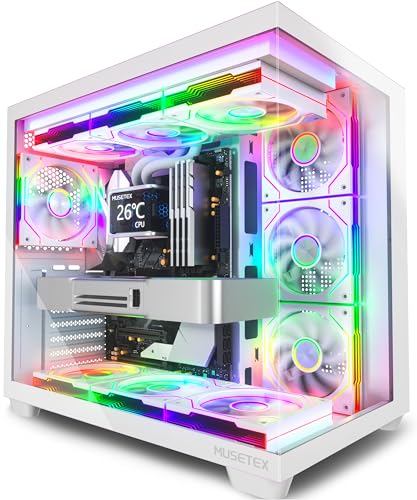
- 270-degree dual-glass viewing area
- Seven included Infinity Mirror fans
- Supports GPUs up to 410 mm
Best For: RGB showcase builds and visible gaming setups
Best for Maximum Cooling

- Seven pre-installed PWM ARGB fans
- Supports GPUs up to 400mm
- Fits top-mounted radiators up to 360mm
Best For: High-performance builds with large components and strong airflow needs
Best for Large GPUs

- Supports graphics cards up to 420mm
- Four pre-installed ARGB PWM fans
- Built-in GPU support bracket
Best For: ATX builds with long, heavy graphics cards
Flexible Airflow Showcase – Lian Li V100-ATX
The Lian Li V100-ATX is one of the more adaptable computer cases for gaming pcs, combining four pre-installed PWM-controlled ARGB fans with broad component support. It accommodates ATX, Micro-ATX, Mini-ITX, and select back-connect motherboards while leaving room for large graphics cards and radiators.
Best For: Builders who want strong hardware clearance, included lighting, and flexible motherboard support.
Pros:
- Includes four PWM-controlled 120mm ARGB fans with daisy-chain connectivity.
- Supports GPUs up to 420mm, CPU coolers up to 178mm, and top radiators up to 360mm.
- Tool-less side panels simplify access, while the integrated 26-LED strip adds synchronized lighting.
Cons:
- Its feature-rich design may be more than needed for a basic build.
- The case uses a combination of plastic, stainless steel, and tempered glass construction.
Choose the V100-ATX if you are planning a spacious, visually focused build and want substantial cooling and GPU clearance without purchasing a full set of case fans separately.
Value Airflow Build – GAMDIAS AURA GC1 ELITE
The GAMDIAS AURA GC1 ELITE is a practical choice among computer cases for gaming pcs, pairing a mesh front panel with four built-in 120mm ARGB fans. Its tempered-glass side panel, PSU shroud, and support for common motherboard sizes make it suitable for a clean, ready-to-assemble gaming system.
Best For: Budget-conscious builders who want included ARGB fans and front-panel airflow.
Pros:
- Four pre-installed 120mm ARGB fans provide intake airflow and lighting.
- Supports ATX, Micro-ATX, and Mini-ITX motherboards.
- Allows graphics cards up to 340mm, 360mm radiators, and up to six 120mm fans.
Cons:
- GPU clearance is lower than larger cases in this roundup.
- Connectivity is limited to one USB 3.0 port, two USB 2.0 ports, and HD audio.
The AURA GC1 ELITE offers a straightforward balance of cooling, lighting, and expandability. Verify your graphics-card and cooler dimensions before buying, especially for larger components.
Expansion-Ready Foundation – DARKROCK EC2 ATX Mid Tower
The DARKROCK EC2 is a sensible platform for computer cases for gaming pcs when airflow and future expansion matter. It combines a mesh front panel, tempered-glass side panel, magnetic dust filters, and compatibility with up to eight 120mm fans or a 360mm front radiator.
Best For: Builders who want Type-C readiness and room to expand cooling later.
Pros:
- Supports up to eight 120mm fans and one 360mm front radiator.
- Mesh front panel and separate magnetic top and bottom dust filters aid ventilation and maintenance.
- Accommodates ATX, Micro-ATX, and Mini-ITX motherboards, with GPU clearance up to 340mm.
Cons:
- Only one fan is pre-installed.
- Its 340mm GPU limit may require careful component selection.
- The notes identify Type-C readiness but do not specify the complete front-I/O layout.
The EC2 is best suited to buyers who prefer to choose their own cooling setup. Its generous fan capacity is useful, but budget for additional fans if you want stronger airflow immediately.
Feature-Packed ARGB Build – MUSETEX NN8 Mid-Tower Case
The MUSETEX NN8 stands out among computer cases for gaming pcs with six pre-installed PWM ARGB fans, a polygonal mesh front, and an opening tempered-glass side panel. It also provides flexible storage capacity and room for ATX, Micro-ATX, or Mini-ITX systems.
Best For: RGB-focused builders who want extensive included cooling and easy interior access.
Pros:
- Six pre-installed PWM ARGB fans offer adjustable speed and customizable lighting.
- Opening glass side panel provides convenient access for maintenance and component installation.
- Supports multiple storage configurations, including up to five SSDs and two HDDs according to the supplied notes.
Cons:
- The supplied details are truncated for some exact clearance specifications.
- ARGB motherboard control requires a compatible 3-pin RGB connection.
- Fans and case are included, but the motherboard, graphics card, power supply, and radiator are not.
The NN8 is a strong pick when out-of-the-box airflow and visual customization are priorities. Confirm your parts’ dimensions and motherboard lighting-header compatibility before committing to the build.
Best Pink Gaming Case – Vetroo AL800
The Vetroo AL800 is a colorful option for shoppers comparing computer cases for gaming pcs. Its mesh front, included ARGB lighting, tempered-glass door, and support for large radiators and graphics cards make it suitable for a performance-focused build with a distinctive pink look.
Best For: RGB gaming builds that need broad component compatibility and easy interior access.
Pros:
- Mesh front panel promotes airflow, with support for up to eight 120 mm fans.
- Supports ATX, Micro-ATX, and Mini-ITX motherboards, GPUs up to 340 mm, and front radiators up to 360 mm.
- Tempered-glass opening door, ARGB strip, and pre-installed ARGB/PWM FDB fans emphasize presentation.
- Type-C, USB 3.0, audio, and reset connections are included on the I/O panel.
Cons:
- The 340 mm graphics-card limit is lower than some competing cases.
- The pink finish may not suit understated or professional-looking setups.
The AL800 balances airflow, expansion room, and visual appeal, while its silicone cable grommets simplify cable routing. Verify graphics-card and cooling dimensions before purchase.
Best Dual-Chamber Value – FOIFKIN F1
The FOIFKIN F1 is a practical choice among computer cases for gaming pcs when airflow organization and included fans matter. Its dual-chamber layout separates the power supply and drives from the main hardware area, while six pre-installed ARGB PWM fans and 360 mm radiator support give builders a strong cooling starting point.
Best For: ATX gaming builds with large graphics cards, organized cable routing, and multiple cooling options.
Pros:
- Dual-chamber construction helps separate hardware from the power supply and drives.
- Includes six 120 mm ARGB PWM fans, with five reverse fans and one forward fan.
- Supports GPUs up to 400 mm, top radiators up to 360 mm, and air coolers up to 170 mm.
- Provides Type-C, USB 3.0, USB 2.0, audio, LED, power, and restart controls.
Cons:
- Its 19.2-inch height and dual-chamber design may require more desk or floor space.
- The listed storage layout is limited to one HDD and three SSDs.
With broad motherboard support and a spacious GPU allowance, the F1 is well suited to modern gaming hardware. Check the specific PSU length and cooler dimensions against the case limits before assembling.
Best Showcase Design – MUSETEX Y6
The MUSETEX Y6 stands out among computer cases for gaming pcs with its white finish, 270-degree tempered-glass view, and seven pre-installed Infinity Mirror ARGB fans. It combines a showcase-oriented layout with support for ATX, Micro-ATX, and Mini-ITX systems, plus room for a 410 mm graphics card and a 360 mm top radiator.
Best For: Display-focused gaming PCs that prioritize panoramic visibility and extensive RGB lighting.
Pros:
- Dual tempered-glass panels provide a 270-degree view of the components.
- Seven speed-adjustable Infinity Mirror ARGB fans are included, with motherboard software control.
- Supports GPUs up to 410 mm, CPU coolers up to 160 mm, and top radiators up to 360 mm.
- Accommodates ATX, Micro-ATX, and Mini-ITX motherboards and includes a Type-C port.
Cons:
- The 160 mm CPU-cooler height limit requires careful cooler selection.
- The highly transparent, RGB-focused design may be excessive for minimalist builds.
- Radiator, motherboard, graphics card, and power supply are not included.
The Y6 is designed to make the finished PC a centerpiece, with its wide viewing angle and synchronized lighting. Confirm cooler and PSU dimensions before buying, especially for high-end components.
Best Wood-Accent Pick – FOIFKIN M1 Walnut ATX Case
If you want computer cases for gaming pcs that look less conventional, the FOIFKIN M1 combines a black walnut front panel with a tempered-glass side and four pre-installed ARGB PWM fans. Its mid-tower layout supports ATX, Micro-ATX, and Mini-ITX motherboards while providing practical front-panel connectivity.
Best For: Gamers who want a distinctive wood-accent case with built-in lighting and flexible motherboard support.
Pros:
- Real walnut styling adds a distinctive appearance to a gaming setup.
- Four pre-installed ARGB PWM fans provide a ready-to-use cooling foundation.
- Supports up to eight 120mm fans and 240mm, 280mm, or 120mm radiators.
- Includes Type-C, USB 3.0, USB 2.0, and audio ports.
Cons:
- GPU clearance is limited to 320mm, which may restrict some larger graphics cards.
- PSU support is limited to 170mm.
- Its compact mid-tower dimensions offer less room than larger cases.
The M1 is a strong choice when appearance matters as much as airflow. Check your graphics-card and power-supply measurements before buying, then take advantage of its expandable fan layout and removable snap-on glass panel.
Best for Maximum Cooling – MUSETEX K2 ATX Gaming Case
Among computer cases for gaming pcs, the MUSETEX K2 stands out for its seven pre-installed PWM ARGB fans and expansive component clearance. Its dual tempered-glass design highlights hardware, while the ATX mid-tower interior supports long graphics cards and top-mounted liquid cooling.
Best For: High-performance gaming builds that need generous cooling capacity, broad component clearance, and prominent RGB presentation.
Pros:
- Seven pre-installed adjustable-speed ARGB fans can expand to ten total.
- Supports graphics cards up to 400mm and CPU coolers up to 165mm.
- Accommodates top-mounted liquid coolers up to 360mm.
- Offers Type-C and two USB 3.0 ports on the I/O panel.
Cons:
- Power-supply clearance depends on the hard-drive cage and is limited to 140mm with it installed.
- The dual-glass design may require more attention to cable management and interior presentation.
- Motherboard, graphics card, power supply, and radiator are not included.
The K2 is well suited to airflow-focused builds with large components. Confirm PSU clearance against your planned storage configuration, especially if you intend to keep the hard-drive cage installed.
Best for Large GPUs – RUIX OV303 Airflow Case
The RUIX OV303 is a practical option among computer cases for gaming pcs when graphics-card clearance and ventilation are priorities. It arrives with four 120mm ARGB prism PWM fans, supports up to ten fans or a 360mm AIO configuration, and includes a built-in GPU support bracket.
Best For: Gaming builds using long, heavy graphics cards and a spacious ATX mid-tower layout.
Pros:
- Supports graphics cards up to 420mm in length.
- Four pre-installed 120mm ARGB prism PWM fans are included.
- Supports up to ten fans or seven fans with a 360mm AIO cooler.
- Magnetic top and bottom dust filters help simplify maintenance.
Cons:
- Only ATX motherboard support is listed.
- Storage capacity is limited to two 3.5-inch drives and one 2.5-inch drive.
- The panoramic three-panel glass design can make cable management especially visible.
The OV303 makes sense for builders who want room for an oversized GPU without giving up a showcase-style exterior. Its integrated support bracket is a useful addition for heavier graphics cards, while the dust filters help protect the airflow path.
How We Picked These Computer Cases for Gaming PCs
We focused on the features that matter most in a modern gaming build: motherboard compatibility, graphics-card and radiator clearance, airflow potential, included fans, front-panel connectivity, cable-management space, and overall practicality. Because the selected cases target different budgets and styles, we considered both ready-to-build value and upgrade flexibility rather than judging every model by the same feature set.
Pre-installed fans can reduce the cost and effort of completing a build, but they are only useful if the case has a sensible intake and exhaust layout. We also looked for designs that balance tempered-glass presentation with ventilation, since attractive panels should not come at the expense of component temperatures.
Quick Comparison
- Best overall flexibility: Choose a conventional ATX mid-tower with strong airflow, broad component clearance, and room for additional fans or a liquid cooler.
- Best for an easy first build: Look for cases that include four or more fans and provide accessible cable-routing space.
- Best for showcase builds: Full-view or panoramic tempered-glass designs emphasize lighting and component visibility.
- Best for high-end cooling: Prioritize 360mm radiator support, generous top clearance, and a mesh front or other unrestricted intake.
- Best for a distinctive setup: Pink, walnut-accented, and geometric designs can make the case a centerpiece without changing core hardware compatibility.
Key Buying Factors for Computer Cases for Gaming PCs
Compatibility and Clearance
Confirm that the case supports your motherboard size, usually ATX, microATX, or Mini-ITX. Then check maximum GPU length, CPU-cooler height, power-supply length, and radiator compatibility. A case that technically fits your parts may still be difficult to assemble if clearances are tight.
Airflow and Cooling
A mesh front generally supports better intake than a solid glass or sealed panel. Check which fans are included, where they are mounted, and whether the layout provides balanced intake and exhaust. For powerful CPUs or GPUs, leave room for extra fans or a compatible radiator.
Build Convenience and Connectivity
Useful features include a removable tempered-glass panel, tool-less drive mounts, routing cutouts, a PSU shroud, dust filters, and a front USB Type-C port. Pre-installed PWM fans are preferable to fixed-speed models because they allow motherboard-based speed control.
Size, Noise, and Appearance
A larger mid-tower is often easier to build in and offers better upgrade room, while a compact design saves desk space. Consider fan noise, panel construction, lighting controls, and whether the glass orientation suits your setup.
Who Should Buy Which Computer Cases for Gaming PCs?
First-time builders should favor an airflow-oriented mid-tower with included fans, clear cable-routing paths, and straightforward ATX support. Performance-focused gamers should prioritize GPU clearance, high CPU-cooler or radiator support, and unrestricted intake over decorative features. RGB enthusiasts will get the most from models with several PWM ARGB fans, broad glass panels, and convenient lighting connectivity. Style-conscious buyers can choose a colored, panoramic, or wood-accented case, but should still verify ventilation and component clearances before purchasing. Finally, upgrade-minded builders should select the roomiest option that fits their budget and workspace, especially if they may add more storage, larger graphics cards, or liquid cooling later.