The Acer 11-in-1 USB-C Docking Station review matters if you want a cleaner desk and more screen space.
This dock is built for laptop users who need serious connectivity without juggling multiple adapters.
Acer Docking Station Review Summary
If your laptop supports DisplayPort Alt Mode and you want a true productivity hub, the Acer 11-in-1 USB-C Docking Station is a compelling buy.
It combines triple-display support, wired Ethernet, fast USB-C data, and laptop charging in one compact desktop dock, which makes it especially attractive for remote workers, office users, and content creators who want a single-cable workflow.
What stands out most is how much this dock tries to do at once.
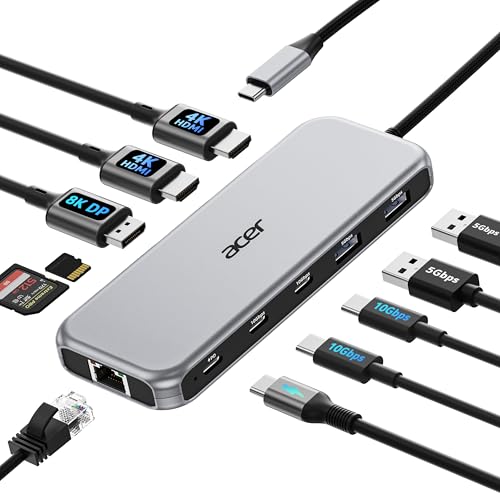
It gives you two HDMI outputs, one DisplayPort, two USB-C data ports, two USB-A ports, SD and microSD slots, and Gigabit Ethernet, so it can replace a messy pile of accessories.
That said, the best experience depends on your laptop’s compatibility, your monitor setup, and whether you are on Windows or macOS.
Scorecard
| Category | Score | Why it matters |
|---|---|---|
| Display expansion | 9.0/10 | Supports triple-monitor setups with two HDMI outputs and one DisplayPort, including high-resolution options. |
| Port selection | 9.0/10 | Strong mix of video, USB, Ethernet, card reader, and charging connections for a full desk hub. |
| Data transfer speed | 8.0/10 | Fast USB-C and practical USB-A ports help with accessories and file movement. |
| Charging capability | 8.0/10 | Up to 85W to the laptop is strong for a dock and reduces charger clutter. |
| Network stability | 8.0/10 | Gigabit Ethernet is a meaningful upgrade over Wi-Fi-only desk use. |
| Compatibility | 7.0/10 | Works best on Windows; macOS users get more limited display behavior. |
Overall verdict: the Acer Docking Station is best for buyers who want a practical, all-in-one USB-C desk dock with real multi-monitor flexibility.
If you need broad connectivity and stable daily performance, it is easy to justify.
Key Features and Specifications of Acer Docking Station
The spec sheet is the reason this dock gets attention.
Acer has packed in enough connectivity to make it useful as a daily workstation dock rather than just a simple USB hub.
| Specification | Details |
|---|---|
| Brand | Acer |
| Color | Grey |
| Video outputs | 2 HDMI, 1 DisplayPort |
| USB ports | 2 USB-C data ports at 10Gbps, 2 USB-A ports at 5Gbps |
| Networking | 1Gbps Gigabit Ethernet (RJ45) |
| Power delivery | 100W USB-C input, up to 85W to laptop |
| Card slots | SD and MicroSD |
| Single display support | Up to 8K@30Hz on DisplayPort or 4K@60Hz on HDMI |
| Dual display support | Up to 4K@60Hz |
| Triple display support | Typically 4K@60Hz + 4K@60Hz + 1080P@60Hz depending on bandwidth and monitors |
| Compatibility | Windows and macOS devices with DisplayPort Alt Mode |
| Connection style | Plug-and-play USB-C docking |
From a buyer’s perspective, the most important detail is not the port count alone.
It is the combination of display output, charging, and data transfer through one USB-C connection, which is what makes a dock like this valuable on a real desk.
The dual 10Gbps USB-C ports are especially useful for fast SSDs, phone syncing, and modern peripherals.
Meanwhile, the 5Gbps USB-A ports cover older accessories like mice, keyboards, printers, and dongles.
The SD and microSD readers make the dock more appealing to photographers and creators who regularly move media files.
Pros and Cons of Acer Docking Station
Here is the practical Acer 11-in-1 USB-C Docking Station pros and cons breakdown buyers should consider before choosing it.
| Pros | Cons |
|---|---|
| Strong triple-monitor support for a dock in this class | Requires a USB-C laptop with DisplayPort Alt Mode |
| Excellent mix of video, USB, Ethernet, and card-reader ports | Mac users do not get the same extended multi-monitor behavior as Windows users |
| Fast 10Gbps USB-C ports for quicker transfers | Triple-monitor resolution can vary based on bandwidth and monitor setup |
| Gigabit Ethernet improves stability for work and streaming | Maximum charging performance depends on using the right charger and cable |
| Single-cable docking makes desk setup cleaner | Adapter and cable are not included in the same way some buyers may expect, so setup planning matters |
The biggest strengths are versatility and monitor expansion. The biggest drawbacks are compatibility requirements and the fact that not every laptop will unlock the dock’s full potential.
Who Should Buy Acer Docking Station?
The Acer Docking Station is a great fit if you want a laptop-to-desktop transition that feels smooth and reliable.
It is especially useful for buyers who need to build a more permanent workspace without replacing their laptop.
- Remote workers who want one cable for monitors, charging, network, and peripherals.
- Office users who need a dependable dock for daily productivity.
- Creators and multitaskers who benefit from multiple displays and fast file transfers.
- Windows laptop owners looking for a true expanded desktop setup.
- Mac users who mainly want docking convenience and understand the external display limitations.
You should probably skip it if your laptop does not support DisplayPort Alt Mode, if you only need a basic travel hub, or if you expect full multi-display flexibility on macOS.
In those cases, a simpler hub or a different dock class may be a better match.
How Triple-Display Output Works
This is the main selling point of the Acer Docking Station, so it deserves a closer look.
The dock uses two HDMI ports plus one DisplayPort to feed multiple monitors from a single USB-C connection.
According to the product brief, it supports single-display output up to 8K at 30Hz on DisplayPort and 4K at 60Hz on HDMI.
Dual-display operation can reach 4K at 60Hz, while triple-display setups typically balance out to something like 4K@60Hz + 4K@60Hz + 1080p@60Hz, depending on the bandwidth available and the displays connected.
That last point is important.
Buyers should not assume all three screens will always run at maximum resolution and refresh rate simultaneously.
Instead, think of this dock as a highly capable workstation hub that intelligently allocates bandwidth to the attached monitors.
For a buyer, that means the dock is ideal for:
- Email, chat, and documents on separate screens
- A main display plus side monitors for research or editing
- Trading, spreadsheets, or dashboard-heavy workflows
If your work depends on multiple visible windows at once, the triple-display feature can be a real productivity boost.
Port Breakdown and Device Connections
The port selection is one of the best reasons to choose this dock over a basic USB-C hub.
It is designed to be a true desk centerpiece, not just a pass-through adapter.
Video ports: Two HDMI outputs and one DisplayPort cover the most common monitor setups.
That gives you flexibility whether you use office monitors, a newer 4K panel, or a mixed display arrangement.
USB-C ports: The two 10Gbps USB-C data ports are a major plus if you use external SSDs, smartphones, or newer accessories.
This is especially useful for anyone who wants faster transfers than standard USB 2.0 or 5Gbps ports can provide.
USB-A ports: The two 5Gbps USB-A ports are still important because so many desk peripherals use older connectors.
Mice, keyboards, printers, webcams, and security keys all fit in neatly here.
Ethernet: The Gigabit RJ45 port is a practical advantage for users who want lower latency, more stable video calls, or reliable file downloads.
For many buyers, this alone makes the dock feel more professional than a wireless-only setup.
Card readers: SD and microSD slots add convenience for photographers, drone users, and creators who regularly move memory cards into a laptop.
Bottom line: the Acer Docking Station’s port layout is sensible, balanced, and geared toward actual productivity.
Charging and Power Delivery Performance
The dock supports 100W USB-C power delivery input and up to 85W to the laptop.
That is strong enough for many ultrabooks and mainstream productivity laptops during normal desk use.
In practical terms, this means you can often leave your laptop charger in your bag and let the dock handle power, display, and peripherals through a single connection.
That is exactly what buyers want from a modern docking station.
Still, there are a few buyer considerations:
- Use a 100W or higher charger and compatible cable to get the most from the dock.
- Not every laptop charges the same way, so confirm your device’s USB-C power delivery support.
- High-performance laptops may still need more power than the dock provides under heavy load.
If your laptop is a standard productivity machine, the charging setup is likely to be a strong fit.
If you run a power-hungry creator laptop, verify wattage needs before buying.
Mac vs Windows Compatibility
This is one of the most important decision factors in any Acer 11-in-1 USB-C Docking Station review.
The dock works with both Windows and macOS devices, but the experience is not identical.
On Windows, the dock makes the most sense.
You can use the multi-monitor functionality more fully, and the triple-display promise is much easier to justify for productivity workflows.
On Mac, the product brief notes that external monitors mirror the same content across displays.
That means Mac users should expect more limited display behavior than they would on Windows.
The dock can still be useful for charging, USB expansion, Ethernet, and basic monitor connectivity, but it is not the same story for extended desktop use.
Best takeaway: if multi-screen productivity is your main reason for buying, Windows is the safer choice.
If you just want a polished dock for a MacBook and understand the display limits, it can still be worthwhile.
Acer Docking Station Review Summary
As a desk dock, the Acer Docking Station checks a lot of boxes that buyers actually care about: monitor expansion, wired internet, fast data ports, card readers, and laptop charging.
It does a particularly good job of serving users who want to simplify a cluttered setup and move toward a clean, single-cable workstation.
Its main advantage over cheaper hubs is not just port count, but the way those ports support real work habits.
You get room for multiple monitors, fast storage devices, stable networking, and everyday accessories without constantly swapping cables.
Its main weakness is compatibility.
If your laptop is not fully supported, the dock cannot deliver its best results.
And if you are on a Mac, the display behavior is more constrained than many buyers expect.
If that tradeoff works for your machine, the Acer Docking Station is a smart, productivity-first accessory with strong day-to-day value.
Alternatives to Consider
If you are comparing options before making a decision, these well-known Amazon product lines are worth a look:
- CalDigit USB-C docking station for premium build quality and creator-focused setups.
- Anker USB-C docking station if you want a mainstream brand with broad dock options.
- Dell USB-C dock for business laptop ecosystems and office compatibility.
- Plugable triple display dock if your top priority is multi-monitor support.
- Lenovo USB-C hub with Ethernet if you want a simpler, more compact solution.
Compared with those alternatives, the Acer Docking Station lands in a strong middle ground: more capable than a basic hub, but simpler than some premium workstation docks.
Is Acer Docking Station Worth It?
So, is Acer 11-in-1 USB-C Docking Station worth it?
For the right buyer, yes.
It is worth considering if you want a desk-ready dock that can handle multiple monitors, power delivery, networking, and everyday peripherals in one package.
The strongest case for buying it is simple: you get real workstation utility.
The triple-display support, 10Gbps USB-C ports, Gigabit Ethernet, and 85W laptop charging make this more than a convenience accessory.
It can genuinely improve how a laptop works at a desk.
Buy it if you want a reliable productivity dock for Windows, if you move between meetings and deep work all day, or if you need to connect a laptop to a more permanent office-style setup.
Skip it if you need flawless Mac extended-display behavior or if your laptop lacks the right USB-C video support.
Final verdict: the Acer Docking Station is a strong, practical, and well-rounded USB-C dock that makes the most sense for buyers who value multi-monitor productivity and one-cable simplicity.
Recommended for: laptop users who want a desktop-style setup with better organization, better connectivity, and fewer compromises.