If you need a compact way to add a monitor, charge your laptop, and connect a few accessories, the Acer 5-in-1 USB C Hub is an easy plug-and-play pick.
This Acer 5-in-1 USB C Hub review focuses on whether its small 5-in-1 layout is enough for real daily use.
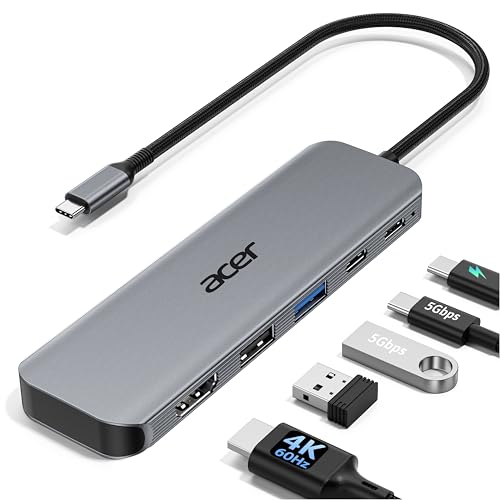
Acer USB C Hub Review Summary
The Acer 5-in-1 USB C Hub is best for buyers who want a lightweight, travel-friendly adapter that covers the essentials without turning into a bulky dock.
It is especially appealing for MacBook, Windows, and ChromeOS users who need 4K external display support, pass-through charging, and a few fast data ports in one compact unit.
What stands out most is the balance of portability and practicality.
You get a 4K HDMI output at 60Hz, USB-C and USB-A 3.0 data ports rated at 5Gbps, a USB 2.0 port for low-bandwidth accessories, and up to 100W Power Delivery input for charging-compatible laptops through the hub.
For students, remote workers, and frequent travelers, that mix makes the Acer 5-in-1 USB C Hub far more useful than a basic dongle.
At the same time, this is still a compact hub, not a full docking station.
If you want dual monitors, Ethernet, SD card slots, or lots of peripheral expansion, you should look at a more advanced dock.
But for straightforward desk setup and everyday carry, the Acer 5-in-1 USB C Hub is a smart, buyer-friendly choice.
Scorecard
| Category | Score | Why it matters |
|---|---|---|
| Display output | 9.0/10 | Supports HDMI output at 4K resolution with a 60Hz refresh rate, which is a strong fit for smoother external displays, presentations, and media use. |
| Charging pass-through | 8.0/10 | Includes up to 100W Power Delivery input with high-output pass-through for keeping compatible laptops powered while using multiple peripherals. |
| Data transfer | 8.0/10 | Adds USB-C and USB-A 3.0 data ports rated for 5Gbps, plus a USB 2.0 port for low-bandwidth accessories like mice and keyboards. |
| Compatibility | 8.0/10 | Works with USB-C devices that support DisplayPort Alt Mode and is positioned for MacBook, iPad Pro, Surface, Dell XPS, ThinkPad, and other USB-C devices. |
| Port selection | 7.0/10 | The 5-in-1 layout covers display, charging, and common data accessories without adding unnecessary bulk, though it is still a compact hub rather than a full dock. |
| Portability | 8.0/10 | The aluminum shell and slim, lightweight design make it easy to carry for travel, office, or remote work use. |
| Build and thermal design | 8.0/10 | A durable aluminum body is intended to improve heat dissipation and support more reliable use during longer sessions. |
Overall, the Acer 5-in-1 USB C Hub review verdict is positive: strong display performance, sensible port selection, and easy portability make it a practical hub for mainstream users.
Key Features and Specifications of Acer USB C Hub
On paper, the Acer 5-in-1 USB C Hub is built around the most useful everyday functions, not gimmicks.
That is exactly what many buyers want from a USB-C hub: one cable in, one useful workstation out.
- Model type: USB-C hub / USB-C to HDMI adapter
- Port layout: HDMI, USB-C, USB-A, USB 2.0, USB 3.0
- Total USB ports: 3
- Video output: 4K at 60Hz
- Power delivery: Up to 100W input, with up to 90W output noted
- Data speed: 5Gbps on USB-C and USB-A 3.0 ports
- Compatibility requirement: USB-C device with DisplayPort Alt Mode
- Operating systems: Windows, macOS, ChromeOS
- Body material: Aluminum shell
- Design: Compact, lightweight, plug-and-play
That specification set makes the Acer USB C Hub especially strong as a simple office or travel accessory.
The HDMI port handles display duties, the USB-C and USB-A 3.0 ports handle fast data transfers, and the USB 2.0 port is there for accessories that do not need speed, such as wireless receivers, mice, or keyboards.
The biggest decision-making factor is compatibility.
The hub is designed for USB-C devices that support DisplayPort Alt Mode, which means not every USB-C port will work for video output.
If your laptop, tablet, or phone supports that feature, the hub becomes far more valuable.
If it does not, the HDMI output will not function as expected.
Acer also leans into practicality with the aluminum shell.
That material choice is not just cosmetic; it helps with durability and thermal management, especially during longer work sessions when the hub is driving a display and passing power at the same time.
Pros and Cons of Acer USB C Hub
Here is the short version of the Acer 5-in-1 USB C Hub pros and cons assessment from a buyer’s point of view.
Pros
- 4K HDMI at 60Hz is excellent for a compact hub in this category.
- 100W Power Delivery input keeps compatible laptops charged while using peripherals.
- 5Gbps USB-C and USB-A 3.0 ports are fast enough for common storage and accessory tasks.
- USB 2.0 port is useful for low-bandwidth accessories like mouse receivers.
- Compact and lightweight design makes it easy to toss in a laptop bag.
- Aluminum build improves durability and heat dissipation.
- Wide device compatibility across Windows, macOS, and ChromeOS systems.
Cons
- Requires DisplayPort Alt Mode, so compatibility is not universal across all USB-C ports.
- Not a full dock, so it lacks Ethernet, SD card slots, and deeper workstation features.
- Only one display output, which rules out multi-monitor setups.
- Charging depends on the right adapter and cable, which are not included.
If your needs are moderate, the pros clearly outweigh the cons.
If your workflow is heavy, the limitations become more relevant.
Who Should Buy Acer USB C Hub?
The Acer 5-in-1 USB C Hub is a strong fit for buyers who want a portable monitor-and-accessory hub rather than a desk-bound docking station.
It suits a wide range of everyday users, especially those who value simplicity over complexity.
- MacBook users who want a clean USB-C travel solution for presentations and desk setups.
- Windows laptop owners using models like Dell XPS, ThinkPad, or Surface devices with compatible USB-C ports.
- Students and remote workers who need a fast way to connect a monitor, charge the laptop, and attach a mouse or flash drive.
- Tablet users who want basic external display support and a couple of accessory ports.
- Frequent travelers who care more about small size and light weight than deep expansion.
You should probably skip it if you need Ethernet, SD card access, dual monitors, or multiple USB-A peripherals.
In that case, a larger docking station will be the better long-term buy.
The Acer 5-in-1 USB C Hub is about efficient essentials, not maximum expansion.
4K HDMI Performance for External Monitors
The most attractive feature in this hub is the 4K@60Hz HDMI output.
That matters because a lot of budget hubs still cap out at 30Hz, which can feel choppy for general desktop use, cursor movement, and scrolling.
With 60Hz support, the Acer USB C Hub feels much more usable as an everyday display adapter.
For buyers using an external monitor in a home office, hotel room, or classroom, this is the feature that elevates the product above a simple dongle.
It is ideal for presentations, document work, streaming, and general productivity.
It is not marketed as a gaming hub, so serious gamers will still want to check refresh-rate limits and device compatibility carefully.
But for mainstream work, 4K at 60Hz is a standout.
One important note: external display support still depends on the host device.
If your laptop’s USB-C port lacks DisplayPort Alt Mode, you will not get video output.
That is one of the most important compatibility checks before buying any USB-C hub.
How the 100W Power Delivery Works
The Acer 5-in-1 USB C Hub supports up to 100W Power Delivery input, with up to 90W output noted in the listing.
In practice, that means you can connect a USB-C charger to the hub and pass power through to a compatible laptop while the hub is handling display and data functions.
This is one of the best use cases for a hub like this.
Without pass-through charging, a single USB-C port can quickly become a bottleneck.
With pass-through, you can keep one cable attached to the computer and still run a monitor, mouse, keyboard, and storage device.
Buyers should remember two important details.
First, your charger and cable matter; the best charging results depend on using a high-quality 100W adapter and cable.
Second, the real charging output can vary based on the laptop and connected accessories.
Even so, the feature is very practical for hybrid work and classroom setups.
Port Layout and Everyday Use
The port selection is where the Acer 5-in-1 USB C Hub shows its focus on simplicity.
Rather than trying to do everything, it gives you the ports most people actually use.
- HDMI for an external monitor or TV
- USB-C 3.0 for faster accessories or storage
- USB-A 3.0 for flash drives, dongles, and older peripherals
- USB 2.0 for a wireless mouse or keyboard receiver
This is a sensible layout because it separates bandwidth needs.
A flash drive or SSD can use the 5Gbps ports, while low-demand accessories can sit on the USB 2.0 port without wasting faster bandwidth.
For many users, that means the hub feels organized rather than cluttered.
The downside is obvious: five ports is enough for basics, but not for power users.
If you regularly juggle multiple drives, wired Ethernet, SD cards, audio interfaces, or two displays, this hub will start to feel limited.
Still, for typical mobile productivity, it is a well-chosen setup.
Compatibility With Laptops, Tablets, and Phones
Acer positions this hub for a broad ecosystem of USB-C devices, including MacBook, iPad Pro, Surface, Dell XPS, ThinkPad, laptops, tablets, smartphones, monitors, and gaming consoles.
That breadth is helpful, but the real-world rule is simple: the device must support the right USB-C features.
For laptops, the easiest path is usually a full-featured USB-C port with display support.
For tablets and phones, buyers should verify external display compatibility carefully, because mobile devices can be more limited than laptops.
Windows, macOS, and ChromeOS support gives the hub excellent cross-platform appeal for mixed-device households and workplaces.
If you switch between a work laptop and a personal machine, the Acer 5-in-1 USB C Hub can be particularly convenient.
It is the kind of accessory that can stay in a laptop bag and move between setups without much friction.
Build Quality and Travel Friendliness
Acer’s decision to use an aluminum shell is a smart one.
In this class of accessory, metal construction usually feels more durable than thin plastic, and it also helps with heat management during extended use.
That matters if the hub is feeding a monitor and delivering power for long work sessions.
The compact form factor is another major plus.
A hub like this is not meant to dominate your desk; it is supposed to disappear into a bag until you need it.
For commuters, students, and remote workers, that is a very important product-design choice.
There is also a sustainability angle to note, since the listing mentions recycled content certification.
That will not be the deciding factor for most buyers, but it is a nice extra if you prefer accessories with a more responsible materials story.
Best Alternatives to Consider
If you are comparing options before buying, these broad alternative categories make sense on Amazon:
- multiport USB-C docking station with dual monitor support for heavier workstation needs.
- USB-C hub with Ethernet and SD card reader if you need networking or memory card access.
- premium Thunderbolt dock for advanced setups and more demanding users.
- simpler USB-C to HDMI adapter if all you need is display output and nothing else.
Compared with those categories, the Acer hub sits in a very appealing middle ground.
It is more versatile than a basic HDMI adapter and less expensive and bulky than a full dock in concept, which is exactly why many buyers search for this type of product.
Is Acer USB C Hub Worth It?
So, is Acer 5-in-1 USB C Hub worth it?
For most buyers who want a simple USB-C expansion tool, the answer is yes.
It offers the most important combination of features: 4K HDMI at 60Hz, pass-through charging, fast 5Gbps data ports, and a compact aluminum build.
The value proposition is strongest if you are building a lightweight workstation around a USB-C laptop or tablet and you do not need advanced docking features.
In that use case, the Acer 5-in-1 USB C Hub feels thoughtfully balanced rather than overbuilt.
It gives you enough connectivity to be genuinely useful while staying small enough to carry everywhere.
That said, the buyer fit is specific.
If you need multi-monitor support, wired Ethernet, memory card slots, or a more permanent desk dock, this is not the final answer.
But if your goal is to connect a monitor, keep your laptop charged, and add a couple of essential peripherals, this Acer hub is an easy recommendation.
Final verdict: the Acer 5-in-1 USB C Hub is a smart, practical buy for mainstream USB-C users who want portability first and features that actually matter day to day.