Choosing the right scanner for sculpture comes down to detail capture, surface handling, and how easily you can move around the piece. The best options balance accuracy with practical workflow features that help preserve texture, edges, and subtle form.
Below, you’ll find a focused roundup of 10 strong picks for artists, studios, and makers who want dependable results for sculptural work, 3D printing, or digital archiving.
Best 10 3d Scanners for Sculpture Picks for 2026
Wireless Precision Scanner for Sculptors

- 0.04mm accuracy with 50 laser lines
- Wireless standalone, PC, and wired modes
- Marker-free scanning for dark or shiny surfaces
Best For: Artists and professionals scanning detailed sculpture with mobility and high accuracy
Entry-Level Scanner for Hobby Sculptors

- 0.07mm accuracy and 0.10mm resolution
- Markerless AI visual tracking
- JMStudio handles scanning, editing, and optimization
Best For: Beginners and hobbyists starting with sculpture scanning
High-Detail Handheld Scanner for Sculpture

- Up to 0.02mm accuracy with blue light
- NIR mode handles larger or featureless objects
- Lightweight handheld design at 372g
Best For: Detailed sculpture scanning across small, medium, and large objects
Industrial Scanner for Sculptural Detail

- Up to 0.01 mm single-frame precision
- Multiple modes for shiny, dark, and detailed surfaces
- Auto turntable and real-time mobile streaming
Best For: Advanced sculpture scanning with industrial-level precision
Industrial Precision Pick
Revopoint MetroY Ultra 3D Scanner

- Up to 0.01 mm single-frame precision
- Five scan modes for different object types
- No-spray scanning on dark or shiny surfaces
Best For: Detailed sculpture scans and precision-focused studio work
Beginner-Friendly Scanner

- AI visual tracking with automated model repair
- Anti-shake module helps steady handheld use
- Marker-free scanning plus re-scanning support
Best For: New users who want a simple handheld sculpture scanner
All-in-One Portable Pick
Revopoint MIRACO Pro 3D Scanner

- Scans and edits on board with no computer needed
- Up to 0.02 mm single-frame precision
- 48MP RGB camera for color-rich models
Best For: Portable sculpture scanning with built-in editing and color capture
Precision Pick
3DMakerpro Moose Standard 3D Scanner

- 0.03mm accuracy for fine detail capture
- AI visual tracking for smoother marker-free scans
- JMStudio handles scanning, editing, and optimization
Best For: Detailed sculpture scans and clean 3D printing prep
Portable Studio Choice

- Wireless scanning with WiFi 6.0
- Handles reflective or dark surfaces without spray
- 0.05mm accuracy for detailed models
Best For: Portable sculpture scanning in studio or outdoor settings
Entry-Level Value
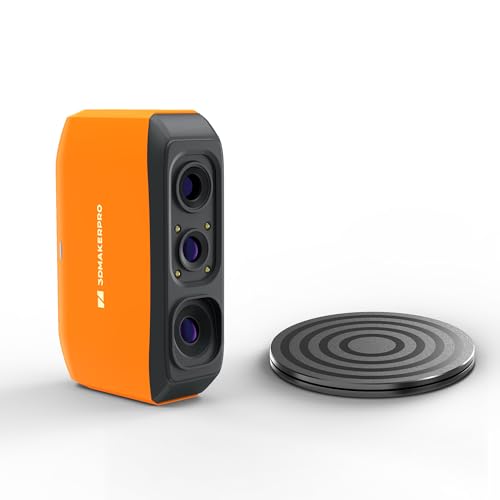
- 0.07mm accuracy for useful detail capture
- Markerless tracking with anti-shake support
- Sized for 40mm to 1200mm objects
Best For: Budget-conscious beginners scanning small to medium sculptures
Wireless Precision Scanner for Sculptors – Shining3D EinScan Rigil
If you need 3d scanners for sculpture that can handle detailed surfaces, the Shining3D EinScan Rigil is built for flexible, high-precision work. Its wireless operation, hybrid laser plus infrared scanning, and marker-free workflow make it a strong fit when you want to capture art pieces, prototypes, or sculpted forms without slowing down for setup.
Best For: Artists and professionals who want a portable, high-accuracy scanner for sculpture and detailed object capture.
Pros:
- 0.04mm accuracy with 50 laser lines for fine detail capture
- Wireless, standalone, and wired PC modes for flexible scanning setups
- Marker-free scanning helps with dark or reflective surfaces
- Built-in 5MP camera captures texture in high definition
Cons:
- Large and heavy compared with simpler handheld scanners
- More advanced hardware may be more than casual users need
For sculpture work, the Rigil stands out when accuracy, texture, and mobility all matter. It is especially appealing if you scan in different environments and want a system that can handle challenging surfaces without spray.
Entry-Level Scanner for Hobby Sculptors – 3DMakerpro Fox
For buyers comparing 3d scanners for sculpture on a tighter budget, the 3DMakerpro Fox is an approachable medium-format option. It is aimed at beginners and hobbyists, but still offers enough precision for 3D printing, modeling, and measurement work when you want dependable scans of sculpted objects.
Best For: Beginners and hobbyists who want an accessible scanner for sculpture, printing, and general modeling.
Pros:
- 0.07mm accuracy and 0.10mm resolution for useful detail
- Markerless AI visual tracking helps recover scans quickly
- JMStudio combines scanning, editing, and optimization in one workflow
- Compact and lightweight compared with larger professional systems
Cons:
- Not as precise as higher-end sculpture-focused scanners
- Designed as an entry-level model, so it is less specialized for advanced workflows
The Fox is a practical starting point if you want to learn scanning without jumping straight to a complex professional setup. It is best when your priority is accessibility and steady results rather than maximum resolution.
High-Detail Handheld Scanner for Sculpture – Creality Raptor
If you want 3d scanners for sculpture that can capture very fine surface detail, the Creality CR-Scan Raptor is built around accuracy and versatility. Its blue light and NIR modes let you work across very small to very large objects, making it a useful option when sculpture projects vary in size and surface type.
Best For: Users who need a handheld scanner with strong detail capture for sculpture, modeling, and mixed-size objects.
Pros:
- Up to 0.02mm accuracy with industrial-grade blue light scanning
- NIR mode supports larger objects and better featureless-object tracking
- RGB camera and flash LEDs help capture texture and color detail
- Lightweight 372g body makes handheld scanning easier
Cons:
- Requires a capable computer for best performance
- Direct blue light exposure may cause minor eye discomfort
The Raptor is a strong choice when sculptural detail matters and you need one scanner that can adapt to different object sizes. It makes the most sense for users comfortable with higher-end hardware and a more demanding workflow.
Industrial Scanner for Sculptural Detail – Revopoint MetroX Pro
Among 3d scanners for sculpture, the Revopoint MetroX Pro is geared toward users who want industrial-grade precision and flexible scan modes. It combines blue laser scanning, structured light, and automated turntable workflows, so it can handle shiny, dark, and feature-rich objects with minimal manual adjustment.
Best For: Advanced users who want high-precision sculpture scans for modeling, inspection, or reverse engineering.
Pros:
- Single-frame precision up to 0.01 mm and accuracy up to 0.02 mm
- Multiple scan modes for shiny, dark, flat, and detailed surfaces
- Auto turntable scanning reduces hands-on work for complex objects
- Real-time streaming to mobile devices helps monitor scans easily
Cons:
- Advanced feature set may be unnecessary for casual users
- Some software tools are sold separately
The MetroX Pro is the most feature-rich option in this set and is best suited to serious scanning workflows. If your sculpture projects demand precise measurement and reliable surface capture, it offers a very capable toolkit.
Industrial Precision Pick – Revopoint MetroY Ultra 3D Scanner
If you’re shopping for 3d scanners for sculpture and need very fine surface capture, the Revopoint MetroY Ultra is built for detail-heavy work. Its blue laser modes and structured-light option are aimed at small to medium objects, while the fast scan speed and marker-free workflows can help speed up repeated sessions.
Best For: Sculptors and makers who want high-precision scans for intricate forms, small details, and clean reverse-engineering workflows.
Pros:
- Up to 0.01 mm single-frame precision for intricate geometric detail
- Five scanning modes, including laser cross-lines, parallel lines, single-line, structured light, and turntable scanning
- Scans dark, shiny, and metallic surfaces without spray
- Wi-Fi 6 support and a 5500 mAh battery grip for more flexible setup options
Cons:
- Requires strong system specs, especially on Windows
- Best suited to small and medium objects rather than very large sculpture pieces
The MetroY Ultra is a strong pick if your priority is precision and workflow flexibility over simplicity. It looks especially useful for detailed sculpture components, prototype forms, and studio work where surface quality matters.
Beginner-Friendly Scanner – 3DMakerpro Moose Lite Premium
For 3d scanners for sculpture that aim to keep setup simple, the 3DMakerpro Moose Lite Premium focuses on easier handheld scanning. Its AI visual tracking, anti-shake module, marker-free operation, and re-scanning support are practical features if you want to capture sculptural forms without a steep learning curve.
Best For: Beginners and hobbyists who want a handheld scanner that is easier to manage during sculpture capture sessions.
Pros:
- AI visual tracking helps with automated model repair
- Anti-shake module is designed to be more beginner-friendly
- Marker-free scanning keeps the workflow simple
- Re-scanning support lets you continue after interruptions
Cons:
- 10 FPS scanning speed is slower than higher-end options
- Less focused on ultra-high precision than the most advanced scanners
This is a practical choice when usability matters more than maximum speed. If you want a straightforward way to scan sculpture forms and avoid extra setup steps, the Moose Lite Premium keeps the process approachable.
All-in-One Portable Pick – Revopoint MIRACO Pro 3D Scanner
If you want 3d scanners for sculpture with a more self-contained workflow, the Revopoint MIRACO Pro stands out for scanning and editing on board. It combines a high-resolution camera system, switchable near/far modes, and a touchscreen interface, which makes it practical for capturing both small sculptural details and larger forms.
Best For: Artists and studios that want an all-in-one scanner for detailed sculpture capture, color models, and portable use.
Pros:
- All-in-one design scans and edits without a separate computer
- Up to 0.02 mm single-frame precision for detailed models
- 48MP RGB camera and flash LED system for color capture
- Near-mode and Far-mode support both small objects and larger surfaces
Cons:
- Battery life is limited to about 2 hours of scanning
- Revo Design is paid software and Windows only
- At 750 g, it is portable but still not ultra-light
The MIRACO Pro is a compelling option if you want a portable scanner that can handle scanning, reviewing, and editing in one device. For sculpture work that benefits from color capture and flexible object sizing, it offers a very complete package.
Precision Pick – 3DMakerpro Moose Standard 3D Scanner
If you’re comparing 3d scanners for sculpture, the 3DMakerpro Moose Standard stands out for detailed capture and marker-free ease of use. Its blue light system, AI visual tracking, and intelligent pre/post processing make it a practical choice for creators who want fine surface detail without a complicated workflow.
Best For: Sculptors and makers who want high-detail scans for display models, printing, or digital archiving.
Pros:
- 0.03mm accuracy and 0.07mm resolution help preserve fine sculptural detail.
- AI visual tracking supports smoother, marker-free scanning.
- Up to 100mm scan depth improves vertical capture on complex forms.
- JMStudio combines scanning, editing, and optimization in one workflow.
Cons:
- Best results will still depend on careful scanning technique.
- Windows/MacOS compatibility is limited to specific versions listed by the manufacturer.
Overall, the Moose Standard is a strong fit when detail matters more than ultra-simple setup. It gives sculpture-focused users the precision and software support needed for refined digital models.
Portable Studio Choice – Revopoint INSPIRE 2 Premium
For buyers shopping 3d scanners for sculpture with more flexibility, the Revopoint INSPIRE 2 Premium brings wireless scanning, outdoor support, and strong surface-handling features. It is built to handle mixed materials and challenging finishes, which can be useful when scanning sculptural work for printing, texture capture, or digital presentation.
Best For: Artists and technicians who need a portable scanner for detailed work in different environments.
Pros:
- WiFi 6.0 supports wireless scanning and real-time streaming.
- Infrared laser lines help scan reflective or dark surfaces without spray.
- Up to 0.05mm accuracy and 0.03mm precision support detailed models.
- Lightweight 190g design and included accessories improve portability.
Cons:
- AI object segmentation is Windows only.
- Minimum system requirements are relatively demanding for smooth use.
The INSPIRE 2 makes sense if your sculpture work moves between studio and outdoor spaces, or if you need a scanner that handles difficult surfaces with less preparation. Its feature set is broad, but it still favors users who can meet the software and PC requirements.
Entry-Level Value – 3DMakerpro Fox 3D Scanner
If you’re looking at 3d scanners for sculpture on a tighter budget, the 3DMakerpro Fox is designed as an approachable entry point. It offers markerless tracking, anti-shake support, and enough accuracy for small-to-medium objects, but it does come with a real learning curve and works best when paired with a capable PC.
Best For: Beginners and DIY users scanning small to medium sculptures, miniatures, or prototypes.
Pros:
- Up to 0.07mm accuracy captures useful structural detail.
- Markerless tracking and anti-shake features simplify setup.
- Supports objects from 40mm to 1200mm in size.
- JMStudio includes scanning, editing, fusion, and export tools.
Cons:
- There is a noticeable learning curve for good scan and print results.
- A dedicated GPU is strongly recommended for stable performance.
- Best suited to small and medium objects rather than very large projects.
The Fox is a sensible starter option if you want to learn digital capture without jumping to a more expensive system. Just plan on some practice time and solid hardware to get the most out of it.
How We Picked the Best 3d Scanners for Sculpture
We prioritized scanners that are well suited to sculptural subjects, especially those that can capture fine surface detail, work with a range of object sizes, and fit real-world studio workflows. Accuracy specs matter, but so do stability, software support, portability, and ease of setup. For 3d Scanners for Sculpture, a scanner that is technically precise but frustrating to use is often a poor fit.
We also looked for models that can handle matte and textured surfaces more consistently, since sculptural materials can vary widely from clay and plaster to resin, stone-like finishes, and mixed media.
Quick Comparison: What Matters Most
If your priority is the finest detail, look for higher advertised accuracy, stable tracking, and scanning modes designed for small objects or complex geometry. If you work on larger sculptures, portability and the ability to maintain tracking while moving around the piece matter more. All-in-one units can be convenient for studio use, while handheld systems are often better for larger or less accessible forms.
Key Buying Factors for 3d Scanners for Sculpture
Accuracy and resolution: Fine facial features, tool marks, undercuts, and surface texture require strong capture precision. Higher accuracy can help, but workflow and lighting matter too.
Object size range: Match the scanner to the scale of your work. Small figurines, busts, and maquettes have different needs than life-size or oversized sculpture.
Tracking and surface handling: Sculptures can be challenging if they are glossy, dark, or low-texture. Good tracking reduces drift and helps maintain clean geometry.
Software workflow: Good pre- and post-processing tools can save time when cleaning meshes, aligning scans, and preparing files for printing or archiving.
Portability and setup: If you scan in the studio, on location, or around large installed pieces, battery power, wireless operation, and handheld ergonomics are valuable.
Output intent: For 3D printing, you may want clean watertight meshes. For archival or digital art workflows, capturing shape fidelity and surface character may be the bigger priority.
Who Should Buy What
Beginner sculptors and hobbyists: Choose an entry-level scanner with simple software and forgiving tracking if you are learning to digitize small-to-medium pieces.
Studio artists and model makers: Look for balanced accuracy, faster scanning, and better post-processing tools for repeatable results on a range of sculpture sizes.
Professional archivists and advanced users: Invest in a higher-precision system with strong tracking, flexible scanning modes, and reliable software for detailed preservation work.
Large sculpture and installation work: Favor portable handheld scanners that are easier to maneuver around bigger pieces and tighter spaces.
In short, the best choice depends on whether you value maximum detail, speed, mobility, or simplicity. Matching the scanner to your sculpture size and workflow will usually matter more than chasing specs alone.