Compact smart displays can do a lot in a small footprint: answer questions, control smart home devices, show calendars, stream video, and keep daily routines moving.
Whether you want a bedside assistant, a kitchen hub, or a small screen for travel and work, the right pick depends on display size, assistant ecosystem, and the features you’ll actually use.
Best 10 Compact Smart Displays Picks for 2026
Compact Alexa Display
Amazon Echo Show 5 (newest model)
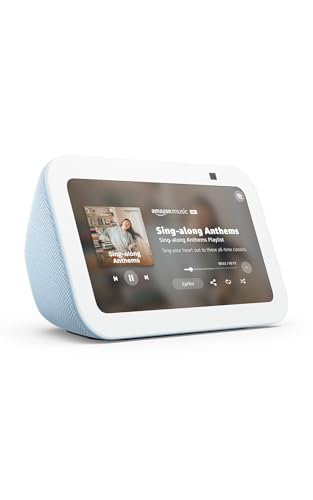
- 5.5-inch screen for quick updates and calls
- Deeper bass and clearer vocals than before
- Privacy shutter and mic/camera off button
Best For: Alexa households that want a compact screen for everyday tasks
Hidden Budget Screen Hub
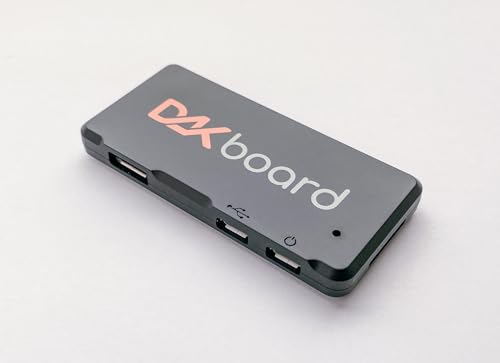
- Hides behind a monitor for a clean dashboard setup
- Built for calendars, photos, weather, and to-do lists
- Low-power design uses up to 3 watts
Best For: DIY home dashboards on a budget
Refurbished Compact Alexa Display
- Certified refurbished with the same limited warranty
- 5.5-inch display and built-in camera
- Deeper bass, clearer vocals, and privacy controls
Best For: Value buyers who want the Echo Show 5 at a lower cost
Portable Android Mini TV
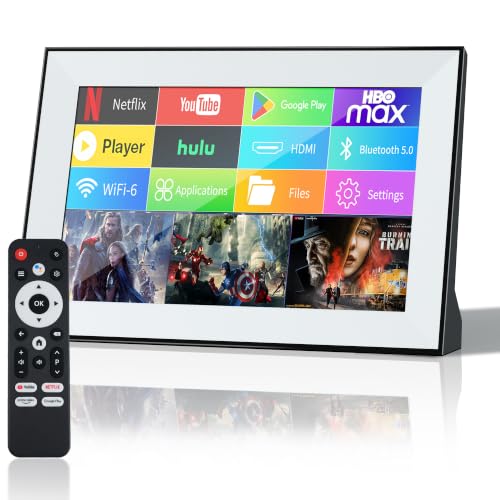
- Android 11 with downloadable apps
- Touchscreen plus remote control
- Wi-Fi, Bluetooth, HDMI, USB, and SD support
Best For: Small-space streaming and travel-friendly viewing
Compact Smart Display Pick
Google Nest Hub 7-inch Smart Display

- 7-inch size fits small spaces well
- Google Assistant handles help and home control
- Supports music, video, photos, and reminders
Best For: Small rooms and everyday voice-controlled home tasks
Kitchen Hub Upgrade
Echo Show 15 15.6-inch Smart Display

- 15.6-inch Full HD screen with widgets
- Built-in Fire TV adds streaming options
- Smart home dashboard and video calling tools
Best For: Kitchen organization and shared family use
Countertop Business Display
7-Inch Android Digital Signage

- Dual-sided signage with customer-facing content
- Built-in charging for multiple phone types
- WiFi CMS supports remote updates
Best For: Small business counters and tabletop promotions
Portable Productivity Pick
AOC 16" Portable Monitor FHD 60Hz

- 15.6-inch FHD IPS panel
- Dual USB-C and Mini HDMI connectivity
- Lightweight 1.5 lb travel-friendly design
Best For: Travel-friendly second-screen use for work, study, and streaming
Travel Charger Pick
Anker 100W 3-Port GaN Smart Display

- 100W max USB-C GaN charging
- Built-in smart display with live data
- Foldable plug and compact travel size
Best For: Portable charging with real-time power and temperature readouts
Budget Portable Display Pick
ForHelp 15.6" FHD IPS Smart Cover Monitor

- 15.6-inch FHD IPS matte panel
- Ultra-thin 0.3-inch, 1.52 lb design
- Smart cover stand with HDR and speakers
Best For: Portable second-screen work, meetings, and casual gaming
Compact Alexa Display – Amazon Echo Show 5 (newest model)
If you want one of the most practical compact smart displays for a nightstand, desk, or kitchen counter, the Echo Show 5 keeps the footprint small while still giving you the core Alexa experience. The 5.5-inch screen is useful for at-a-glance updates, video calls, smart home control, and quick entertainment.
Best For: Alexa users who want a small smart display for calls, cameras, music, and home control.
Pros:
- 5.5-inch display is easy for checking weather, news, and song titles.
- Improved audio with deeper bass and clearer vocals for its size.
- Built-in camera supports drop-in checks and compatible video doorbells.
- Mic/camera off button and built-in camera shutter add privacy controls.
Cons:
- Small screen is best for quick glances, not immersive viewing.
- 2 MP camera is basic compared with larger smart displays.
- Works best inside the Alexa ecosystem and with compatible devices.
Overall, this is a strong choice if you want a compact smart display that does the everyday Alexa basics well without taking up much space. It balances size, convenience, and privacy features in a simple package.
Hidden Budget Screen Hub – DAKboard CPU Mini
The DAKboard CPU Mini is aimed at shoppers building compact smart displays from an existing monitor rather than buying a standalone screen. Its tiny, low-power design is built for essentials like calendars, photos, weather, and simple to-do lists, making it a neat fit for a minimalist home dashboard.
Best For: DIY smart home displays focused on calendars, photos, weather, and basic reminders.
Pros:
- Ultra-compact CPU can hide behind a monitor for a clean setup.
- Low 3-watt max power use makes it easy to run continuously.
- Supports integrations like Google Calendar, OneDrive, iCloud, and Todoist.
- Mini-HDMI cable is included for a simpler install.
Cons:
- Not recommended for continuous video streaming or heavy animation.
- Not the right pick if you need touchscreen features.
- Requires a separate monitor to function as a display.
This is a practical pick if your goal is a low-cost, discreet dashboard rather than a media-heavy smart display. It shines when used for glanceable home information and simple organization tools.
Refurbished Compact Alexa Display – Like-New Amazon Echo Show 5
If you want compact smart displays on a tighter budget, the Like-New Echo Show 5 gives you the same core feature set as the standard model in refurbished form. It is tested and certified to look and work like new, and it keeps the same 5.5-inch display, camera, privacy controls, and Alexa features.
Best For: Shoppers who want the Echo Show 5 experience in a refurbished package with warranty coverage.
Pros:
- Refurbished, tested, and certified to look and work like new.
- Same 5.5-inch display for weather, news, calls, and photos.
- Includes deeper bass, clearer vocals, and smart home control.
- Built-in camera, shutter, and mic/camera off button support privacy.
Cons:
- May arrive in generic Amazon-branded packaging.
- Only makes sense if you are comfortable buying refurbished.
- Screen size remains small for more ambitious media use.
For buyers who want the Echo Show 5 feature set without paying for a brand-new unit, this is an easy value play. The main tradeoff is simply accepting refurbished packaging in exchange for certification and warranty support.
Portable Android Mini TV – FancyAug 10.1" Smart TV
This portable mini TV sits at the edge of the compact smart displays category by combining a 10.1-inch touchscreen with Android 11, app support, and multiple connectivity options. It is designed for home, kitchen, RV, and travel use, so it works best when you want a small all-in-one screen that can handle streaming, apps, and external devices.
Best For: Anyone who wants a compact touchscreen TV-style display for streaming, apps, and travel use.
Pros:
- Android 11 lets you install apps and use a familiar smart interface.
- Touchscreen plus remote control gives you two easy ways to navigate.
- Supports Wi-Fi, Bluetooth, HDMI, USB, and SD card connections.
- 10.1-inch size makes it useful in kitchens, RVs, bedrooms, or small spaces.
Cons:
- Not battery-operated, so it still needs power access.
- 720p native resolution is modest for a modern smart screen.
- Less specialized for home-assistant tasks than dedicated Alexa displays.
As a compact smart display, this model is more of a mini entertainment screen than a voice assistant hub. It makes sense if you want a portable Android-based display with broad input support and touchscreen control.
Compact Smart Display Pick – Google Nest Hub 7-inch Smart Display
Google Nest Hub 7” Smart Display with Google Assistant (1st Gen) - Chalk (Bulk Packaging)
Check Price On AmazonIf you want one of the most compact smart displays for everyday help, the Google Nest Hub 7-inch keeps things simple. It combines Google Assistant, touchscreen controls, and a small footprint that fits easily on a counter, desk, or nightstand while handling smart home tasks, media, and reminders.
Best For: Bedrooms, kitchens, desks, and other small spaces where a compact Google Assistant display is useful.
Pros:
- 7-inch design is compact and easy to place in tight spaces.
- Google Assistant supports hands-free help, timers, reminders, and smart home control.
- Works for entertainment like music, videos, and Google Photos.
- Can control compatible lights, cameras, thermostats, plugs, and speakers.
Cons:
- 1st Gen model, so it is not the newest Nest Hub version.
- Bulk packaging may matter if you want a retail-style presentation.
- International/Korean version may require setup language changes.
This is a practical pick if you want a small, capable smart display without taking up much room. It focuses on core assistant features and home control rather than oversized-screen entertainment.
Kitchen Hub Upgrade – Echo Show 15 15.6-inch Smart Display
Among compact smart displays, the Echo Show 15 stands out less for being tiny and more for packing a lot into a wall-friendly kitchen hub. Its 15.6-inch Full HD screen, widgets, Fire TV, and Alexa-driven smart home tools make it a strong choice when you want a central display for organization and entertainment.
Best For: Families who want a large smart display for kitchen organization, media, and shared household control.
Pros:
- 15.6-inch Full HD display gives you a large, clear view of widgets and content.
- Built-in Fire TV supports streaming from major apps like Prime Video, Netflix, YouTube, and more.
- Customizable widgets help track calendars, to-do lists, weather, and smart home info.
- Includes a centered, auto-framing camera with 3.3x zoom for video calls.
Cons:
- Much larger than true compact smart displays.
- May be more display than you need for a bedroom or small desk.
- Some streaming apps may require subscriptions.
If you want a smart display that acts like a family command center, this is the more ambitious option. It is best when screen size, organization, and built-in entertainment matter more than saving every inch of space.
Countertop Business Display – 7-Inch Android Digital Signage
If your goal is a compact smart display for a business setting rather than a home assistant, this 7-inch Android digital signage unit is built for the job. It combines tabletop advertising, menu playback, cloud content updates, and built-in phone charging in a small countertop-friendly form factor.
Best For: Restaurants, cafes, hotels, reception desks, and retail counters that need small digital signage with charging.
Pros:
- Dual-sided display can show menus, ads, QR codes, and announcements.
- Integrated phone charging supports Micro-USB, USB-C, Lightning, and USB-A devices.
- WiFi and cloud CMS make it easy to update JPG, PNG, and MP4 content remotely.
- Built-in battery supports portable use and long runtime depending on brightness and charging activity.
Cons:
- Designed for signage, not voice assistant or home automation use.
- 7-inch screen is small for broader visual merchandising needs.
- Best results depend on managing content through the CMS.
This is a strong compact display for businesses that want to inform customers and add charging convenience at the same time. It is more of a commercial signage tool than a consumer smart display, but it fits the roundup well for small-space countertop use.
Portable Productivity Pick – AOC 16" Portable Monitor FHD 60Hz
If you want one of the more practical compact smart displays for work and travel, this AOC portable monitor keeps things simple: add a second screen, plug in fast, and get back to work. The 15.6-inch FHD IPS panel is built for clear text, comfortable multitasking, and casual entertainment without taking up much bag space.
Best For: Travelers, students, and laptop users who need a lightweight second screen for productivity and streaming.
Pros:
- 15.6-inch 1920 x 1080 FHD display delivers sharp detail for spreadsheets, calls, and media.
- IPS panel with 170°/170° viewing angles helps keep colors consistent from different positions.
- Lightweight 1.5 lb build and ultra-slim profile make it easy to carry.
- Dual USB-C ports plus Mini HDMI support quick plug-and-play setup with laptops, consoles, and more.
Cons:
- 60Hz refresh rate is fine for everyday use, but not aimed at high-refresh gaming.
- Designed as a portable monitor, so it depends on a connected device for use.
Overall, this is a straightforward portable second screen for anyone who values convenience, broad compatibility, and a clean travel-ready setup.
Travel Charger Pick – Anker 100W 3-Port GaN Smart Display
Among compact smart displays, this Anker charger stands out for showing useful charging data instead of just power output. It combines a 100W max GaN design with a built-in smart display, making it a strong choice if you want a smaller charger that still handles laptops, phones, and other everyday devices.
Best For: Frequent travelers and desk users who want a compact multi-port charger with live charging feedback.
Pros:
- 100W max USB-C output supports high-power charging for compatible devices.
- Smart display shows charging status, temperature, and port performance in real time.
- Foldable plug and 330% smaller frame improve portability for bags and pockets.
- Three ports and low-current mode add flexibility for charging smaller devices too.
Cons:
- Best results depend on devices that can take advantage of USB-C fast charging.
- Single charger design means you still need your own cables and device compatibility checks.
This is a smart pick if you want a compact charger with better visibility into what your devices are doing while they power up.
Budget Portable Display Pick – ForHelp 15.6" FHD IPS Smart Cover Monitor
If your shortlist of compact smart displays includes something built for easy travel and broad device support, this ForHelp portable monitor is worth a look. It offers a 15.6-inch Full HD IPS panel, a slim aluminum body, and a smart cover that doubles as a stand, which makes it useful for work, meetings, and gaming on the go.
Best For: Users who want an ultra-thin portable monitor for second-screen work, sharing, and casual gaming.
Pros:
- 1920 x 1080 IPS matte display offers sharp image quality and wide 178° viewing angles.
- Ultra-slim 0.3-inch profile and 1.52 lb weight make it easy to pack.
- Smart cover doubles as a stand and provides scratch protection.
- Multiple display modes, HDR support, and built-in speakers add versatility.
Cons:
- Requires compatible USB-C DP Alt Mode or HDMI connections for best use.
- Primarily a portable display, so setup depends on the connected device and cables.
For a portable monitor that balances travel convenience, simple setup, and useful extras, this model covers a lot of bases without overcomplicating things.
How We Picked the Best Compact Smart Displays
We focused on products that balance useful screen size, everyday convenience, and space-saving design. For Compact Smart Displays, that means evaluating how well each model fits on a desk, nightstand, or counter without feeling cluttered.
We also considered software ecosystem, voice assistant support, display clarity, speaker quality, connectivity, and whether the device serves a clear purpose beyond simply being a screen.
Quick Comparison
Think first about the job you want the display to do. Alexa-based options are often best for smart home control and household routines, Google Assistant models can suit users already invested in Google services, while portable and signage-style displays are better for media, dashboards, or shared information.
If you need a true home hub, look for a fixed smart display with strong voice integration. If you want flexibility, a portable monitor or touchscreen unit may make more sense than a traditional assistant screen.
Key Buying Factors for Compact Smart Displays
Screen Size and Placement
Smaller displays are easier to place on bedside tables and kitchen counters, but very small screens can feel cramped for video or multi-step tasks. A 5- to 7-inch model is usually best for quick interactions, while larger units work better for shared spaces.
Voice Assistant and App Ecosystem
Choose the platform that matches your smart home setup. Alexa, Google Assistant, and Android-based interfaces each have strengths, but the best choice is the one that integrates most smoothly with your lights, cameras, calendars, and streaming services.
Power, Ports, and Connectivity
USB-C, HDMI, Wi-Fi, Bluetooth, and SD support can expand what a device can do. For Compact Smart Displays used as monitors or signage, port selection matters as much as screen quality.
Audio and Daily Usability
Better speakers matter if you’ll use the display for music, timers, calls, or news briefings. If the screen is mostly for visual information, prioritize brightness, touch response, and viewing angles instead.
Who Should Buy Which Compact Smart Displays?
Buy a small voice-enabled display if you want a simple bedside or kitchen assistant. Choose a larger hub if family organization, media control, or shared viewing matters more. Pick portable or signage-style Compact Smart Displays if you need a flexible screen for travel, counters, dashboards, or lightweight business use.
The best option is the one that matches your space, your ecosystem, and how often you’ll use the display throughout the day.