Switching between sitting and standing is easier when your workstation can support two monitors without crowding your keyboard, mouse, or other essentials. The best desk converters for dual monitors combine a broad, stable platform with enough lift range for comfortable screen positioning.
This roundup compares 10 options ranging from compact manual risers to motorized models with integrated monitor arms. Consider your monitor size, desk depth, available workspace, and preferred adjustment method before choosing.
Best 10 Desk Converters for Dual Monitors Picks for 2026
Roomy Walnut Workstation
38-Inch Dual-Monitor Converter

- 38-inch platform fits two monitors or a monitor and laptop
- Gas-spring height adjustment from 5.9 to 16.9 inches
- Full-size keyboard tray and 33-pound support capacity
Best For: Large desks needing a spacious walnut dual-monitor riser
Compact Black Value Pick

- 32-inch surface supports a dual-monitor workstation
- Pneumatic adjustment from 4.3 to 19.7 inches
- Mostly assembled with keyboard tray and dual-monitor stand
Best For: Home offices and study spaces seeking an uncomplicated riser
Stable Spring-Lift Choice

- 36-inch surface fits dual monitors with accessory space
- Mechanical spring lift avoids common gas-spring concerns
- Reinforced steel frame supports up to 33 pounds
Best For: Users wanting a sturdy walnut riser with mechanical height adjustment
Integrated Monitor-Arm Pick
VIVO 36-Inch Dual-Monitor Converter

- Built-in mount supports two 13- to 30-inch screens
- Full-motion arms tilt, swivel, rotate, and adjust in height
- Riser adjusts from 4.5 to 20 inches
Best For: Users wanting integrated VESA monitor mounting and flexible screen positioning
Spacious Value Pick

- 42-inch surface fits two monitors
- Gas-spring height adjustment
- Separate keyboard tray included
Best For: Wide home-office workstations on a budget
Premium Ready-to-Use Pick

- Fully assembled out of the box
- 11 height-adjustable settings
- Weighted base and two tiers
Best For: Stable, convenient dual-monitor setups
Best Powered Monitor Control
Mount-It! Electric Dual Monitor Riser

- Electric one-touch height adjustment
- Two adjustable VESA monitor arms
- 55-pound total capacity
Best For: Ergonomic dual-screen workstations with powered movement
Compact Ergonomic Pick
Dual-Monitor Standing Desk Converter

- Supports two monitors up to 32 inches and 22 pounds each
- Gas-spring height adjustment from 5.7 to 17.1 inches
- Includes keyboard tray, gel wrist pad, and cable management
Best For: Compact dual-monitor workstations
Spacious Manual Pick
36-Inch Dual-Monitor Desk Converter
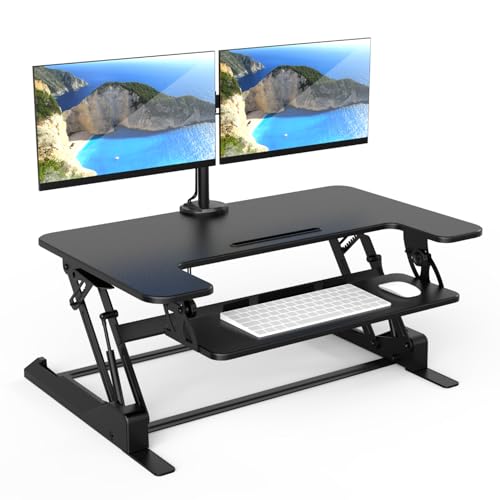
- 36-inch work surface accommodates monitors, laptop, and accessories
- Monitor arms offer tilt, swivel, and rotation adjustments
- Manual gas-spring height range spans 6.5 to 16.3 inches
Best For: Large dual-monitor workspaces
Motorized Upgrade
Electric Dual-Monitor Desk Converter
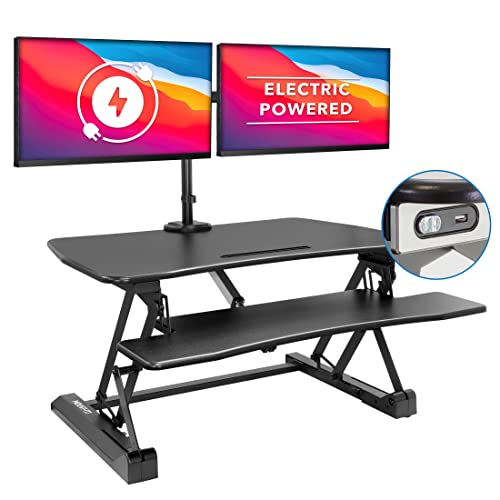
- Push-button electric height adjustment from 6.3 to 19.3 inches
- Supports two monitors up to 32 inches each
- Adds USB charging, a device channel, and a 35.4-inch desktop
Best For: Feature-rich powered sit-stand setups
Roomy Walnut Workstation – 38-Inch Dual-Monitor Converter
For shoppers comparing desk converters for dual monitors, the Mount-It! 38-inch model offers an especially spacious platform with a full-size keyboard tray. Its gas-spring lift adjusts from 5.9 to 16.9 inches, while the 33-pound steel-supported surface accommodates two monitors or a monitor-and-laptop setup. Confirm that your desk has at least 38 inches of width and 26 inches of depth before buying.
Best For: Large desks and users who want a walnut-finished dual-monitor workstation with room for accessories.
Pros:
- 38-by-19.5-inch desktop provides generous dual-monitor space.
- One-touch gas-spring adjustment covers seated and standing positions.
- Full-size keyboard tray, device channel, cable slots, and monitor-arm grommet add flexibility.
- Steel frame supports up to 33 pounds.
Cons:
- Requires substantial desk clearance: at least 38 inches wide and 26 inches deep.
- Minor movement may occur at maximum height with heavier monitor setups.
- The large footprint may not suit compact desks.
This is a strong choice when workspace is more important than compactness. Its broad surface and useful cable-management features make it practical for a full dual-screen setup, provided your existing desk can accommodate it.
Compact Black Value Pick – TechOrbits 32-Inch Converter
The TechOrbits 32-inch riser is a practical option for desk converters for dual monitors when you want a broad work surface without moving to a larger 36- or 38-inch model. Its pneumatic lift adjusts from 4.3 to 19.7 inches, and the mostly assembled design only requires attaching the keyboard tray.
Best For: Home offices, study rooms, and gaming setups that need a straightforward adjustable riser with dual-monitor capacity.
Pros:
- 32-inch work area leaves room for dual monitors, keyboard, mouse, and accessories.
- Wide 4.3-to-19.7-inch height range supports sitting and standing.
- Mostly assembled, with tools included for keyboard-tray installation.
- Includes a keyboard tray and dual-monitor stand.
Cons:
- Particle-board construction may feel less premium than heavier-duty alternatives.
- Maximum listed load is 33 pounds, so monitor and accessory weight should be checked.
- The 16.1-inch listed depth may limit larger equipment layouts.
With its simple setup and useful height range, the TechOrbits model suits buyers who want an accessible dual-monitor standing workstation. Measure your available depth and account for the total equipment weight before choosing it.
Stable Spring-Lift Choice – FLEXISPOT 36-Inch Converter
The FLEXISPOT 36-inch riser is among the desk converters for dual monitors designed for a standard-size workstation with extra accessory room. Its patented-pending mechanical spring system provides height adjustment without relying on a gas spring, and the converter arrives nearly assembled apart from the keyboard tray.
Best For: Professionals who want a 36-inch walnut converter with a mechanical spring lift and reinforced steel construction.
Pros:
- 36-inch surface is sized for two monitors with additional workspace.
- Mechanical spring system is designed to avoid gas-spring air leakage and performance drop.
- Reinforced steel frame and square tubing improve stability.
- Desktop supports up to 33 pounds; keyboard tray supports 4.4 pounds.
Cons:
- The supplied notes do not specify the full height-adjustment range.
- The keyboard tray has a separate 4.4-pound capacity, limiting heavier accessories there.
- At 34.5 pounds, the converter itself is relatively heavy to reposition.
This model stands out for shoppers prioritizing a mechanical lift and reinforced frame over the lightest possible riser. It offers a balanced 36-inch footprint for dual monitors, though buyers wanting a precise height range should verify that specification before purchase.
Integrated Monitor-Arm Pick – VIVO 36-Inch Dual-Monitor Converter
For buyers seeking desk converters for dual monitors with built-in screen positioning, the VIVO DESK-V036K-M2 combines a 36-inch riser with a dual monitor mount. The stand supports two 13- to 30-inch displays up to 17.6 pounds each and offers height, tilt, swivel, and rotation adjustments for a more customizable viewing setup.
Best For: Dual-monitor users who want integrated VESA mounting and portrait-or-landscape screen flexibility.
Pros:
- Dual mount supports two 13- to 30-inch monitors up to 17.6 pounds each.
- Monitor arms provide tilt, swivel, rotation, and height adjustment.
- Riser adjusts from 4.5 to 20 inches with a height-locking mechanism.
- Minimal assembly and underside padding help simplify setup and protect the desk.
Cons:
- Monitors must use compatible VESA 75x75mm or 100x100mm patterns.
- Each monitor has a 17.6-pound weight limit.
- The 36-by-15.7-inch top and 36-by-11.8-inch tray may provide less open surface depth than larger platforms.
The VIVO is the most feature-focused option in this group for users who want monitor arms included rather than added separately. Its compatibility limits and per-monitor weight rating should be checked carefully, but the full-motion mount offers useful positioning flexibility.
Spacious Value Pick – 42" Standing Desk Converter
For shoppers comparing desk converters for dual monitors, the JOYSEEKER 42-inch riser stands out for its broad work surface and straightforward sit-to-stand adjustment. Its upper platform accommodates two monitors, while the lower tray keeps a keyboard, mouse, and accessories organized.
Best For: Home-office users who want a wide, manually adjustable dual-monitor workstation with room for peripherals.
Pros:
- 42-inch-wide desktop provides space for two monitors and includes a phone or tablet slot.
- Separate 42-by-11.8-inch lower tray holds a keyboard, mouse, and accessories.
- Single-lever gas-spring lift adjusts from 4.7 to 19.3 inches and supports up to 28.7 pounds.
- Requires only keyboard-tray attachment and includes the necessary tools.
Cons:
- Manual lifting requires using the lever rather than an electric control.
- The 42-inch width may be too large for compact desks.
- Its listed weight capacity is lower than some heavier-duty options.
This is a practical choice when surface area matters most. Measure your desk before buying, and confirm that the combined weight of both monitors and accessories stays within the 28.7-pound capacity.
Premium Ready-to-Use Pick – VariDesk Cube Corner 36
The VariDesk Cube Corner 36 is a polished option among desk converters for dual monitors, combining a two-tier layout with a weighted base and spring-assisted movement. It arrives fully assembled, making it easy to place on an existing desk and start using.
Best For: Buyers who prioritize stability, convenient setup, and multiple manual height settings.
Pros:
- Upper 36-by-19.75-inch tier is designed to hold up to two monitors, a laptop, or extra hardware.
- Lower tier provides dedicated space for a keyboard, mouse, and accessories.
- Eleven height settings raise the work surface up to 17.5 inches.
- Ships fully assembled and includes a five-year warranty with 30-day free returns, according to the supplied notes.
Cons:
- The rowing-style lift moves up and back, so it needs clearance behind the converter.
- Height adjustment is spring-assisted and manual rather than electric.
- The 36-inch footprint may not suit very small desks.
Choose this model if you want a sturdy, low-hassle converter with a well-organized two-tier design. Its weighted base and 11 positions are especially useful for users who regularly alternate between sitting and standing.
Best Powered Monitor Control – Mount-It! Electric Dual Monitor Riser
For shoppers seeking desk converters for dual monitors with more precise screen positioning, the Mount-It! MI-7952 combines one-touch electric height adjustment with two VESA monitor arms. It supports monitors up to 32 inches each and leaves space on the base for everyday desk accessories.
Best For: Dual-monitor users who want powered sit-to-stand movement and independent monitor adjustment.
Pros:
- VESA 75×75 and 100×100 arms support two monitors up to 32 inches each.
- Electric controls adjust the platform from 1.4 to 21.1 inches.
- Each screen can tilt, swivel, and rotate for portrait or landscape viewing.
- Steel construction supports up to 55 pounds total, with integrated cable-management channels.
Cons:
- Monitor compatibility depends on having supported VESA mounting patterns.
- The unit weighs 63 pounds, which can make placement and repositioning difficult.
- Partial assembly is required, unlike fully assembled alternatives.
This is the strongest fit for productivity-focused setups where monitor ergonomics and effortless height changes matter. Confirm your monitors’ VESA patterns, individual weights, and desk capacity before installation.
Compact Ergonomic Pick – Dual-Monitor Standing Desk Converter
For shoppers comparing desk converters for dual monitors, the Mount-It! MI-7914 offers a compact sit-stand workstation with an integrated monitor mount. Its gas-spring lift adjusts from 5.7 to 17.1 inches, while the separate keyboard tray helps keep a dual-screen setup organized.
Best For: Users who want dual-monitor support in a relatively compact converter for an existing desk.
Pros:
- Supports two monitors up to 32 inches and 22 pounds each.
- Adjustable height and smooth gas-spring lifting support sitting or standing.
- Includes a wide keyboard tray, gel wrist pad, and cable management.
- Compact 23.6-by-15.7-inch top platform fits a range of existing desks.
Cons:
- The top platform is narrower than the work surface on larger converters.
- At 47 pounds, it is substantial to move once positioned.
- Monitor compatibility depends on supported VESA mounting patterns.
This is a practical choice when monitor mounting, keyboard comfort, and a smaller footprint matter more than maximum desktop space. Verify your monitor weights, VESA patterns, and available desk area before buying.
Spacious Manual Pick – 36-Inch Dual-Monitor Desk Converter
The Mount-It! MI-7934 is a strong option among desk converters for dual monitors when you need more room for screens, a laptop, and accessories. Its 36-inch work surface pairs with a manual gas-spring lift and integrated dual monitor arms.
Best For: Users who need a broad workstation surface and adjustable positioning for two monitors.
Pros:
- 36-inch-wide surface provides room for dual monitors, a laptop, and essentials.
- Supports two monitors up to 32 inches with tilt, swivel, and rotation adjustments.
- Manual gas-spring height adjustment ranges from 6.5 to 16.3 inches.
- Built-in cable management and nonskid pads support a tidy, stable setup.
Cons:
- Manual adjustment requires operating the gas-spring lift rather than pressing a button.
- The converter weighs 46.1 pounds and needs a suitably spacious desk.
- Each monitor arm is rated for up to 17.6 pounds, so heavier screens may not be suitable.
Choose this model if surface area is a priority and manual height changes are acceptable. Its monitor articulation is useful for fine-tuning viewing angles, but check screen weights and desk dimensions before installation.
Motorized Upgrade – Electric Dual-Monitor Desk Converter
The Mount-It! MI-8053 stands out among desk converters for dual monitors with push-button electric height adjustment. Its 35.4-inch desktop, dual monitor arms, USB charging station, and device channel are designed for a feature-rich sit-stand setup.
Best For: Users who want powered height adjustment and a large, organized dual-monitor workstation.
Pros:
- Electric lift adjusts from 6.3 to 19.3 inches at the push of a button.
- Dual monitor arms support two screens up to 32 inches each.
- Large 35.4-by-23-inch desktop provides room for work essentials.
- Integrated USB charging and a device channel add workspace convenience.
Cons:
- At 59 pounds, this is a heavy converter to assemble and reposition.
- It requires assembly, although necessary tools are included.
- The listed maximum height and desktop dimensions require adequate surrounding space.
This is the most convenience-focused option of the three, particularly for users who frequently alternate between sitting and standing. Consider its weight, assembly requirements, and available desk depth before choosing it.
How We Picked the Best Desk Converters for Dual Monitors
We focused on the features that matter most in a two-screen sit-stand setup: platform width and depth, monitor support, height-adjustment range, stability, adjustment method, and overall workspace practicality. The selection includes manual and electric converters, models with built-in monitor mounts, and broader platforms designed to hold monitors on their original stands.
Because desks and displays vary widely, there is no single best design for everyone. A converter should fit your existing desk, raise screens to a comfortable viewing height, and leave enough room for your keyboard and pointing device.
Quick Comparison
| Type | Best For | Main Advantage | Watch For |
|---|---|---|---|
| Manual platform | Occasional position changes | Usually simpler and less expensive | Requires lifting or squeezing a mechanism |
| Electric converter | Frequent sit-stand transitions | Convenient powered adjustment | Needs an outlet and may cost more |
| Built-in monitor arms | Clean dual-screen setups | Frees platform space and improves positioning | Check VESA compatibility and weight limits |
| Large flat platform | Monitors on their original stands | Flexible placement and broad work area | Requires more desk space and depth |
Key Buying Factors for Desk Converters for Dual Monitors
Width, Depth, and Weight Capacity
Measure both monitors, their stands, and the usable area of your desk. A 32- to 36-inch platform may suit two compact displays, while larger screens or wide stands may require a 38- or 42-inch model. Confirm the converter’s total weight rating, including monitors, keyboard, accessories, and any attached arms.
Monitor Mount Compatibility
Integrated arms can save space, but verify VESA mounting patterns, screen-size limits, and per-arm capacity. If you plan to use original monitor stands, choose a platform deep enough to keep both screens stable without pushing them too close to the desk edge.
Adjustment Range and Stability
Compare the lowest and highest settings with your seated and standing elbow heights. The keyboard should remain at a comfortable level, and the monitors should be close to eye height. A broad base, rigid frame, and smooth lifting action help prevent wobbling, especially with heavier displays.
Manual or Electric Operation
Manual models are often straightforward and do not require power. Electric models are more convenient for frequent transitions and may provide smoother movement, but they add motor noise, cables, and potential space requirements.
Who Should Buy Which Desk Converters for Dual Monitors?
Choose a large flat converter if you want flexible placement or use monitors with nonstandard stands. Pick a model with dual monitor arms if you want a cleaner setup and more screen-positioning control. An electric converter is the better fit for users who change height several times daily, while a manual riser can be sufficient for occasional standing. If desk space is limited, prioritize a compact footprint and integrated mounts; if stability and accessories matter most, choose the widest platform that your desk can safely support.