Choosing one of the best desktop computers for home offices can make daily work faster, quieter, and far less frustrating. The right setup should handle video calls, spreadsheets, browser tabs, and cloud apps without slowing down.
In this roundup, we focused on practical performance, expansion options, and space-saving designs so you can pick a desktop that fits your workflow and your desk.
Best 10 Desktop Computers for Home Offices Picks for 2026
AI-Powered Productivity
Dell Tower Desktop, Intel Core Ultra 7

- Intel Core Ultra 7 with built-in AI
- 32GB DDR5 memory for smooth multitasking
- Supports up to four FHD or two 4K monitors
Best For: Home office users who want performance, security, and upgrade room
Compact All-in-One

- 21.45-inch Full HD anti-glare display
- Windows 11 Pro with built-in webcam
- All-in-one design saves desk space
Best For: Small home offices and everyday work setups
Space-Saving Performance
Dell Slim Desktop, Core Ultra 5

- Compact tower fits small workspaces
- 512GB SSD for quick boot and storage
- Supports up to four FHD or two 4K monitors
Best For: Users who want a slim, business-ready home office desktop
Budget Office Tower

- 13th Gen Intel Core i3 for office tasks
- 256GB SSD for fast boot and app loading
- Includes keyboard, mouse, HDMI, VGA, and Wi-Fi
Best For: Budget-conscious home office users who need a dependable tower
Compact Power Mini PC
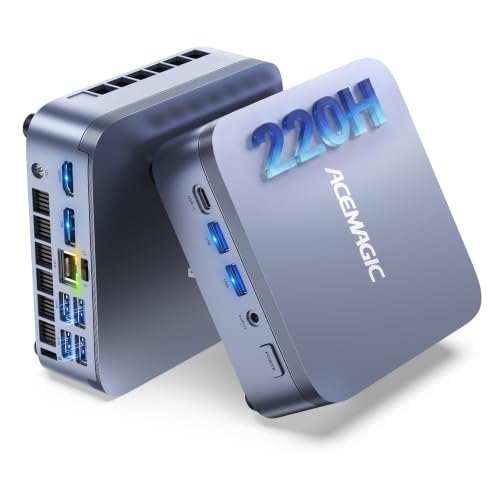
- 12-core Intel Core 5 220H with 45W system power
- 24GB LPDDR5 memory for smooth multitasking
- Dual SSD slots and triple-display support
Best For: Compact home office setups that need strong multitasking in a tiny case
High-Performance Home Office Tower

- 14th Gen Intel Core i7-14700 processor
- 1TB PCIe 4.0 SSD with 16GB DDR5 RAM
- Expandable platform with Wi-Fi 6E and Bluetooth 5.3
Best For: Power users who want a fast home office tower with upgrade room
Refurbished Office Value
Dell Optiplex 3060 for Home Productivity

- 32GB RAM and 1TB SSD
- Built-in Wi‑Fi and Bluetooth
- Windows 11 Pro on a compact tower
Best For: Budget-minded home office buyers who want lots of memory and storage
Balanced Business Tower
HP Pro Tower 290 G9 for Everyday Work

- 16GB RAM with SSD + HDD storage
- Wi‑Fi 6, Bluetooth, HDMI, and VGA
- Includes keyboard and mouse
Best For: Everyday home office use with easy connectivity and dual storage
Modern Small Form Factor
Lenovo IdeaCentre 3 for Compact Offices

- 10-core i5-14400 with 32GB RAM
- 1TB SSD and room for expansion
- Wi‑Fi 6, Bluetooth 5.1, and USB-C
Best For: Compact home office setups that need modern performance and multitasking
AI-Powered Productivity – Dell Tower Desktop, Intel Core Ultra 7
For desktop computers for home offices, this Dell tower is built for users who want strong everyday performance with room to grow. The Intel Core Ultra 7 processor adds built-in AI support, while the 32GB of DDR5 memory helps keep multitasking smooth across work apps, browser tabs, and media.
Best For: Home office users who want a fast, secure tower with strong multitasking headroom and upgrade flexibility.
Pros:
- Intel Core Ultra 7 processor with built-in AI support for productivity-focused tasks
- 32GB DDR5 RAM and 5600 MHz memory for responsive multitasking
- Supports multiple monitors, including up to four FHD displays or two 4K displays
- Tool-less access and removable side panel make upgrades easier
Cons:
- Integrated graphics are better for office work than graphics-heavy creative workloads
- Tower design takes more desk or floor space than a slim desktop
This is a solid choice if you want a dependable home office PC with modern connectivity, business-minded security features, and enough flexibility to adapt over time. Dell’s onsite service also adds practical support for a work-from-home setup.
Compact All-in-One – HP 22" FHD Desktop
If you want desktop computers for home offices that keep the setup simple, this HP all-in-one combines the PC and display in one compact unit. Its 21.45-inch Full HD anti-glare screen, Windows 11 Pro, and included webcam make it practical for everyday work, video calls, and light multitasking.
Best For: Home offices that need a space-saving all-in-one for everyday computing and video meetings.
Pros:
- All-in-one design helps reduce desk clutter
- 21.45-inch FHD anti-glare display is comfortable for daily viewing
- Windows 11 Pro adds business-friendly features and remote desktop support
- Built-in HD webcam with privacy shutter is useful for meetings
Cons:
- Intel N100 processor is geared toward everyday use rather than demanding workloads
- Included internal storage is modest, so larger files may rely on the external flash drive
This model makes sense if your priority is simplicity instead of raw power. It offers the key essentials for a tidy home office, especially when space is limited and you still want a full desktop setup.
Space-Saving Performance – Dell Slim Desktop, Core Ultra 5
For desktop computers for home offices, this Dell slim tower is a strong fit when you want a smaller footprint without giving up modern features. The Intel Core Ultra 5 processor brings built-in AI support, while the 512GB SSD and compact chassis make it a practical everyday work machine.
Best For: Home office users who want a compact desktop with solid everyday performance and multi-monitor support.
Pros:
- Slim design is well suited to small workspaces
- Intel Core Ultra 5 processor includes built-in AI support
- 512GB SSD provides fast storage for apps and files
- Supports up to four FHD monitors or two 4K displays
Cons:
- Integrated graphics are intended for standard productivity use
- External speakers are required for audio output
This is a practical option if desk space is tight but you still want a business-ready desktop with expansion-friendly access and security features like TPM. The included keyboard, mouse, and Dell Migrate bonus add convenience for setup and moving files.
Budget Office Tower – HP 290 G9 Desktop
Among desktop computers for home offices, this HP tower focuses on straightforward business performance rather than extras. With a 13th Gen Intel Core i3 processor, 8GB of DDR4 memory, and a 256GB SSD, it covers email, documents, spreadsheets, and browser-based work with a simple setup.
Best For: Home office buyers who want an affordable, no-frills tower for everyday business tasks.
Pros:
- 13th Gen Intel Core i3 processor handles common office tasks reliably
- 256GB SSD offers fast boot times and quick app loading
- Includes wired keyboard and mouse for a ready-to-work package
- HDMI, VGA, Ethernet, and Wi-Fi support flexible office connectivity
Cons:
- 8GB RAM is adequate, but heavier multitasking may feel limited
- Integrated graphics and basic storage are aimed at office use, not demanding media work
This model is a sensible choice if you mainly need dependable day-to-day performance and broad port compatibility. It keeps the buying decision simple while still covering the essentials for a functional home office workstation.
Compact Power Mini PC – ACEMAGIC M5 Intel Core 5 220H
If you want desktop computers for home offices that save space without feeling slow, the ACEMAGIC M5 is built around a 12-core Intel Core 5 220H and 24GB of LPDDR5 memory. It’s aimed at users who keep lots of tabs open, switch between office apps, or run more demanding productivity tasks and still want a tidy, book-sized system on the desk.
Best For: Home office users who want a compact Windows 11 Pro desktop with strong multitasking and easy monitor setup.
Pros:
- Intel Core 5 220H high-performance mobile chip with 12 cores and 4.9GHz boost
- 24GB LPDDR5 RAM supports responsive multitasking and heavy browser use
- Dual M.2 SSD slots with expansion up to 2TB per drive
- Triple-display support with USB-C, DP 1.4, HDMI, and Wi-Fi 6
Cons:
- Memory is factory-soldered and not upgradable
- Integrated graphics are built for productivity rather than graphics-heavy work
Overall, this is a strong fit if your home office needs desktop-grade performance in a very small footprint. Its real advantage is combining sustained H-series-style power with generous connectivity and a neat, VESA-mountable design.
Reliable Small Form Factor Desktop – HP ProDesk 400 G9 SFF
For desktop computers for home offices where reliability and simplicity matter more than raw speed, the HP ProDesk 400 G9 SFF is a practical pick. It brings Windows 11 Pro, 32GB of RAM, a 1TB PCIe SSD, and a compact chassis that should fit neatly under or beside a desk while handling everyday work tasks.
Best For: Home office users who want a compact business desktop with strong memory, security, and broad connectivity.
Pros:
- 32GB RAM and 1TB PCIe SSD for fast booting and responsive daily use
- Compact under-9-pound small form factor saves desk space
- Windows 11 Pro with TPM 2.0 and HP Wolf Security
- Includes Wi-Fi, Ethernet, USB-C, HDMI, and DisplayPort
Cons:
- Intel Celeron G6900 is a basic processor, not a high-performance chip
- Graphics are integrated, so it is not suited to demanding creative workloads
This model makes sense if you need a dependable home office PC rather than a speed-focused workstation. The hardware list is especially attractive for straightforward productivity, remote work, and a clean cable setup.
High-Performance Home Office Tower – ASUS S501MER i7-14700
If your home office workload is heavier than basic email and spreadsheets, this ASUS desktop is the most performance-oriented of the group. It uses a 14th Gen Intel Core i7-14700, 16GB of DDR5 RAM, and a 1TB PCIe 4.0 SSD, which makes it a strong choice for people who want a faster everyday desktop with room to grow.
Best For: Home office buyers who want a powerful tower for demanding multitasking and future expansion.
Pros:
- 14th Gen Intel Core i7-14700 delivers high-end CPU performance
- 1TB PCIe 4.0 SSD and 16GB DDR5 RAM provide a fast baseline
- Expandable up to 64GB RAM with multiple M.2 and PCIe slots
- Wi-Fi 6E, Bluetooth 5.3, and a wide set of rear and front ports
Cons:
- Windows 11 Home lacks the business features of Pro editions
- Integrated graphics limit it to productivity and general-use computing
For a home office that needs more headroom, this ASUS tower stands out for its faster processor and upgrade flexibility. It’s a better fit for users who expect their desktop to handle bigger workloads over time.
Refurbished Office Value – Dell Optiplex 3060 for Home Productivity
For shoppers comparing desktop computers for home offices, this renewed Dell OptiPlex 3060 stands out for strong everyday performance and a generous 32GB of RAM paired with a 1TB SSD. It also adds built-in Wi‑Fi, Bluetooth, Windows 11 Pro, and a compact tower design that fits neatly into a work-from-home setup.
Best For: Home office users who want a renewed desktop with lots of memory, fast storage, and easy wireless connectivity.
Pros:
- 32GB DDR4 RAM helps with multitasking and keeping several office apps open.
- 1TB SSD offers fast boot times and plenty of storage for files.
- Built-in Wi‑Fi and Bluetooth simplify wireless setup.
- Windows 11 Pro and a 90-day warranty add practical business-friendly value.
Cons:
- Renewed condition may not suit buyers who prefer a brand-new PC.
- Integrated Intel UHD Graphics 630 is fine for office work, but not for heavy creative or gaming use.
- RAM is listed as 8GB installed in the detailed specs, which conflicts with the product title’s 32GB claim.
This is a sensible pick if you want a budget-conscious work desktop with strong storage and memory. The main tradeoff is that it’s a renewed system, so it’s best for practical home office use rather than premium feature shopping.
Balanced Business Tower – HP Pro Tower 290 G9 for Everyday Work
This HP Pro Tower 290 G9 fits well among desktop computers for home offices if you want a straightforward business PC with modern wireless features and flexible storage. It combines a 256GB PCIe SSD for quick starts with a 1TB HDD for extra space, plus Windows 11 Pro, Wi‑Fi 6, and Bluetooth for a smooth work-from-home setup.
Best For: Home office buyers who want a practical business desktop with dual storage and strong connectivity.
Pros:
- 16GB RAM supports multitasking for everyday office work.
- 256GB PCIe SSD plus 1TB HDD balances speed and storage capacity.
- Wi‑Fi 6, Bluetooth, HDMI, VGA, and 8 USB ports make it easy to connect peripherals.
- Includes a wired HP keyboard and mouse for a ready-to-use package.
Cons:
- The processor details conflict between the title and notes, so buyers should verify the exact CPU configuration.
- Integrated graphics are suitable for office tasks, not demanding visual workloads.
- The 256GB SSD is relatively small if you plan to store many large local files on the faster drive.
Overall, this is a flexible home office desktop with the kind of ports and wireless support that make setup easy. It’s best for practical productivity use rather than performance-heavy workloads.
Modern Small Form Factor – Lenovo IdeaCentre 3 for Compact Offices
Among desktop computers for home offices, the Lenovo IdeaCentre 3 is a strong fit if you want a compact system with modern CPU performance and plenty of memory. Its 10-core Intel Core i5-14400, 32GB RAM, and 1TB SSD make it a capable daily driver, while Wi‑Fi 6, Bluetooth 5.1, and dual display outputs help it slide neatly into a multi-device workspace.
Best For: Home office users who want a compact desktop with modern performance and room to grow.
Pros:
- 10-core Core i5-14400 delivers strong multitasking headroom for office workloads.
- 32GB RAM and 1TB SSD offer fast responsiveness and generous storage.
- HDMI plus VGA support dual-monitor setups.
- Wi‑Fi 6, Bluetooth 5.1, USB-C, Ethernet, and a card reader add useful connectivity.
Cons:
- Windows 11 Home lacks the Pro features some business users prefer.
- Integrated Intel UHD Graphics 730 is best for productivity, not graphics-intensive work.
- It ships with wired peripherals, so wireless keyboard/mouse users will need their own accessories.
This Lenovo is the most forward-looking option here if you want a compact home office machine with modern internals and expansion room. It makes the most sense for productivity-focused buyers who value speed, connectivity, and a neat desk footprint.
How We Picked the Best Desktop Computers for Home Offices
We prioritized Desktop Computers for Home Offices that offer dependable everyday performance, sensible storage and memory configurations, and a strong mix of value and longevity. We also looked at form factor, upgrade potential, wireless connectivity, and support for one or more displays.
For home office use, the best choice is usually not the most powerful machine on the list. It is the one that balances speed, noise, footprint, and flexibility for your specific workload.
Quick Comparison
In general, tower desktops are the best fit for users who want more power, more ports, and easier upgrades. Small form factor PCs are better if you want a tidy desk and still need solid multitasking. Mini PCs are ideal for light-to-moderate workloads and minimal clutter. All-in-one desktops save space, but they usually offer less upgrade room and more limited long-term flexibility.
Key Buying Factors for Desktop Computers for Home Offices
Processor and Multitasking
For everyday office work, an Intel Core i5-class processor or better is usually the sweet spot. If you regularly run heavy spreadsheets, large browser sessions, design tools, or video meetings while multitasking, step up to a Core i7 or newer Core Ultra chip.
Memory and Storage
8GB RAM is workable for basic use, but 16GB is the safer baseline for most people. If you keep many apps open, 32GB gives more breathing room. For storage, an SSD is far more important than a hard drive alone because it improves boot times and app loading. A 512GB or 1TB SSD is a practical target for most home office setups.
Size, Noise, and Connectivity
Desk space matters. A slim tower or small form factor desktop can keep your workspace organized without sacrificing performance. Also look for Wi-Fi, Bluetooth, USB-C, HDMI, and support for dual monitors if your work setup depends on accessories and multiple screens.
Upgrade Path and Longevity
The best Desktop Computers for Home Offices should last several years. Towers generally offer the easiest upgrades for RAM, storage, and sometimes graphics. That matters if your workload grows or you want to extend the life of your purchase instead of replacing the whole system.
Who Should Buy Which Desktop Computers for Home Offices?
Choose a full tower if you want the strongest performance and the most upgrade flexibility. Pick a small form factor desktop if you need a compact, professional-looking machine for everyday office tasks. Go with a mini PC if you value a tiny footprint and mostly handle light to moderate work. An all-in-one is the right call if you want a simple, space-saving setup and do not expect to upgrade much later.
If your home office needs are mostly email, documents, video calls, and web tools, a midrange desktop will usually deliver the best value. If you want room to grow, choose the more expandable option now so your setup can scale with your work.