If you need a PC that can juggle dozens of browser tabs, office apps, video calls, and light creative work without slowing down, the right tower or small-form-factor system makes a huge difference.
This roundup of the best desktop computers for multitasking focuses on responsive performance, enough RAM for smooth switching, and storage that helps apps load quickly.
Best 10 Desktop Computers for Multitasking Picks for 2026
Quiet Power for Busy Workdays
Dell Tower Desktop, Core Ultra 7, 32GB RAM

- Core Ultra 7 with built-in AI support
- Up to four FHD or two 4K displays
- 32GB DDR5 RAM and easy upgrades
Best For: Home office and business multitasking
Strong All-Rounder
HP OmniDesk Ryzen 7, 32GB, 1TB SSD

- Ryzen 7 8700G with Ryzen AI
- 32GB DDR5 memory and 1TB NVMe SSD
- Wi-Fi 6, Bluetooth 5.4, and peripherals included
Best For: Everyday multitasking with easy setup
Compact Performance Pick
ACEMAGIC M5 Mini PC, Core 5 220H, 24GB
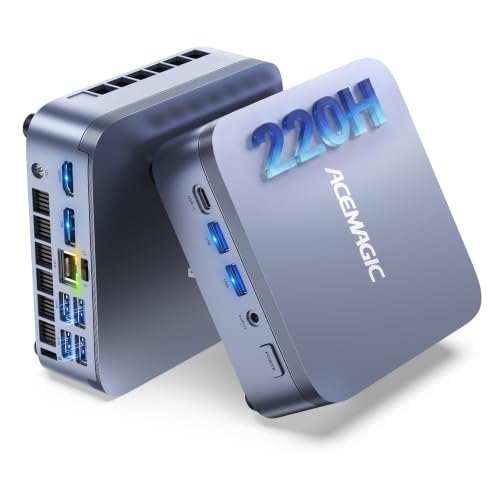
- 12-core Core 5 220H with 4.9GHz boost
- 24GB LPDDR5 and dual SSD slots
- Supports triple 4K displays
Best For: Space-saving multitasking and business use
Business-Ready Workhorse
Dell Pro Tower Plus, Core Ultra 7, 32GB

- Core Ultra 7 with AI acceleration
- Drives three 4K monitors
- Windows 11 Pro with BitLocker and Hyper-V
Best For: Business and developer multitasking
Fast Everyday Tower
Acer Aspire TC-1780-UR11 for Work & Media

- 13th Gen Core i5-13400 with 10 cores
- 16GB DDR4 RAM and 512GB PCIe Gen 4 SSD
- Wi-Fi 6E, Bluetooth 5.3, and Windows 11 Pro
Best For: Everyday multitasking, business tasks, and media use
Refurbished Value Workstation
Dell Optiplex 3060 for Home Office

- 32GB DDR4 RAM for multitasking
- 1TB SSD plus Wi-Fi and Bluetooth
- Windows 11 Pro in a refurbished tower
Best For: Budget home or office multitasking
Compact Office Multitasker
HP ProDesk 400 SFF for Organized Work

- 16GB DDR4 RAM for everyday multitasking
- 256GB PCIe SSD plus 1TB HDD storage
- Dual 4K display support with Type-C and HDMI
Best For: Small desks, office work, and multi-monitor setups
Reliable Business Pick
Dell OptiPlex 7070 SFF for Smooth Multitasking

- 8-core i7-9700 with up to 4.7GHz boost
- 32GB RAM plus 1TB NVMe SSD
- Dual DisplayPort output and Wi-Fi 6E
Best For: Compact office setups and everyday multitasking
High-Performance Tower
Dell i7-12700K Desktop for Demanding Multitasking

- 12-core i7-12700K with up to 5.0GHz speed
- 32GB DDR5 RAM and 1TB PCIe SSD
- Dual 4K monitor support with USB-C
Best For: Power users and busy workstations
Compact Budget Business Pick
HP ProDesk SFF for Everyday Multitasking

- 32GB RAM with 1TB SSD storage
- Dual 4K display support
- Compact SFF design saves desk space
Best For: Space-saving everyday productivity
Quiet Power for Busy Workdays – Dell Tower Desktop, Core Ultra 7, 32GB RAM
If you want desktop computers for multitasking that can handle office work, multiple displays, and everyday productivity, this Dell Tower Desktop is built to keep up. Its Intel Core Ultra 7 processor, 32GB of DDR5 memory, and support for up to four FHD monitors make it a practical fit for busy workspaces.
Best For: Home office users, students, and business buyers who want a straightforward tower for multi-monitor productivity.
Pros:
- Intel Core Ultra 7 processor with built-in AI support for productivity tasks
- Can connect up to four FHD monitors or two 4K displays
- 32GB DDR5 RAM helps with smooth multitasking
- Tool-less access makes future upgrades easier
Cons:
- Uses integrated graphics, so it is not aimed at graphics-heavy work
- Windows 11 Home may be less business-focused than Pro
- No mention of built-in Wi-Fi in the supplied notes
This is a sensible desktop if your main priority is stable multitasking, monitor flexibility, and easy maintenance rather than advanced graphics. The onsite service also adds peace of mind for work-from-home or office setups.
Strong All-Rounder – HP OmniDesk Ryzen 7, 32GB, 1TB SSD
For desktop computers for multitasking, the HP OmniDesk offers a strong blend of speed, memory, and storage. With a Ryzen 7 8700G, 32GB of DDR5 memory, and a 1TB NVMe SSD, it is set up for responsive everyday work and heavier app switching.
Best For: Users who want a well-equipped tower for general productivity, mixed workloads, and a clean all-in-one-peripheral package.
Pros:
- Ryzen 7 8700G processor with AMD Ryzen AI support
- 32GB DDR5 memory for smoother multitasking
- 1TB PCIe Gen4 NVMe SSD for fast loading and ample storage
- Includes keyboard and mouse to get started quickly
Cons:
- Only one HDMI port is listed in the supplied details
- Windows 11 Home is less advanced than Pro for business features
- Built-in graphics are fine for productivity, not for dedicated GPU-level workloads
This HP desktop makes sense if you want a capable machine that balances multitasking, storage, and convenience. It is especially appealing for users who prefer a ready-to-use tower with wireless connectivity built in.
Compact Performance Pick – ACEMAGIC M5 Mini PC, Core 5 220H, 24GB
If you are shopping desktop computers for multitasking but need a smaller footprint, this ACEMAGIC M5 mini PC delivers a lot of performance in a very compact chassis. Its Intel Core 5 220H chip, 24GB of LPDDR5 memory, and dual SSD slots are aimed at sustained productivity and heavy app switching.
Best For: People who want a space-saving mini PC for office work, coding, trading, and multi-tab workloads.
Pros:
- Intel Core 5 220H with 12 cores and up to 4.9GHz boost
- 24GB LPDDR5-5200 memory supports responsive multitasking
- Dual M.2 SSD slots with expandable storage up to 4TB total
- Triple-display support with HDMI, DP1.4, and USB-C
Cons:
- Factory memory is soldered and not upgradable
- Smaller design may not suit users who want a traditional tower
- Storage expansion still requires opening the compact chassis
This mini PC is a practical choice when desk space matters as much as speed. It is best suited to users who want a tidy, business-friendly setup without giving up the ability to juggle multiple demanding tasks.
Business-Ready Workhorse – Dell Pro Tower Plus, Core Ultra 7, 32GB
Among desktop computers for multitasking, the Dell Pro Tower Plus stands out for business-focused features and flexible display support. With an Intel Core Ultra 7 chip, 32GB of DDR5 RAM, and the ability to drive three 4K monitors, it is built for demanding office and developer workflows.
Best For: Business users, developers, and power users who want a wired tower with strong display and security features.
Pros:
- Intel Core Ultra 7 processor with 13 TOPS NPU for AI acceleration
- Supports three 4K monitors through DisplayPort 1.4a
- 32GB DDR5 RAM and 1TB PCIe NVMe SSD
- Windows 11 Pro includes BitLocker, Remote Desktop, and Hyper-V
Cons:
- No built-in Wi-Fi, so wired Ethernet is required
- Integrated graphics limit it to productivity rather than graphics-heavy tasks
- No keyboard is listed in the supplied details as included media
This Dell is a strong pick if your workflow depends on secure, stable multitasking and multiple high-resolution monitors. It trades wireless convenience for a more office-oriented feature set that should appeal to serious users.
Fast Everyday Tower – Acer Aspire TC-1780-UR11 for Work & Media
If you want desktop computers for multitasking that can handle work apps, streaming, and general household use, the Acer Aspire TC-1780-UR11 is built as a practical all-around tower. Its 13th Gen Intel Core i5-13400, 16GB of DDR4 memory, and PCIe Gen 4 SSD give it a responsive feel for day-to-day productivity.
Best For: Users who want a fast, expandable Windows 11 Pro desktop for everyday multitasking, business tasks, and media use.
Pros:
- 13th Gen Intel Core i5-13400 with 10 cores for solid everyday performance
- 16GB DDR4 memory plus 512GB PCIe Gen 4 SSD for quick responsiveness
- Wi-Fi 6E, Bluetooth 5.3, and gigabit Ethernet for flexible connectivity
- Windows 11 Pro and included keyboard/mouse make it ready to use
Cons:
- Integrated Intel UHD Graphics 730 is not intended for demanding creative or gaming workloads
- 512GB storage may feel limited for large media libraries
- Memory is expandable to 32GB, but the base configuration starts at 16GB
This Acer is a sensible pick if you value speed, simple setup, and room to grow. It focuses on practical performance first, which makes it a strong fit for multitasking without overcomplicating the buying decision.
Refurbished Value Workstation – Dell Optiplex 3060 for Home Office
For buyers comparing desktop computers for multitasking on a tighter budget, the Dell Optiplex 3060 stands out as a refurbished tower with generous memory and fast storage. Its Intel Core i5-8500 processor, 32GB of DDR4 RAM, and 1TB SSD help it stay responsive for office work and daily tasks.
Best For: Budget-minded home or office users who want lots of RAM and solid storage in a refurbished Windows 11 Pro desktop.
Pros:
- 32GB DDR4 RAM is well suited to multitasking and keeping multiple apps open
- 1TB SSD provides fast storage and plenty of room for files
- Built-in Wi-Fi and Bluetooth add convenient wireless connectivity
- Includes DisplayPort and HDMI for flexible monitor hookups
Cons:
- Older Intel Core i5-8500 is from an earlier generation than newer alternatives
- Refurbished unit comes with a 90-day warranty rather than a longer coverage period
- Integrated graphics are basic and not aimed at heavy visual workloads
This Dell is a practical value option if memory capacity matters more than having the newest processor. It is best considered as a dependable productivity machine for users who need lots of multitasking headroom at a lower entry cost.
Compact Office Multitasker – HP ProDesk 400 SFF for Organized Work
If you need desktop computers for multitasking in a compact office setup, the HP ProDesk 400 SFF is designed to keep work moving without taking much desk space. It combines 16GB of DDR4 RAM, a 256GB PCIe SSD, and a 1TB hard drive for a mix of quick startup and extra storage.
Best For: Small-business and home-office users who want a space-saving Windows 11 Pro desktop with strong connectivity.
Pros:
- 16GB DDR4 RAM supports smooth day-to-day multitasking
- 256GB PCIe SSD and 1TB HDD balance speed with larger storage
- Dual 4K display support plus HDMI, DisplayPort, and Type-C expand monitor options
- Compact SFF design is easy to place in tight workspaces
Cons:
- Intel Celeron G5905 is less powerful than Core i5-based competitors
- HDD storage adds capacity, but it is slower than SSD-only setups
- Integrated graphics are suitable for basic work, not demanding graphics tasks
For users who care more about organization, ports, and monitor flexibility than raw processor power, this HP is a sensible fit. It is a straightforward office desktop that emphasizes multitasking support and practical expandability.
Reliable Business Pick – Dell OptiPlex 7070 SFF for Smooth Multitasking
If you’re comparing desktop computers for multitasking, this Dell OptiPlex 7070 SFF is a practical business-focused option with an 8-core Intel i7-9700, 32GB of RAM, and a 1TB NVMe SSD. The compact design keeps the footprint small while still offering the kind of responsiveness that helps with office apps, web work, and moving between multiple programs.
Best For: Home offices, business users, and anyone who wants a compact desktop with strong everyday multitasking performance.
Pros:
- 8-core i7-9700 processor with speeds up to 4.7GHz for efficient multitasking
- 32GB DDR4 RAM and 1TB NVMe SSD for fast boot times and smoother app loading
- Supports dual displays through 2 DisplayPorts, which helps productivity
- Includes Wi-Fi 6E, Windows 11 Pro, and wireless keyboard and mouse
Cons:
- Renewed unit, so it is not a brand-new desktop
- Integrated graphics are better suited to productivity than heavy visual workloads
- Small form factor limits the expansion room of a larger tower
This model stands out as a balanced workstation for everyday productivity, especially if you want a ready-to-use desktop that can handle several tasks at once without taking up much desk space.
High-Performance Tower – Dell i7-12700K Desktop for Demanding Multitasking
For shoppers focused on desktop computers for multitasking, this Dell tower brings a much newer 12-core Intel i7-12700K processor, 32GB of DDR5 RAM, and a 1TB PCIe SSD. It is built for faster response across demanding business apps, data-heavy workflows, and general productivity, with dual 4K monitor support to make multitasking easier.
Best For: Users who want a fast tower for demanding office work, content creation, and heavy multitasking.
Pros:
- 12 cores and 20 threads for strong multitasking performance
- DDR5 memory and PCIe SSD help with speed and responsiveness
- Dual 4K monitor support through HDMI and DisplayPort
- Includes Wi-Fi, Bluetooth, USB-C, Windows 11 Pro, and wired keyboard and mouse
Cons:
- Larger tower format takes up more space than an SFF desktop
- Integrated graphics are not intended for serious gaming
- Maximum RAM is listed as 32GB in the details, which is lower than the bullet claim of up to 64GB
This is the strongest performance pick in the group if you want a desktop that can keep up with more intensive multitasking and still offers modern connectivity for a tidy work setup.
Compact Budget Business Pick – HP ProDesk SFF for Everyday Multitasking
If you need desktop computers for multitasking without moving to a big tower, this HP ProDesk SFF is built around a compact, space-saving chassis with 32GB of RAM and a 1TB SSD. The supplied notes point to everyday business, education, and home productivity use, with dual 4K display support to help you spread out your work.
Best For: Office tasks, remote work, classrooms, and home users who want a compact multitasking desktop.
Pros:
- 32GB RAM and 1TB SSD support responsive everyday multitasking
- Dual 4K display support via HDMI and DisplayPort
- Small form factor design helps save desk space
- Windows 11 Pro, Wi-Fi, Bluetooth, keyboard, and mouse included
Cons:
- Pentium Gold G5905 is much less powerful than the Core i7 options here
- Integrated graphics are limited to basic visual workloads
- Best suited to routine productivity rather than demanding applications
This HP is the most space-conscious option in the roundup, and while it is not the fastest machine here, it still offers the memory, storage, and display flexibility that many everyday multitasking setups need.
How We Picked the Best Desktop Computers for Multitasking
We favored systems with modern multi-core processors, at least 16GB of memory, and SSD storage for faster boot times and app launches. We also looked at upgrade potential, Wi-Fi and Bluetooth support, and display connectivity for people who run more than one monitor.
For Desktop Computers for Multitasking, the best value usually comes from a balanced configuration rather than the highest raw CPU score alone.
Quick Comparison
Higher-end towers with Intel Core Ultra or Core i7-class processors are the strongest choice for heavy multitaskers, especially if you keep many apps open at once. Midrange desktops with Ryzen 7 or Core i5 processors are a smart fit for office workflows, schoolwork, and mixed productivity. Small-form-factor PCs and mini PCs save space, but they are best when you want efficient everyday performance instead of maximum expandability.
Key Buying Factors for Desktop Computers for Multitasking
Processor
Choose a CPU with enough cores and threads to keep background tasks from interfering with active work. For demanding multitasking, newer Intel Core Ultra, Core i7, or AMD Ryzen 7 chips are strong options.
Memory
16GB is the practical minimum for smooth multitasking, while 32GB gives more headroom for large spreadsheets, many browser tabs, virtual meetings, and heavier workloads. If you regularly keep several programs open, more RAM matters as much as processor speed.
Storage
An NVMe SSD is a major advantage because it improves responsiveness across the entire system. Larger capacities are helpful if you store many files locally or want room for future apps and updates.
Form Factor and Upgrades
Full towers usually offer better upgrade flexibility, while SFF desktops and mini PCs save space and can still handle productivity well. Check whether memory and storage can be expanded later if you want a system that grows with your needs.
Ports and Multi-Monitor Support
If you work across several windows, dual-display or 4K monitor support is especially valuable. Also look for enough USB ports, plus Wi-Fi and Bluetooth if you prefer a cleaner desk setup.
Who Should Buy Which Desktop Computers for Multitasking?
Power users, business professionals, and anyone running heavy multitasking workloads should prioritize the fastest CPUs and 32GB of RAM. Buyers focused on office work, home productivity, and general use can save money with a midrange model that still includes an SSD and at least 16GB of memory. If desk space is limited, a mini PC or compact SFF desktop is the most practical choice, as long as you do not need lots of internal expansion.
In short, the best Desktop Computers for Multitasking are the ones that match your workload, monitor setup, and upgrade plans—not just the ones with the biggest numbers on paper.