A good stand can make a drawing display feel more natural, more stable, and far easier to use for long sessions. The right angle helps reduce neck strain, improves hand control, and keeps your workspace organized.
In this roundup of the best drawing tablet adjustable stand options for 2026, we focus on practical features like tilt range, build quality, compatibility, and portability so you can choose with confidence.
Best 10 Drawing Tablet Adjustable Stand Picks for 2026
Universal Tilt Stand
Parblo PR 100 for 10-16 Inch Tablets
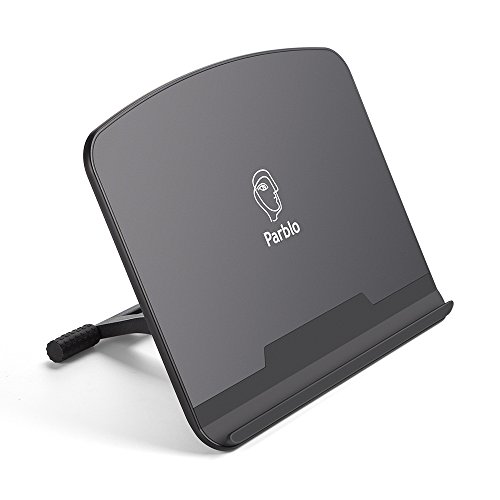
- Fits most 10 to 16 inch tablets
- 15° to 90° tilt adjustment
- Rubber contact points improve stability
Best For: Artists who want broad tablet compatibility and strong tilt flexibility
Lightweight Desk Stand
MAX SMART Foldable Stand for 9-16 Inch Tablets

- Fits most tablets and drawing devices up to 16 inches
- Adjusts from 15° to 39°
- Slim 360 g fold-flat design
Best For: Everyday desk use with a slim, travel-friendly stand
VESA Ergonomic Stand
HUION ST100A for Large VESA Pen Displays

- Supports 75 mm and 100 mm VESA mounts
- Adjusts from 20° to 80°
- Anti-slip mats help secure larger displays
Best For: Large VESA-compatible pen display owners who want ergonomic support
Frunsi 9-Level Multi-Device Stand
Adjustable Drawing Tablet Stand with Phone Holder
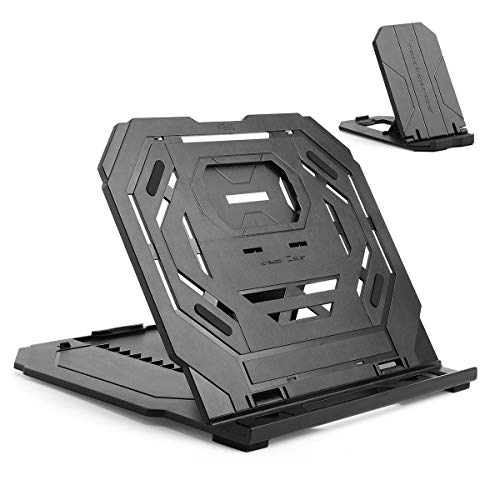
- 9 angle settings for ergonomic positioning
- Double triangular build for added stability
- Built-in phone holder and fold-flat design
Best For: Creators who want one portable stand for tablet, laptop, and phone
Frunsi Triangular Foldable Stand
Blue Adjustable Tablet Riser with Phone Holder
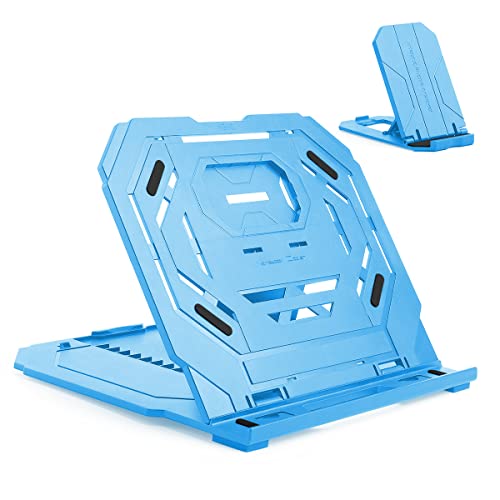
- 9 angle settings for better posture
- Double triangular structure for stability
- Foldable design with built-in phone holder
Best For: Buyers who want a simple, stable, foldable desk stand
Universal Adjustable Stand
HUION ST200 Portable Desktop Stand

- 20-60° adjustment for drawing and typing
- Folds flat and weighs 566g for portability
- Aluminum build with anti-slip mats and stopper
Best For: Artists who need a lightweight stand for tablets, pen displays, or laptops
Original Pen Display Stand
HUION ST300 Foldable Drawing Support
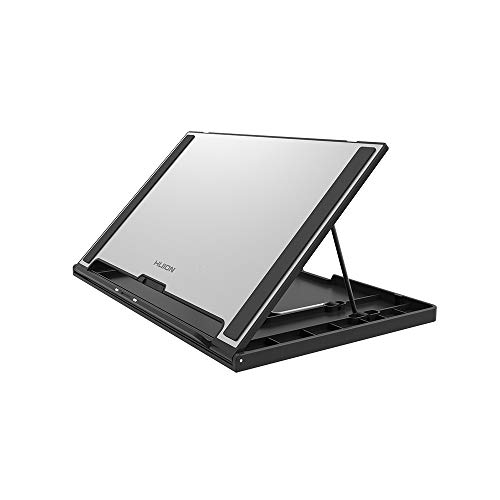
- 14.5-45° adjustment for ergonomic use
- 11mm thin when folded for easy carry
- Anti-slip mats and hidden stopper for stability
Best For: HUION pen display users and mobile artists
Portable Artist Riser
XPPen Adjustable Tablet Desk Stand

- Fits 10-15.6 inch tablets, displays, and laptops
- Only 0.8 lbs and includes a storage bag
- Silicone pads and aluminum build improve stability
Best For: XPPen artists and mobile users with smaller drawing tablets
Universal Tilt Stand – Parblo PR 100 for 10-16 Inch Tablets
If you want a drawing tablet adjustable stand that works across a wide size range, the Parblo PR 100 is built for 10 to 16 inch tablets and drawing monitors. Its 15° to 90° tilt range gives you a lot of freedom to dial in a viewing position for sketching, inking, or general desk use, while rubber contact points help keep your device more stable during sessions.
Best For: Artists who need a simple, wide-compatibility stand for 10 to 16 inch drawing tablets and monitors.
Pros:
- Fits most 10 to 16 inch tablets and drawing monitors
- Adjusts from 15° to 90° for flexible positioning
- Rubber touch points add stability while drawing
- Alloy and plastic build is made for desk use
Cons:
- Does not appear to offer fine height adjustment
- Not designed for larger pen displays over 16 inches
Overall, the PR 100 is a practical pick if you want broad compatibility and a highly adjustable tilt range without extra complexity. It focuses on stability and convenience, which makes it a straightforward choice for everyday drawing setups.
Portable Ventilated Stand – MIXJOY Adjustable Stand for Wacom, XP-PEN, Huion
This drawing tablet adjustable stand is aimed at users who want a compact, travel-friendly way to hold pen displays and tablets at a comfortable angle. It supports a wide list of devices, including Wacom, XP-PEN, and Huion models, and offers 6 angle settings from 18° to 35° for more ergonomic drawing or viewing.
Best For: Creators who need a lightweight, foldable stand for portable drawing monitor setups.
Pros:
- Compatible with many Wacom, XP-PEN, and Huion displays
- Six adjustable angles for ergonomic positioning
- Folds flat and is easy to pack for travel
- Ventilated aluminum design helps airflow and cooling
Cons:
- Angle range is narrower than some larger stands
- Designed more for portability than heavy-duty desk setups
For artists who move between workspaces, this stand balances compatibility, portability, and ventilation well. It is especially appealing if you want a lightweight stand that can tuck into a bag without taking much space.
Lightweight Desk Stand – MAX SMART Foldable Stand for 9-16 Inch Tablets
If you want a drawing tablet adjustable stand that is easy to move and store, the MAX SMART stand focuses on simplicity and portability. It fits most tablets and digital drawing devices up to 16 inches, adjusts from 15° to 39°, and uses an open, ventilated structure to help airflow during longer sessions.
Best For: Artists and students who want a slim, lightweight stand for everyday desk use and travel.
Pros:
- Compatible with tablets, e-readers, books, and lightweight laptops
- Adjusts from 15° to 39° for comfortable viewing
- Very slim and lightweight at about 360 g and 1 cm thick
- Fold-flat design helps keep desks and bags organized
Cons:
- No adjustable length
- Angle range is limited compared with more advanced stands
This is a good everyday stand if you value portability and a clean desk over maximum adjustability. Its broad compatibility and slim profile make it easy to use for drawing, reading, or watching content.
VESA Ergonomic Stand – HUION ST100A for Large VESA Pen Displays
The HUION ST100A is a drawing tablet adjustable stand made for larger pen displays that use VESA mounting holes. It supports 75 mm and 100 mm VESA patterns, adjusts from 20° to 80°, and uses anti-slip mats to help keep compatible displays steady while you work.
Best For: Owners of larger HUION and VESA-compatible pen displays who want a sturdy ergonomic stand.
Pros:
- Supports 75 mm and 100 mm VESA mounting holes
- Adjusts from 20° to 80° for ergonomic positioning
- Anti-slip mats help keep the display secure
- Fits many larger Kamvas and other drawing monitors over 15.6 inches
Cons:
- Only works with monitors that have VESA holes
- Not a universal stand for smaller tablets
If your display is VESA-compatible, the ST100A offers a strong ergonomic angle range and a stable platform for bigger screens. It is less versatile than universal tablet stands, but that tradeoff makes sense for dedicated pen display users.
Frunsi 9-Level Multi-Device Stand – Adjustable Drawing Tablet Stand with Phone Holder
If you want a drawing tablet adjustable stand that also works for a laptop or phone, this Frunsi model is built around versatility and everyday comfort. It offers 9 angle settings, a double triangular structure for stability, and a heat-dissipating surface to help keep devices cooler during longer sessions.
Best For: Artists and students who want one lightweight stand for a 12-17 inch drawing tablet, laptop, and smartphone.
Pros:
- 9 adjustable angles help you find a more ergonomic viewing and drawing position.
- Double triangular structure is designed to be more stable and reduce shaking while typing or drawing.
- Built-in phone holder lets you keep a smartphone in use alongside the stand.
- Foldable, lightweight design makes it easier to pack for travel or daily carry.
Cons:
- Only compatible with 12-17 inch tablets and laptops, so smaller devices may not fit as intended.
- Its simple fold-flat design is portable, but it is not a fully specialized drawing arm or riser.
This is a practical pick if you need a compact stand that supports long creative sessions and multi-device setups. The added phone holder and cooling-focused surface make it especially useful for desk work that runs for hours.
HUION ST200 Portable Tilt Stand – Slim Adjustable Stand for Pen Displays
The HUION ST200 is a drawing tablet adjustable stand made for pen displays and other slim devices up to 15.6 inches. It focuses on ergonomic tilt control, secure placement, and a thin aluminum design that folds flat for easier transport.
Best For: Pen display users who want a lightweight, angle-adjustable stand for drawing and typing.
Pros:
- Adjusts from 20 to 60 degrees to help you find a comfortable working angle.
- Aluminum-alloy construction includes anti-slip mats and a hidden stopper for secure positioning.
- Ultra-thin, fold-flat profile makes it easy to carry for travel or commuting.
- Ventilation design and alloy surface are intended to improve heat dissipation during use.
Cons:
- Designed for devices 15.6 inches and under, so larger displays are not a fit.
- Its minimalist tabletop design is portable, but it offers fewer extras than stands with built-in accessory holders.
For artists who prioritize a clean, stable, and adjustable viewing angle, the ST200 is a straightforward choice. It suits pen-display workflows especially well because it balances portability, grip, and cooling-friendly construction.
Frunsi Triangular Foldable Stand – Blue Adjustable Tablet Riser with Phone Holder
This drawing tablet adjustable stand is a simple desk riser for users who want a stable, angle-adjustable platform for a 12-17 inch tablet or laptop. It uses a double triangular structure, includes a built-in phone holder, and folds flat when you need to clear desk space or pack it away.
Best For: Users who want a foldable stand with strong stability and a built-in smartphone holder.
Pros:
- 9 adjustable angles support more comfortable posture for long drawing or typing sessions.
- Double triangular structure is designed for better stability and less wobble.
- Built-in smartphone holder lets you use a phone at the same time as the main stand.
- Fold-flat, lightweight construction makes it easy to store or carry.
Cons:
- Compatibility is limited to 12-17 inch tablets and laptops.
- Its feature set is focused on basic support rather than advanced stand mechanisms.
If you want a no-fuss stand for creative work, this Frunsi model keeps the essentials front and center. It is especially appealing for buyers who value stability, portability, and a separate spot for a phone on the same desk.
Universal Adjustable Stand – HUION ST200 Portable Desktop Stand
If you’re comparing a drawing tablet adjustable stand for a pen tablet or pen display, the HUION ST200 is a practical all-around pick. It tilts from 20 to 60 degrees, folds flat for travel, and uses an aluminum-alloy build with anti-slip mats and a hidden stopper to help keep your device steady while you work.
Best For: Artists who want a lightweight, foldable stand for drawing tablets, pen displays, or even laptops.
Pros:
- Adjusts from 20 to 60 degrees for a more comfortable viewing and drawing angle
- Folds into a slim, portable shape and weighs 566g
- Aluminum-alloy construction with anti-slip mats and hidden stopper for added stability
- Ventilation-friendly design helps support heat dissipation
Cons:
- Angle range is narrower than some other HUION options
- Best suited to devices in the 10-16 inch range
The ST200 is a solid choice if you want a simple, portable stand that prioritizes ergonomic adjustment and stability without adding much bulk. It works well as a flexible desk companion for drawing, typing, and general tablet use.
Original Pen Display Stand – HUION ST300 Foldable Drawing Support
The HUION ST300 is a focused drawing tablet adjustable stand built for pen displays and compatible tablets, with angle control from 14.5 to 45 degrees. It folds down to an 11mm-thin profile, so it’s easy to slide into a bag, while the aluminum-alloy surface, anti-slip mats, and hidden stopper are meant to keep your device in place during use.
Best For: HUION pen display owners and artists who want a slim, travel-friendly stand for drawing sessions.
Pros:
- Adjusts from 14.5 to 45 degrees for ergonomic viewing
- Folds to an 11mm thin, flat shape for easy transport
- Anti-slip mats and hidden stopper help secure your device
- Compatible with several HUION Kamvas and Kamvas Pro models, plus other tablets and laptops under 15.6 inches
Cons:
- Angle range is more limited than the ST200
- Best fit is centered on specific HUION displays and smaller devices
If you want a stand that feels designed around pen-display workflows, the ST300 is the more targeted option. It keeps the profile slim for transport while still offering enough adjustment for comfortable drawing and typing angles.
Portable Artist Riser – XPPen Adjustable Tablet Desk Stand
If you need a drawing tablet adjustable stand for a 10-15.6 inch tablet or display, the XPPen stand is built as a light, portable desk riser. It uses an aluminum body, silicone anti-slip pads, and a foldable design, and it even includes a storage bag for carrying it between home, office, or studio.
Best For: XPPen artists and anyone who wants a compact, easy-to-carry stand for smaller drawing tablets or displays.
Pros:
- Compatible with 10 to 15.6 inch laptops, drawing tablets, and displays
- Lightweight at 0.8 lbs and includes a storage bag
- Anti-slip silicone pads help keep devices steady
- Aluminum alloy construction supports better cooling and a clean desk setup
Cons:
- Designed for smaller screens, so it won’t suit larger pen displays
- Product details do not specify angle increments
This is a straightforward choice if portability matters as much as stability. It fits neatly into a mobile workflow, especially for XPPen users who want a matching stand for compatible Artist models.
How We Picked the Best Drawing Tablet Adjustable Stand
We prioritized stands that offer reliable adjustability, solid support for pen displays and tablets, and a design that works well for everyday creative use. Compatibility mattered, but so did ergonomics, ventilation, and ease of setup. For a Drawing Tablet Adjustable Stand, a good balance of stability and angle flexibility is usually more important than flashy extras.
Quick Comparison
Most options here fall into two groups: lightweight multi-angle stands for portable setups and heavier-duty desk stands for larger pen displays. If you move between home, studio, or class, portability may matter most. If you use a larger display or want maximum stability, look for a reinforced aluminum frame or a VESA-compatible design.
Key Buying Factors for a Drawing Tablet Adjustable Stand
Size and Compatibility
Check the supported screen size and whether the stand is intended for tablets, pen displays, or both. Some models are made for compact 10 to 16 inch devices, while others are designed for larger displays with VESA mounting holes.
Angle Adjustment
More angle positions generally mean better ergonomic tuning, but the mechanism should feel secure and easy to change. A stable tilt is especially important if you press hard while sketching or use a heavier display.
Stability and Material
Aluminum stands usually offer a strong, lightweight build. Look for wide support surfaces, non-slip feet, and a frame that minimizes wobble during drawing.
Ventilation and Desk Comfort
Open-frame designs can help with airflow and keep devices cooler during long work sessions. This is useful for displays that run warm or for artists who work for hours at a time.
Portability and Extras
Foldable stands are easier to store or carry. Built-in phone holders and compact profiles can be helpful, but they should not compromise the main job: keeping your tablet steady and comfortable to use.
Who Should Buy Which Drawing Tablet Adjustable Stand?
If you use a smaller pen display and want an affordable everyday solution, a compact multi-angle stand is usually enough. If you own a larger or VESA-mountable display, choose a more robust desk stand built for heavier hardware. Artists who travel or work in shared spaces should lean toward foldable, lightweight models, while studio users may prefer maximum rigidity and broad adjustment control.
For most buyers, the best choice is the stand that matches your device size, gives you the right drawing angle, and stays rock-solid under pressure. That combination matters more than any single feature.