Choosing the right storage can make or break a Mac editing workflow. The best eight-bay NAS for Mac video editing should deliver fast transfers, dependable uptime, and room to grow as projects get larger.
In this roundup, we focus on models that balance performance, networking, and long-term value for solo creators and small teams alike.
Best 10 Eight Bay NAS for Mac Video Editing Picks for 2026
Enterprise 8-Bay Powerhouse
Synology DS1825+ for Large-Scale Production

- Up to 2,239 MB/s for 4K/8K collaboration
- Scales from 160TB to 360TB with expansion
- 10GbE or 25GbE upgrade options
Best For: Post-production teams and growing studios needing fast shared storage
Budget-Friendly High-Capacity 8-Bay NAS
QNAP TS-832PX-4G for Fast Shared Storage

- Built-in 10GbE SFP+ plus 2.5GbE ports
- Eight-bay storage for large media libraries
- Memory expands up to 16 GB
Best For: Editors who want fast networking and lots of storage without extra cards
Expandable Enterprise Workhorse
Synology DS1823xs+ for Reliable Mac Editing

- Expands to 18 bays with DX517 units
- License-free backup, replication, and recovery
- Hot-swappable drives with High Availability
Best For: Teams needing reliable shared storage and future expansion
Ryzen-Powered Creative NAS
QNAP TS-873A-8G for Flexible Editing Workflows

- Ryzen Embedded V1500B quad-core CPU
- RAM expandable up to 64GB
- Two PCIe Gen3 slots for upgrades
Best For: Small studios that want a flexible, upgradeable NAS platform
Rack-Mount Pick
Synology RS1221+ 8-Bay RackStation

- Up to 2,315 MB/s read and 1,147 MB/s write
- Short-depth 298 mm rack design
- Supports PCIe network expansion and HA clustering
Best For: Editing teams needing rack-mounted storage and high availability
Thunderbolt Editing Pick
OWC ThunderBay 8 Thunderbolt RAID Enclosure

- Eight-bay Thunderbolt 3 enclosure for Mac and Windows
- Includes SoftRAID Premium for flexible RAID setup
- Plug-and-play with dual ports and included cable
Best For: Mac editors wanting fast direct-attached RAID storage
Performance Pick

- Intel Core i9 with 64GB RAM
- Dual M.2 Gen4 slots and dual 10GbE
- Built for 4K playback and real-time transcoding
Best For: Power users needing maximum NAS performance for media work
Desktop JBOD Expansion
QNAP TL-D800C 8-Bay USB-C Storage Enclosure
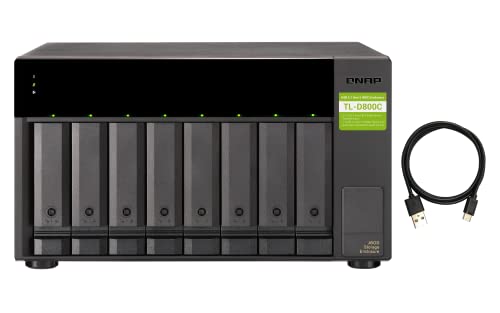
- 8-bay JBOD enclosure for SATA drives
- USB 3.2 Gen 2 Type-C connectivity
- Diskless desktop design with 250W PSU
Best For: Expanding a Mac editing setup with lots of direct-attached storage
High-Performance Media NAS
UGREEN NAS DXP8800 Plus 8-Bay with 10GbE

- Dual 10GbE ports with up to 20G aggregation
- Intel Core i5 1235U with 8GB DDR5 RAM
- 8 bays plus 2 M.2 NVMe slots for storage growth
Best For: Mac video editors who need fast shared storage and advanced hardware
Virtualization-Ready NAS
QNAP TS-855X-8G 8-Bay Tower with 10GbE

- 8-core CPU with 8GB DDR4 RAM
- 10GbE plus dual 2.5GbE networking
- Dual M.2 slots and two PCIe expansion slots
Best For: Teams that want a flexible NAS with 10GbE and expansion headroom
Enterprise 8-Bay Powerhouse – Synology DS1825+ for Large-Scale Production
If you need an eight bay NAS for Mac video editing that can keep up with demanding 4K and 8K workflows, the Synology DS1825+ is built for high-throughput shared storage. It’s aimed at production teams that want fast access, room to grow, and enterprise-style reliability rather than a basic media archive.
Best For: Post-production teams, studios, and creative departments handling many concurrent editors and large media libraries.
Pros:
- Supports 50+ concurrent users editing 4K/8K projects with speeds up to 2,239 MB/s.
- Can scale from 160TB to 360TB with expansion units for growing video archives.
- Upgradeable to 10GbE or 25GbE for faster transfers and shared editing workflows.
- Includes enterprise protections like high-availability clustering and automated failover.
Cons:
- Diskless, so you’ll need to buy drives separately.
- Advanced performance depends on adding the right network upgrade card.
- More than many small studios need if your editing team is very small.
Overall, this is the most production-focused option here, especially if your Mac editing setup needs serious scale, redundancy, and room for future growth.
Budget-Friendly High-Capacity 8-Bay NAS – QNAP TS-832PX-4G for Fast Shared Storage
The QNAP TS-832PX-4G is a practical eight bay NAS for Mac video editing if you want high-capacity storage with built-in fast networking. Its 10GbE SFP+ ports make it a straightforward choice for moving large video files quickly across a team, while the 2.5GbE ports add extra flexibility.
Best For: Creators who want an 8-bay NAS with built-in 10GbE for faster file transfers and shared project storage.
Pros:
- Includes 2 x 10 Gigabit Ethernet ports plus 2 x 2.5GbE ports.
- Eight-bay design gives you plenty of room for large media storage.
- Uses a quad-core AnnapurnaLabs processor for general NAS workloads.
- Expandable memory up to 16 GB.
Cons:
- ARM-based processor is less powerful than some Ryzen-based alternatives.
- Only 4 GB of RAM installed by default.
- Diskless, so drive purchase is separate.
This model makes sense when networking speed matters more than workstation-class processing, especially for shared storage and file movement in a Mac-focused editing setup.
Expandable Enterprise Workhorse – Synology DS1823xs+ for Reliable Mac Editing
For an eight bay NAS for Mac video editing that prioritizes uptime and expandability, the Synology DS1823xs+ is built like an enterprise workhorse. It supports backup, replication, and recovery workflows, while hot-swappable drives and online volume expansion help keep projects moving during busy production periods.
Best For: Teams that want dependable shared storage with strong recovery features and room to expand.
Pros:
- Can expand to 18 drive bays with two DX517 expansion units.
- Supports license-free backup, replication, and recovery solutions.
- Offers hot-swappable drives, online volume expansion, and High Availability clustering.
- Comes with a 5-year warranty.
Cons:
- Diskless and aimed more at server-style deployment than simple desktop use.
- Rack-mount form factor may not suit every studio space.
- More enterprise-oriented than a basic home editing NAS.
If your editing workflow depends on reliable shared storage and you want a platform that can grow with the production, this Synology is a strong long-term choice.
Ryzen-Powered Creative NAS – QNAP TS-873A-8G for Flexible Editing Workflows
QNAP TS-873A-8G 8 Bay NAS | High-performance, 2 x 2.5GbE Ports, Two PCIe Gen3 Slots
Check Price On AmazonThe QNAP TS-873A-8G is a versatile eight bay NAS for Mac video editing if you want a stronger CPU platform and expansion options. With an AMD Ryzen Embedded processor, 8GB of RAM, and two PCIe Gen3 slots, it gives creative users flexibility for networking and storage upgrades as projects grow.
Best For: Editors and small studios that want a flexible NAS platform with a stronger processor and upgrade paths.
Pros:
- AMD Ryzen Embedded V1500B quad-core 2.2 GHz processor.
- 8GB DDR4 RAM installed, expandable up to 64GB.
- Two PCIe Gen3 slots for future expansion.
- Includes two 2.5GbE ports plus multiple USB 3.2 connections.
Cons:
- Does not include 10GbE out of the box.
- Diskless, so drives must be purchased separately.
- Rack-mount design may be less convenient for some desktop setups.
For Mac editors who value flexibility and upgrade potential, this QNAP offers a solid foundation without forcing you into a fixed configuration on day one.
Rack-Mount Pick – Synology RS1221+ 8-Bay RackStation
If you need an eight bay NAS for Mac video editing in a shared studio, the Synology RS1221+ is built for fast, centralized storage rather than desk-side convenience. Its short-depth rack design, strong read/write throughput, and upgrade options make it a practical fit for teams that need reliable file access and room to grow.
Best For: Shared editing teams that want rack-mounted storage with high read/write performance and high-availability options.
Pros:
- Up to 2,315 MB/s read and 1,147 MB/s write performance for demanding multi-user workflows
- Short 298 mm depth can fit more easily in compact rack setups
- PCIe expansion support can improve network performance with compatible SFP+ or RJ-45 cards
- Can be paired with another unit for Synology High Availability and faster failover
Cons:
- Diskless configuration means drives must be purchased separately
- Rack-mount form factor is less convenient than a desktop NAS for small home setups
- Best performance depends on supported network-card and system configuration
Overall, the RS1221+ makes the most sense when your Mac editing workflow is centered on shared access, uptime, and rack infrastructure. It is less about desktop simplicity and more about dependable throughput and service continuity.
Thunderbolt Editing Pick – OWC ThunderBay 8 Thunderbolt RAID Enclosure
For an eight bay NAS for Mac video editing alternative that stays directly on the desk, the OWC ThunderBay 8 is a Thunderbolt storage enclosure with the speed and simplicity many editors want. It offers eight universal drive bays, dual Thunderbolt ports, and plug-and-play setup, making it a straightforward way to build fast local RAID storage for large media projects.
Best For: Mac editors who want fast direct-attached eight-bay RAID storage with simple setup and flexible drive support.
Pros:
- Eight universal 2.5-inch or 3.5-inch bays support SSDs and HDDs
- Dual Thunderbolt 3 ports with backward compatibility for Thunderbolt 2 devices
- Includes SoftRAID Premium for flexible RAID 0/1/4/5/10 management
- Plug-and-play design with included Thunderbolt cable and no drivers needed
Cons:
- It is a storage enclosure, not a network NAS
- Best suited to Mac and Windows systems with Thunderbolt support
- Capacity depends on the drives you add separately
If your priority is fast local editing performance instead of network sharing, this is one of the most practical eight-bay options in the group. It is especially appealing when you want Thunderbolt speed and RAID flexibility without a complicated install.
Performance Pick – QNAP TVS-h874X-i9 8-Bay NAS
If you want an eight bay NAS for Mac video editing that is built for serious throughput, the QNAP TVS-h874X-i9-64G brings desktop-class horsepower and high-speed networking. With an Intel Core i9, 64GB of RAM, dual M.2 Gen 4 slots, and multiple fast network ports, it is aimed at large media libraries, cache acceleration, and heavy file movement.
Best For: Power users and post-production teams that need a very fast NAS with strong networking and SSD acceleration options.
Pros:
- Intel Core i9 with 64GB DDR4 RAM for demanding workloads
- Dual M.2 PCIe Gen4x4 slots for cache acceleration or SSD storage pools
- Dual 10GbE plus quad 2.5GbE ports for high-speed connectivity
- USB 3.2 Gen 2 and HDMI 4K output add flexible media workflow support
Cons:
- Diskless model requires separate drives
- More powerful than many smaller editing setups need
- Rack-mount design may be less convenient than a desktop unit in a home office
For editors who care most about performance headroom, this QNAP stands out as the most aggressive spec sheet in the roundup. It is a strong fit when your workflow involves large projects, fast transfers, and multiple users.
Desktop JBOD Expansion – QNAP TL-D800C 8-Bay USB-C Storage Enclosure
QNAP TL-D800C 8 Bay Desktop JBOD Storage Enclosure | USB 3.2 Gen 2 Type-C Connectivity
Check Price On AmazonIf you need an eight bay NAS for Mac video editing but already have a primary NAS or editing workstation, the QNAP TL-D800C is a straightforward way to add more SATA storage over USB-C. It is a diskless 8-bay JBOD enclosure with USB 3.2 Gen 2 Type-C connectivity, so it is built for capacity expansion rather than onboard NAS features.
Best For: Editors who want a simple 8-bay Mac-friendly expansion enclosure for large media libraries and project storage.
Pros:
- 8-bay desktop enclosure with support for 3.5-inch SATA drives
- USB 3.2 Gen 2 Type-C connection for direct attachment to computers and servers
- Diskless design lets you choose the drives that fit your workflow
- Includes a 250W power supply and installation accessories
Cons:
- JBOD storage enclosure, not a full NAS with its own network features
- Drives are not included
- Best suited to expansion use rather than standalone multi-user sharing
The TL-D800C makes sense if your editing setup needs a large local drive pool without replacing your current NAS or computer storage stack. For Mac video workflows, its value is in adding lots of SATA bays in a compact desktop enclosure.
High-Performance Media NAS – UGREEN NAS DXP8800 Plus 8-Bay with 10GbE
The UGREEN NAS DXP8800 Plus is a strong eight bay NAS for Mac video editing if you want high-speed network storage with more advanced hardware. It pairs an Intel Core i5 1235U processor, dual 10GbE ports, 2x M.2 NVMe slots, and 8GB DDR5 RAM, making it geared toward heavy file transfers and larger shared projects.
Best For: Mac editors who want a fast, feature-rich NAS for shared media storage and high-bandwidth transfers.
Pros:
- 8-bay design with support for up to 272TB of storage
- Dual 10GbE ports with aggregation up to 20G bandwidth
- Intel 10-core CPU and 8GB DDR5 RAM for demanding workloads
- Two M.2 NVMe slots plus 8K HDMI and Thunderbolt 4 ports
Cons:
- Diskless, so drives must be purchased separately
- Wired Ethernet only, with no Wi-Fi support
- Advertised speed depends on your network, drives, and file sizes
For editors building a central library for 4K or larger projects, this model offers a lot of bandwidth and expandability in one box. It is more NAS than enclosure, so it fits workflows that need shared access, caching options, and room to grow.
Virtualization-Ready NAS – QNAP TS-855X-8G 8-Bay Tower with 10GbE
The QNAP TS-855X-8G is an eight bay NAS for Mac video editing when you want a desktop tower that emphasizes file sharing, cache acceleration, and upgrade flexibility. It includes an Intel Atom C5125 8-core processor, 8GB DDR4 RAM, a single 10Gbase-T port, dual 2.5GbE ports, and dual M.2 NVMe slots.
Best For: Editors who want a flexible 8-bay NAS with 10GbE, cache support, and expansion options.
Pros:
- 8-core Intel Atom processor with 8GB DDR4 RAM
- Single 10Gbase-T plus dual 2.5GbE ports for faster transfers
- Dual M.2 NVMe slots for cache acceleration or SSD storage pools
- Two PCIe Gen 3 x4 slots for extra adapters or cards
Cons:
- Diskless, so storage drives are not included
- Baseline RAM is 8GB, which may be modest for heavier multitasking
- Desktop tower form factor may be larger than a compact enclosure
This model is a good fit if your editing workflow benefits from a more traditional NAS platform with room to add network or storage hardware later. It is especially appealing for teams that want faster transfer paths and cache-friendly storage architecture.
How We Picked the Best Eight Bay NAS for Mac Video Editing
For eight-bay NAS for Mac video editing, we prioritized sustained transfer performance, network upgrade paths, drive expansion, and day-to-day reliability. We also considered how well each unit fits common Mac-centric workflows, including multi-user editing, media archiving, and proxy-heavy projects.
Quick Comparison
Not every editor needs the same setup. Some buyers will want a true NAS for shared access and backup, while others may prefer a Thunderbolt or USB enclosure for direct-attached speed. In this list, the higher-end NAS models are better for collaborative work, while JBOD and RAID enclosures suit local storage expansion.
Key Buying Factors for Eight Bay NAS for Mac Video Editing
Network Speed
Look for 10GbE or faster if you plan to edit directly from the NAS. Dual 2.5GbE is useful for lighter workflows, but high-bitrate 4K and 6K projects benefit from more headroom.
CPU and Memory
Video editing workloads often involve thumbnails, indexing, transcoding, and multiple simultaneous users. A stronger processor and upgradeable RAM can help the system stay responsive under load.
Drive and Expansion Support
Eight bays provide a strong base for capacity and redundancy, but expansion options matter if your media library keeps growing. Consider maximum raw capacity, SSD cache support, and whether the platform can scale beyond the initial chassis.
Mac Compatibility and Workflow Fit
Make sure the system works smoothly with macOS file sharing, Time Machine, and your preferred editing apps. For an Eight Bay NAS for Mac Video Editing, ease of setup and stable client connectivity are just as important as benchmark numbers.
Who Should Buy Which Eight Bay NAS for Mac Video Editing?
Solo editors and small studios usually do best with a fast desktop NAS that offers 10GbE and solid CPU performance. Teams working on shared timelines should lean toward higher-end NAS models with better networking and upgrade flexibility. If you only need direct-attached expansion for one Mac, a Thunderbolt RAID or JBOD enclosure may be the simpler choice.
In short, choose the platform that matches your workflow today, while leaving enough performance and capacity for larger projects tomorrow.