Finding an ergonomic gaming mouse compatible with Mac can be tricky when you want comfort for long sessions and enough precision for fast-paced games. The best options balance shape, button placement, sensor quality, and reliable Mac connectivity.
This roundup focuses on picks that work well on macOS, whether you prefer a vertical design, a traditional gaming shape, or a productivity-first mouse that still handles casual gaming with ease.
Best 10 Ergonomic Gaming Mouse Compatible with Mac Picks for 2026
Lightweight Wireless Pick
Logitech G305 Lightspeed for Mac

- 12,000 DPI HERO sensor
- 1 ms LIGHTSPEED wireless
- Up to 250 hours battery life
Best For: Mac gamers who want a portable wireless mouse with long battery life.
Premium Productivity Ergonomic
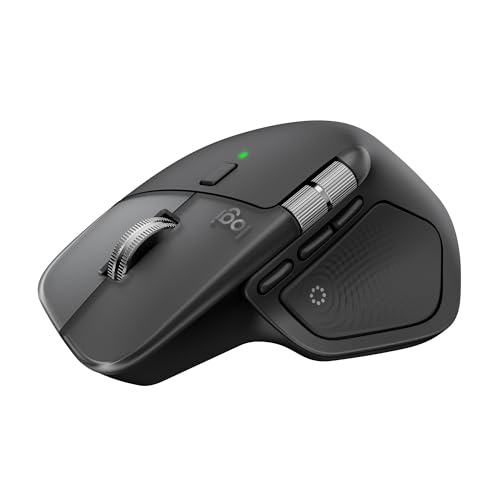
- Haptic Sense Panel with custom feedback
- MagSpeed scrolling and Actions Ring
- Ergonomic right-handed comfort design
Best For: Mac users who want an ergonomic mouse with advanced productivity features.
RGB Performance Ergonomic

- 26K DPI Focus+ optical sensor
- 11 programmable buttons
- Ergonomic thumb-rest design
Best For: Right-handed gamers who want a wired mouse with lots of customization.
Balanced Wireless Ergonomic

- MagSpeed wheel with ultra-fast scrolling
- Bluetooth or USB-C dongle support
- Quiet Clicks and natural tilt
Best For: Mac users who want a comfortable wireless mouse for work and light gaming.
Vertical Comfort Pick
Nulea M504 Wired Vertical Mouse, Grey

- 57-degree ergonomic vertical grip
- 4 DPI levels up to 3200
- USB wired plug-and-play design
Best For: Mac users who want a comfortable vertical mouse for daily use
Mac-Ready Premium Pick
Logitech Lift for Mac Wireless Vertical Mouse
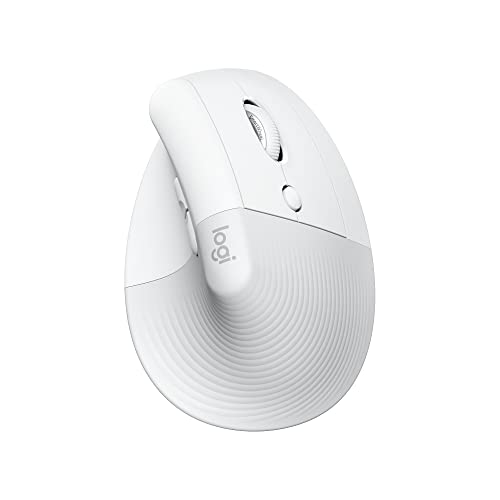
- Bluetooth Low Energy for Mac and iPad
- Quiet clicks with silent SmartWheel
- 4 customizable buttons and long battery life
Best For: Mac users who want a premium wireless ergonomic mouse
Quiet comfort pick
UGREEN Vertical Ergonomic Mouse

- Natural vertical grip helps reduce wrist rotation
- Bluetooth 5.4 and 2.4G dual-mode wireless
- Quiet clicks with 4 DPI levels up to 4000
Best For: Mac users who want a quiet vertical mouse for daily work and light gaming
Balanced comfort pick
Logitech Lift Vertical Ergonomic Mouse

- 57-degree vertical design for natural posture
- Bluetooth Low Energy or Logi Bolt USB connection
- Quiet clicks, SmartWheel, and 4 customizable buttons
Best For: Small to medium right hands on Mac that need all-day ergonomic comfort
Lightweight Wireless Pick – Logitech G305 Lightspeed for Mac
If you want an ergonomic gaming mouse compatible with Mac that keeps things simple, the Logitech G305 Lightspeed is a strong lightweight option. It pairs a compact ambidextrous shape with a HERO sensor, 1 ms wireless response, and long battery life, making it a practical pick for players who want speed without extra bulk.
Best For: Mac gamers who want a lightweight, portable wireless mouse with long battery life and a straightforward button layout.
Pros:
- HERO sensor reaches up to 12,000 DPI for precise tracking.
- LIGHTSPEED wireless promises 1 ms response time.
- Up to 250 hours of battery life on a single AA battery.
- Compact, lightweight design with built-in USB receiver storage.
Cons:
- Only 6 programmable buttons, so it is not the most feature-heavy pick.
- Uses a single AA battery instead of a built-in rechargeable pack.
- Classic shape is comfortable, but less advanced than premium ergonomic models.
Overall, the G305 is best if you care more about fast wireless performance and portability than about advanced comfort features. It is a clean, dependable choice for Mac users who want a gaming mouse that travels well and lasts a long time between battery changes.
Premium Productivity Ergonomic – Logitech MX Master 4 for Mac
The Logitech MX Master 4 for Mac is a premium ergonomic gaming mouse compatible with Mac users who also want top-tier productivity features. Its haptic feedback, ultra-fast scrolling, quiet clicks, and Mac-focused software support make it a strong fit for long sessions where comfort and control matter.
Best For: Mac users who want a comfort-first wireless mouse with advanced scrolling, haptics, and customization.
Pros:
- Haptic Sense Panel adds customizable feedback for actions and shortcuts.
- MagSpeed wheel scrolls up to 1,000 lines per second with precise stopping.
- Ergonomic design includes a natural tilt and thumb scroll wheel.
- Quiet Clicks reduce click noise by 90% for focused work.
Cons:
- Designed mainly for right-handed users.
- Not a pure gaming mouse in the classic sense; it leans heavily into productivity.
- USB-C charging cable is not included.
If you want a Mac mouse that feels more like a premium control center than a basic peripheral, this model stands out. It is especially appealing for buyers who want ergonomic support, smooth scrolling, and app-aware features in one package.
RGB Performance Ergonomic – Razer Basilisk V3
The Razer Basilisk V3 is an ergonomic gaming mouse compatible with Mac hardware, but it is clearly aimed at gamers who want a fully featured wired design. Its thumb rest, 11 programmable buttons, 26K DPI sensor, and HyperScroll tilt wheel make it a strong choice when customization and performance are the priority.
Best For: Right-handed gamers who want a feature-rich ergonomic mouse with lots of programmable controls.
Pros:
- Iconic ergonomic shape with thumb rest for hand support.
- 11 programmable buttons for macros and secondary functions.
- 26K DPI optical sensor for precise tracking.
- HyperScroll tilt wheel switches between free-spin and tactile modes.
Cons:
- Wired USB connection only, so there is no wireless flexibility.
- Official OS support is listed for Windows 10 and 11, so Mac users should check software expectations.
- Heavier feature set may be more than casual users need.
For players who want a mouse with plenty of buttons, strong ergonomics, and fast sensor performance, the Basilisk V3 is easy to recommend. It is a better fit for desk-based gaming setups than for minimalist Mac workflows.
Balanced Wireless Ergonomic – Logitech MX Master 4
The Logitech MX Master 4 is an ergonomic gaming mouse compatible with Mac users who want comfort, modern wireless connectivity, and productivity-first controls. With haptic feedback, MagSpeed scrolling, Bluetooth or USB-C dongle options, and a natural tilt, it is built for long sessions where hand strain and workflow speed both matter.
Best For: Mac users who want a versatile ergonomic wireless mouse with strong connectivity and premium scrolling.
Pros:
- MagSpeed wheel scrolls up to 1,000 lines per second.
- Ergonomic shape with natural tilt and thumb scroll wheel.
- Offers Bluetooth or USB-C dongle connectivity.
- Quiet Clicks reduce click noise for distraction-free use.
Cons:
- Only 8,000 DPI, which is lower than some dedicated gaming mice.
- Right-handed design limits ambidextrous use.
- It is more productivity-oriented than competitive-gaming focused.
This is the best all-rounder in the group for Mac users who value comfort and versatility over raw gaming specs. If you want one mouse for work, browsing, and lighter gaming, the MX Master 4 is the most balanced option here.
Vertical Comfort Pick – Nulea M504 Wired Vertical Mouse, Grey
If you want an ergonomic gaming mouse compatible with Mac for long sessions, the Nulea M504 focuses on comfort first. Its 57-degree vertical shape is designed to keep your forearm in a more natural position, which can help reduce wrist strain, while the wired USB connection keeps setup simple on a Mac or PC.
Best For: Mac users who prioritize wrist comfort and want a simple wired vertical mouse for everyday use.
Pros:
- 57-degree vertical design aims to reduce arm discomfort and wrist pain.
- 4 adjustable DPI settings: 800, 1200, 2400, and 3200.
- Plug-and-play USB connection with a long 5.9 ft cable.
- 11 RGB lighting modes add a customizable look.
Cons:
- Forward and backward buttons are not compatible with Mac OS.
- All buttons are non-programmable.
- Vertical shape may take a few days to get used to.
Overall, this is a practical pick if ergonomics matter more than gaming-focused extras. It offers basic sensitivity control and a comfortable hand position, but Mac users should note the limitations on side-button support.
Mac-Ready Premium Pick – Logitech Lift for Mac Wireless Vertical Mouse
The Logitech Lift for Mac is a strong choice if you want an ergonomic gaming mouse compatible with Mac that leans into comfort and quiet operation. It uses a 57-degree vertical angle, Bluetooth Low Energy connectivity, and a Mac-focused design that works with MacBook Pro, MacBook Air, iMac, and iPad models.
Best For: Mac and iPad users who want a wireless vertical mouse with quiet clicks and long battery life.
Pros:
- Designed specifically for Mac devices with Bluetooth Low Energy support.
- 57-degree angle promotes a more relaxed wrist and arm position.
- Whisper-quiet clicks and silent SmartWheel reduce noise.
- Four customizable buttons and up to 2-year battery life.
Cons:
- Made for small to medium hands, so fit may be limited for larger users.
- Requires Bluetooth connectivity rather than a wired USB connection.
- Best features are tuned for macOS and iPadOS, not cross-platform flexibility.
This is the most polished Mac-specific option in the group, especially if you want a wireless ergonomic mouse with quiet controls. It balances comfort, battery life, and a clean Mac setup well.
Budget Wired Option – Nulea M504 Wired Vertical Mouse, White
If you are shopping for an ergonomic gaming mouse compatible with Mac and want a straightforward wired option, the white Nulea M504 covers the basics well. It uses the same 57-degree vertical design as the grey version, includes 4 DPI levels, and connects by USB for easy plug-and-play use.
Best For: Budget-minded Mac users who want a simple ergonomic vertical mouse with adjustable DPI.
Pros:
- Ergonomic 57-degree vertical grip helps reduce wrist strain.
- 4 DPI settings from 800 to 3200 for flexible cursor speed.
- USB wired setup is simple and driver-free.
- Lightweight build and 11 RGB backlight modes.
Cons:
- Forward and backward buttons are not compatible with Mac OS.
- All buttons are non-programmable.
- Vertical design may require an adjustment period.
This version makes sense if you want the Nulea ergonomic shape in a different color and prefer a no-fuss wired mouse. Just keep in mind that the extra buttons are limited on Mac.
Vertical speed pick – Keychron M5 8K Ergonomic Mouse
If you want an ergonomic gaming mouse compatible with Mac that still feels built for performance, the Keychron M5 brings a vertical shape, low-latency wireless options, and very high sensor resolution. Its 47° tilt is designed to reduce wrist pressure, while the 2.4 GHz connection and 8K polling support give it a more responsive feel for fast-moving work and play.
Best For: Mac users who want a vertical ergonomic mouse with gaming-focused speed and deep customization.
Pros:
- 47° vertical design aims to reduce wrist pressure and muscle activity.
- 2.4 GHz wireless, Bluetooth 5.3, and wired modes add flexibility for Mac setups.
- Up to 30K DPI with PixArt 3950 sensor for precise tracking.
- Programmable buttons, macros, and onboard profiles support customized workflows.
Cons:
- Right-handed vertical design only.
- Some advanced settings require using the web-based Launcher app.
Overall, the M5 is the most performance-forward pick here for Mac-friendly users who want ergonomic comfort without giving up responsiveness. It leans more toward tuned productivity and gaming precision than a simple office mouse.
Quiet comfort pick – UGREEN Vertical Ergonomic Mouse
The UGREEN Vertical Mouse is a practical ergonomic gaming mouse compatible with Mac if you want a quiet, simple design that still covers everyday control. Its natural handshake angle helps reduce wrist rotation, and the dual-mode Bluetooth 5.4 plus 2.4G connection makes it easy to switch between devices.
Best For: Mac users who want a comfortable vertical mouse for work, browsing, and light gaming.
Pros:
- Natural vertical shape helps reduce wrist strain during long sessions.
- Quiet clicks are useful for shared spaces and late-night use.
- Bluetooth and 2.4G wireless support up to 3 devices.
- Four DPI settings from 1000 to 4000 cover everyday tasks well.
Cons:
- Lower DPI ceiling than the more performance-focused options here.
- Not as feature-rich for customization as higher-end gaming mice.
This is the most straightforward comfort-first option in the group. It makes sense if your priority is a quiet, Mac-compatible vertical mouse that balances office use with casual control.
Balanced comfort pick – Logitech Lift Vertical Ergonomic Mouse
The Logitech Lift is a strong ergonomic gaming mouse compatible with Mac when you want comfort first and a polished everyday experience. Its 57-degree vertical design, quiet clicks, and SmartWheel scrolling make it easy to live with through long work sessions, while Bluetooth or Logi Bolt support keeps it flexible across Mac, iPadOS, and more.
Best For: Small to medium right hands on Mac that need a comfortable vertical mouse for all-day use.
Pros:
- 57-degree vertical shape supports a more natural forearm and wrist position.
- Bluetooth Low Energy and Logi Bolt USB options suit Mac setups.
- Quiet clicks and SmartWheel scrolling improve everyday usability.
- Four customizable buttons and up to 24 months of battery life add convenience.
Cons:
- Best suited to small and medium right hands.
- 4000 DPI max is modest compared with more gaming-focused mice.
The Lift is the most rounded ergonomic choice here if you want comfort, reliability, and broad Apple-device compatibility. It is less about high-end gaming specs and more about making long mouse sessions easier on your hand.
How We Picked the Best Ergonomic Gaming Mouse Compatible with Mac
We looked for mice that are comfortable to hold, dependable on Mac, and practical for both gaming and daily use. Priority went to models with strong sensor performance, stable wireless options, useful customization, and software or onboard controls that still make sense if you move between Mac and other devices.
Quick Comparison
If you want the most gaming-focused feel, choose a mouse with a higher-end sensor, responsive switches, and more side buttons. If comfort matters most, a vertical or sculpted ergonomic design is usually the better fit. For Mac users who split time between work and play, Bluetooth and multi-device support can be a major advantage.
Key Buying Factors for an Ergonomic Gaming Mouse Compatible with Mac
Comfort and Grip Style
Look at whether the mouse is vertical, contoured, or low-profile. A vertical shape can reduce wrist twist, while a sculpted gaming mouse may feel more natural for claw or palm grips.
Mac Connectivity
Check whether the mouse connects through Bluetooth, a USB receiver, or wired USB-C. For the smoothest Mac setup, Bluetooth is convenient, but a 2.4 GHz receiver or wired mode often provides lower latency for gaming.
Sensor and Responsiveness
For an Ergonomic Gaming Mouse Compatible with Mac, sensor quality matters more than raw DPI numbers. A reliable sensor, consistent tracking, and low click delay are more important than chasing extreme sensitivity settings you may never use.
Buttons and Customization
Extra programmable buttons are helpful for gaming shortcuts, browser navigation, and creative workflows. Make sure the mouse still offers usable default controls on macOS even if the companion software is limited.
Weight, Size, and Battery Life
Lighter mice are easier to move quickly during games, while heavier designs can feel steadier for productivity. If you choose wireless, battery life and charging method should match how often you use the mouse.
Who Should Buy Which Ergonomic Gaming Mouse Compatible with Mac?
Buy a gaming-style mouse if you want speed, precision, and more control in action or strategy games. Choose a vertical ergonomic mouse if wrist comfort is your top priority and gaming is occasional rather than intense. If you want one mouse for work and play, a versatile Mac-friendly model with Bluetooth, customizable buttons, and a comfortable sculpted shape is usually the safest choice.