If you spend long hours editing, retouching, or laying out designs on a Mac, the right mouse can make a real difference. Comfort, precision, and dependable scrolling matter just as much as speed.
These picks focus on ergonomic shape, Mac-friendly connectivity, and features that support creative work without adding strain.
Best 10 Ergonomic Mouse for Mac Graphic Design Picks for 2026
Mac Power Workflow Pick
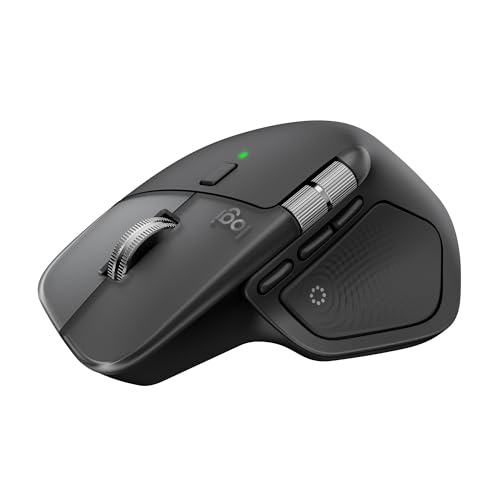
- Haptic feedback and Actions Ring add workflow shortcuts.
- MagSpeed scrolling is fast, quiet, and precise.
- Ergonomic shape and Quiet Clicks support long sessions.
Best For: Mac designers who want premium comfort and productivity features.
Posture-First Ergonomic Pick

- 57° vertical angle helps improve wrist posture.
- Handshake design is built to reduce muscle strain.
- 4000 DPI tracking keeps movement precise and controlled.
Best For: Creators who want maximum wrist comfort during long sessions.
Balanced Comfort Pick

- Full-size ergonomic shape with soft sides and thumb rest.
- Programmable buttons and silent clicks support workflow.
- Dual Bluetooth pairing and USB-C recharging add convenience.
Best For: Users who want comfortable everyday control and flexible connectivity.
Premium Bluetooth Performer
Logitech MX Master 3S Bluetooth Edition

- 8K DPI sensor tracks accurately, even on glass.
- MagSpeed scrolling is fast, precise, and quiet.
- Bluetooth-only design supports up to 3 devices.
Best For: Mac users who want premium precision without a dongle.
Ergo-Certified Comfort for Mac Creators
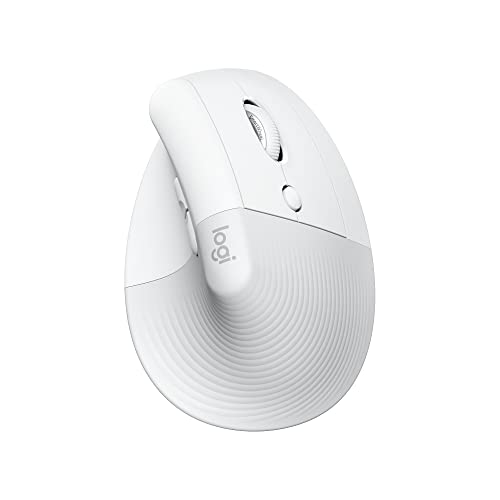
- 57-degree vertical design reduces wrist pressure
- Quiet clicks and silent scrolling for focused work
- Bluetooth Mac/iPad compatibility with 4 buttons
Best For: Small to medium-handed Mac users who want quiet ergonomic comfort
Ultra-Slim Travel Shape for Mac Work

- Ultra-slim body snaps flat for travel
- Full scroll plane supports vertical and horizontal scrolling
- Bluetooth mouse works with Mac computers
Best For: Traveling designers who need a compact, easy-to-pack mouse
Trackball Precision for Compact Workspaces

- Thumb trackball keeps your hand in place
- Ergonomic shape supports relaxed forearm posture
- Bluetooth or USB receiver with long battery life
Best For: Mac users who want a space-saving ergonomic trackball
Vertical Comfort Pick
Logitech Lift Vertical Ergonomic Mouse

- Vertical shape supports a more natural hand position
- Quiet clicks and SmartWheel suit focused work
- Bluetooth or Logi Bolt connectivity for Mac setups
Best For: Small to medium right-handed creatives who value all-day comfort
Premium Workflow Pick

- Haptic feedback and Actions Ring speed up creative tasks
- MagSpeed scrolling is fast, quiet, and precise
- Natural tilt and thumb wheel reduce hand stress
Best For: Power users and graphic designers who want advanced controls
Mac Power Workflow Pick – Logitech MX Master 4 for Mac
If you want an ergonomic mouse for Mac graphic design work that feels built for long creative sessions, the MX Master 4 for Mac is aimed squarely at productivity. It pairs a natural tilt, thumb scroll wheel, ultra-fast MagSpeed scrolling, and app-focused controls to help you move through canvases, tools, and timelines with less hand strain.
Best For: Mac-based designers who want a feature-packed ergonomic mouse with deep customization and quiet operation.
Pros:
- Haptic Sense Panel adds customizable feedback for specific actions, shortcuts, and notifications.
- Actions Ring provides a dynamic overlay for fast access to app-specific tools and commands.
- MagSpeed scrolling is fast, precise, and quiet for moving through large creative files.
- Quiet Clicks reduce click noise by 90%, which helps in focused workspaces.
Cons:
- Designed primarily for right-handed use.
- USB-C charging cable is not included.
- Some advanced features depend on Logi Options+ and macOS compatibility.
Overall, this is the most feature-rich option here for Mac creatives who value comfort, precision, and workflow shortcuts. It also comes with a 1-month Adobe Creative Cloud subscription, which adds a nice bonus for design users.
Posture-First Ergonomic Pick – Logitech MX Vertical
The MX Vertical is a strong ergonomic mouse for Mac graphic design if your priority is reducing wrist and forearm strain. Its vertical handshake angle, thumb rest, and precision tracking are all designed to support comfort during extended creative work without giving up control.
Best For: Designers who want a posture-focused vertical mouse for long Mac editing sessions.
Pros:
- 57° vertical angle promotes a more natural wrist position.
- Handshake grip is designed to reduce muscular activity and wrist pressure.
- 4000 DPI sensor and cursor speed switch help cut down on hand movement.
- Works with macOS, iPadOS, and Windows, making it flexible across setups.
Cons:
- Vertical shape is a major style change if you are used to a standard mouse.
- Only 4 buttons, so it is less feature-heavy than some flagship models.
- USB connectivity may be less convenient than Bluetooth-only options for some users.
This is the better pick if comfort and wrist relief matter more than extra controls. For artists and editors who spend hours at the desk, the ergonomic design is the main selling point.
Balanced Comfort Pick – Lenovo Yoga Pro Mouse
The Lenovo Yoga Pro Mouse is a practical ergonomic mouse for Mac graphic design if you want a comfortable full-size shape without going all-in on a vertical design. It combines a soft-sided grip, thumb rest, programmable buttons, and rechargeable Bluetooth connectivity for a flexible everyday workflow.
Best For: Mac and PC users who want a balanced, comfortable mouse with programmable controls.
Pros:
- Full-sized ergonomic design with soft sides and a thumb rest for comfort and balance.
- Programmable side and top buttons support adaptable workflows.
- Silent left and right buttons help keep distractions low.
- Dual-device Bluetooth 5.1 pairing and fast USB-C charging support portable work.
Cons:
- The product details list Windows as the main operating system support.
- It is not as specialized for posture correction as a vertical mouse.
- Some advanced tuning relies on software and may take setup time.
This is a solid middle-ground choice for designers who want comfort, quiet clicks, and customization without a dramatic ergonomic learning curve. It should suit mixed-device workstations especially well.
Premium Bluetooth Performer – Logitech MX Master 3S Bluetooth Edition
The MX Master 3S Bluetooth Edition is a strong ergonomic mouse for Mac graphic design when you want premium scrolling, precise tracking, and quiet operation over a USB-receiver setup. Its natural wrist posture shape, 8K DPI sensor, and app-specific customization make it especially useful for detailed creative work.
Best For: Mac creatives who want a high-end Bluetooth mouse with precision and workflow customization.
Pros:
- 8K DPI sensor supports accurate tracking, even on glass.
- MagSpeed scrolling is fast, precise, and near silent.
- Quiet Clicks reduce noise while keeping a satisfying click feel.
- Up to 3-device Bluetooth support and FLOW help streamline multi-computer work.
Cons:
- Bluetooth only, so there is no USB receiver included.
- No charging cable is included.
- Right-handed shape means it is not suitable for left-handed users.
For designers who care about smooth navigation and dependable precision, this remains one of the most capable options. It is a particularly good fit if you already prefer Bluetooth-only accessories on a Mac desk.
Ergo-Certified Comfort for Mac Creators – Logitech Lift for Mac
If you want an ergonomic mouse for Mac graphic design work that reduces wrist strain without changing your workflow too much, the Logitech Lift for Mac is a strong fit. Its vertical 57-degree angle encourages a more relaxed hand and arm position, while the quiet clicks and silent SmartWheel make it easy to stay focused during long editing sessions.
Best For: Small to medium hands, Mac users, and creatives who want a quieter vertical mouse for all-day comfort.
Pros:
- 57-degree vertical shape helps relieve wrist pressure and support a more natural posture
- Quiet clicks and silent SmartWheel suit focused design work
- Bluetooth Low Energy compatibility for MacBook, iMac, and iPad setups
- 4 customizable buttons add useful shortcuts for productivity
Cons:
- Right-hand design only
- Best suited to small and medium hands, not larger ones
- Vertical shape can take time to get used to if you prefer a standard mouse
For Mac graphic designers who prioritize comfort over a traditional shape, this model balances ergonomic support with practical Mac compatibility. It is especially appealing if you work long hours and want a quiet mouse that keeps distractions low.
Ultra-Slim Travel Shape for Mac Work – Microsoft Arc Mouse
The Microsoft Arc Mouse is a practical choice if you want an ergonomic mouse for Mac graphic design that stays extremely portable. Its slim, lightweight design snaps flat for travel, and the full scroll plane gives you vertical and horizontal scrolling control in a compact form factor.
Best For: Designers who travel often or need a very slim mouse that fits easily in a bag.
Pros:
- Ultra-slim and lightweight body is easy to carry
- Snaps flat for pocket or bag storage
- Full scroll plane supports vertical and horizontal scrolling
- Bluetooth connectivity works with Mac computers
Cons:
- Battery life is shorter than some ergonomic competitors at up to 6 months
- Not a traditional ergonomic shape, so comfort may be less specialized for long sessions
- Compatibility notes emphasize Windows requirements, so Mac users should check setup expectations carefully
This mouse makes the most sense when portability matters as much as design control. It is less about deep ergonomic shaping and more about an easy-to-pack, modern mouse that still offers useful scrolling features.
Trackball Precision for Compact Workspaces – Logitech ERGO M575S
If your ergonomic mouse for Mac graphic design needs to save desk space while keeping cursor control precise, the Logitech ERGO M575S is worth a close look. Its thumb-controlled trackball means you can move the pointer without moving your hand, which is useful for compact setups and long creative sessions.
Best For: Mac designers who want a space-saving trackball with relaxed hand positioning and precise control.
Pros:
- Thumb trackball reduces hand movement and helps keep the desk clear
- Sculpted ergonomic shape is designed for relaxed forearm posture
- Bluetooth or Logi Bolt USB receiver connection options
- Up to 18 months of battery life with an included AA battery
Cons:
- Trackball control has a learning curve for users coming from standard mice
- Only 2 buttons by default, so some users may want more shortcuts
- Right-hand design only
For Mac graphic designers working in tight spaces, the M575S offers a smart balance of comfort and control. It is especially appealing if you want to limit arm movement and keep your workspace uncluttered.
Vertical Comfort Pick – Logitech Lift Vertical Ergonomic Mouse
If you want an ergonomic mouse for Mac graphic design work that prioritizes wrist comfort, the Logitech Lift is built around a vertical shape, soft grip, and thumb rest for a more natural hand position. It connects by Bluetooth or Logi Bolt and includes quiet clicks plus a SmartWheel for smooth scrolling during long editing sessions.
Best For: Small to medium right-handed users who want a comfortable vertical mouse for everyday creative work on Mac, iPadOS, or desktop setups.
Pros:
- Vertical design helps promote a more natural forearm posture.
- Whisper-quiet clicks are useful in shared workspaces.
- Bluetooth or Logi Bolt connection gives flexible pairing options.
- Up to 24-month battery life reduces charging concerns.
Cons:
- Made for right hands only.
- 4000 DPI max is solid, but not the highest here for precision-heavy work.
- Best fit is specifically small to medium hands.
The Lift is a practical pick if comfort matters more than extra features. For designers who spend long hours navigating layouts and menus, its vertical design and quiet operation make it an easy daily driver.
Premium Workflow Pick – Logitech MX Master 4
The Logitech MX Master 4 is an ergonomic mouse for Mac graphic design users who want more control and faster navigation in demanding workflows. It adds haptic feedback, an Actions Ring for app-specific shortcuts, MagSpeed scrolling, and a thumb scroll wheel to help you move through creative apps efficiently.
Best For: Professional designers and power users who want advanced shortcuts, fast scrolling, and a comfort-focused shape for intensive Mac or multi-device work.
Pros:
- Haptic Sense Panel adds customizable feedback for selected actions.
- Actions Ring surfaces app shortcuts right at the cursor.
- MagSpeed wheel is built for very fast, precise scrolling.
- Natural tilt, thumb wheel, and quiet clicks support long work sessions.
Cons:
- More feature-heavy than a simple everyday mouse.
- Right-handed design only.
- Its advanced tools may be more than casual users need.
If you work across design tools and want to streamline repetitive actions, this is the most feature-rich option in the group. It leans strongly toward productivity and precision, which makes it well suited to serious creative workflows.
Multi-Device Budget Pick – PHILIPS Ergonomic Wireless Mouse
The PHILIPS ergonomic wireless mouse is a practical ergonomic mouse for Mac graphic design work if you want a right-handed shape, multi-device support, and dual scroll wheels. It pairs by Bluetooth or the included USB-A/C receiver and offers adjustable DPI up to 4000 for more controlled cursor movement.
Best For: Designers and productivity users who switch between Mac, Windows, and iPad devices and want a quiet, rechargeable ergonomic mouse with extra scrolling control.
Pros:
- Bluetooth plus USB-A/C receiver makes multi-device setup flexible.
- Side scroll wheel is handy for horizontal navigation in spreadsheets and design layouts.
- 5-level DPI adjustment helps match tracking speed to the task.
- Quiet clicks and rechargeable battery suit shared or mobile workspaces.
Cons:
- Right-handed only.
- Max DPI tops out at 4000, so it is not the highest-sensitivity option here.
- Battery life is solid, but shorter than some competitors.
This model stands out for practical everyday use rather than flashy extras. If you want a comfortable, quiet mouse with useful dual scrolling and easy switching between devices, it is a strong value-oriented option.
How We Picked the Best Ergonomic Mouse for Mac Graphic Design
We looked for mice that balance comfort, cursor control, and Mac compatibility. For graphic design, that means a shape you can use for extended sessions, responsive tracking for fine adjustments, and useful extras like programmable buttons, silent clicks, and smooth scrolling. We also prioritized Bluetooth or multi-device support, since many Mac users work across laptops, desktops, and tablets.
Quick Comparison: What Matters Most
The best option for one designer may not be the best for another. Vertical mice reduce wrist twist, standard ergonomic mice feel more familiar, and trackballs minimize arm movement altogether. If you edit for hours, comfort may matter more than speed. If you move between apps constantly, customizable buttons and fast scrolling can save time. If your workflow is tight or travel-heavy, a slim mouse may be the most practical choice.
Key Buying Factors for Ergonomic Mouse for Mac Graphic Design
Shape and Hand Position
Look at whether you prefer a vertical, contoured, or trackball design. Vertical mice encourage a more natural handshake grip, while sculpted mice usually feel closer to a traditional mouse. Trackballs are worth considering if you want less shoulder and wrist movement.
Precision and Tracking
Graphic design often involves detailed work, so responsive tracking and adjustable sensitivity are important. Higher DPI is not everything, but accurate cursor control on large or high-resolution Mac displays is a plus.
Buttons and Workflow Shortcuts
Programmable buttons can speed up common actions like undo, zoom, pan, copy, or switching tools. Side scroll wheels and gesture controls are especially helpful in creative apps.
Mac Compatibility and Connectivity
Check whether the mouse pairs cleanly over Bluetooth and supports the devices you actually use. Multi-device switching is especially useful if you work across a MacBook and desktop setup.
Noise, Battery, and Desk Setup
Quiet clicks are helpful in shared studios or late-night work. USB-C charging and long battery life reduce interruptions, while a compact shape may suit portable creative workflows better than a large performance mouse.
Who Should Buy Which Ergonomic Mouse for Mac Graphic Design?
If you want the most complete feature set for serious design work, choose a premium ergonomic mouse with strong customization and smooth scrolling. If wrist comfort is your top concern, a vertical mouse is usually the best fit. If you want the least hand movement, a trackball stands out. If you need something slim, simple, and travel-friendly, a compact ergonomic model may be the better everyday choice.
For most buyers, the best Ergonomic Mouse for Mac Graphic Design is the one that reduces strain without slowing down your creative flow. Comfort should support productivity, not compete with it.