Old negatives and slides can fade, scratch, or get harder to view over time. A good scanner helps you preserve those memories in a digital format you can organize, back up, and share.
Below, we’ve focused on the most useful film scanners for archiving, with options that balance image quality, supported formats, and simple operation for home users.
Best 10 Film Scanners for Archiving Picks for 2026
Compact All-in-One Viewer

- 22MP film and slide scanning
- 5-inch LCD with quick edits
- Saves directly to SD card
Best For: simple at-home archiving of mixed slide and negative collections
Precision 35mm Archiver

- 7200 resolution for 35mm film
- Includes SilverFast 9 Ai Studio
- Bundled IT8 calibration target
Best For: detail-focused users archiving 35mm slides and negatives
Offline Family Archive Scanner
DigitPro 5" Photo & Film Scanner

- Scans slides, negatives, and photos
- Standalone operation with no computer
- Includes SD card and accessories
Best For: users digitizing mixed family memories at home
Fast Standalone Film Archive

- 24MP scans to JPEG files
- Supports film and slide formats
- No-computer standalone operation
Best For: fast archiving of multiple legacy film formats
Quick Batch Digitizer
KODAK Slide N Scan Max Film Scanner

- Direct SD saving without a computer
- Handles 135, 110, and 126 film formats
- 13MP sensor with one-touch editing
Best For: Computer-free archiving of mixed slide and negative collections
Precision Manual Scanner
Plustek eFilm V Slide & Negative Scanner
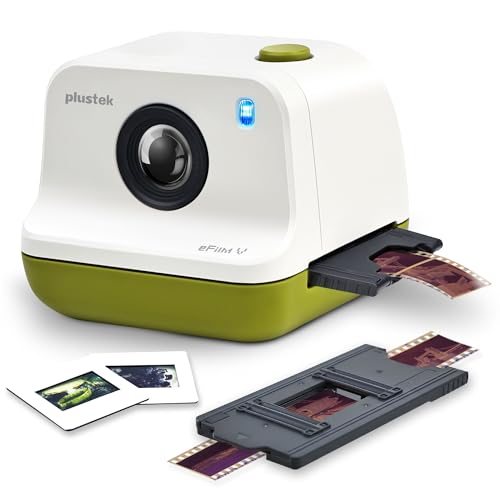
- Manual boundary control for cleaner framing
- Supports 35mm, 110, and APS formats
- Windows and Mac compatible
Best For: Careful archiving with stronger border control and file management
Touchscreen Archive Scanner
HP Film & Slide Scanner 7" Touch LCD

- 7-inch touch display for preview and editing
- Quick-feed tray for 135, 126, and 110 formats
- USB and HDMI connectivity for transfer or display
Best For: Beginners wanting an easy touchscreen scanner for common film formats
Family Memory Digitizer
22MP Film & Slide Scanner with 5" LCD

- Supports 35mm, 110, 126, and Super 8 photo film
- 5-inch LCD enables instant preview and playback
- Saves to internal memory or SD card
Best For: Families digitizing mixed old film formats at home
High-Detail Archiver
22MP Film & Slide Scanner for Photo Preservation

- 22MP output with JPEG conversion
- Supports 35mm, 120, 126, 127, and 135 film
- Brightness and color adjustments built in
Best For: Collectors with mixed-format film archives
Easy Home Archiver
PORTTA 22MP Film Scanner with 5" LCD

- No computer required for scanning and saving
- Chooses between 16MP and enhanced 22MP output
- 5-inch LCD plus HDMI and SD card support
Best For: Home archiving with simple preview and direct storage
Compact All-in-One Viewer – Kodak Slide N Scan 22MP
If you want film scanners for archiving without a complicated setup, the KODAK Slide N Scan keeps things straightforward. It scans 135, 110, and 126mm negatives plus 50mm slides, saves directly to an SD card, and gives you a large 5-inch LCD for previewing and quick edits right on the device.
Best For: Home users who want a simple standalone scanner for old slides and negatives.
Pros:
- 22MP output for digitizing film and slides into digital files
- 5-inch LCD makes previewing and basic editing easy
- Easy-load film inserts help speed up batch scanning
- Connects via USB and HDMI for flexible viewing and transfer
Cons:
- SD or SDHC card not included
- Supports cards up to 32GB only
- Requires Windows 7 or a Type-C USB-enabled computer for connection use
Overall, this is a practical archiving scanner if you value convenience over advanced workstation-style software. It is built for fast, direct conversion of family memories with minimal learning curve.
Precision 35mm Archiver – Plustek OpticFilm 8300i Ai
For film scanners for archiving where image control matters, the Plustek OpticFilm 8300i Ai is aimed at serious 35mm users. It pairs 7200 resolution with SilverFast 9 Ai Studio, Quick Scan Plus, and an included IT8 calibration target to support more accurate color workflow and detailed digitizing.
Best For: Dedicated 35mm slide and film users who want software-driven control and calibration tools.
Pros:
- 7200 resolution for high-detail 35mm scanning
- Includes SilverFast 9 Ai Studio and Quick Scan Plus software
- IT8 calibration target is bundled for color calibration
- Supports advanced image tools like iSRD, HDRi, and Multi-Exposure
Cons:
- Limited to 35mm slide media in the supplied details
- Requires software setup rather than one-button standalone use
- Windows 7/8/10/11 and Mac support is dependent on the included software workflow
This scanner is the most archival-minded option in the group if you care about calibration and fine control. It is better suited to users who want to spend time getting the best possible scan rather than the fastest one.
Offline Family Archive Scanner – DigitPro 5" Photo & Film Scanner
If your priority is film scanners for archiving without needing a computer, this DigitPro all-in-one model is built for convenience. It digitizes 35mm slides, 135 and 110 negatives, printed photos, and business cards, then saves JPEGs directly for easy transfer later.
Best For: Families who want a simple standalone scanner for photos, slides, and negatives.
Pros:
- Converts slides, negatives, printed photos, and business cards
- 5-inch LCD offers previewing and basic editing on-device
- Works offline with one-touch operation and no software install
- Includes an SD card, holders, photo trays, cleaning brush, and cables
Cons:
- Only listed at 1080P resolution, which is lower than some dedicated film scanners
- Supplied details do not specify advanced calibration or pro editing tools
- SD storage is included, but long-term archiving may still require later computer transfer
For a household archive project, this is a friendly, low-friction choice that covers more media types than just film. The included bundle and 3-year warranty make it especially appealing if you want to start scanning right away.
Fast Standalone Film Archive – Magnasonic FS71 24MP
Among film scanners for archiving, the Magnasonic FS71 focuses on speed and simplicity. It converts 35mm, 110, 126, and Super 8 negatives plus matching slides into 24MP JPEG files, and it does so directly to an SD card with no computer required.
Best For: Users who want a fast standalone scanner for a wide range of legacy film formats.
Pros:
- 24MP output for high-resolution digital files
- Supports 35mm, 110, 126, and Super 8 film plus slides
- 5-inch LCD lets you view scans directly on the device
- Adjust brightness and RGB color correction without software
Cons:
- SD card is not included
- HDMI cable is not included for external viewing
- Windows 7 is listed as the minimum system requirement for transfer use
This is a strong pick if you have several film formats to archive and want quick scans with minimal setup. The fast-loading trays and on-scanner controls make it practical for repeated family-photo projects.
Quick Batch Digitizer – KODAK Slide N Scan Max Film Scanner
If you want film scanners for archiving that keep the workflow simple, the KODAK Slide N Scan Max is built for fast standalone digitizing. Its smooth-moving tray reduces constant repositioning, and the direct SD save option means you can archive slides and negatives without relying on a computer.
Best For: Users who want a computer-free scanner for mixed 35mm, 110, and 126 film collections.
Pros:
- Direct SD/SDHC saving up to 32GB for portable archiving
- Supports 135mm, 110mm, and 126 film plus slides and negatives
- 13MP CMOS sensor with up to 4208 x 3120 output
- One-touch editing keeps basic adjustments simple
Cons:
- Requires Windows 7 minimum for its software workflow
- SD card limit is capped at 32GB
Overall, this is a practical pick if speed and convenience matter more than a deep editing workflow. It fits well for family photo archiving where you want a straightforward path from old film to saved files.
Precision Manual Scanner – Plustek eFilm V Slide & Negative Scanner
For film scanners for archiving where framing accuracy matters, the Plustek eFilm V focuses on control and compatibility. It supports common formats like 35mm, 110, and APS, and its manual boundary adjustment helps avoid black edges and over-cropping during digitization.
Best For: Users who want more control over scan borders and file organization on Windows or Mac.
Pros:
- Supports 35mm, 110, and APS negatives and slides
- Manual boundary adjustment helps prevent cropping errors
- Two resolution modes for flexible scanning needs
- Works with Windows 10/11 and macOS 12+
Cons:
- Requires film strips and mounted slides in standard 50mm frames
- Lower stated resolution than some direct-to-device competitors
This model makes sense if you care about getting the frame right and want better file naming flexibility than many standalone scanners. It is a solid choice for organized archiving rather than fully automated scanning.
Touchscreen Archive Scanner – HP Film & Slide Scanner 7" Touch LCD
If you prefer film scanners for archiving with an easy on-device workflow, the HP FilmScan leans into simplicity. Its 7-inch color LCD touch display lets you preview, edit, and manage scans directly on the unit, while the quick-feed tray helps speed through mixed photo collections.
Best For: Beginners or casual archivers who want touchscreen control and fast loading for common slide formats.
Pros:
- 7-inch touch LCD for previewing and editing on the scanner
- 13MP CMOS sensor captures color and black-and-white negatives
- Quick-feed tray supports 135, 126, and 110 formats
- USB and HDMI connections add easy transfer and display options
Cons:
- Stated resolution is 1200 dpi, lower than some archive-focused options
- Best suited to common formats rather than broader film compatibility
For users who want an approachable, screen-based scanner, this HP model keeps the process straightforward. It works especially well when the priority is quick digitization and easy viewing rather than maximum technical control.
Family Memory Digitizer – 22MP Film & Slide Scanner with 5" LCD
If you want a straightforward option for film scanners for archiving, this model is built for quick home conversion of old negatives and slides. It supports 35mm/135, 110, 126, and Super 8 photo film formats, and it saves scans directly to internal memory or an SD card so you can start preserving images without extra setup.
Best For: Families and casual users who want an easy, all-in-one scanner for old slides and negatives.
Pros:
- Supports 35mm/135, 110, 126 negatives, slides, and Super 8 photo film
- 5-inch LCD provides instant preview and playback
- One-touch scanning keeps the process simple and fast
- Includes HDMI and USB output for TV viewing or computer transfer
Cons:
- Internal memory is only 128MB, so SD card use is more practical
- Film handling is format-specific, so holders must match the media type
This is a practical pick if you value convenience and broad format support over a more hands-on workflow. The included accessories and built-in editing controls make it a solid entry-level choice for archiving family photo collections.
High-Detail Archiver – 22MP Film & Slide Scanner for Photo Preservation
For buyers comparing film scanners for archiving, this unit focuses on high-resolution conversion of negatives and slides into JPEG files. It supports multiple film sizes, including 120 film in several frame formats, plus 126 and 127 negatives, and it lets you adjust brightness and color during scanning for more control over the final image.
Best For: Users who want a flexible scanner for preserving a wide mix of film formats.
Pros:
- 22MP scan output for detailed digital files
- Supports 35mm, 120, 126, 127, and 135 film formats
- Brightness and color can be adjusted in the scanner
- Can save scans to a computer or SD card up to 128GB
Cons:
- SD card is not included
- Some notes mention printer-saving in limited cases, but the main workflow is computer or card based
This is a strong option if your archive includes multiple film formats, especially 120 negatives. Its focus on JPEG output and in-scanner adjustments makes it a useful pick for people who want a balance of flexibility and image control.
Easy Home Archiver – PORTTA 22MP Film Scanner with 5" LCD
If you want film scanners for archiving without needing a computer, this PORTTA model is designed for simple at-home digitizing. It handles 35mm/135, 126, 110, and Super 8 photo-only scans, shows a live preview on the 5-inch LCD, and lets you save images straight to an SD card or send them to a TV through HDMI.
Best For: Home users who want a no-computer scanner with easy preview and storage.
Pros:
- Supports 35mm/135, 126, 110, and Super 8 photo-only film
- Choose 16MP or enhanced 22MP output
- 5-inch LCD screen helps with preview and alignment
- HDMI output and SD card storage make sharing and saving simple
Cons:
- Super 8 support is for photo only
- Uses a smaller format set than some multi-format scanners
This model is a practical fit for users who want a guided scanning experience and quick results. The built-in adjustment tools and no-computer workflow make it a convenient choice for digitizing family film collections.
How We Picked the Best Film Scanners for Archiving
We prioritized scanners that make archiving straightforward: reliable film handling, useful resolution for everyday preservation, and controls that don’t require a steep learning curve. We also considered the range of supported formats, since the best choice often depends on whether you’re scanning 35mm slides, negatives, or larger film types.
Quick Comparison
Flatbed-style and all-in-one scanners tend to be easier for fast batch work and mixed media, while dedicated film scanners usually offer better detail and more control. If you want simple one-touch digitizing, look for built-in displays and stand-alone saving. If image quality matters most, software-assisted models with higher optical capability and calibration support are often the stronger pick.
Key Buying Factors for Film Scanners for Archiving
Resolution and Real Detail
Higher megapixel claims can help, but the meaningful number is how well the scanner captures grain, edge detail, and small text. For preservation, you want enough detail to make future reprints or clean edits possible without creating oversized files you won’t use.
Film and Slide Compatibility
Check whether the scanner supports 35mm, 110, 126, APS, 127, or 120 film. The more varied your collection, the more important it is to choose a model that matches your archive instead of forcing workarounds.
Ease of Use and Workflow
Built-in screens, HDMI output, and one-step save functions can speed up large projects. If you plan to scan hundreds of frames, tray design and loading speed matter just as much as image specs.
Color Accuracy and Software
For serious restoration, software tools and calibration targets can make a real difference. Features like dust reduction, color correction, and IT8 calibration are especially valuable when consistency matters across an entire collection.
Who Should Buy Which Film Scanners for Archiving?
If you want the simplest path to digitizing family photos, choose an all-in-one scanner with a screen and broad format support. If your archive includes valuable slides or negatives and you want the best quality possible, a dedicated film scanner with stronger software and calibration tools is the better fit. For mixed collections and occasional use, a midrange model with easy loading and a display usually offers the best balance of speed, convenience, and results.