If you want a simple way to protect Mac backups, an encrypted portable drive is a smart upgrade. It keeps private files safer if the drive is lost, shared, or carried every day.
This roundup focuses on the best fingerprint encrypted backup drive for Mac options in 2026, along with keypad and hardware-encrypted alternatives for different security needs and budgets.
Best 10 Fingerprint Encrypted Backup Drive for Mac Picks for 2026
Fingerprint Security Pick
Lexar F35 PRO 128GB Fast USB Drive

- Fingerprint unlock with 256-bit AES encryption
- Up to 10 fingerprints and sub-1-second recognition
- Fast USB 3.2 Gen 1 speeds for portable backups
Best For: Mac users needing a compact encrypted flash drive for private files
Heavy-Duty Encrypted Storage
Apricorn Aegis Fortress L3 5TB
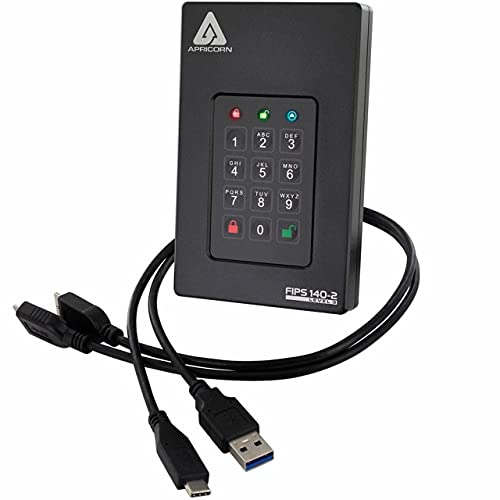
- 5TB portable drive with hardware encryption
- FIPS 140-2 Level 3 validated security
- Admin/User modes plus read-only and brute-force defenses
Best For: Secure high-capacity backups for Mac and mixed-platform users
High-Capacity Fingerprint Pick
Lexar F35 PRO 256GB Secure Drive
- 256GB version with fingerprint unlock and AES encryption
- Up to 10 fingerprints and less than 1-second recognition
- Fast 400MB/s read and 350MB/s write performance
Best For: Mac users wanting more encrypted flash-drive storage for backups
Keypad Backup Option
SecureDrive KP 500GB Portable Encrypted Drive

- Hardware-encrypted drive with face ID, fingerprint, or password unlock
- Includes USB-C and USB-A cables plus protective pouch
- Can be reformatted for Mac or exFAT use
Best For: Mac users wanting a secure portable backup drive with flexible unlocking
Hardware-Encrypted Pick
Kingston Ironkey Locker+ 50 G2 32GB Encrypted USB Drive

- XTS-AES 256-bit hardware encryption
- FIPS 197 certified security
- Multi-password admin and user access
Best For: Mac users who want password-based encrypted storage
Best for Everyday Use
Fingerprint Encrypted USB C Flash Drive 128GB

- Hardware fingerprint unlock with no software
- Works with macOS, iOS, Android, and Windows
- USB 3.2 speed plus reset-key security
Best For: Mac users who want biometric encrypted access
Tap-to-Unlock Pick
Nukii 256GB Encrypted USB-C Flash Drive

- NFC tap-to-unlock with auto-lock
- Remote wipe and write-protect controls
- USB-C support for Mac, iPhone, Android, and PC
Best For: Mac users who want NFC-based encrypted backup security
Hardware-Secured USB-C Backup Pick
Kingston Ironkey Keypad 200 32GB

- XTS-AES 256-bit hardware encryption
- Physical keypad with multi-PIN support
- BadUSB and brute force protection
Best For: Security-focused users who want OS-independent USB-C encrypted storage
Fingerprint Mobile-First Pick
iPhone USB3.0 Encrypted Drive 128GB

- Fingerprint and password protection
- Lightning plus USB 3.0 connectors
- Works with iPhone, iPad, Mac, and PC
Best For: Apple users who want biometric protection with mobile-to-Mac transfers
Software Encrypted USB-C Option

- 256-bit AES software encryption
- USB-C compatible with macOS and Windows
- Lifetime warranty
Best For: Users who want simple cross-platform encrypted USB-C storage
Fingerprint Security Pick – Lexar F35 PRO 128GB Fast USB Drive
If you want a fingerprint encrypted backup drive for Mac-style file protection in a compact USB format, the Lexar JumpDrive F35 PRO focuses on quick access and simple fingerprint security. It pairs 256-bit AES encryption with fingerprint authentication, making it a practical choice for protecting confidential files while still keeping everyday backups easy to carry.
Best For: Mac users who want a small encrypted flash drive for fast, portable backups and private files.
Pros:
- Fingerprint authentication adds an extra security layer for confidential files
- Stores up to 10 fingerprints for shared access
- Less than 1 second recognition for quick unlocking
- Up to 400MB/s read and 300MB/s write speeds
Cons:
- 128GB capacity may be limiting for larger backup jobs
- Uses USB Type-A connectivity, so some Macs may need an adapter
The F35 PRO is a strong fit if you value convenience and strong file-level protection over large capacity. It is best viewed as a secure portable backup and storage expansion drive rather than a full desktop backup solution.
Heavy-Duty Encrypted Storage – Apricorn Aegis Fortress L3 5TB
The Apricorn Aegis Fortress L3 is a fingerprint encrypted backup drive for Mac-compatible environments when you need much more storage than a flash drive can offer. With 5TB of capacity, FIPS 140-2 Level 3 validation, and 256-bit AES XTS hardware encryption, it is built for serious backups, controlled access, and rugged portable use.
Best For: Users who need a high-capacity hardware-encrypted external drive for secure Mac backups and business files.
Pros:
- Large 5TB storage capacity for backups and file archiving
- FIPS 140-2 Level 3 validated with 256-bit AES XTS encryption
- Separate Admin and User modes support controlled access
- Includes two read-only modes and brute-force defense
Cons:
- USB 3.0 is not as fast as newer drive standards
- Heavier and larger than a typical flash drive at 16 ounces
This model makes sense when security and capacity matter more than ultra-portability. Its Mac compatibility, rugged design, and hardware-encrypted workflow make it a strong backup drive for sensitive data.
High-Capacity Fingerprint Pick – Lexar F35 PRO 256GB Secure Drive
If you need a fingerprint encrypted backup drive for Mac tasks with more room for files, the 256GB Lexar JumpDrive F35 PRO is the larger sibling of the line. It combines fingerprint authentication, 256-bit AES encryption, and fast USB 3.2 Gen 1 performance for secure portable storage and straightforward backup workflows.
Best For: Mac users who want a pocketable encrypted flash drive with more capacity for backups and confidential files.
Pros:
- 256GB capacity gives more room for backups than the 128GB version
- Fingerprint authentication helps secure confidential files
- Supports up to 10 fingerprints with fast recognition
- Up to 400MB/s read and 350MB/s write speeds
Cons:
- Still a flash drive, so it is not a full-size backup drive
- Uses USB Type-A, which may require an adapter on some Macs
This is the best fit if you like the F35 PRO security model but want more storage headroom. It balances encryption, speed, and portability well for everyday encrypted file transfer and smaller backup sets.
Keypad Backup Option – SecureDrive KP 500GB Portable Encrypted Drive
The SecureData SecureDrive KP is a hardware-encrypted external drive for Mac users who want a secure backup option with flexible unlock methods. It supports face ID, fingerprint, or password access, includes USB-C and USB-A cables, and can be reformatted for Mac use or set to exFAT for broader compatibility.
Best For: Mac owners who want a portable encrypted backup drive with multiple unlock options and included cables.
Pros:
- Supports face ID, fingerprint, or password unlock
- Includes both USB-C and USB-A cables for easier setup
- Can be reformatted for Mac or set to exFAT for universal use
- Includes splash-proof pouch and water-resistant, shockproof case
Cons:
- Formatted NTFS out of the box, so Mac users may need to reformat
- Listed transfer rate of 5MB/s is very modest
This drive leans heavily into security and portability rather than speed. It is a practical choice if you need a protected backup device with multiple unlock methods and a more complete travel kit.
Hardware-Encrypted Pick – Kingston Ironkey Locker+ 50 G2 32GB Encrypted USB Drive
If you want a fingerprint encrypted backup drive for Mac alternatives that still prioritize strong hardware protection, the Kingston Ironkey Locker+ 50 G2 is a straightforward encrypted USB drive built around AES-XTS 256-bit security and FIPS 197 certification. It does not use fingerprint access, but it does offer a simple, no-fuss encrypted storage option for Mac users who want password-based protection and solid transfer speeds.
Best For: Mac users who want a compact hardware-encrypted USB drive with admin/user password control.
Pros:
- Hardware-encrypted with XTS-AES 256-bit protection
- FIPS 197 certified for compliance-minded buyers
- Multi-Password support with Admin and User options
- USB 3.2 Gen 1 with up to 145MB/s read and 115MB/s write
Cons:
- No fingerprint unlock or biometric login
- 32GB capacity is modest for larger backup sets
- Password-based workflow may feel less convenient than touch-unlock drives
Overall, this is a practical encrypted flash drive for users who care more about proven hardware security than biometric convenience. It is best suited to smaller Mac backups, portable sensitive files, and everyday encrypted transport.
Best for Everyday Use – Fingerprint Encrypted USB C Flash Drive 128GB
If you want a fingerprint encrypted backup drive for Mac, this USB-C model is the most direct fit in the group because it uses pure hardware fingerprint access with no app or driver required. It supports macOS alongside iPhone, Android, and Windows, making it a practical choice for encrypted backups and portable files when you want quick biometric unlocking.
Best For: Mac users who want fingerprint-based encrypted access without software installation.
Pros:
- Pure hardware fingerprint unlock with no app or driver needed
- Compatible with macOS, iOS, Android, Windows, and USB-C devices
- USB 3.2 speed up to 5Gbps for fast transfers
- Reset key and one-time use mode add flexible security options
Cons:
- Enrollment is limited to 5 fingerprints
- USB-C only may not suit older Mac setups without adapters
- Security features may be more complex than a basic encrypted drive
This is the strongest match if your priority is biometric convenience paired with hardware encryption. The one-time-use mode and reset key also make it appealing for sharing sensitive files more safely across devices.
Tap-to-Unlock Pick – Nukii 256GB Encrypted USB-C Flash Drive
For buyers comparing a fingerprint encrypted backup drive for Mac, Nukii takes a different approach with NFC tap-to-unlock instead of fingerprint scanning. It works with Mac, iPhone, Android, and PC, and its hardware-encrypted design adds auto-lock, write-protect, and remote wipe features for users who want strong control over backup data.
Best For: Mac users who want app-based NFC unlock and stronger security controls for sensitive backups.
Pros:
- Patented NFC tap-to-unlock with auto-lock on unplug
- Hardware-encrypted storage with remote wipe capability
- Write-protect mode helps reduce malware and unauthorized changes
- USB-C compatibility with Mac, iPhone, Android, and PC
Cons:
- Requires the Nukii app for unlocking and controls
- Uses NFC rather than fingerprint authentication
- Security workflow is more involved than a simple plug-and-play drive
Nukii is a strong pick if you want a secure Mac backup drive with extra safeguards beyond basic encryption. Its offline vault, write-protect option, and remote wipe features make it well suited to highly sensitive files.
Hardware-Secured USB-C Backup Pick – Kingston Ironkey Keypad 200 32GB
If you want a fingerprint encrypted backup drive for Mac alternatives that relies on hardware security instead of software, the Kingston IronKey Keypad 200 is a strong option. It uses XTS-AES 256-bit encryption, a physical alphanumeric keypad, and FIPS 140-3 Level 3 validation pending, making it a practical choice for portable files that need more than basic password protection.
Best For: Users who want a rugged, OS-independent encrypted USB-C drive with keypad access and strong physical security controls.
Pros:
- Hardware encryption with XTS-AES 256-bit protection
- Physical keypad supports admin and user multi-PIN options
- Brute force and BadUSB attack protection
- USB-C connectivity with Mac-compatible, OS-independent use
Cons:
- 32GB capacity is modest for large backups
- No fingerprint reader; access is PIN-based
- Read-only mode is optional rather than always on
This is best viewed as a security-first portable drive rather than a high-capacity backup solution. If your priority is locked-down access and durable encrypted storage for sensitive files, it offers a very solid feature set.
Fingerprint Mobile-First Pick – iPhone USB3.0 Encrypted Drive 128GB
This fingerprint encrypted backup drive for Mac users is geared more toward Apple mobile workflows than traditional desktop-only drives. It combines fingerprint and password protection, dual Lightning and USB 3.0 connectors, and app-based management so you can secure and move files between iPhone, iPad, and a Mac or PC.
Best For: Apple users who want fingerprint-secured portable storage that can also connect to Mac through USB.
Pros:
- Fingerprint and password protection stored on the drive
- Dual-connector design for Lightning and USB 3.0 use
- Works with iPhone, iPad, Mac, and PC
- 128GB capacity gives more room for file transfers and backups
Cons:
- Password and fingerprint setup is limited to Apple iOS devices
- App-based setup adds extra steps
- Best suited to Apple Lightning workflows, not Mac-only management
The fingerprint feature makes this stand out if you specifically want quick biometric access on the mobile side, but the setup flow is centered on iPhone and iPad. For Apple households that move files between mobile devices and a Mac, it is a flexible encrypted storage option.
Software Encrypted USB-C Option – Integral Secure 360-C 32GB
For shoppers comparing a fingerprint encrypted backup drive for Mac with a simpler security model, the Integral Secure 360-C is a straightforward USB-C choice. It uses 256-bit AES software encryption, works with macOS and Windows, and keeps the design focused on cross-platform compatibility rather than biometric hardware.
Best For: Mac and Windows users who want a software-encrypted USB-C drive with broad compatibility.
Pros:
- 256-bit AES software encryption for protected files
- USB-C connector suits modern MacBooks and other devices
- Compatible with macOS and Microsoft Windows
- Lifetime warranty adds peace of mind
Cons:
- No fingerprint authentication
- 32GB capacity may feel limited for full-system backups
- Security depends on software encryption rather than a hardware keypad
This model makes sense if you want encrypted portable storage with a simple USB-C form factor and broad OS support. It is less feature-rich than hardware-locked or biometric options, but it stays practical for everyday encrypted file transport.
How We Picked the Best Fingerprint Encrypted Backup Drive for Mac
We looked for drives that balance Mac compatibility, strong encryption, practical capacity, and easy unlocking methods. Priority went to models with hardware encryption, biometric or keypad access, and designs that work well for backups, travel, and everyday file transfer.
We also favored drives with modern connectors, straightforward setup, and security features that reduce reliance on third-party software. For Mac users, that means less friction and fewer compatibility headaches.
Quick Comparison: What Matters Most
For fast backup jobs and portability, smaller fingerprint USB drives are convenient. For full-system backups, photo libraries, and larger Time Machine-style archives, higher-capacity SSDs or larger hardware-encrypted drives make more sense. If you need the strongest access control, keypad and FIPS-validated models are often better than convenience-first fingerprint drives.
Key Buying Factors for a Fingerprint Encrypted Backup Drive for Mac
Security Type
Hardware encryption is the main feature to look for. It protects data directly on the drive, which is usually safer than software-only encryption. Fingerprint unlock is convenient, but keypad and password-based security can be better if multiple people need access or if you want a fully OS-independent workflow.
Capacity and Backup Size
Match capacity to your real backup needs. 32GB to 128GB works for documents, keys, and light project backups. 256GB and above is better for media folders, design files, and broader Mac backup libraries. If you are backing up an entire laptop regularly, consider an SSD instead of a small flash drive.
Mac Compatibility
Look for drives that are clearly compatible with macOS and do not require complicated drivers. If you plan to use the drive across Mac, iPhone, and PC, check connector type, formatting support, and whether the unlocking process stays simple on each device.
Portability and Build
A compact body is useful for travel, but sturdier drives may better survive daily carry. If the drive will live in a laptop bag or keychain pouch, pay attention to locking mechanisms, auto-lock behavior, and any write-protect or self-defense features.
Who Should Buy Which Fingerprint Encrypted Backup Drive for Mac?
If you want the easiest day-to-day experience, choose a fingerprint model with hardware encryption and quick unlock access. If you value strict compliance or higher-assurance security, pick a FIPS-rated keypad drive. If your main goal is larger backup storage for a Mac, a secure encrypted SSD is usually the better fit.
In short, the best Fingerprint Encrypted Backup Drive for Mac is the one that matches your storage size, security requirements, and how often you need to access the data.