If you want a simple way to duplicate drives without a PC, a hard drive enclosure with offline cloning is one of the most practical upgrades you can buy.
These docks are useful for backups, SSD migrations, and working with multiple drive types, especially when speed, tool-free access, and broad compatibility matter.
Best 10 Hard Drive Enclosure with Offline Cloning Picks for 2026
SATA Offline Cloner Dock
SABRENT EC-CH2B Dual-Bay Cloner Dock

- Offline clones SATA drives without a PC
- Works with 2.5in and 3.5in SATA HDDs/SSDs
- Dual bays mount separately over USB-C
Best For: SATA users who want a simple two-bay dock with offline cloning
Mixed-Drive Clone Dock
SABRENT DS-UFNC NVMe and SATA Clone Dock

- Clones NVMe and SATA drives offline
- Includes USB-C and USB-A cables
- Tool-free dock for Windows, macOS, and Linux
Best For: People who want one dock for both NVMe and SATA cloning
Affordable SATA Duplicator Dock
ORICO DD28U3-C Dual-Bay Clone Dock

- Offline clones SATA drives with a button press
- Supports 2.5in and 3.5in HDDs and SSDs
- Works across Windows, Mac, Linux, Android, and more
Best For: Buyers looking for an affordable SATA dock with broad compatibility
High-Speed NVMe Cloner
WAVLINK Dual M.2 40Gbps Cloner Enclosure
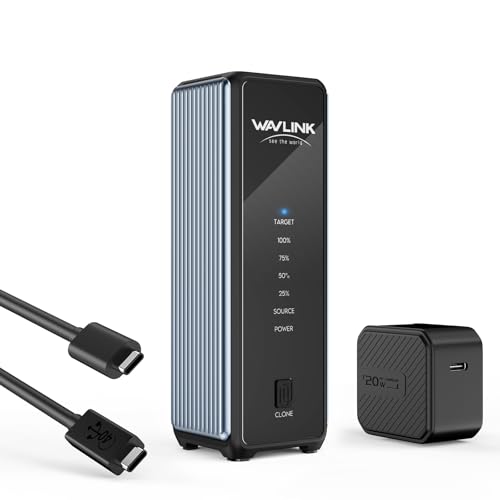
- 40Gbps USB4 enclosure for NVMe SSDs
- One-click offline cloning between two M.2 slots
- Active cooling helps manage heat during use
Best For: NVMe owners who want fast cloning and strong thermal control
4-Bay Clone Dock
SABRENT 4-Bay USB 3.0 Docking Station

- Offline clone function with LED progress indicators
- Supports up to four 2.5-inch or 3.5-inch SATA drives
- Trayless design with USB 3.0 plug-and-play use
Best For: multi-drive SATA backups and computer-free cloning
NVMe + SATA Clone Dock
GRAUGEAR NVMe & SATA Cloner Dock

- Offline cloning between SATA and NVMe drives
- Supports one M.2 NVMe SSD plus one SATA drive
- Built-in 3-speed fan and 10Gbps/6Gbps transfer support
Best For: mixed NVMe and SATA upgrades with fast cloning
Dual-Bay SATA Clone Dock

- Offline cloning without a computer
- Supports two 2.5-inch/3.5-inch SATA drives up to 20TB each
- USB 3.0 with UASP and a compact portable design
Best For: simple SATA cloning on a compact, budget-friendly dock
RGB Offline Cloner Dock
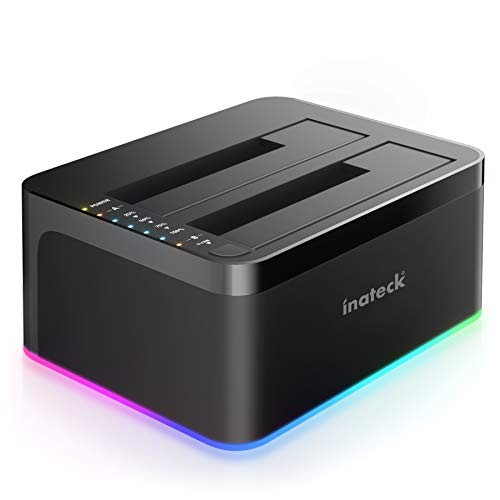
- Offline cloning without a PC
- Supports 2.5-inch and 3.5-inch SATA drives
- UASP and USB 3.0 for faster transfers
Best For: SATA users who want easy offline cloning and basic dock access
10Gbps Triple Bay Cloner

- Offline cloning without a host PC
- Supports M.2 NVMe, SATA SSDs, and HDDs
- USB 3.2 Gen 2x1 up to 10Gbps
Best For: Mixed-storage users who need NVMe and SATA support in one cloner
Bidirectional NVMe Cloner Dock
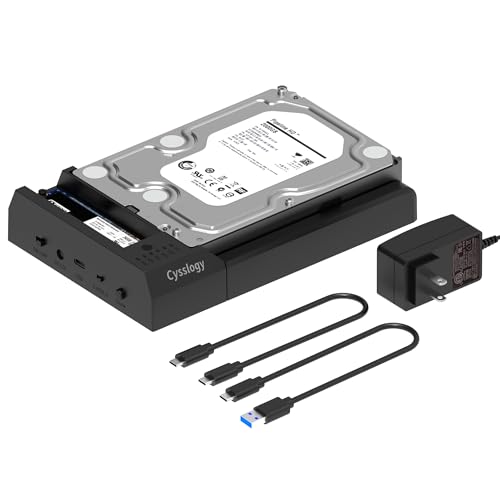
- Bidirectional offline cloning between NVMe and SATA
- Supports M.2 NVMe and 2.5-inch/3.5-inch SATA drives
- USB-C 10Gbps with tool-free installation
Best For: Users migrating data between NVMe and SATA drives without a computer
SATA Offline Cloner Dock – SABRENT EC-CH2B Dual-Bay Cloner Dock
If you want a hard drive enclosure with offline cloning for SATA drives, the SABRENT EC-CH2B keeps it simple: insert two bare drives, press the clone button, and copy without connecting to a computer. It also doubles as a USB-C dock, so both bays mount separately when plugged into a PC or Mac for normal file access.
Best For: Users who need a straightforward SATA-only dock that can clone drives offline and also work as a two-bay USB-C station.
Pros:
- Offline 1-to-1 cloning with no computer needed
- Supports 2.5in and 3.5in SATA HDDs and SSDs
- Both bays can mount as separate drives over USB
- USB-C cable included for plug-and-play use on Windows and Mac
Cons:
- Does not support IDE/PATA, M.2, or NVMe drives
- Target drive must be the same size as, or larger than, the source
- Offline cloning is capped at up to 60MBps by design
This is a practical pick if your workflow centers on SATA cloning and basic dual-drive docking. It trades advanced format support for a simple, tool-free setup that does the job with minimal fuss.
Mixed-Drive Clone Dock – SABRENT DS-UFNC NVMe and SATA Clone Dock
This hard drive enclosure with offline cloning is built for mixed-drive setups, handling M.2 PCIe NVMe SSDs plus 2.5in and 3.5in SATA drives in one tool-free dock. With USB-C 10Gbps support and included USB-C and USB-A cables, it’s a flexible choice when you want fast drive access and one-button cloning in the same unit.
Best For: Users who need one dock for both NVMe and SATA drives, plus offline cloning without a computer.
Pros:
- Supports M.2 PCIe NVMe and SATA 2.5in/3.5in drives
- Offline clone mode with direction switch, button, and LEDs
- Includes both USB-C to USB-C and USB-A to USB-C cables
- Tool-free design works on Windows, macOS, and Linux
Cons:
- Clone target must be equal to or larger than the source
- One-drive dock design means it’s not a dual-bay file-mounting station
- Real-world speed still depends on the installed drive type
If your storage mix includes both NVMe and SATA, this dock is more versatile than a SATA-only cloner. It’s a strong pick for users who want broader compatibility without giving up offline duplication.
Affordable SATA Duplicator Dock – ORICO DD28U3-C Dual-Bay Clone Dock
The ORICO DD28U3-C is a hard drive enclosure with offline cloning aimed at straightforward SATA duplication and everyday disk access. It supports 2.5in and 3.5in SATA HDDs and SSDs, includes a USB-A cable and power adapter, and adds a simple clone button for copying a drive without a computer.
Best For: Users who want a basic dual-bay SATA dock with offline clone support and broad device compatibility.
Pros:
- Offline clone function works without connecting to a computer
- Supports 2.5in and 3.5in SATA HDDs and SSDs
- Includes USB-A cable and universal power adapter
- Works with Windows, Mac, Linux, Android, and more
Cons:
- Target disk must be larger than the source disk
- USB 3.0 speeds top out at 5Gbps
- Cloning requires the button hold and status LED monitoring
This is a solid no-frills option if you mainly need reliable SATA cloning and a dock that fits into mixed-device environments. Its value comes from simplicity, not cutting-edge speed or format support.
High-Speed NVMe Cloner – WAVLINK Dual M.2 40Gbps Cloner Enclosure
If you need a hard drive enclosure with offline cloning for NVMe SSDs, the WAVLINK dual M.2 enclosure is built for speed and portability. It supports M-key and B+M-key NVMe drives, offers one-click offline cloning between two M.2 slots, and adds active cooling to help keep temperatures under control during heavy use.
Best For: NVMe users who want a fast USB4 enclosure with dual-drive offline cloning and cooling.
Pros:
- 40Gbps USB4 connection with high-speed NVMe support
- One-click offline cloning between two M.2 SSDs
- Active cooling, aluminum housing, and vented design
- Supports 2230/2242/2260/2280 drives up to 8TB per drive
Cons:
- Designed for NVMe M.2 SSDs, not SATA drives
- Target SSD must be equal to or larger than the source
- Offline clone will format the target drive
This enclosure makes the most sense when speed and NVMe support matter more than universal drive compatibility. It’s a strong fit for system upgrades and fast data transfers, especially if you want built-in thermal management.
4-Bay Clone Dock – SABRENT 4-Bay USB 3.0 Docking Station
If you want a hard drive enclosure with offline cloning for multiple drives, this SABRENT 4-bay dock is built for straightforward drive access, backups, and direct copying without a computer. It supports 2.5-inch and 3.5-inch SATA HDDs and SSDs, uses USB 3.0 for host connections, and keeps the process simple with a trayless design and plug-and-play operation.
Best For: Users who need a four-drive dock for backups, drive management, and computer-free cloning.
Pros:
- Clones drives directly without a computer and shows progress with LED indicators.
- Supports up to four 2.5-inch or 3.5-inch SATA HDDs and SSDs in one dock.
- Trayless, tool-free design makes swapping drives quick and simple.
- USB 3.0 connection offers up to 5Gbps and works with no drivers or software.
Cons:
- Only works with SATA drives, not M.2 NVMe.
- Largest footprint of the group because it is a 4-bay dock.
This is a practical choice if you want a single docking station for several SATA drives and value offline cloning as a built-in feature. The external power adapter also supports stable operation when multiple drives are installed.
NVMe + SATA Clone Dock – GRAUGEAR NVMe & SATA Cloner Dock
This hard drive enclosure with offline cloning is a strong pick if you work with both modern NVMe and traditional SATA storage. It lets you clone source to target without a computer, supports one M.2 NVMe SSD plus one SATA drive, and adds fast USB-C data transfer plus a built-in cooling fan for steadier performance.
Best For: Upgraders and power users who need NVMe and SATA support in one cloning dock.
Pros:
- Offline cloning works between SATA and NVMe drives without a PC.
- Supports one M.2 NVMe SSD plus one SATA drive at a time.
- Up to 10Gbps for NVMe and 6Gbps for SATA data transfers.
- Built-in 3-speed fan helps manage heat during heavier use.
Cons:
- Only handles two drives at once, so it is less suited to multi-drive workflows.
- Cloning requires a specific button sequence to start.
For mixed-storage setups, this dock stands out because it combines cloning, fast transfers, and broad drive compatibility in one unit. It is especially useful when you are upgrading drives or moving data between NVMe and SATA formats.
Dual-Bay SATA Clone Dock – GODO Dual-Bay SATA Clone Dock
If you need a simple hard drive enclosure with offline cloning, this GODO dual-bay dock keeps the focus on compatibility and ease of use. It supports 2.5-inch and 3.5-inch SATA HDDs and SSDs, can clone independently from a computer, and adds USB 3.0 with UASP for faster connected transfers.
Best For: Budget-friendly SATA users who want easy offline cloning and broad drive compatibility.
Pros:
- Offline cloning works without a computer for direct drive-to-drive copying.
- Supports up to two 2.5-inch or 3.5-inch SATA drives up to 20TB each.
- USB 3.0 with UASP offers faster transfers when connected to a PC.
- Compact design makes it easy to carry and use with desktop, laptop, or TV setups.
Cons:
- Limited to two SATA drives and does not support NVMe.
- USB 3.0 Type-A connection may be less flexible than USB-C options.
This dock is a straightforward choice for users who want cloning, broad SATA support, and a compact footprint without extra complexity. The on/off power switch is also useful for helping protect installed drives.
RGB Offline Cloner Dock – Inateck SATA Docking Station
If you want a hard drive enclosure with offline cloning that doubles as a simple dock, this Inateck model keeps things straightforward. It supports 2.5-inch and 3.5-inch HDDs and SSDs, clones without a computer, and adds UASP support for faster USB 3.0 transfers.
Best For: Users who want a budget-friendly dual-bay SATA dock with offline cloning and easy drive swaps.
Pros:
- Offline cloning works independently from a computer.
- Supports up to two SATA drives, including 2.5-inch and 3.5-inch HDDs and SSDs.
- UASP support can improve transfer performance over standard USB 3.0.
- RGB LED status effects provide a clear visual indicator when drives are active or asleep.
Cons:
- Limited to SATA drives; it does not support M.2 NVMe storage.
- Uses USB 3.0 rather than a newer 10Gbps interface.
Overall, this is a practical pick if your main need is offline SATA cloning with simple dock-style access. The RGB lighting is extra flair, but the real value is the no-PC cloning and broad SATA compatibility.
10Gbps Triple Bay Cloner – Rosewill M.2 and SATA Dock
This hard drive enclosure with offline cloning is built for users who need more format support and faster transfers. Rosewill combines M.2 NVMe, SATA SSD, and 2.5-inch/3.5-inch HDD support in a triple-bay dock that can clone drives without a host computer.
Best For: People who want a versatile cloner for mixed NVMe and SATA storage with a faster 10Gbps connection.
Pros:
- Offline cloning lets you duplicate drives without using a host computer.
- Supports M.2 NVMe plus SATA SSDs and 2.5-inch/3.5-inch HDDs.
- USB 3.2 Gen 2×1 provides transfer speeds up to 10Gbps.
- Tool-free design makes drive installation and removal simple.
Cons:
- Product details list support for up to 3 devices, but the form factor info is not as straightforward as a dedicated two-bay SATA dock.
- Plastic enclosure may not feel as robust as metal alternatives.
If you work across both NVMe and SATA storage, this Rosewill dock offers the broadest flexibility of the group. Its standout advantage is combining offline cloning with 10Gbps USB 3.2 speed and tool-free operation.
Bidirectional NVMe Cloner Dock – Cysslogy Dual Bay Enclosure
For buyers comparing a hard drive enclosure with offline cloning, this Cysslogy dock stands out for bidirectional cloning between M.2 NVMe and SATA drives. It supports cloning without a computer, offers a tool-free open design, and reaches up to 10Gbps over USB 3.2 Gen 2.
Best For: Users who want a dual-bay cloner for migrating between M.2 NVMe and SATA HDDs or SSDs.
Pros:
- Bidirectional offline cloning works between M.2 NVMe and SATA drives.
- Supports both M.2 NVMe SSDs and 2.5-inch/3.5-inch SATA HDDs and SSDs.
- USB 3.2 Gen 2 speeds up to 10Gbps help with transfers and cloning.
- Tool-free, hot-swap-ready design makes drive changes quick and easy.
Cons:
- Not compatible with M.2 SATA (NGFF) SSDs.
- Target drive must be equal to or larger than the source drive for cloning.
This is a strong choice if you need more than basic SATA cloning and want NVMe migration support in the same device. The combination of bidirectional cloning, fast USB-C connectivity, and broad drive support makes it especially useful for upgrades and maintenance.
How We Picked the Best Hard Drive Enclosure with Offline Cloning
We focused on offline cloning support, drive compatibility, connection speed, bay count, and how easy the dock is to use for everyday backups and migrations. Priority went to models that support common SATA and NVMe drives, offer stable performance, and make drive swapping straightforward.
We also considered the most useful features buyers tend to need: USB-C or USB 3.2 connectivity, tool-free loading, clear clone indicators, and support for both 2.5-inch and 3.5-inch drives where relevant.
Quick Comparison
For simple SATA-to-SATA cloning, dual-bay docks are usually the best value. If you need to clone or access M.2 drives, choose a model with NVMe support and confirm whether it handles M-Key only or both M-Key and B+M-Key SSDs. Multi-bay options are better for users managing several drives or mixing backup and cloning tasks in one station.
Speed matters too: 10Gbps docks are a strong fit for most buyers, while higher-bandwidth NVMe enclosures are better for users who want faster transfers and less bottlenecking during large file work.
Key Buying Factors for a Hard Drive Enclosure with Offline Cloning
Drive Type Support
Check whether the dock supports SATA HDDs/SSDs, NVMe SSDs, or both. Not every enclosure can handle mixed formats, and some only work with specific M.2 key types or size ranges.
Clone Method and Bay Layout
Offline cloning usually requires a source bay and a target bay. Dual-bay designs are the most common, while triple- and four-bay units offer more flexibility but can be larger and more expensive.
Speed and Interface
A USB-C 10Gbps connection is a good sweet spot for most users. If your workflow is centered on PCIe NVMe performance, look for a higher-speed enclosure that better matches the drive’s capabilities.
Ease of Use and Cooling
Tool-free trays, clear status lights, and stable docking make a big difference. If you clone large drives often, also pay attention to heat management and enclosure build quality.
Who Should Buy Which Hard Drive Enclosure with Offline Cloning?
If you mainly clone 2.5-inch or 3.5-inch SATA drives, a standard dual-bay Hard Drive Enclosure with Offline Cloning is the most straightforward choice. If you work with modern NVMe SSDs, pick a dedicated M.2 model or a hybrid dock that supports both NVMe and SATA.
Power users, IT techs, and anyone maintaining multiple systems should look at triple- or four-bay docks for better workflow flexibility. Casual users migrating one drive at a time will usually be happiest with a simple dual-bay model that prioritizes reliability and ease of setup.