If you need faster external storage without sacrificing compatibility, a hard drive enclosure with Thunderbolt 4 can be a smart upgrade. It’s a simple way to add high-speed SSD or multi-drive storage for editing, backups, and everyday workflow.
Below, we’ve narrowed the field to 10 strong options for different needs, from compact M.2 NVMe enclosures to larger RAID-ready multi-bay models.
Best 10 Hard Drive Enclosure with Thunderbolt 4 Picks for 2026
Quad-Bay RAID Workhorse
OWC ThunderBay 4 40Gb/s Storage Enclosure

- Four-bay SATA enclosure for 3.5-inch or 2.5-inch drives
- User-configurable RAID 0/1/4/5/1+0
- Up to 1527MB/s sustained performance
Best For: Desktop users who want flexible RAID storage and quiet multi-drive performance
Fan-Cooled Speed Build
UGREEN 40Gbps NVMe Enclosure with Dual Chips
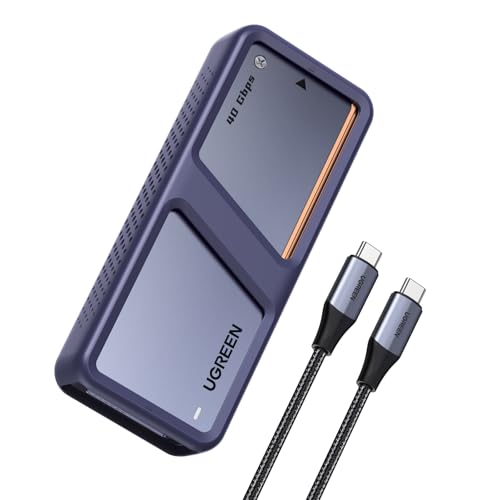
- Dual-chip NVMe enclosure with Thunderbolt 3/4 and USB4 support
- Up to 3600MB/s with Thunderbolt 4 devices and cables
- Smart fan and aluminum housing manage heat
Best For: Fast portable NVMe storage with active cooling
Quiet Four-Bay DAS
TerraMaster D4-320 Diskless 4-Bay Enclosure

- Four-bay DAS with hot-swap and tool-free trays
- USB 3.2 Gen2 connection up to 10Gbps
- Quiet operation with temperature-controlled fan
Best For: Simple multi-drive storage and backups without RAID
Portable NVMe Pick
UGREEN 40Gbps Compact M.2 Enclosure

- Compact fanless NVMe enclosure with Thunderbolt 3/4 support
- Up to 3600MB/s with compatible Thunderbolt 4 setup
- Supports 2230 to 2280 NVMe drives up to 8TB
Best For: Travel-friendly high-speed NVMe storage in a compact case
Pro-Grade Multi-Bay
OWC ThunderBay 8 Eight-Bay Thunderbolt Storage

- Eight bays for 2.5-inch or 3.5-inch SATA drives.
- Dual Thunderbolt ports support daisy-chaining.
- Plug-and-play with included Thunderbolt cable.
Best For: Large SATA storage setups for Mac and Windows users
Fast Compact NVMe
TERRAMASTER D4 SSD 4-Bay 40Gbps NVMe Enclosure

- 40Gbps USB-C connection with Thunderbolt 5/4/3 support.
- Four M.2 NVMe slots for up to 32TB total.
- Tool-free, hot-swappable design with active cooling.
Best For: Portable NVMe expansion for editing and backups
Hybrid RAID Workhorse
ACASIS 4-Bay Thunderbolt/USB4 Hybrid Enclosure

- Two SATA bays plus two NVMe bays in one unit.
- Supports RAID 1, RAID 0, and LARGE mode.
- USB4 40Gbps interface works with Thunderbolt 3/4/5.
Best For: Mixed workflows needing backup, speed, and capacity
Multi-Bay Storage Workhorse

- Supports 8 SATA drives up to 24TB each
- USB4 40Gbps with Thunderbolt 3/4/5 support
- Independent power buttons and smart fan control
Best For: Centralized home or office storage with many SATA drives
Silent Portable Option
Fanless Thunderbolt 4 NVMe Enclosure

- USB4 and Thunderbolt 4/5 support up to 40Gbps
- Fanless aluminum design for silent cooling
- Fits M.2 NVMe SSDs up to 8TB
Best For: Quiet, portable high-speed NVMe storage
Tool-Free Speed Pick

- USB4/Thunderbolt 4 with up to 40Gbps speed
- Tool-free flip cover for easy installation
- Supports M-Key NVMe SSDs up to 8TB
Best For: Portable, no-tools NVMe storage for laptops
Quad-Bay RAID Workhorse – OWC ThunderBay 4 40Gb/s Storage Enclosure
If you want a hard drive enclosure with thunderbolt 4-style performance goals for a multi-drive setup, the OWC ThunderBay 4 is built for high-capacity SATA storage rather than a single NVMe SSD. It uses dual Thunderbolt 3 ports and supports up to four 3.5-inch or 2.5-inch drives, making it a strong option for users who need flexible RAID storage and sustained throughput.
Best For: Editors, backup users, and anyone building a quiet four-bay RAID enclosure for Mac or PC.
Pros:
- Supports up to four 3.5-inch or 2.5-inch SATA drives with no adapter needed.
- User-configurable RAID 0/1/4/5/1+0 (10) for flexible storage setups.
- Up to 1527MB/s sustained performance for demanding workflows.
- Ultra-quiet aluminum chassis helps with heat dissipation.
Cons:
- Uses Thunderbolt 3 ports, not Thunderbolt 4.
- Diskless enclosure only, so drives must be purchased separately.
- Large desktop footprint compared with compact single-drive enclosures.
This is the right pick if your priority is capacity, RAID flexibility, and stable multi-drive performance. It is less about portability and more about building a serious desktop storage array.
Fan-Cooled Speed Build – UGREEN 40Gbps NVMe Enclosure with Dual Chips
If you need a hard drive enclosure with thunderbolt 4 compatibility for a single NVMe drive, this UGREEN enclosure is aimed at fast transfers and thermal control. It supports Thunderbolt 3/4 and USB4, and its dual-chip design is built to maintain speed while reducing heat during heavy file work.
Best For: Users who want a fast, fan-cooled NVMe enclosure for large file transfers and backups.
Pros:
- Dual-chip design with JHL7440 and RTL9210 for high-speed operation.
- Up to 3600MB/s maximum speed with Thunderbolt 4 cables and devices.
- Smart cooling fan activates above 40°C to help protect the SSD.
- Supports up to 8TB NVMe SSDs and works with Windows, macOS, and Linux.
Cons:
- SSD is not included.
- Requires Thunderbolt 4 cables and devices to reach top speed.
- Not compatible with SATA-based SSDs or PCIe 5.0 SSDs.
For users chasing top-end portable NVMe speeds, this enclosure is a practical match. The included cooling approach and broad compatibility make it a strong everyday option for demanding storage tasks.
Quiet Four-Bay DAS – TerraMaster D4-320 Diskless 4-Bay Enclosure
The TerraMaster D4-320 is a hard drive enclosure with thunderbolt 4 compatibility at the interface level, but it actually uses USB 3.2 Gen2 for up to 10Gbps performance. If you want a simple four-bay DAS for mixed SATA drives, it offers hot swapping, tool-free installation, and broad compatibility without RAID complexity.
Best For: Users who want a straightforward four-bay USB-C DAS for backups and general storage expansion.
Pros:
- Supports four individual drives with no RAID function for simple storage use.
- Tool-free trays and push-lock design make drive changes easy.
- Hot-swappable and plug-and-play with Mac, Windows, and Linux.
- Quiet design with temperature-controlled fan and sound-damping measures.
Cons:
- Uses USB 3.2 Gen2 rather than Thunderbolt for its 10Gbps connection.
- Plastic enclosure instead of aluminum.
- Diskless, so you must supply all drives separately.
This enclosure makes sense when ease of use matters more than maximum interface speed. It is a good fit for users who want flexible, quiet, direct-attached storage without RAID setup.
Portable NVMe Pick – UGREEN 40Gbps Compact M.2 Enclosure
For buyers looking for a hard drive enclosure with thunderbolt 4 support in a small, travel-friendly format, this UGREEN NVMe enclosure is focused on portability and speed. It uses the ASM2464PD chip, supports Thunderbolt 3/4 and USB4, and is designed for single M.2 NVMe drives up to 8TB.
Best For: Mobile users who want a compact, silent NVMe enclosure for fast external storage.
Pros:
- Up to 3600MB/s maximum speed with Thunderbolt 4 compatible devices and cables.
- Compact aluminum body with double-sided fin cooling design.
- Supports 2230/2242/2260/2280 NVMe sizes up to 8TB.
- Fanless design keeps operation quiet and avoids fan wear.
Cons:
- SSD is not included.
- Not compatible with SATA NGFF or mSATA drives.
- Very thick SSDs may need thinner thermal pads to fit properly.
This is a strong choice if you want a compact high-speed enclosure for travel or desk use. Its quiet, fanless build is especially appealing for users who prefer simplicity over active cooling.
Pro-Grade Multi-Bay – OWC ThunderBay 8 Eight-Bay Thunderbolt Storage
If you need a hard drive enclosure with thunderbolt 4-style bandwidth for a large SATA workflow, the OWC ThunderBay 8 is built for scale. It supports up to eight 2.5-inch or 3.5-inch SSDs/HDDs, uses dual Thunderbolt 3 ports, and is Thunderbolt certified for Mac and Windows with plug-and-play setup.
Best For: Editors and pros who want a high-capacity desktop enclosure for multiple SATA drives and daisy-chaining.
Pros:
- Eight drive bays support both 2.5-inch and 3.5-inch SATA SSDs/HDDs.
- Dual Thunderbolt ports let you daisy-chain additional devices or more storage.
- Plug-and-play design includes a Thunderbolt cable and needs no drivers.
- Quick-swap trays make drive changes easier for busy workflows.
Cons:
- Uses Thunderbolt 3 rather than a native Thunderbolt 4 host interface.
- Built around SATA drives, so it is not an NVMe solution.
- Large aluminum enclosure and 7.3 kg weight make it less portable.
The ThunderBay 8 makes the most sense when raw bay count matters more than compact size. If your priority is a stable, high-capacity desktop storage enclosure with fast Thunderbolt connectivity, this is a strong pro-focused pick.
Fast Compact NVMe – TERRAMASTER D4 SSD 4-Bay 40Gbps NVMe Enclosure
The TERRAMASTER D4 SSD is a compact hard drive enclosure with thunderbolt 4 compatibility through its 40Gbps USB-C connection, making it a strong fit for fast NVMe storage. It supports four M.2 NVMe 2280 SSDs, reaches up to 3,224MB/s with four drives installed, and is designed for Mac, Windows, Linux, Android, and iOS workflows.
Best For: Users who want a portable high-speed NVMe enclosure for editing, backups, and large file transfers.
Pros:
- 40Gbps performance with compatibility for Thunderbolt 5/4/3 and USB4.
- Supports four M.2 NVMe 2280 SSDs for up to 32TB of storage.
- Tool-free installation and hot-swappable drive access.
- Active cooling and temperature sensors help manage heat under load.
Cons:
- No built-in RAID, so RAID requires third-party software.
- Diskless design means you must supply your own SSDs.
- Best performance depends on using compatible high-speed NVMe drives.
For users who value speed, portability, and easy drive swaps, the D4 SSD is a practical NVMe enclosure. Its blend of 40Gbps performance and broad compatibility makes it a flexible desktop expansion choice.
Hybrid RAID Workhorse – ACASIS 4-Bay Thunderbolt/USB4 Hybrid Enclosure
If you want a hard drive enclosure with thunderbolt 4 compatibility that combines SATA storage and NVMe speed, the ACASIS 4-Bay Hybrid Enclosure is built for mixed workloads. It pairs dual 3.5-inch/2.5-inch SATA bays with dual NVMe bays, supports USB4 and Thunderbolt 3/4/5, and can be configured for mirror, speed, or large-capacity storage modes.
Best For: Creators and power users who want one enclosure for backups, editing, and high-capacity storage.
Pros:
- Hybrid design combines two SATA bays and two NVMe bays in one enclosure.
- Supports RAID 1 on HDDs and RAID 0 or LARGE mode for flexible setups.
- USB4 40Gbps interface works with Thunderbolt 3/4/5 ports.
- Active cooling, aluminum construction, and a 96W power supply support demanding use.
Cons:
- Full 40Gbps performance requires RAID mode and a compatible Thunderbolt/USB4 port.
- More complex than a simple single-purpose drive dock.
- Performance and total capacity depend heavily on the drives you install.
This is the most versatile option here if you need both archiving capacity and faster NVMe performance in one box. It is especially appealing for users who want one enclosure to cover multiple storage jobs.
Multi-Bay Storage Workhorse – 8-Bay USB4 SATA Dock
If you need a hard drive enclosure with thunderbolt 4 support for building a large-capacity desktop storage hub, this 8-bay IO CREST enclosure is aimed squarely at that job. It uses a USB4 40Gbps Type-C connection and is fully compatible with Thunderbolt 3/4/5, making it a strong fit for fast SATA-based storage expansion.
Best For: Home or office users who want centralized multi-drive storage with independent drive control.
Pros:
- Supports up to 8 SATA drives, including 2.5-inch and 3.5-inch models up to 24TB each
- 40Gbps USB4 connection with Thunderbolt 3/4/5 compatibility
- Independent power ON/OFF buttons for each drive and removable trays for organization
- Built-in smart fan with auto/manual modes and three fan speeds
Cons:
- Does not support RAID or NAS functions
- Large desktop enclosure at 12.5 x 10.5 x 6 inches and 7 pounds
- Designed for SATA drives only, not NVMe SSDs
This is a practical choice when raw bay count matters more than advanced storage features. If your priority is fast, Thunderbolt-compatible SATA expansion with easy drive management, it offers a lot of capacity in one enclosure.
Silent Portable Option – Fanless Thunderbolt 4 NVMe Enclosure
For shoppers wanting a compact hard drive enclosure with thunderbolt 4 performance for a single NVMe SSD, this Qwiizlab model focuses on speed and silence. It supports USB4 and Thunderbolt 4/5 ports at up to 40Gbps, while its fanless aluminum body is designed for efficient heat dissipation.
Best For: Users who want a quiet, portable NVMe enclosure for high-speed external storage.
Pros:
- Up to 40Gbps transfer support with USB4 and Thunderbolt 4/5 ports
- Fanless aluminum enclosure for silent operation
- Supports M.2 NVMe PCIe SSDs in 2230/2242/2260/2280 sizes up to 8TB
- Includes thermal pads, USB-C cable, tools, and a carrying pouch
Cons:
- SSD is not included
- Only supports one drive
- Not compatible with Thunderbolt 2/1 ports
This enclosure makes sense if you value a quiet setup and want a straightforward way to use a fast NVMe SSD externally. It is compact, well-equipped, and built for modern Thunderbolt and USB4 systems.
Tool-Free Speed Pick – Thunderbolt 4 NVMe Enclosure
This Inateck enclosure is a strong hard drive enclosure with thunderbolt 4 support for users who want a fast, simple NVMe setup without tools. It uses USB4/Thunderbolt 4 connectivity, supports 40Gbps transfer rates, and is designed for plug-and-play convenience with M-Key NVMe SSDs.
Best For: Laptop users who want a compact, tool-free NVMe enclosure with Thunderbolt 4 support.
Pros:
- Supports USB4/Thunderbolt 4 with up to 40Gbps transfer speed
- No-tools, flip-style installation for quick SSD swaps
- Compatible with 2230/2242/2260/2280 M-Key NVMe SSDs up to 8TB
- Includes a 50cm Thunderbolt 4 cable and supports 8K@60Hz video output
Cons:
- Not compatible with Thunderbolt 3
- Only works with M-Key NVMe SSDs
- Designed for a single SSD, not multiple drives
If you want a compact enclosure that is easy to install and built for modern Thunderbolt 4 systems, this model is very practical. Its blend of portability, cable inclusion, and 40Gbps support makes it a clean everyday option.
How We Picked the Best Hard Drive Enclosure with Thunderbolt 4
We focused on enclosure speed, interface support, drive type compatibility, build quality, cooling, and ease of setup. For a Hard Drive Enclosure with Thunderbolt 4, the most important question is whether the enclosure can sustain real transfer speeds under load, not just advertise a high rating.
We also favored models that support common use cases: portable NVMe storage, desktop expansion, and multi-bay setups for backups or RAID. Practical factors like tool-free access, fan or passive cooling, and clear compatibility with Thunderbolt 4/USB4 systems mattered as well.
Quick Comparison
Compact M.2 NVMe enclosures are best for portability and high-speed single-drive storage. Multi-bay SATA and hybrid enclosures make more sense if you need capacity, redundancy, or a local backup array. If you want maximum flexibility, look for a model that supports both Thunderbolt 4 and USB4 so it can work across more computers.
Key Buying Factors for a Hard Drive Enclosure with Thunderbolt 4
Drive Type and Form Factor
Start with the drives you already own or plan to buy. M.2 NVMe enclosures are ideal for fast SSDs, while 2.5-inch and 3.5-inch SATA enclosures are better for larger-capacity hard drives and SATA SSDs. Some hybrid designs combine both, but they usually trade simplicity for versatility.
Cooling and Sustained Performance
Thunderbolt 4 can move data quickly, but heat can throttle performance. Aluminum housings, heatsinks, and active fans all help maintain stable speeds during long transfers. If you expect sustained workloads like video editing or frequent backups, cooling should be a priority.
Compatibility and Connection Standards
Make sure the enclosure supports Thunderbolt 4, USB4, or both, especially if you use multiple devices. A Thunderbolt 4 enclosure is usually backward compatible with older Thunderbolt ports, but actual performance depends on the host machine and drive type. Check whether the enclosure includes cables rated for the full speed.
Capacity, RAID, and Use Case
If you need speed in a compact footprint, choose a single-bay NVMe enclosure. If you need capacity, redundancy, or a shared workspace, a multi-bay model with RAID support may be a better fit. For many buyers, the right Hard Drive Enclosure with Thunderbolt 4 is the one that matches the workload rather than the fastest spec sheet.
Who Should Buy Which Hard Drive Enclosure with Thunderbolt 4?
Choose a compact NVMe enclosure if you want the best mix of portability and speed for laptops or travel kits. Choose a multi-bay SATA enclosure if you need lots of storage for archives, backups, or media libraries. Choose a RAID-capable enclosure if you want flexibility between speed and redundancy. And if you want the broadest compatibility, prioritize Thunderbolt 4 plus USB4 support so the enclosure works well across future systems too.