A good Mac Mini cable management mount can turn a cluttered workspace into a cleaner, more efficient setup. Whether you want to hide the computer behind a monitor, under a desk, or on the wall, the right mount helps keep cables tidy and the Mac mini secure.
Below, we break down ten strong options for 2026, with a focus on compatibility, airflow, installation style, and cable routing convenience.
Best 10 Mac Mini Cable Management Mount Picks for 2026
Classic Under-Desk Pick
SABRENT Mac mini VESA/Wall Mount

- Wall, under-desk, and VESA mounting
- Keeps ports, power button, and cables accessible
- Aluminum with black powder coating
Best For: Compatible Unibody Mac Mini owners who want a basic secure mount
Heat-Safe Space Saver
Freejia Mac mini M4 Metal Mount

- Designed for 2024 Mac mini M4/M4 Pro
- VESA, wall, and under-desk mounting support
- Four-sided vents and metal alloy steel build
Best For: M4/M4 Pro users who want durable mounting with airflow
Premium Cable-Friendly Mount
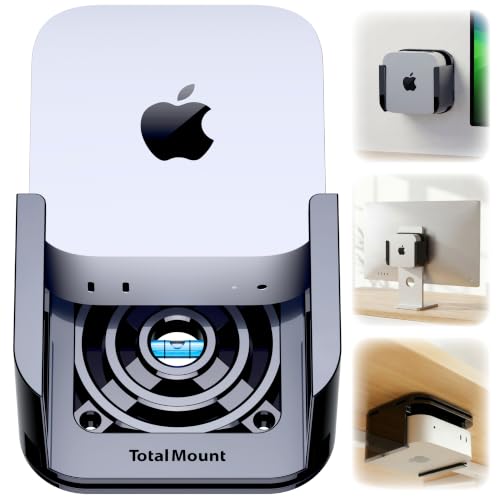
- Metal-free design preserves Wi-Fi antenna access
- Patented ventilation channels help airflow
- Desk, wall, and monitor mounting included
Best For: Buyers wanting a premium, wireless-safe mount with flexible setup options
Quick-Install Organizer
SplashNColor Under Desk Mac mini Mount

- Built-in cable routing channels
- No-drill quick-install option
- Open frame for airflow and cooling
Best For: Home office setups that need neat under-desk cable management
Under-Desk Space Saver
Mac mini M4 Under-Desk or Wall Mount

- Single-piece injection-molded ABS design
- Fits under desk, wall, or monitor back
- Keeps ports, power button, and cables accessible
Best For: People who want a quick way to clear desk space around a 2024 Mac mini
Premium Cable-Routing Mount
SABRENT Flex-Mount for Mac mini 2024+

- Scratch-resistant aluminum construction
- Wall, desk, or surface mounting support
- Built for airflow and flexible cable routing
Best For: Anyone who wants a polished, cable-friendly mount for the 2024+ Mac mini
Heavy-Duty Metal Bracket
VESA Metal Mount for Mac mini M1/M2 Pro

- 2mm steel plate for a sturdy build
- VESA, under-desk, and wall mounting support
- Foam pad helps prevent scratches and drops
Best For: Mac mini M1/M2 Pro users who want a durable metal mount
Wall-Ready VESA Solution
HumanCentric 2024 Mac mini Mount

- Supports wall, under-desk, and behind-monitor mounting
- Fits 75x75mm and 100x100mm VESA patterns
- Designed only for the 2024 Mac mini
Best For: A tidy VESA or wall-mount setup for the 2024 Mac mini
All-Metal Hidden Mount
Mac Mini M4 Under-Desk Bracket

- All-metal bracket for stronger support
- Mounts under a desk or behind a monitor
- Soft padding helps prevent scratches and slip
Best For: A sturdy hidden mount for desk or monitor placement
Multi-Mount Organizer Pick
Mac Mini M4 Wall and VESA Bracket

- Wall, under-desk, and behind-monitor mounting
- Anti-scratch and anti-slip strips for added stability
- Built-in pen holder for small office items
Best For: M4 owners who want flexible mounting and a small organizer
Classic Under-Desk Pick – SABRENT Mac mini VESA/Wall Mount
If you want a straightforward Mac Mini cable management mount, this SABRENT bracket is built for secure placement on a wall, under a desk, or via VESA. It keeps the Mac mini accessible while helping route the computer out of the way, and the black aluminum finish adds scratch protection during everyday use.
Best For: Buyers with a compatible Unibody Mac Mini who want a simple, sturdy mount for wall or desk setups.
Pros:
- Supports wall, under-desk, and VESA mounting options
- Leaves power button, output jacks, and cables accessible
- Aluminum body with black powder coating for added scratch protection
- Includes screws, drywall anchors, and installation instructions
Cons:
- Compatible only with Unibody Mac Mini models
- Does not add built-in cable routing features
This is a practical pick if your main goal is to mount the Mac mini securely and free up desk space. It focuses on fit, access, and basic protection rather than extra cable-routing extras.
Heat-Safe Space Saver – Freejia Mac mini M4 Metal Mount
For a Mac Mini cable management mount aimed at the 2024 M4 and M4 Pro, this metal bracket is designed to keep ports unobstructed while reducing desk clutter. It supports VESA, under-desk, wall, and micro-mount setups, and the open design is meant to preserve airflow around the computer.
Best For: Mac mini M4 and M4 Pro owners who want a durable mount with ventilation and broad mounting flexibility.
Pros:
- Built specifically for 2024 Mac mini M4/M4 Pro sizing
- Supports VESA, under-desk, wall, and micro-mount use
- Four-sided venting helps with heat dissipation
- Metal alloy steel build includes non-slip pads and anti-rust coating
Cons:
- Monitor back mounting has compatibility limitations noted by the seller
- More hardware and setup steps than a simple stand
This option stands out if you want a heavy-duty mount that balances cable access, ventilation, and long-term durability. It is especially appealing for tidy workspaces where the Mac mini stays mounted permanently.
Premium Cable-Friendly Mount – TotalMount for Mac mini
If you want a refined Mac Mini cable management mount, TotalMount focuses on secure placement without blocking Wi-Fi or airflow. It works under a desk, on a wall, or attached to a monitor with straps, and it keeps enough space open to reach the power button easily.
Best For: Users who want a premium, metal-free mount with strong wireless safety and flexible installation options.
Pros:
- Compatible with 2024, 2025, and 2026 Mac mini models
- Metal-free design avoids blocking the Wi-Fi antenna
- Ventilation channels support airflow and heat management
- Includes mounting options for desk, wall, and monitor setups
Cons:
- Not compatible with older Mac mini models before October 2024
- Monitor mounting uses straps rather than VESA holes
This is the most feature-focused option here for buyers who care about a polished install and stable placement. It makes sense for users who want cable management benefits without sacrificing wireless performance or cooling.
Quick-Install Organizer – SplashNColor Under Desk Mac mini Mount
For a Mac Mini cable management mount that emphasizes desk organization, this SplashNColor bracket turns unused under-desk space into hidden storage. Built-in routing channels help guide power and data cables, while the open frame is meant to keep airflow moving around the Mac mini M4.
Best For: Home office users who want quick under-desk installation with cleaner cable routing and a hidden-device look.
Pros:
- Built-in cable routing channels help keep cords neat
- Quick-install design with no drilling required for adhesive setup
- Open frame supports ventilation and cooling
- Friction-fit corner grips are designed for secure hold
Cons:
- Designed specifically for the 2024 Mac mini M4
- ABS construction may feel less premium than metal alternatives
This is a strong pick if your priority is cable tidiness and an uncluttered desktop. It is less about heavy-duty hardware and more about fast installation and a clean workspace finish.
Under-Desk Space Saver – Mac mini M4 Under-Desk or Wall Mount
If you want a practical Mac Mini cable management mount for the 2024 Mac mini M4 or M4 Pro, this under-desk and wall option is built to tuck the device out of the way while keeping key ports and the power button accessible. The single-piece injection-molded ABS design is aimed at stronger, longer-term use, and the included screws plus double-sided tape make installation straightforward.
Best For: Buyers who want a simple way to free up desk space and mount a 2024 Mac mini under a desk, on a wall, or behind a monitor.
Pros:
- Single-piece injection-molded construction for improved durability over earlier 3D-printed versions
- Supports under-desk, wall, and monitor-back mounting with 75×75mm and 100×100mm VESA compatibility
- Designed for full access to the power button, output jacks, and cables
- Includes screws and double-sided tape for quick installation
Cons:
- Made specifically for the 2024 Mac mini M4/M4 Pro, so it is not a universal fit
- ABS construction is practical, but it is not the metal option in this group
Overall, this is a tidy space-saving mount if your main goal is to hide the Mac mini and reduce desktop clutter without blocking everyday access. It leans toward convenience and fit rather than premium materials.
Premium Cable-Routing Mount – SABRENT Flex-Mount for Mac mini 2024+
For a Mac Mini cable management mount with a more finished look, this SABRENT flex-mount is designed for the 2024+ Mac mini and focuses on cleaner routing, airflow, and a scratch-resistant aluminum build. It supports wall, desk, or surface mounting, and the included hardware makes it easier to set up in the location that works best for your desk.
Best For: Users who want an aluminum mount with flexible mounting options and a cleaner cable layout for the 2024+ Mac mini.
Pros:
- Scratch-resistant aluminum construction for a more premium feel
- Supports wall, under-desk, or surface mounting
- Designed for full access to ports, the power button, and cables
- Built with airflow and flexible cable routing in mind
Cons:
- Only compatible with Mac mini (2024+)
- More focused on organization and airflow than on extra protective padding
This is the strongest pick if you want a mount that balances cable routing, ventilation, and a cleaner visual finish. The aluminum build and included installation kit make it a polished option for a more permanent setup.
Heavy-Duty Metal Bracket – VESA Metal Mount for Mac mini M1/M2 Pro
This Mac Mini cable management mount is a straightforward metal bracket for the Mac mini M1/M2 Pro, with VESA support, under-desk installation, and wall mounting options. The 2mm steel plate construction and foam pad are geared toward a secure hold while helping prevent scratches and accidental drops.
Best For: Owners of a Mac mini M1 or M2 Pro who want an all-metal mount with VESA compatibility and basic protection.
Pros:
- 2mm steel plate construction for sturdiness and durability
- Supports VESA mounting on compatible monitors
- Can be used under a desk or on a wall to save space
- Foam pad adds scratch protection and helps keep the device secure
Cons:
- Compatibility is limited to Mac mini M1/M2 Pro use cases
- Focuses more on secure mounting than on advanced cable-routing features
If you want a no-nonsense metal bracket and your Mac mini matches the supported generation, this is the most rugged-feeling option here. It is a strong fit for users who care more about solid mounting and space savings than a refined cable-management system.
Wall-Ready VESA Solution – HumanCentric 2024 Mac mini Mount
If you want a Mac Mini cable management mount that helps clear desk clutter, this HumanCentric bracket gives you flexible placement options for the 2024 Mac mini. It supports wall, under-desk, and VESA mounting behind a monitor, so you can tuck the mini PC out of the way while keeping it accessible.
Best For: Users with a 2024 Mac mini who want a clean VESA or wall-mounted setup.
Pros:
- Compatible with 75x75mm and 100x100mm VESA patterns
- Mounts behind a monitor, on a wall, or under a desk
- Minimalist molded design helps protect from scratches
- Includes drywall screws, anchors, and VESA screws
Cons:
- Does not work with older Mac mini models
- Only fits the 2024 Mac mini
This is a practical pick if your goal is to hide the Mac mini and improve cable management at the same time. The click-in holder and included hardware make it straightforward, but buyers should confirm they have the 2024 model before ordering.
All-Metal Hidden Mount – Mac Mini M4 Under-Desk Bracket
For a Mac Mini cable management mount that focuses on simplicity and strength, this all-metal bracket is built to hold the 2024 Mac mini under a desk or behind a monitor. Its space-saving design keeps the device off the desktop, while the soft padding helps reduce scratches and accidental movement.
Best For: Buyers who want a sturdy metal mount for under-desk or behind-monitor placement.
Pros:
- All-metal construction for long-lasting strength
- Works under a desk or behind a monitor
- Soft padding helps prevent scratches and slipping
- Different screws are prepared for desk and monitor installation
Cons:
- Limited to the 2024 Mac Mini M4/M4 Pro notes provided
- No extra storage or accessory features
This bracket is a straightforward option if you mainly want to reclaim desk space and keep cables less visible. The metal build and included mounting screws make it feel purpose-built for a secure hidden installation.
Multi-Mount Organizer Pick – Mac Mini M4 Wall and VESA Bracket
If you’re shopping for a Mac Mini cable management mount with flexible placement, this Bedycoon bracket is designed for the Mac Mini M4 and M4 Pro with wall, under-desk, and behind-monitor options. It also adds anti-scratch and anti-slip strips, plus a built-in pen holder for small office items.
Best For: Mac Mini M4 owners who want flexible mounting plus a small organizer feature.
Pros:
- Compatible with Mac Mini M4 and M4 Pro only
- Can be installed behind a monitor, under a desk, or on a wall
- Anti-scratch and anti-slip strips help protect and stabilize the device
- Includes a pen holder for stationery or small items
Cons:
- Not compatible with Mac Mini M1 or M2
- Must confirm the device size limits before buying
This is a useful choice if you want more than just mounting, since the pen holder adds a little extra desk organization. The steel build and included screws make it a practical all-around option for a cleaner setup.
How We Picked These Mac Mini Cable Management Mounts
We looked for mounts that solve the most common setup problems: loose cables, limited desk space, exposed hardware, and awkward placement around monitors or workstations. Priority went to models with strong compatibility, secure fit, practical mounting options, and thoughtful cable access. Cooling design mattered too, since a cramped mount can restrict airflow if it is not engineered well.
Quick Comparison: What Matters Most
Most buyers will choose between under-desk, wall, behind-monitor, or VESA-mounted options. Under-desk mounts are best for hiding the Mac mini while keeping it easy to reach. Wall mounts suit fixed installations and studio spaces. VESA mounts are ideal if you want the Mac mini attached directly to the back of a monitor for an all-in-one look. If your workspace changes often, a more flexible Mac Mini Cable Management Mount is usually the safer pick.
Key Buying Factors for a Mac Mini Cable Management Mount
Compatibility
Check the exact Mac mini generation first, especially if you own a 2024 M4 or M4 Pro model. Some mounts are custom-fit, while others support older M1/M2 units or broader VESA patterns.
Mounting Style
Choose based on your desk layout. Under-desk and wall options maximize open surface space, while monitor-backed mounts reduce visible clutter. If you need frequent access to ports, make sure the opening faces a convenient direction.
Airflow and Cooling
A mount should not trap heat. Look for open sides, ventilation cutouts, or designs that leave the Mac mini breathing room around the chassis. This is especially important in enclosed desks or warm office environments.
Cable Management
The best mounts make cable routing easier, not harder. Features like rear cable channels, accessible port cutouts, and secure fitment help keep power, display, and accessory cables organized.
Build Quality
Metal mounts often offer better rigidity and long-term durability, while padded contact points can help protect the finish. If you are mounting under a desk or behind a monitor, a stable bracket is worth the extra attention.
Who Should Buy Which Mac Mini Cable Management Mount?
If you want the cleanest desk possible, choose an under-desk or behind-monitor model with good cable access. If you care most about a professional, fixed installation, a wall mount is the better choice. For users who switch setups often or want the broadest compatibility, a VESA-friendly Mac Mini Cable Management Mount is usually the most versatile option. And if cooling is a top concern, prioritize designs that explicitly support airflow rather than fully enclosed storage.