A good Mac Mini dock with SSD enclosure turns a compact desktop into a far more capable workstation. It adds fast expansion, easier cable management, and the extra ports many users need every day.
Below, we focus on practical options for Mac mini M4 and M4 Pro owners who want storage, connectivity, and a cleaner setup without adding clutter.
Best 10 Mac Mini Dock with SSD Enclosure Picks for 2026
All-in-One Expandability
Mac mini M4 Dock with SSD Enclosure and HDMI

- Built-in M.2 NVMe/SATA enclosure up to 8TB
- 4K@60Hz HDMI plus 10Gbps USB-A/USB-C
- Aluminum stand designed for Mac mini M4/M4 Pro
Best For: Users who want storage expansion and a simple single-monitor dock
High-Speed Workstation Choice
40Gbps Mac mini Dock with Dual NVMe Bays
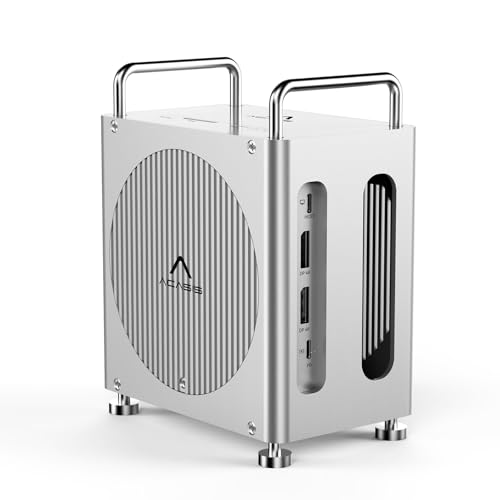
- 40Gbps host connection for fast data transfer
- Dual NVMe enclosure with RAID 0/1, JBOD, and default modes
- Dual DisplayPort output for triple-display setups
Best For: Users building a fast, storage-heavy Mac mini workstation
Feature-Rich Everyday Dock
13-in-1 Mac mini Dock with Power Button

- Up to 8TB NVMe enclosure at 10Gbps
- 4K@144Hz DP and 4K@60Hz HDMI support
- One-touch power button with five USB ports
Best For: Creators and multitaskers who want storage plus easy controls
Compact Cooling Design
Satechi Mac mini M4 Hub with NVMe SSD

- Up to 4TB NVMe storage support
- Two USB-A 3.2 ports and UHS-II SD reader
- Optimized airflow with heat-dissipating vents
Best For: Users who want a compact, cooling-friendly Mac mini hub
Dual-Bay Power Dock
Mac mini M4 Dock & Stand with Dual-Bay NVMe SSD Enclosure
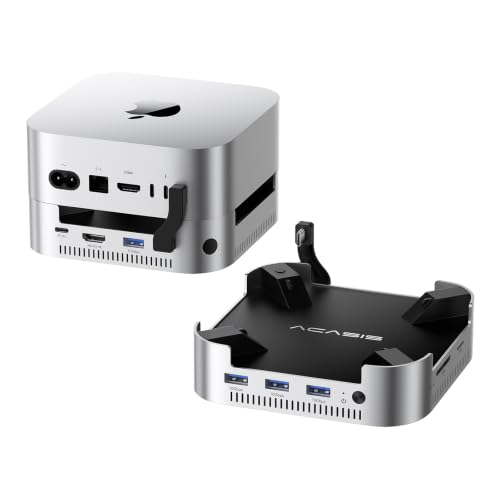
- Supports 2 NVMe SSDs up to 16TB
- 4K@60Hz HDMI and 3×10Gbps USB-A
- Dual fans and 30W self-powered design
Best For: Users who want maximum storage and a full-featured Mac mini base
Tidy Single-Bay Hub
Mac mini M4 Dock & Stand with NVMe SSD Enclosure

- Up to 8TB NVMe storage support
- 11-port hub with USB-A, USB-C, and SD/TF
- Compact design with short cable and anti-slip pads
Best For: People who want a neat, compact Mac mini hub with everyday expansion
All-in-One Expansion Dock

- Up to 8TB SSD support
- 2x 10Gbps USB-A plus SD/TF and HDMI
- Bottom power button and vented stand design
Best For: Mac mini M4 users who want storage, ports, and easier power access in one dock
Display-First Dock

- Up to 8TB NVMe SSD support
- DP output up to 4K@240Hz on M4 Pro
- 10Gbps USB-A/C, SD/TF, and audio ports
Best For: Mac mini users who want high-refresh external display support with built-in SSD expansion
Thermal Aluminum Dock
Acer Gadget Mac Mini SSD Enclosure

- Up to 8TB NVMe or SATA SSD support
- Aluminum body with thermal pad for cooling
- HDMI 2.1, 10Gbps USB-C/A, SD/TF, and audio
Best For: Buyers who want a premium aluminum dock with cooling-focused design and included setup accessories
All-in-One Expandability – Mac mini M4 Dock with SSD Enclosure and HDMI
If you want a Mac Mini dock with SSD enclosure that adds storage, ports, and a stand in one unit, this RayCue model is a straightforward option. It combines an M.2 NVMe/SATA enclosure with a 10-in-1 hub, giving you expanded connectivity without adding another stack of accessories.
Best For: Mac mini M4 users who want a compact dock with built-in storage expansion and a single-monitor setup.
Pros:
- Supports M.2 NVMe/SATA SSDs up to 8TB in 2230/2242/2260/2280 sizes
- Includes 4K@60Hz HDMI plus 10Gbps USB-A and USB-C data ports
- Adds SD/TF card slots, audio, and two 5Gbps USB-A ports for peripherals
- Designed as an aluminum stand that matches Mac mini M4 and M4 Pro 2024
Cons:
- Only one HDMI port, so it supports one external display through the dock
- Requires the extra USB-C charging port for adequate power when using drives
- Compatibility is focused on Mac mini M4/M4 Pro 2024 and USB-C laptops
This is a practical pick if your priority is pairing a Mac Mini dock with SSD enclosure capability and everyday connectivity in a clean, integrated design. It’s best suited to users who value storage expansion and a tidy desktop over multi-display complexity.
High-Speed Workstation Choice – 40Gbps Mac mini Dock with Dual NVMe Bays
This Mac Mini dock with SSD enclosure is built for heavier workflows, with a 40Gbps host connection and dual NVMe bays for storage expansion. If you want fast file transfers, RAID options, and broader display support, this ACASIS unit is aimed at power users.
Best For: Power users who want maximum bandwidth, dual-drive storage, and multi-display flexibility.
Pros:
- 40Gbps host connection for high-throughput performance
- Dual M.2 bays support RAID 0, RAID 1, JBOD, and default modes
- Two DisplayPort outputs support triple-display productivity with Mac mini ports
- Three 10Gbps USB-A ports and SD/TF card readers add useful connectivity
Cons:
- Shared bandwidth can reduce SSD performance when using dual displays
- RAID 0 performance depends on using two identical M.2 SSDs
- More advanced than a basic dock, so it may be more than casual users need
For demanding workflows, this dock stands out because it combines dual-bay storage with serious bandwidth and display options. It makes the most sense when you need both speed and expansion in one desktop hub.
Feature-Rich Everyday Dock – 13-in-1 Mac mini Dock with Power Button
If you want a Mac Mini dock with SSD enclosure that balances storage, display support, and everyday ports, this TobenONE model covers a lot of ground. It adds an internal NVMe slot, 13 total functions, and a one-touch power button in a compact Mac mini M4/M4 Pro stand.
Best For: Creators and multitaskers who want a feature-rich dock with easy power control and storage expansion.
Pros:
- Supports up to 8TB NVMe storage at 10Gbps
- Includes DisplayPort 4K@144Hz and HDMI 4K@60Hz for dual or triple display setups
- Offers five USB ports, SD/microSD, and 3.5mm audio for daily workflows
- Built-in power button and internal baffles help with convenient, stable setup
Cons:
- SATA drives are not supported
- Only compatible with Mac mini M4 and M4 Pro 2024
- Top display performance depends on your overall monitor and port configuration
This is a strong middle ground if you want broad utility without moving up to a more specialized pro docking station. It’s especially attractive for users who want storage, display flexibility, and one-button convenience in one unit.
Compact Cooling Design – Satechi Mac mini M4 Hub with NVMe SSD
For buyers comparing a Mac Mini dock with SSD enclosure, this Satechi model focuses on clean front-facing expansion and airflow. It adds NVMe storage support, USB-A ports, and an SD card reader while keeping the dock design compact and optimized for cooling.
Best For: Mac mini M4 owners who want a tidy, well-built hub with practical storage and media access.
Pros:
- Supports up to 4TB NVMe SSDs in 2230/2242/2260/2280 sizes
- Includes two USB-A 3.2 ports up to 10Gbps plus USB-A 2.0
- UHS-II SD reader reaches up to 312MB/s for faster media transfer
- Heat-dissipating vents and recessed top are designed to preserve airflow
Cons:
- Only works with Mac mini M4, not earlier Mac mini models
- SSDs with heatsinks or double-sided drives are incompatible
- Fewer ports than some larger all-in-one docks
This Satechi dock is a sensible choice if you care more about a streamlined desktop and reliable basics than maximum port count. It pairs storage expansion with thoughtful cooling and a compact footprint, which makes it easy to live with every day.
Dual-Bay Power Dock – Mac mini M4 Dock & Stand with Dual-Bay NVMe SSD Enclosure
If you want a Mac mini dock with SSD enclosure that adds both storage and desktop ports, this ACASIS model is built for heavy expansion. It supports two NVMe drives, offers up to 16TB of storage, and includes a self-powered 30W adapter to help keep the setup stable for long sessions.
Best For: Mac mini M4 users who want maximum storage expansion, strong cooling, and a full-size hub in one stand.
Pros:
- Dual NVMe enclosure supports up to 16TB, with RAID 0 options for faster performance.
- Includes 4K@60Hz HDMI plus 3 USB-A 10Gbps ports and SD/TF slots.
- Aluminum body with dual silent fans helps manage heat during extended use.
- Comes with a 30W power adapter and a full accessory kit for setup.
Cons:
- Requires careful SSD handling; the notes warn not to plug or unplug drives while powered on.
- Uses HDMI instead of DisplayPort, which may matter if your monitor setup is DP-based.
This is a strong pick if storage expansion is the priority and you want the dock to feel like a purpose-built Mac mini base. It balances capacity, cooling, and everyday connectivity well for a tidy desktop setup.
Tidy Single-Bay Hub – Mac mini M4 Dock & Stand with NVMe SSD Enclosure
This Mac mini dock with SSD enclosure is aimed at users who want a cleaner desk and fast everyday expansion without a bulky footprint. UGREEN adds up to 8TB of NVMe storage, a mix of USB-A and USB-C ports, and a short cable design that helps keep the setup neat.
Best For: Mac mini M4 owners who want a compact, tidy hub with solid storage expansion and lots of USB connectivity.
Pros:
- Supports M.2 NVMe SSDs up to 8TB for fast local storage.
- Offers 11 total ports, including 10Gbps USB-A and USB-C data connections.
- Includes SD/TF card reader support with up to 170MB/s transfer rates.
- Designed to match Mac mini curves and includes anti-slip pads plus a power button lever.
Cons:
- Does not include an SSD, so storage must be added separately.
- External power is recommended for multi-device setups, so peak flexibility may depend on your power plan.
Overall, this is the practical choice if you want a Mac mini dock with SSD enclosure that emphasizes desk organization and broad USB access. It is less aggressive on storage than dual-bay options, but it covers the essentials very well.
DisplayPort Workstation Dock – 40Gbps Mac mini M4 Dock & Stand with Dual-Bay NVMe SSD Enclosure
For buyers looking at a Mac mini dock with SSD enclosure and a display-first setup, this ACASIS version leans into high-refresh external monitor support. It pairs dual NVMe storage with DisplayPort output, fast USB, and a self-powered aluminum design made for multitasking workstations.
Best For: Mac mini M4 users who want dual-storage expansion and DisplayPort-based multi-monitor support.
Pros:
- Dual NVMe enclosure supports up to 16TB of storage.
- DisplayPort output supports up to 4K@144Hz on a single screen or 4K@60Hz on dual screens.
- Three USB-A 10Gbps ports and SD/TF 4.0 slots for faster transfers.
- Aluminum build with dual silent fans and a 30W adapter for stable operation.
Cons:
- Setup may require troubleshooting steps if displays or drives do not connect properly.
- The notes recommend a 65W or higher power adapter for some troubleshooting scenarios, which may add complexity.
If your desk setup prioritizes monitor performance, this model stands out among Mac mini dock with SSD enclosure options. It offers the same broad expansion idea as other dual-bay docks, but with a stronger focus on high-refresh DisplayPort output.
All-in-One Expansion Dock – Stouchi 8TB SSD Dock Stand
If you want a Mac Mini dock with SSD enclosure that also cleans up your desk, the Stouchi dock is built around an all-in-one approach. It combines storage expansion, extra ports, a bottom power button, and a stand-style design made specifically for the Mac mini M4 and M4 Pro.
Best For: Mac mini M4 owners who want a single dock for storage, ports, and easier power access.
Pros:
- Supports up to 8TB via M.2 NVMe or SATA SSDs in multiple sizes.
- Includes 2x 10Gbps USB-A ports, extra USB-A data ports, SD/TF readers, HDMI, and 3.5mm audio.
- Bottom-mounted power button makes it easier to turn on the Mac mini without lifting it.
- Designed with shielding, vented airflow, and non-slip pads for a more stable setup.
Cons:
- SSD is not included.
- Works only with Mac mini M4 and M4 Pro.
- Plastic construction may not appeal if you prefer an aluminum finish.
Overall, this is a practical pick if you want the dock to do more than just add ports. It is aimed at users who value storage expansion, convenience, and a tidy desk in one package.
Display-First Dock – UGREEN Mac mini M4 DP Hub
This Mac Mini dock with SSD enclosure is a strong fit if display performance matters as much as storage. UGREEN pairs an M.2 NVMe enclosure with a DP hub, giving Mac mini M4 and M4 Pro users a compact way to add fast storage, fast data ports, and high-refresh external display support.
Best For: Users who want a dock centered on 4K high-refresh output plus SSD expansion.
Pros:
- Supports up to 8TB M.2 NVMe SSDs in 2230/2242/2260/2280 sizes.
- DP output supports up to 4K@240Hz on M4 Pro and 4K@144Hz on M4.
- Includes 10Gbps USB-A and USB-C data ports plus SD/TF and audio.
- Power button lever and anti-slip silicone pads add everyday convenience.
Cons:
- SSD is not included.
- Display performance depends on the monitor and cable you use.
- Only NVMe SSDs are supported for the enclosure.
For buyers who want a dock that emphasizes screen smoothness without giving up storage expansion, this is a well-balanced choice. It is especially appealing for productivity setups and creative workstations that benefit from a DP-focused design.
Thermal Aluminum Dock – Acer Gadget Mac Mini SSD Enclosure
The Acer Gadget dock is a Mac Mini dock with SSD enclosure designed for users who want a more premium, all-inclusive setup. It combines 8TB storage support, HDMI 2.1 output, fast USB-C and USB-A connectivity, and an aluminum body that is meant to help both airflow and SSD cooling.
Best For: Users who want an aluminum dock with strong cooling features and a complete accessory bundle.
Pros:
- Supports up to 8TB M.2 NVMe and SATA SSDs in multiple sizes and key types.
- HDMI 2.1 supports up to 4K@144Hz for a high-refresh external display setup.
- Offers 10Gbps USB-C and USB-A ports, plus SD/TF card readers and 3.5mm audio.
- Includes a USB-C cable, screwdriver, thumb screws, thermal pad, and 5V/3A power adapter.
Cons:
- SSD is not included.
- Best performance depends on using the recommended 5V/3A power adapter.
- Bulky feature set may be more than needed for simple port expansion.
If you want a dock that feels more like a full workstation upgrade, this one stands out for its aluminum build and included accessories. It is a solid option when cooling, display output, and storage expansion all matter at once.
How We Picked the Best Mac Mini Dock with SSD Enclosure
We focused on docks built specifically for the Mac mini M4 and M4 Pro, with an emphasis on real-world usefulness: SSD enclosure support, port selection, display output quality, and overall build design. We also looked for models that balance speed, compatibility, and desk-friendly form factors.
Quick Comparison
The main differences come down to SSD design and I/O mix. Some Mac Mini Dock with SSD Enclosure models use a single M.2 slot for simpler storage expansion, while others add dual-bay support for more total capacity or flexibility. For connectivity, compare USB-A versus USB-C counts, HDMI versus DisplayPort, SD/TF readers, and audio jacks. Display support matters too, especially if you plan to run a high-refresh external monitor.
Key Buying Factors for a Mac Mini Dock with SSD Enclosure
SSD Type and Capacity
Check whether the enclosure supports NVMe, SATA, or both. NVMe is generally the better choice for speed, while dual-bay designs can be useful if you want larger storage pools or separate drives for work and media.
Display Output
Choose HDMI or DisplayPort based on your monitor setup. If you use a 4K display at higher refresh rates, confirm the dock supports the resolution and refresh rate you need, not just basic 4K output.
Port Mix
Think about what you actually plug in daily. A few 10Gbps USB ports, a USB-C data port, and SD/TF card readers may be enough for most users, while creators and power users may want more total I/O.
Thermals and Build Quality
Because the dock also acts as a stand, aluminum construction and decent ventilation are worth prioritizing. Better heat management helps protect SSD performance during longer transfers.
Who Should Buy Which Mac Mini Dock with SSD Enclosure?
If you want the simplest upgrade, choose a single-drive dock with the ports you use most. If you work with large files, consider a dual-bay model for more storage flexibility. If your setup depends on a high-refresh monitor, prioritize a dock with the right HDMI 2.1 or DisplayPort support. For creators, readers, and frequent multitaskers, a Mac Mini Dock with SSD Enclosure that combines strong display support with multiple fast USB ports will usually be the best fit.