A great dock can turn your Mac Studio into a cleaner, faster, and more flexible workstation. If you want extra storage without clutter, a dock with built-in NVMe expansion is one of the smartest upgrades you can make.
Below, we focus on the best options for everyday creators, power users, and anyone who wants more ports, better cable management, and easy local SSD storage.
Best 10 Mac Studio Dock with NVMe Enclosure Picks for 2026
Dual-SSD Performance Dock
Mate Studio Stand-A 80Gbps SSD Expansion Dock
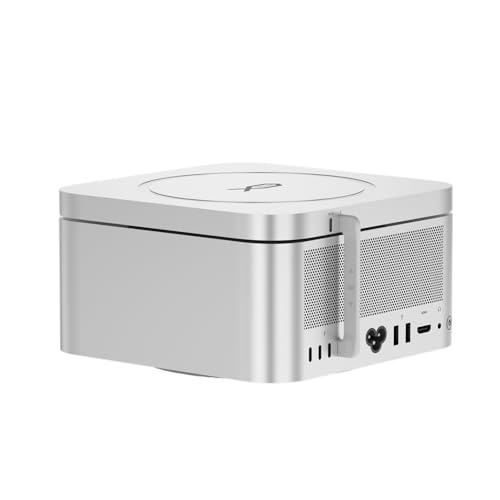
- Dual M.2 slots with up to 16TB total
- Up to 3600MB/s claims with PCIe 4.0 SSDs
- Aluminum stand with ventilation and PD 3.0
Best For: Dual-drive storage expansion on a clean Mac Studio-style desk
All-in-One Storage Hub
Qwiizlab Mac mini / Mac Studio Hub

- M.2 NVMe/SATA plus 2.5-inch drive support
- USB-C, USB-A, and SD/microSD included
- Slim aluminum design for Mac mini and Studio
Best For: Mixed storage and port expansion in a compact hub
High-Speed Portable Enclosure
UGREEN 80Gbps M.2 NVMe SSD Enclosure

- Up to 7000 MB/s with dual-chip design
- Aluminum fin cooling for lower temperatures
- Supports M.2 2230-2280 and multiple OSs
Best For: Portable high-speed NVMe storage for Mac workflows
Mac mini Expansion Dock
Stouchi M4 Dock Stand with SSD Enclosure

- 8TB SSD enclosure plus 8-port hub
- 2x 10Gbps USB-A, HDMI, SD/TF, and audio
- Bottom power button and vented stand design
Best For: Mac mini M4 owners wanting a storage-and-hub base
Thunderbolt 5 Performance Dock
Satechi Thunderbolt 5 CubeDock

- Up to 8TB built-in NVMe expansion
- Thunderbolt 5 with 140W charging
- 2.5GbE, SD/microSD, and 10Gbps USB ports
Best For: Mac Studio users who want one dock to handle fast storage, charging, and multi-display workflows.
Compact Mac mini Storage Hub

- Built-in M.2 NVMe support up to 8TB
- 4K high-refresh DisplayPort support
- 10Gbps USB, SD/TF, and audio ports
Best For: Mac mini M4 and M4 Pro users who want a simple storage-and-hub solution with display support.
Aluminum Hub Stand with SSD Bay

- NVMe/SATA M.2 SSD enclosure
- USB-C 10Gbps plus USB-A, SD/microSD, audio
- Air vents and aluminum design aid cooling
Best For: Mac mini M2/M1 users who want added storage, easy-access ports, and a stand that matches the desktop.
Most Compact Hub

- M.2 NVMe enclosure supports up to 8TB
- 11 ports include USB-A, USB-C, and SD/TF
- Short cable and lever-style power access reduce desk clutter
Best For: Mac mini M4 users who want storage and a tidy hub
Premium Pick

- Supports NVMe or SATA SSDs up to 8TB
- HDMI 2.1 reaches up to 4K@144Hz
- Aluminum design helps airflow and SSD cooling
Best For: Users who want premium build quality and high-refresh display support
Dual-SSD Performance Dock – Mate Studio Stand-A 80Gbps SSD Expansion Dock
If you want a Mac Studio dock with NVMe enclosure that focuses on raw storage expansion, this Mate Studio stand is built for high-capacity workflows. It combines dual M.2 slots with an aluminum stand design, aiming to add fast, compact SSD storage while keeping the desktop footprint clean.
Best For: Users who need a Mac Studio-style dock for dual SSD expansion, large media libraries, and space-saving desk setups.
Pros:
- Dual M.2 2280 slots support up to 16TB total capacity.
- Claims up to 3600MB/s sequential reads with PCIe 4.0 x4 SSDs.
- Aluminum alloy body with ventilation slots for cooling.
- Integrated PD 3.0 port helps with higher-power drives.
Cons:
- Performance depends on the SSD and host system.
- Designed around storage expansion, not extra USB or display ports.
For buyers prioritizing storage density over docking extras, this is a practical expansion stand with a professional look. It is a strong fit when the main goal is adding fast NVMe capacity to a compact workstation.
All-in-One Storage Hub – Qwiizlab Mac mini / Mac Studio Hub
This Mac Studio dock with NVMe enclosure is a versatile option if you want storage expansion and extra ports in one compact unit. Qwiizlab pairs an internal drive bay with a practical hub layout, so it works well for users who need both added capacity and everyday connectivity.
Best For: Users who want a combined storage hub for a Mac Studio or Mac mini setup with mixed drive support.
Pros:
- Supports M.2 PCIe SATA/NVMe SSDs up to 8TB.
- Also supports 2.5-inch SATA SSDs up to 8TB and HDDs up to 2TB.
- Includes USB-C, USB-A, and SD/microSD card readers.
- Aluminum alloy enclosure keeps the footprint slim.
Cons:
- 10Gbps docking speeds are solid, but not as fast as Thunderbolt-class solutions.
- Setup may take a little more effort because it supports multiple drive formats.
This is a flexible choice for buyers who want one accessory to handle storage, peripherals, and card access. It stands out most when you need compatibility across several drive types instead of just a single NVMe slot.
High-Speed Portable Enclosure – UGREEN 80Gbps M.2 NVMe SSD Enclosure
If your goal is a Mac Studio dock with NVMe enclosure performance in a portable format, this UGREEN enclosure is built for speed and thermal control. It is an external SSD housing rather than a desktop dock, but it can be a strong add-on for users who want fast, quiet storage near a Mac Studio workflow.
Best For: Users who want a fast, compact external NVMe enclosure for transfer-heavy Mac workflows.
Pros:
- Dual-chip design supports speeds up to 7000 MB/s.
- Aluminum fin cooling is designed to reduce heat and improve airflow.
- Supports M.2 sizes 2230 through 2280.
- Compatible with macOS, Windows, Linux, and Android.
Cons:
- SSD is not included.
- Not compatible with SATA or mSATA drives.
- Heatsink-equipped SSDs are not supported.
For users who care most about transfer speed and portability, this enclosure is a straightforward option. It is best treated as an external high-speed storage accessory rather than a full dock replacement.
Mac mini Expansion Dock – Stouchi M4 Dock Stand with SSD Enclosure
This Mac Studio dock with NVMe enclosure alternative is aimed at Mac mini M4 owners who want an all-in-one desktop base with storage, ports, and power access. Stouchi combines an SSD enclosure with a multiport hub and a bottom-mounted power button, which makes the Mac mini setup more convenient and desk-friendly.
Best For: Mac mini M4 users who want storage expansion plus a full hub and easy power access.
Pros:
- Supports M.2 NVMe or SATA SSDs up to 8TB.
- Includes 2x 10Gbps USB-A ports, HDMI, SD/TF, and audio.
- Integrated bottom power button adds convenience.
- Vented design and locking fit help with cooling and stability.
Cons:
- Designed specifically for Mac mini M4 and M4 Pro.
- SSD is not included.
If you want one dock to handle storage, connectivity, and daily power-on use, this is a strong functional bundle. It is especially appealing for a tidy Mac mini desk where convenience matters as much as expansion.
Thunderbolt 5 Performance Dock – Satechi Thunderbolt 5 CubeDock
If you want a Mac Studio dock with NVMe enclosure that also replaces a pile of adapters, the Satechi Thunderbolt 5 CubeDock is built for that kind of desk setup. It combines high-bandwidth connectivity, built-in SSD expansion, and serious charging in one compact aluminum dock for users who want a cleaner workstation.
Best For: Mac Studio users who want one dock to handle fast storage, charging, and multi-display workflows.
Pros:
- Built-in M.2 NVMe enclosure supports up to 8TB of PCIe 4.0 storage.
- Thunderbolt 5 connection offers up to 120Gbps bandwidth and 140W host charging.
- Supports multi-display output, including dual 6K 60Hz on macOS M3/M4/M5.
- Includes 2.5GbE, SD/microSD, and 10Gbps USB-C/A ports for a fuller desktop hub.
Cons:
- SSD is not included.
- For best performance, you need the included or a certified Thunderbolt 5 cable.
- macOS display support is specific to the listed M3/M4/M5 systems.
The CubeDock is a strong fit if you need a premium, all-in-one dock with fast onboard storage and modern connectivity. It is especially appealing for Mac Studio setups that need fewer cables without giving up expansion.
Compact Mac mini Storage Hub – UGREEN Mac mini M4 Dock
If you’re looking for a Mac Studio dock with NVMe enclosure, this UGREEN stand is worth a look for Mac mini M4 owners who want compact storage and front-facing ports in one tidy base. It adds an internal SSD slot plus a display hub layout designed to keep a small desktop setup organized.
Best For: Mac mini M4 and M4 Pro users who want a simple storage-and-hub solution with display support.
Pros:
- Supports M.2 NVMe SSDs up to 8TB for extra internal-style storage.
- Includes 4K@240Hz on Mac mini M4 Pro and 4K@144Hz on M4 via DisplayPort.
- Offers 10Gbps USB-A/USB-C data ports plus SD/TF and audio.
- Power button lever lets you turn on the Mac without lifting it.
Cons:
- Designed for Mac mini M4 and M4 Pro, not for Mac Studio.
- Multi-screen use requires combining the dock’s DP port with the Mac’s Thunderbolt port.
- SSD is not included.
This is a practical pick if you want a clean Mac mini desk setup with built-in NVMe expansion and quick-access ports. It focuses more on compact utility than on heavy-duty workstation expansion.
Aluminum Hub Stand with SSD Bay – Satechi Mac mini Hub & Stand
For buyers searching for a Mac Studio dock with NVMe enclosure, this Satechi hub is a better fit if you actually use a Mac mini M2 or M1. It combines front-facing ports, an SSD enclosure, and a matching aluminum stand design for a more polished desktop layout.
Best For: Mac mini M2/M1 users who want added storage, easy-access ports, and a stand that matches the desktop.
Pros:
- Supports NVMe and SATA M.2 SSDs in 2242/2260/2280 sizes.
- Offers USB-C 10Gbps, multiple USB-A ports, SD/microSD, and a 3.5mm audio jack.
- Built-in air vents and brushed aluminum help with airflow and heat dissipation.
- Includes a thermal pad, screwdriver, and 2-year limited warranty.
Cons:
- Not compatible with Mac mini M4.
- Not compatible with SSDs that have pre-installed heatsinks.
- USB-A limitations apply for certain bus-powered devices and optical drives.
This hub is a straightforward way to add storage and everyday ports while keeping a Mac mini setup neat. It makes the most sense if your priority is a stable, matching stand with practical expansion rather than cutting-edge speed.
Most Compact Hub – UGREEN 11-in-1 NVMe Stand
If you want a Mac Studio dock with NVMe enclosure-style setup for a Mac mini M4, this UGREEN stand is built for users who need fast storage and a cleaner desk in one piece. It combines an M.2 NVMe slot with a 11-in-1 USB hub, so it works well when you want more everyday ports without adding a stack of separate adapters.
Best For: Mac mini M4 users who want compact NVMe expansion plus a practical USB hub.
Pros:
- Supports M.2 NVMe drives in 2230/2242/2260/2280 sizes and up to 8TB.
- Includes 11 total ports, with 3 USB-A 10Gbps, 2 USB-A 5Gbps, 2 USB-C 10Gbps, and SD/TF support.
- Precision-fit design includes a power-button lever, silicone pads, and a short 4cm cable for a tidier setup.
- Can draw power from the Mac mini or an external adapter for multi-device use.
Cons:
- SSD is not included.
- Designed specifically for Mac mini M4/M4 Pro, not Mac Studio.
- Uses UHS-I card reading rather than a higher-end media workflow focus.
Overall, this is a strong pick if your priority is fast NVMe expansion and a compact port hub in a single desktop accessory. It is best viewed as a Mac mini M4 companion rather than a true Mac Studio dock, but the storage and port mix is very practical for general creative and productivity use.
Best for Displays – TobenONE 13-in-1 NVMe Hub
For buyers looking at a Mac Studio dock with NVMe enclosure features, this TobenONE dock is really about turning a Mac mini M4 into a more complete workstation. It pairs built-in NVMe storage support with display outputs, audio, card readers, and multiple USB ports, so it suits users who want fewer dongles and more desktop flexibility.
Best For: Mac mini M4 owners who need dual-display support and a fuller all-in-one hub.
Pros:
- Built-in M.2 NVMe enclosure supports up to 8TB at 10Gbps.
- Offers 13 total ports, including HDMI, DisplayPort, five USB ports, SD/microSD, and 3.5mm audio.
- Supports 4K@144Hz via DisplayPort and 4K@60Hz via HDMI for flexible monitor setups.
- Includes a one-touch power button and internal baffles for a stable fit.
Cons:
- SSD is not included.
- Not compatible with Mac Studio or older Mac mini models.
- The detailed monitor setup depends on your display and connection choices.
This is one of the more feature-rich options in the group if you want storage, display outputs, and everyday connectivity from one accessory. It is especially appealing for creators or multitaskers who want a dock that feels closer to a workstation base than a simple USB hub.
Premium Pick – Acer Gadget M4 Stand
If you need a Mac Studio dock with NVMe enclosure-style functionality for a Mac mini M4, this Acer Gadget stand focuses on storage, cooling, and higher-end display support. It adds an M.2 enclosure plus 10Gbps USB and HDMI 2.1 connectivity, making it a strong fit for users who want a more polished and performance-minded desktop base.
Best For: Mac mini M4 and M4 Pro users who want premium build quality, cooling, and fast expansion.
Pros:
- Supports up to 8TB M.2 NVMe or SATA SSDs in 2230/2242/2260/2280 sizes.
- HDMI 2.1 supports up to 4K@144Hz for high-refresh monitor setups.
- Includes 10Gbps USB-C and USB-A ports plus SD/TF card readers for fast transfers.
- Elevated aluminum design improves airflow and helps cool the internal SSD.
Cons:
- SSD is not included.
- Best results depend on your monitor and HDMI cable support.
- It is made for Mac mini M4/M4 Pro, not Mac Studio.
Among these options, this one stands out for combining a premium aluminum body with storage expansion and thermal management. If your priority is a dock that feels sturdy and performance-focused while keeping the desk neat, it makes a convincing case.
How We Picked the Best Mac Studio Dock with NVMe Enclosure
We looked for docks that balance storage expansion, port selection, thermal design, and Mac compatibility. For a Mac Studio Dock with NVMe Enclosure, the most important factors are sustained transfer speed, reliable enclosure access, and a layout that actually improves your desk setup instead of adding more clutter.
We also favored products with useful extras such as USB-A and USB-C ports, card readers, video output on some models, and solid aluminum construction for heat dissipation.
Quick Comparison
If you mainly want simple external storage, a compact NVMe-focused dock is enough. If you need a full workstation hub, look for models with multiple USB ports, SD/TF card support, and display connections. Users who move large video files or photo libraries should prioritize higher-bandwidth designs and better cooling, while casual users may prefer a quieter, more affordable hub with moderate expansion.
Key Buying Factors for a Mac Studio Dock with NVMe Enclosure
Storage Type and Capacity
Check whether the enclosure supports NVMe, SATA, or both. NVMe is usually the better pick for speed, while dual-protocol support adds flexibility. Also verify the maximum capacity so the dock can grow with your workflow.
Connection Speed
Connection bandwidth affects real-world performance. Faster interfaces help large file transfers, project backups, and media editing feel smoother. If your workflow includes high-resolution video or frequent scratch disk use, speed matters more than extra ports.
Thermals and Build Quality
Aluminum bodies, heat fins, and open stand designs can help keep SSDs cooler under load. Better thermals often mean more consistent performance over long sessions.
Port Layout
Choose the port mix that matches your peripherals. Common needs include USB-A for legacy accessories, USB-C for modern devices, SD/TF card readers for creators, and HDMI or DisplayPort on some all-in-one models.
Who Should Buy Which Mac Studio Dock with NVMe Enclosure?
Choose a more storage-first dock if your main goal is fast local SSD expansion for apps, media, and backups. Pick a feature-rich hub if you want one device to handle drives, peripherals, and card media at the same time. Power users and creators should lean toward higher-bandwidth options with strong cooling, while general office users can save money by choosing a simpler dock with the ports they use most.
In short, the best Mac Studio Dock with NVMe Enclosure is the one that matches your transfer needs, desk setup, and long-term storage plans.