If your Mac Studio is running out of ports, the right expansion hub can make a big difference in day-to-day workflow. From external drives and card readers to keyboards, audio gear, and charging accessories, a well-matched hub keeps everything connected without clutter.
In this roundup, we focus on practical options for speed, power delivery, and reliable connectivity so you can choose a setup that fits your desk and your workload.
Best 10 Mac Studio USB Expansion Hub Picks for 2026
Storage-focused Mac mini stand
Satechi Mac mini Hub & SSD Enclosure

- Adds NVMe/SATA SSD storage in the base
- USB-C, 3 USB-A, card readers, and audio
- Cooling vents and aluminum finish
Best For: Mac mini M1/M2 users who want storage and front ports
Maximum USB port hub
ACASIS 16-Port Powered USB 3.2 Hub
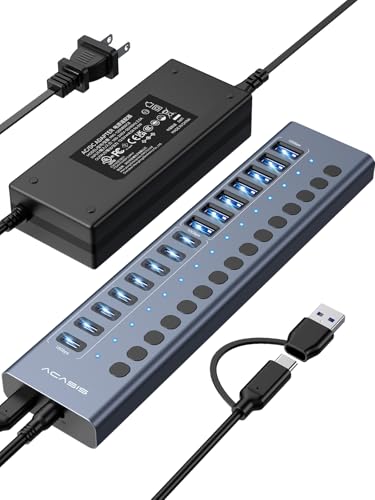
- 16 ports total: 8 USB-A and 8 USB-C
- 10Gbps speed with 96W power adapter
- Independent switches for each port
Best For: Busy desks needing lots of powered USB connections
Premium Thunderbolt expansion
OWC Thunderbolt 5 Hub 5-Port Expansion

- Thunderbolt 5 with up to 80Gb/s bandwidth
- Up to three 8K displays supported
- 140W charging in a fanless aluminum body
Best For: Power users who need top-tier Mac expansion and display support
Portable USB-C all-in-one
intpw 9-in-1 USB-C Hub with HDMI and PD

- 4K@60Hz HDMI plus 100W PD passthrough
- USB-C, 2 USB-A 3.0, 2 USB 2.0, SD/TF
- Lightweight aluminum body with angled design
Best For: Portable USB-C setups that need display output and charging
Storage-First Expansion
Qwiizlab dual-drive hub for Mac Studio

- Adds M.2 SATA/NVMe, 2.5-inch SSD, and HDD support
- Includes 10Gbps USB-C/USB-A plus 5Gbps USB-A ports
- Built-in SD/microSD readers speed up transfers
Best For: Mac Studio users who want ports and internal storage in one dock
Fast USB-C Expansion
Belkin 4-port 10Gbps USB-C hub

- Four USB-C 3.2 Gen 2 ports with 10Gbps speeds
- Supports audio devices and pass-through charging up to 100W
- Compact plug-and-play design with FSR
Best For: Mac Studio users who want fast USB-C ports and charging in a small hub
Powered Port Control
SABRENT 7-port hub with switches

- Seven ports total: 3 USB-A and 4 USB-C
- Independent power switches on every port
- Includes a 48W adapter and one 20W PD port
Best For: Mac Studio users who want a powered hub with lots of switchable ports
Compact MacBook Docking Upgrade

- 7-in-2 port mix with HDMI and card readers
- Up to 100W charging and 40 Gb/s data
- 4K@60Hz HDMI plus 5K@60Hz USB-C display
Best For: portable MacBook users needing a slim all-in-one hub
High-Power Desktop Expansion

- 9 ports with 10Gbps USB-C and USB-A options
- Two PD 45W charging ports included
- 65W adapter supports stable powered use
Best For: desktop setups that need many USB ports and charging
Simple Peripherals Hub

- Seven USB 3.0 data ports plus one charging port
- Up to 5Gbps transfer speed
- Individual on/off switches for each port
Best For: basic desktop peripheral expansion with one charging port
Storage-focused Mac mini stand – Satechi Mac mini Hub & SSD Enclosure
If you want a Mac Studio USB expansion hub style setup that also adds storage, this Satechi stand/hub is built for Mac mini users who need front-facing ports and an SSD bay in one compact aluminum piece. It combines USB connectivity, card readers, audio, and NVMe/SATA expansion while helping with airflow under the computer.
Best For: Mac mini M1/M2 owners who want a tidy desk setup with extra ports and internal SSD storage.
Pros:
- Includes an SSD enclosure for M.2 NVMe PCIe or NGFF SATA drives in 2242/2260/2280 sizes.
- Offers USB-C, three USB-A ports, microSD/SD readers, and a 3.5mm audio jack.
- Aluminum design with air vents helps with cooling and matches Mac mini/Mac Studio styling.
- Comes with SSD installation tools, thermal pad, and a 2-year limited warranty.
Cons:
- Not compatible with Mac mini M4.
- SSD is not included.
- USB-A ports have limits for CD readers, Apple SuperDrive, and iPad charging.
This is a smart pick if your priority is desk organization plus local storage expansion, but it is more of a Mac mini dock than a universal high-port-count hub.
Maximum USB port hub – ACASIS 16-Port Powered USB 3.2 Hub
For a Mac Studio USB expansion hub alternative that focuses on raw port count, this ACASIS desktop hub is built to connect a lot of peripherals at once. It provides 16 total USB 3.2 ports, a 96W power adapter, and independent switches, making it useful for a crowded workstation with drives, printers, cameras, and accessories.
Best For: Users who need many USB ports on a single powered desktop hub.
Pros:
- 16-port layout with 8 USB-A and 8 USB-C 3.2 connections.
- 10Gbps transfer speed supports fast data movement.
- 96W power adapter helps run multiple devices simultaneously.
- Independent switches add convenience for managing connected gear.
Cons:
- Does not support video output.
- Bulkier than a travel-style hub.
- Best suited to USB peripherals rather than display expansion.
This is the right choice when your main goal is to multiply USB connections on a desk, especially if you want a powered hub with both USB-A and USB-C ports.
Premium Thunderbolt expansion – OWC Thunderbolt 5 Hub 5-Port Expansion
If you need a premium Mac Studio USB expansion hub with serious bandwidth, this OWC Thunderbolt 5 hub is aimed at modern Mac and PC setups that rely on Thunderbolt connectivity. It adds five Thunderbolt ports, supports high-speed data and multiple displays, and includes 140W charging in a fanless aluminum design.
Best For: Thunderbolt users who want fast expansion, display support, and high-watt charging in one compact hub.
Pros:
- Thunderbolt 5 platform with up to 80Gb/s bi-directional bandwidth and up to 120Gb/s for display needs.
- Supports up to three 8K displays and a range of Thunderbolt/USB-C/DisplayPort displays.
- Delivers up to 140W charging for power-hungry notebooks.
- Fanless aluminum enclosure and Thunderbolt cable included.
Cons:
- No Ethernet port.
- Requires Thunderbolt/USB4-compatible use cases to make the most of it.
- Higher-end than a simple USB hub if you only need basic peripherals.
This is the strongest pick here for users who care about performance first, especially if your Mac workflow depends on fast external storage, displays, and daisy-chained Thunderbolt gear.
Portable USB-C all-in-one – intpw 9-in-1 USB-C Hub with HDMI and PD
If you want a compact Mac Studio USB expansion hub for travel or a smaller desk setup, this intpw USB-C hub covers the essentials in one lightweight aluminum adapter. It adds HDMI, power passthrough, SD/TF slots, and multiple USB ports, so it works well for everyday laptop-style expansion.
Best For: MacBook, iPad, and USB-C users who want a portable all-in-one adapter.
Pros:
- Includes 4K@60Hz HDMI for external displays.
- Offers 100W PD pass-through charging.
- Provides USB-C, two USB-A 3.0 ports, two USB 2.0 ports, and SD/TF card readers.
- Aluminum body with angled ergonomic design for better stability and heat handling.
Cons:
- PD port does not support data transfer or video output.
- Does not include a power adapter.
- USB-C devices must support DP Alt Mode or Thunderbolt for display output.
This adapter is a good fit when you need a flexible, portable hub more than a large desktop dock. It gives you a useful mix of display, charging, storage, and USB connectivity without taking up much space.
Storage-First Expansion – Qwiizlab dual-drive hub for Mac Studio
If you want a Mac Studio USB expansion hub that also adds internal storage, this Qwiizlab dock is built for both jobs. It combines a multi-port USB-C/USB-A hub with support for M.2 SATA/NVMe SSDs, 2.5-inch SATA SSDs, and even a 2.5-inch HDD, making it a practical way to add ports and capacity in one enclosure.
Best For: Mac Studio users who want both extra USB ports and onboard storage expansion.
Pros:
- Supports M.2 PCIe SATA and NVMe SSDs up to 8TB.
- Also fits 2.5-inch SATA SSDs up to 8TB and HDDs up to 2TB.
- Includes 10Gbps USB-C and USB-A ports plus two 5Gbps USB-A ports.
- SD and microSD readers reach up to 104MB/s for quick file access.
Cons:
- Best suited to users comfortable with drive installation.
- Designed around Mac mini and Mac Studio compatibility rather than universal desktop use.
For Mac Studio owners who want a tidy expansion base with storage built in, this is one of the most versatile options in the group. It is especially appealing if you want fast accessory connections and a cleaner way to add SSD or HDD capacity under the Mac.
Fast USB-C Expansion – Belkin 4-port 10Gbps USB-C hub
This Belkin option is a straightforward Mac Studio USB expansion hub if you mainly need more USB-C connections. It gives you four USB-C 3.2 Gen 2 ports, each rated up to 10Gbps, so it is a clean way to add fast peripherals, audio gear, or capture devices without moving to a larger dock.
Best For: Users who want a compact, high-speed USB-C hub for fast peripherals and pass-through charging.
Pros:
- Four USB-C ports, all rated up to 10Gbps.
- Supports audio devices such as headphones, speakers, and audio interfaces.
- Pass-through charging supports up to 100W.
- Compact, plug-and-play design with Fast Role Swap support.
Cons:
- No USB-A ports, so legacy accessories will need adapters.
- Focused on data and charging rather than broader docking features.
This is a strong pick if your Mac Studio setup is already USB-C heavy and you want speed over port variety. Its simplicity is the advantage: fast data, charging support, and a very small footprint.
Powered Port Control – SABRENT 7-port hub with switches
If you need a Mac Studio USB expansion hub for lots of everyday peripherals, this SABRENT model focuses on quantity, power, and control. It adds seven ports total, mixes USB-A and USB-C connectivity, and gives each port its own power switch, which is useful when you want to manage devices individually.
Best For: People who want a powered, switchable hub for many USB accessories on a Mac Studio.
Pros:
- Seven total ports: 3 USB-A and 4 USB-C.
- Independent power switches make it easy to control each device.
- Includes a 48W power adapter for stable powered use.
- One USB-C port supports up to 20W PD.
Cons:
- Top transfer speed is 5Gbps, not the faster 10Gbps class.
- Larger and more desk-oriented than ultra-compact hubs.
For a busy desktop with multiple accessories, this hub stands out for convenience more than raw speed. The switches and powered design make it well suited to users who regularly connect and disconnect several devices at once.
Compact MacBook Docking Upgrade – Anker 7-in-2 USB-C Hub
If you want a Mac Studio USB expansion hub-style solution for a MacBook setup, this Anker 7-in-2 hub is built for users who need extra ports without adding much desk clutter. It turns two USB-C ports into a compact mix of USB-A, USB-C, HDMI, SD, and microSD, while still supporting fast data and high-resolution display output.
Best For: MacBook users who want a slim, all-in-one hub for ports, media cards, and an external display.
Pros:
- Offers 7-in-2 expansion with USB-C, USB-A, HDMI, SD, and microSD support.
- Multi-function USB-C port supports up to 100W charging and 40 Gb/s data transfer.
- HDMI supports 4K@60Hz, and the USB-C display path supports up to 5K@60Hz.
- Designed to avoid blocking the MacBook MagSafe port.
Cons:
- Made for MacBook-style setups, not a full desktop expansion dock.
- M1 and M2 MacBooks do not support dual external displays with this hub.
- Not compatible with MacBook Neo.
This is a strong pick if you want a compact hub that balances charging, displays, and day-to-day file access. It is especially useful when you need a tidy portable expansion option rather than a larger powered desktop hub.
High-Power Desktop Expansion – intpw 9-Port USB 3.2 Hub
For a Mac Studio USB expansion hub setup that prioritizes wired peripherals and stable power, this intpw 9-port USB 3.2 hub is aimed at dense desktop expansion. It focuses on high-speed USB connections and dedicated charging ports, but it does not include video output, so it is best for peripherals rather than monitors.
Best For: Desktop users who need lots of USB ports, fast transfers, and separate charging ports.
Pros:
- Combines USB-C 3.2 10Gbps, USB-A 3.2 10Gbps, and USB-A 3.0 5Gbps ports.
- Includes two PD 45W charging ports for phones and tablets.
- Comes with a 65W power adapter for stable powered operation.
- Aluminum body and angled ergonomic design help with desktop use.
Cons:
- Does not support video output.
- Not recommended for charging computers or other high-power devices.
- Multiple SSDs should not be used simultaneously.
This hub makes sense when your main goal is to add a lot of USB connections and keep charging separate. It is a practical choice for a desk with accessories, drives, and mobile devices, but not for display expansion.
Simple Peripherals Hub – Atolla 8-Port USB 3.0 Hub
If you need a straightforward Mac Studio USB expansion hub for keyboards, mice, printers, and other USB accessories, the Atolla 8-port USB 3.0 hub keeps things simple. It offers basic SuperSpeed data expansion with a powered design, plus a smart charging port for phones and tablets.
Best For: Users who want a basic powered USB hub for everyday peripherals and one charging port.
Pros:
- Expands one USB 3.0 port into seven USB 3.0 data ports plus one charging port.
- Supports data transfer speeds up to 5Gbps.
- Includes individual on/off switches for each USB port.
- Comes with a 5V/4A power adapter for powered operation.
Cons:
- Does not offer USB-C or video output.
- Charging port is separate from the data ports.
- Plastic enclosure is simpler than premium metal hubs.
This is a solid no-frills option when you mainly need more USB ports and like the convenience of port switches. It is less advanced than newer USB-C hubs, but it covers the essentials well for a wired desk setup.
How We Picked the Best Mac Studio USB Expansion Hub
We prioritized hubs that offer the right mix of port variety, data speed, power delivery, and build quality for Mac users. For a Mac Studio USB Expansion Hub, that means looking beyond the raw port count and focusing on real-world usefulness: stable performance with external storage, enough power for busier accessories, and a design that fits a clean desktop setup.
We also favored models with clear specs, sensible port layouts, and features that help prevent cable swapping, such as powered operation, USB-C support, or dedicated switch controls.
Quick Comparison
The best choice depends on what you connect most often. If you need maximum flexibility, a powered multiport hub with both USB-A and USB-C is usually the most versatile. If your workflow leans heavily on fast drives and peripherals, prioritize 10Gbps or better. For users who want a cleaner workstation, compact hubs with charging support can reduce desk clutter, while higher-end Thunderbolt options are better for demanding video and multi-display setups.
Key Buying Factors for Mac Studio USB Expansion Hub
Port Type and Layout
Check whether you need mostly USB-A, mostly USB-C, or a balanced mix. A good layout should make it easy to plug in frequently used devices without blocking nearby ports.
Data Speed
For SSDs, cameras, and other high-throughput accessories, 10Gbps USB is a strong baseline. Slower 5Gbps hubs are fine for keyboards, mice, and printers, but they are not ideal for bandwidth-heavy storage tasks.
Power Delivery and Powered Operation
Powered hubs are generally more stable when multiple devices are attached. If you plan to charge a laptop, tablet, or phone, confirm the hub’s charging limits separately from its data performance.
Mac Compatibility
Make sure the hub works properly with macOS and your specific Mac Studio setup. Some devices are better suited to general USB expansion, while others are designed for dock-style workflows or extra drive storage.
Desk Setup and Cooling
Aluminum enclosures, compact footprints, and fanless designs can help keep your workspace tidy and quiet. If you use the hub all day, cable direction and access to switches or front-facing ports matter more than you might expect.
Who Should Buy Which Mac Studio USB Expansion Hub?
Choose a simple bus-powered or basic multiport hub if you mainly need extra ports for everyday accessories. Go with a powered USB hub if you connect external drives, audio gear, and multiple peripherals at once. If your Mac Studio setup is centered on fast storage, displays, and pro-level expansion, a Thunderbolt-class option is the better long-term choice. For most buyers, the best Mac Studio USB Expansion Hub is the one that matches your device mix today while leaving a little room for tomorrow.