If your Mac setup is tight on space, a good headphone hanger can clean up the desk fast. It keeps your headset accessible, protected, and out of the way.
Below, we focus on practical options that fit modern Mac workstations, from monitor-mounted designs to under-desk adhesive and clamp-on holders.
Best 10 Mac Workstation Headphone Hanger Picks for 2026
Clamp-On Swivel Pick
EURPMASK Rotating Headphone Stand

- Fits desks from 0.31 to 1.57 inches thick.
- 360-degree swivel for easy access or tuck-away storage.
- Cable clip and rubber pads help keep setup neat and protected.
Best For: An adjustable under-desk hanger with simple clamp-on installation.
Monitor Mount Pick
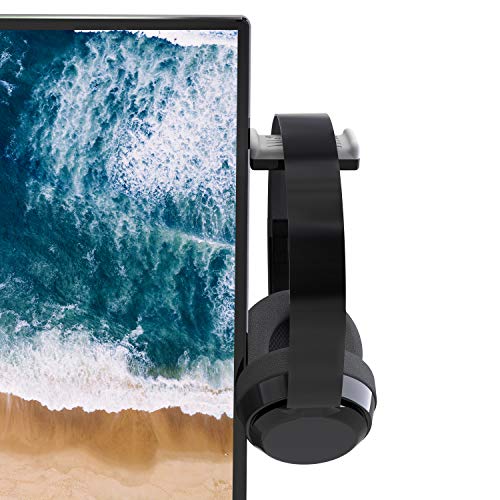
- Mounts to the left or right side of your monitor.
- Soft-silicone holder helps protect the headphone band.
- Compatible with over-ear, on-ear, and gaming headsets.
Best For: Keeping headphones off the desk and attached to a monitor.
2-in-1 Adjustable Pick

- Works as either a hanger or a stand.
- Height adjusts from 6.5 to 10.2 inches.
- 360-degree rotation and silicone-padded clamp improve usability.
Best For: Switching between under-desk hanging and desk-top storage.
Adhesive Space Saver
Aluminum Under-Desk Headphone Hanger

- 3M VHB adhesive is rated to hold at least 5 pounds.
- Curved support and rounded edges help protect the headband.
- Compact aluminum design saves desk space.
Best For: A low-profile adhesive hook for flat, hard surfaces.
Under-Desk Adhesive Mount
The Original Under-Desk Headphone Stand

- Genuine 3M adhesive for clean, finished surfaces
- Silicone body with steel inner reinforcement
- Can hold two sets of headphones
Best For: Minimalist desks needing hidden, easy-access headphone storage
Heavy-Duty Adhesive Hook
Aluminum Headset Holder with Strong Adhesive

- Aluminum hook with soft silicone pad
- Adhesive tape mount for desks, computers, and walls
- Claimed load capacity up to 10 pounds
Best For: Simple workstation setups that need a basic adhesive headphone hook
Clamp-On Desk Hanger
Aluminum Alloy Headphone Stand

- Adjustable screw clamp for different desk thicknesses
- No glue required and easy to reinstall
- Aluminum alloy with silicone protection
Best For: Workstations needing a removable headphone hanger without adhesive
Adhesive Space-Saver
Sticky Under-Desk Foldable Headphone Hanger
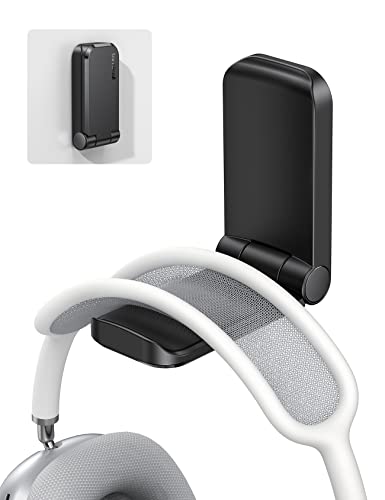
- Folds flat with magnetic closure
- Soft rubber pad protects headphones
- Strong adhesive for smooth surfaces
Best For: Compact under-desk storage on clean, smooth surfaces
Modern Desk Stand
Aluminum Headphone Stand with Soft TPU Headrest

- Soft TPU headrest for gentle contact
- Aluminum alloy pole for sturdiness
- Anti-slip base improves desk stability
Best For: A clean tabletop headphone stand for office or home desks
Clamp-On Utility
Foldable Under-Desk Aluminum Headphone Hanger

- Clamps to desks from 5mm to 50mm thick
- Foldable arm lays flat to save space
- No glue needed for removal and reattachment
Best For: A removable under-desk hanger with clamp mounting
Clamp-On Swivel Pick – EURPMASK Rotating Headphone Stand
If you want a Mac workstation headphone hanger that stays out of the way, this clamp-on option is a practical fit. It mounts under a desk or shelf, swivels 360 degrees for easy access, and includes a cable clip to help keep your workspace tidy.
Best For: Users who want an adjustable under-desk hanger with simple installation and cable management.
Pros:
- Clamp-on design fits desks from 0.31 to 1.57 inches thick.
- 360-degree swivel makes it easy to tuck headphones away or pull them forward.
- Built-in cable clip helps organize headset cords.
- Rubber pads and curved edges help protect both the headset and the desk.
Cons:
- Clamp-style mounting is not as invisible as adhesive options.
- Best suited to desk edges or similar surfaces rather than permanent placement.
Overall, this is a flexible desk accessory for people who want quick access, basic protection, and a cleaner-looking workstation without using glue.
Monitor Mount Pick – TotalMount Headphone Holder
For a Mac workstation headphone hanger that clears desk space, this monitor-mounted holder is a tidy solution. It attaches to the left or right side of your computer monitor and uses a soft-silicone holder to help protect the headphone band.
Best For: People who want to move headphones off the desk and onto the monitor.
Pros:
- Monitor-mounted design helps eliminate desk clutter.
- Soft-silicone holder is designed to protect the headphone band.
- Compatible with over-ear headphones, on-ear headphones, and gaming headsets.
- Left-side or right-side mounting gives you placement flexibility.
Cons:
- Works only with a monitor-mounted setup, not a desk edge or wall.
- Not the best choice if you want an adjustable hanging arm.
This is a good pick if your priority is freeing up desktop space and keeping a headphone band off hard edges.
2-in-1 Adjustable Pick – NEETTO HS906 Headphone Stand
If you want a Mac workstation headphone hanger that can work as both a stand and a hanger, the HS906 is a versatile choice. It clamps to a desk or shelf, rotates 360 degrees, and adjusts in height so you can use it above or under the desk.
Best For: Users who want one mount that can switch between hanging and display-style storage.
Pros:
- 2-in-1 design works as either a hanger or a stand.
- Height adjusts from 6.5 inches to 10.2 inches for different setups.
- 360-degree rotating support makes access easier.
- Clamp-on installation uses soft silicone pads and supports up to 1.97-inch tabletops.
Cons:
- Bulkier than a simple fixed hook.
- Clamp mounting may be more than some minimal desks need.
This model stands out if you want flexibility, especially if you like being able to switch between under-desk storage and an easy-to-reach stand.
Adhesive Space Saver – Aluminum Under-Desk Headphone Hanger
For a Mac workstation headphone hanger that stays discreet, this adhesive aluminum hook keeps headphones off the desk without using a clamp. It uses 3M VHB tape, is rated to hold at least 5 pounds, and has a curved support designed to help reduce headband creases.
Best For: People who want a low-profile, adhesive-mounted under-desk hook.
Pros:
- Strong 3M VHB adhesive is rated to hold at least 5 pounds.
- Aluminum construction is thick and durable.
- Curved support and rounded edges help protect the headband.
- Compact design saves desk space and keeps the area tidy.
Cons:
- Requires a clean surface and a 24-hour wait before use.
- Best for flat, hard surfaces rather than flexible mounting locations.
This is the cleanest-looking option in the group if you want a simple fixed hook and do not need adjustability.
Under-Desk Adhesive Mount – The Original Under-Desk Headphone Stand
If you want a Mac workstation headphone hanger that disappears under the desk, The Anchor keeps headphones close at hand while reducing cord clutter. Its genuine 3M adhesive is designed for clean, finished surfaces, and the thick silicone build with steel reinforcement adds a secure, low-profile hold.
Best For: Minimalist desks and users who want an easy, hidden mount for one or two headsets.
Pros:
- Strong 3M adhesive mount for clean, finished surfaces
- Thick silicone construction with steel inner reinforcement
- Can hold two sets of headphones
- Keeps headphones out of sight and easy to reach
Cons:
- Will not hold on unfinished wood or fibrous surfaces
- Requires a clean surface for best adhesion
For a simple under-desk storage solution, this is a practical pick if you want secure placement without adding desk clutter. It focuses on straightforward cable and headphone organization rather than adjustable hardware.
Heavy-Duty Adhesive Hook – Aluminum Headset Holder with Strong Adhesive
This Mac workstation headphone hanger uses an aluminum hook with strong adhesive tape for a simple, space-saving mount. It is meant for home or office use and can be mounted on computers, desks, and walls, with a silicone pad to help protect your headphones.
Best For: Users who want a basic adhesive hook with a simple metal build and high claimed holding strength.
Pros:
- Aluminum hook with soft silicone pad
- Strong adhesive tape mounting
- Claimed to withstand up to 10 pounds
- Suitable for desks, computers, and walls
Cons:
- Adhesive-based mounting may not suit every surface
- Single-hook design is less feature-rich than clamp mounts
If you want a no-frills hanger for a workstation, this model keeps the design simple and the footprint small. It is a practical choice when you mainly want a durable hook and don’t need an adjustable clamp.
Clamp-On Desk Hanger – Aluminum Alloy Headphone Stand
For a Mac workstation headphone hanger that avoids glue, this clamp-on aluminum alloy holder tightens to match desk thickness and stays firmly in place. It is designed for easy removal and reinstallation, and the silicone rubber contact points help protect your headphones from scratches.
Best For: Desks with varying thickness where you want a removable, no-adhesive hanger.
Pros:
- Adjustable screw clamp fits most table thicknesses
- No glue required, so there is no adhesive mess
- Aluminum alloy build with silicone protection
- Works on desks, cabinets, glass surfaces, and more
Cons:
- Clamp-style hardware is more visible than hidden under-desk mounts
- May be more than needed if you only want a very basic hook
This is a flexible choice if your workspace changes or you move accessories around often. The clamp design makes it especially useful when you want a sturdy hanger without committing to adhesive placement.
Adhesive Space-Saver – Sticky Under-Desk Foldable Headphone Hanger
If you want a Mac workstation headphone hanger that stays out of the way, this adhesive under-desk option is built for simple, space-saving mounting. It sticks to smooth, clean surfaces and folds flat when not in use, making it a practical pick for keeping headphones, cables, or small accessories off your desktop.
Best For: Users who want a compact, adhesive hanger for smooth desk surfaces and light everyday use.
Pros:
- Magnetic folding design helps save space when the hanger is not needed.
- Soft rubber padding helps protect headphones from slipping and scratching.
- Strong adhesive mount works on smooth surfaces like plastic, metal, wood, and glass.
- Wide compatibility for many wired and wireless headphones, including larger models.
Cons:
- Not suitable for painted or whitewashed walls.
- Requires a smooth, clean, dry, oil-free surface to adhere properly.
- Max total weight is limited to 500g.
This is a good fit if you want a low-profile hanger that disappears when folded, but it is best used exactly as directed for a secure hold.
Modern Desk Stand – Aluminum Headphone Stand with Soft TPU Headrest
This Mac workstation headphone hanger alternative is a tabletop stand for users who prefer a dedicated desk display instead of an under-desk mount. With an aluminum alloy pole, soft TPU headrest, and stable anti-slip base, it keeps headphones accessible while adding a clean, minimalist look to the workspace.
Best For: Desk setups that need a stable tabletop stand with a modern finish.
Pros:
- Soft TPU headrest helps cradle headphones gently.
- Aluminum alloy pole adds sturdiness and long-term durability.
- Silicone sponge anti-slip base improves stability on different desktops.
- No-tool assembly makes setup quick and simple.
Cons:
- Takes up desk space because it is a tabletop stand.
- No adjustable length.
- Less suited to users specifically looking for an under-desk hanger.
If you want a neat, permanent spot for your headset on the desk, this stand offers a straightforward balance of stability, protection, and clean styling.
Clamp-On Utility – Foldable Under-Desk Aluminum Headphone Hanger
For a Mac workstation headphone hanger that avoids adhesives, this clamp-on under-desk model is a practical choice. It screws onto desks and can be removed and reattached easily, while the foldable arm helps keep the setup compact when not in use.
Best For: Desk users who want a removable clamp-on hanger with a fold-flat design.
Pros:
- Clamp fits desks from 5mm to 50mm thick for broad compatibility.
- Foldable arm saves space and can lay flat when not in use.
- No glue required, so there is no adhesive mess.
- Aluminum construction is described as durable and strong.
Cons:
- Requires clamp-and-screw installation.
- Not a tabletop stand, so it is designed specifically for mounting.
- Best on desk edges within the specified thickness range.
This hanger is a strong fit if you want a reusable mounting solution with a sturdy feel and the flexibility to move it between setups.
How We Picked the Best Mac Workstation Headphone Hanger
For a Mac Workstation Headphone Hanger, the best choices balance desk compatibility, build quality, holding strength, and how cleanly they integrate with a minimal setup. We favored models that reduce clutter without blocking ports, cables, or drawers.
We also looked for flexible mounting methods, since Mac desks vary widely: some use thick tabletops, some use monitor risers, and others rely on adhesive for a cleaner no-clamp look.
Quick Comparison
Clamp-on hangers are usually the most adjustable and easiest to reposition. Adhesive hangers are the cleanest visually and work well on smooth, stable surfaces. Monitor-mounted options are ideal if you want the headphone holder elevated and off the desktop entirely.
If you use heavier headphones like AirPods Max or premium over-ear models, prioritize weight capacity and a stable mount over the smallest footprint.
Key Buying Factors for a Mac Workstation Headphone Hanger
Mounting Style
Choose clamp-on if you want versatility and easy removal. Choose adhesive if you want a streamlined look and your desk surface is smooth, clean, and non-porous. Monitor and stand-mounted designs are best when you want to free up every inch of desktop space.
Compatibility with Your Desk Setup
Check tabletop thickness, edge clearance, and whether the hanger will interfere with cable trays, monitor arms, or desk accessories. A Mac workstation often has tight geometry, so a few millimeters matter.
Strength and Finish
Metal hangers tend to feel more durable and suit premium Mac setups better than bulkier plastic designs. If you plan to hang expensive headphones daily, a sturdy arm, smooth edge, and dependable adhesive or clamp are important.
Protection for Headphones
Look for rounded contact points, a wide cradle, or a headrest-style design to avoid flattening the band over time. That matters most for large headphones and long-term storage.
Who Should Buy Which Mac Workstation Headphone Hanger?
If you want maximum flexibility, a clamp-on Mac Workstation Headphone Hanger is the safest all-around choice. If you prefer the cleanest minimalist look, adhesive models are best as long as the surface is suitable. If your desk is already crowded or you use a monitor riser, an elevated hanger can be the most practical option.
For heavier headphones, choose a stronger mount with a broader contact surface. For lighter everyday headsets, compact hooks are usually enough. The best pick is the one that matches your desk material, headphone weight, and how often you reach for your headset.