Finding the right mechanical keyboard for Mac programmers can make daily coding faster, quieter, and more comfortable. The best options balance Mac-friendly shortcuts, dependable connectivity, and switch feel that suits long typing sessions.
In this roundup, we focused on keyboards that work well with macOS workflows, whether you want a compact layout, full-size navigation keys, or a wireless setup for a cleaner desk.
Best 10 Mechanical Keyboard for Mac Programmers Picks for 2026
Mac-Friendly TKL Pick

- 87-key layout keeps navigation keys in a smaller frame.
- Bluetooth 5.1 supports 3 devices plus USB-C wired use.
- Includes Mac and Windows keycaps for easy switching.
Best For: Mac programmers who want a compact, tactile wireless board.
Premium Wired Typing
Das Keyboard 4 Professional for Mac

- Cherry MX Blue switches give a tactile, clicky feel.
- Full-size layout adds media controls and a volume knob.
- Includes a 2-port USB 3.0 hub and NKRO support.
Best For: Mac programmers who want a full-size, feature-rich typing board.
Compact Custom Value
Kisnt KN85 Wireless Mechanical Keyboard

- 75%/85-key layout keeps essentials in a smaller footprint.
- Tri-mode connectivity supports USB-C, 2.4GHz, and Bluetooth.
- Hot-swappable switches and dampening foam aid customization.
Best For: Mac programmers who want a compact, customizable budget board.
Full-Size Mac Workhorse
Satechi SM3 Mechanical Keyboard

- 108-key layout adds a numeric keypad and Mac shortcuts.
- Connects by Bluetooth, 2.4GHz, or USB-C to 4 devices.
- Low-profile brown switches and aluminum build suit work setups.
Best For: Mac programmers who want a full-size keyboard for work and multitasking.
Desktop-Ready Mechanical Option
Logitech G413 SE full-size wired tactile board

- Tactile mechanical switches for responsive typing
- PBT keycaps and aluminum top case for durability
- macOS compatible with FN media controls
Best For: Mac programmers who want a rugged wired keyboard with a standard full-size layout
Compact Mac-Friendly Wireless Pick
Keychron K4 96% wireless Mac mechanical keyboard

- 96% layout keeps a numpad in a smaller footprint
- Bluetooth 5.1 for up to 3 devices plus USB-C wired mode
- Mac layout with extra keycaps for Mac and Windows
Best For: Mac programmers who need a compact board with multi-device wireless and a numpad
Quiet Low-Profile Premium Choice
Logitech MX Mechanical low-profile quiet wireless keyboard

- Low-profile Tactile Quiet switches reduce typing noise
- Smart backlighting and USB-C rechargeable battery
- Supports up to 3 devices via Bluetooth or Logi Bolt
Best For: Mac programmers who want a premium quiet keyboard for long typing sessions
Retro Full Size Wired Pick
Keychron C2 Mac/Windows Brown Switch
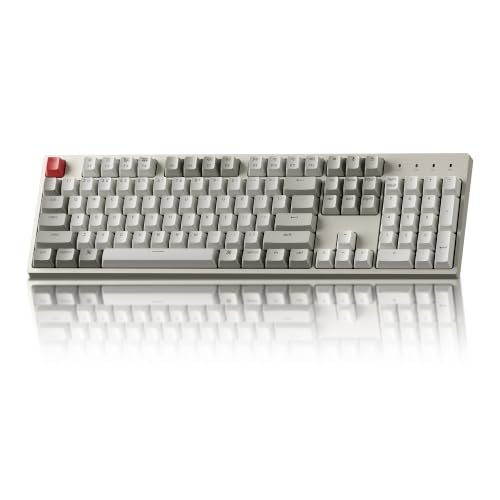
- 104-key full-size layout with number pad
- Mac-optimized keys plus extra Mac/Windows caps
- Wired USB-C connection for steady power
Best For: Mac programmers who want a dependable full-size wired board
Ultra-Slim Wireless Compact Pick
Keychron K3 V2 Low-Profile Brown

- 75% compact layout with Mac-focused key setup
- Bluetooth 5.1 pairs with up to 3 devices
- Low-profile tactile switches in a slim body
Best For: Mac programmers who prefer a compact wireless keyboard
Full Size Multi-Device Pick

- Full-size 104-key layout with number pad
- Bluetooth 5.1 connects to up to 3 devices
- Large 4000 mAh battery for long use
Best For: Mac programmers who want a full-size wireless keyboard with a number pad
Mac-Friendly TKL Pick – Keychron K8 Wireless TKL
If you’re shopping for a mechanical keyboard for Mac programmers, the Keychron K8 is a practical tenkeyless option that keeps the layout compact while still giving you direct access to navigation keys like Home, End, and Page Up. It pairs Mac and Windows support with Bluetooth 5.1 and USB-C wired mode, so it fits both desk and laptop setups.
Best For: Mac programmers who want a compact, wireless keyboard with Mac key support and a tactile feel.
Pros:
- 87-key TKL layout saves space without losing navigation keys.
- Works with Mac and Windows, and includes extra keycaps for both systems.
- Bluetooth 5.1 supports up to 3 devices, plus USB-C wired mode.
- Brown tactile switches suit long typing sessions.
Cons:
- White backlight only, so no RGB lighting options.
- Compatible with macOS, but not identical to Apple’s built-in keyboards.
- Plastic enclosure is less premium than metal-bodied models.
The K8 makes sense if you want a balanced coding keyboard with portability, multi-device convenience, and a familiar Mac-friendly layout. Its large battery and adjustable feet also help it work well as an everyday typing board.
Premium Wired Typing – Das Keyboard 4 Professional for Mac
For Mac programmers who prefer a full-size wired board, the Das Keyboard 4 Professional for Mac focuses on typing feel and desk utility. Its Cherry MX Blue switches deliver a clicky tactile response, while the aluminum top, volume knob, and USB 3.0 hub make it a straightforward productivity keyboard.
Best For: Mac programmers who want a full-size mechanical keyboard with clicky switches and built-in desk features.
Pros:
- Cherry MX Blue switches provide tactile and audio feedback.
- Full-size 104-key layout includes dedicated media controls and a large volume knob.
- Built-in 2-port USB 3.0 hub adds convenient connectivity.
- Supports full NKRO over USB for fast, accurate typing.
Cons:
- Wired-only design may not suit wireless-first setups.
- Clicky switches can be noisy in shared spaces.
- Larger footprint takes more desk space than TKL boards.
This is a strong choice if you value a classic mechanical typing experience and want hardware extras on the keyboard itself. It is less about portability and more about a stable, feature-rich workstation setup.
Compact Custom Value – Kisnt KN85 Wireless Mechanical Keyboard
If you want a mechanical keyboard for Mac programmers that stays compact without giving up essentials, the Kisnt KN85 is built around a 75%/85-key layout with F1-F12, arrows, and shortcut access. It also offers tri-mode connectivity, hot-swappable switches, and programmable keys, which makes it easy to tune for work or mixed use.
Best For: Mac programmers who want a compact, customizable keyboard with wireless flexibility and soft typing acoustics.
Pros:
- Compact layout keeps function keys, arrows, and shortcuts.
- Tri-mode connectivity includes USB-C, 2.4GHz, and Bluetooth 5.0.
- Hot-swappable switch support makes customization easy.
- Sound-dampening foam and gasket mounting create a deeper, quieter feel.
Cons:
- Driver-based remapping is Windows only in wired/2.4G mode.
- Bluetooth pairing steps and power settings add a little setup overhead.
- Compact layout may feel cramped if you want a numpad.
The KN85 stands out as a budget-friendly option for coders who want a smaller footprint and more tuning potential. Its creamy sound profile and hot-swap support are especially appealing if you like experimenting with switches.
Full-Size Mac Workhorse – Satechi SM3 Mechanical Keyboard
The Satechi SM3 is aimed at Mac programmers who want a full-size mechanical keyboard with modern wireless flexibility and a clean, low-profile design. Its 108-key layout adds a numeric keypad, while dual Bluetooth, 2.4GHz, and USB-C wired support make it easy to use across multiple devices.
Best For: Mac programmers who want a full-size, low-profile keyboard with Mac shortcuts and multi-device connectivity.
Pros:
- 108-key full-size layout includes a numeric keypad.
- Supports up to 4 devices via Bluetooth, 2.4GHz, or USB-C.
- Low-profile brown switches offer tactile feedback with faster actuation.
- Designed for Mac with dedicated shortcuts and includes Mac/Windows keycaps.
Cons:
- Full-size format needs more desk space than compact boards.
- White LED backlight is less customizable than RGB models.
- Low-profile feel may not suit users who prefer taller mechanical switches.
For developers who use a numpad or want one keyboard to cover several devices, the SM3 is a well-rounded option. It combines Mac-focused design with a practical layout and a quieter office-friendly build.
Desktop-Ready Mechanical Option – Logitech G413 SE full-size wired tactile board
If you want a mechanical keyboard for Mac programmers that feels sturdy and straightforward, the Logitech G413 SE is a practical full-size option. It brings tactile switches, PBT keycaps, and a brushed aluminum top case, but it stays focused on the basics rather than adding wireless extras or deep customization.
Best For: Mac programmers who want a durable, wired full-size keyboard with tactile feedback and a clean, no-fuss layout.
Pros:
- Tactile mechanical switches for clear key feedback while typing.
- PBT keycaps are heat- and wear-resistant for long-term use.
- Brushed aluminum-magnesium alloy top case adds rigidity and a premium feel.
- Works with macOS and includes FN media controls.
Cons:
- Wired-only design, so there is no Bluetooth connectivity.
- Full-size layout takes up more desk space than compact boards.
- Backlighting is single-color white only.
For Mac users who prioritize reliability and a solid typing feel over portability, the G413 SE is easy to justify. It is especially appealing if you want a keyboard that can handle everyday coding and occasional gaming without feeling delicate.
Compact Mac-Friendly Wireless Pick – Keychron K4 96% wireless Mac mechanical keyboard
The Keychron K4 is a strong mechanical keyboard for Mac programmers who want a smaller footprint without giving up a number pad. Its 96% layout, Mac-specific key setup, Bluetooth 5.1 support, and wired USB-C mode make it a flexible everyday board for coding across devices.
Best For: Mac programmers who want a compact wireless mechanical keyboard with Mac keys, a numpad, and multi-device support.
Pros:
- Compact 96% layout keeps the numpad while saving desk space.
- Bluetooth 5.1 supports up to 3 devices, plus wired USB-C use.
- Includes a unique Mac layout and extra keycaps for Mac and Windows.
- Big 4000 mAh battery can last up to 240 hours with backlight off.
Cons:
- Wireless mode is limited to 6KRO instead of full NKRO.
- White LED backlight is single-color only.
- It is not water resistant.
If you code on a Mac but still want a numpad for spreadsheets or shortcuts, the K4 hits a useful middle ground. It is one of the more practical choices here for programmers who move between a laptop, desktop, and tablet.
Quiet Low-Profile Premium Choice – Logitech MX Mechanical low-profile quiet wireless keyboard
The Logitech MX Mechanical is a polished mechanical keyboard for Mac programmers who want low-profile keys, quiet tactile feel, and strong wireless flexibility. It adds smart backlighting, multi-device support, and USB-C charging, making it a more premium office-style option than a gaming-first board.
Best For: Mac programmers who want a low-profile, quiet mechanical keyboard with wireless convenience and smart lighting.
Pros:
- Tactile Quiet switches give feedback with less noise.
- Low-profile mechanical design is built for comfort and precision.
- Pairs with up to 3 devices through Bluetooth Low Energy or Logi Bolt.
- Smart illumination and USB-C quick charging add everyday convenience.
Cons:
- Full-size layout may be larger than some programmers prefer.
- Battery life drops to about 15 days with backlighting on.
- Best features rely on Logi Options+ software.
For Mac programmers who spend long hours typing, the MX Mechanical stands out for comfort and quiet operation. It feels more refined than a typical mechanical keyboard and is especially appealing if you want a premium wireless desk setup.
Retro Full Size Wired Pick – Keychron C2 Mac/Windows Brown Switch
If you want a mechanical keyboard for Mac programmers with a traditional full-size layout, the Keychron C2 keeps things simple and practical. It gives you the number pad, Mac-optimized function keys, and a wired USB-C connection, which makes it a straightforward desk keyboard for coding sessions at home or in the office.
Best For: Mac programmers who want a dependable full-size wired board with Mac-specific keycaps and a number pad.
Pros:
- Full-size 104-key layout includes a number pad for productivity work.
- Mac-optimized layout comes with extra keycaps for both Mac and Windows.
- USB-C wired connection provides constant power and simple setup.
- Adjustable feet and inclined frame help improve typing comfort.
Cons:
- Non-backlight version may not suit users who want illuminated keys.
- Wired-only design is less flexible than wireless options.
- Bulky full-size footprint takes more desk space than compact boards.
The C2 is a good fit if you value a no-fuss layout and want a Mac-friendly keyboard that still works well on Windows. Its tactile Keychron Brown switches and retro styling make it a practical office board without trying to do too much.
Ultra-Slim Wireless Compact Pick – Keychron K3 V2 Low-Profile Brown
The Keychron K3 Version 2 is a strong mechanical keyboard for Mac programmers who want a slimmer desk setup without giving up tactile feedback. Its compact 75% layout, low-profile switches, and Bluetooth support for up to three devices make it a flexible choice for coding on a MacBook, laptop, tablet, or phone.
Best For: Mac programmers who prefer a compact wireless keyboard with low-profile switches and multi-device pairing.
Pros:
- Compact 75% layout saves desk space while keeping essential keys.
- Bluetooth 5.1 supports pairing with up to 3 devices.
- Low-profile Keychron switches are slimmer and faster-triggering than standard switches.
- Includes extra keycaps for Mac and Windows, plus white LED backlighting.
Cons:
- 84-key layout leaves out the dedicated number pad.
- Battery-powered design requires charging.
- Low-profile feel may not appeal to users who prefer taller mechanical switches.
For programmers who want portability and a cleaner workspace, the K3 lands in a useful middle ground. It is thin, lightweight, and Mac-friendly, while still giving you the tactile feel of a mechanical board and the convenience of wireless switching.
Full Size Multi-Device Pick – Keychron K10 Mac Brown Switch
If you want a mechanical keyboard for Mac programmers that combines a full-size layout with wireless convenience, the Keychron K10 is easy to recommend. It gives you a 104-key design, Mac-specific function keys, Bluetooth support for up to three devices, and a large battery for long work sessions.
Best For: Mac programmers who want a full-size wireless keyboard with a number pad and strong battery life.
Pros:
- 104-key full-size layout includes a number pad for daily productivity.
- Broadcom Bluetooth 5.1 supports switching between up to 3 devices.
- Large 4000 mAh battery is rated for up to 240 hours with backlight off.
- Mac layout includes dedicated screenshot, Siri/Cortana, and screen lock keys.
Cons:
- Full-size design takes up more desk space than compact keyboards.
- Battery-powered wireless use means you will need to recharge eventually.
- Single-color white LED backlight may feel basic to some users.
The K10 is the most office-ready option here if you rely on a number pad and want fewer cable distractions. It balances Mac compatibility, long battery life, and a comfortable typing angle, making it a solid everyday board for coding and multitasking.
How We Picked the Best Mechanical Keyboard for Mac Programmers
We looked for a Mechanical Keyboard for Mac Programmers that fits real development use: reliable macOS compatibility, sensible key layouts, strong build quality, and typing comfort for all-day work. We also considered connectivity, shortcut support, backlighting, and whether the board is better suited to a portable setup or a permanent desk.
Quick Comparison
If you prefer a compact board, 75% and low-profile models save space without giving up core typing comfort. If you rely on frequent number entry, function keys, or navigation shortcuts, a full-size or 96% layout is usually the safer choice. Wireless models are great for flexibility, while wired keyboards can be simpler and more consistent.
Key Buying Factors for Mechanical Keyboard for Mac Programmers
Layout and Key Access
Mac programmers often benefit from dedicated arrow keys, function rows, and easy access to delete, home, end, and media controls. Compact boards can work well, but only if you are comfortable with layered shortcuts.
Switch Type and Noise
Tactile switches are a popular middle ground for coding because they give clear feedback without requiring a hard press. Quiet switches are better for shared offices, while clicky switches suit users who want the most pronounced typing response.
Mac Support
Look for native Mac legends, easy modifier swapping, and software or onboard support for remapping. A good Mechanical Keyboard for Mac Programmers should feel natural with Command, Option, and other macOS-specific shortcuts.
Connectivity and Charging
Bluetooth is useful for switching between a MacBook, desktop, or tablet, while USB-C wired mode is ideal when you want a stable connection and zero battery concerns.
Who Should Buy Which Mechanical Keyboard for Mac Programmers?
Choose a full-size or 96% board if you use spreadsheets, databases, or lots of numeric input alongside coding. Pick a tenkeyless, 75%, or low-profile model if desk space and portability matter more than a built-in number pad. If you work in a quiet environment, prioritize tactile-quiet or other low-noise switches. If you want the most straightforward setup, a Mac-ready wired keyboard is often the easiest choice.
For most buyers, the best Mechanical Keyboard for Mac Programmers is the one that matches your layout habits first and your aesthetics second. Comfort, shortcuts, and consistency will matter far more over time than any single spec on the box.