If you want faster volume control, smoother media navigation, and a more satisfying typing feel, a mechanical keyboard with rotary knob for Mac can be a smart upgrade.
These picks focus on Mac compatibility, layout practicality, and the features most buyers actually use, including wireless modes, hot-swap support, and knob placement that feels natural day to day.
Best 10 Mechanical Keyboard with Rotary Knob for Mac Picks for 2026
Compact Tri-Mode Knob Board
YUNZII B75 PRO 75% Wireless Mechanical Keyboard

- 75% layout with arrow keys, function row, and knob
- Bluetooth, 2.4GHz, and wired connections
- Hot-swappable gasket mount with five-layer padding
Best For: Mac users who want a compact wireless keyboard with a knob and softer typing feel
Custom RGB Knob Keyboard
Keymatic 75% Hot-Swappable Wireless Board

- Tri-mode connectivity with Bluetooth 5.0, 2.4GHz, and USB-C
- Knob switches between media and backlight control
- Hot-swappable with 5000mAh battery and PBT keycaps
Best For: Users who want a customizable 75% keyboard with RGB, a knob, and wireless flexibility
Silent Multi-Device Knob Board
Cherry KW 300 MX Wireless Hot-Swap Keyboard

- Mac keycaps included for switching to Mac layout
- Rotary knob controls volume, brightness, and other functions
- Silent Red switches with hot-swap sockets and multi-device support
Best For: Mac users who want a quiet compact keyboard with a knob and native layout flexibility
Compact Wireless Knob Board
SOLAKAKA A75 75% Wireless Mechanical Keyboard

- Tri-mode wireless plus USB-C wired connectivity
- Rotary knob switches between gaming and office functions
- Gasket mount and PBT keycaps for a softer, durable feel
Best For: Mac users who want a compact wireless board with knob control and hot-swap support
Feature-Rich 96% Option
AULA S99 Wireless Mechanical Keyboard

- Tri-mode connectivity with Bluetooth, 2.4GHz, and USB support
- Dual-mode knob controls volume, lights, and connection mode
- 96% layout includes a number pad and programmable shortcuts
Best For: Mac and multi-device users who want a 96% keyboard with a knob and number pad
Wired Mac-Friendly Choice
ATTACK SHARK AK820 Rotary Knob Keyboard
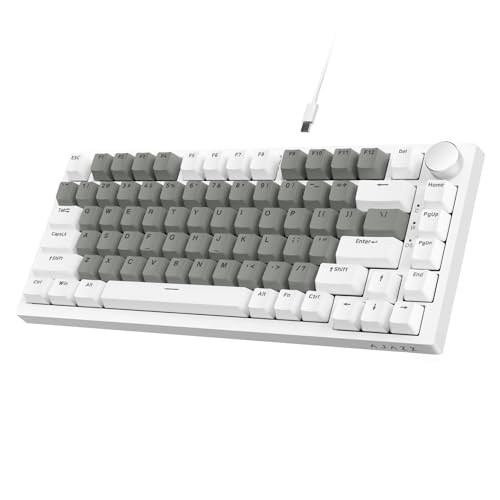
- Wired 75% layout with Mac and Windows compatibility
- Rotary knob handles volume and mute controls
- Hot-swap gasket build with sound dampening layers
Best For: Mac users who prefer a wired 75% board with hot-swap support and simple media control
Compact 96% Knob Board
MechLands Aula F99 PRO Wireless Mechanical Keyboard

- 96% layout keeps most full-size keys in a smaller body
- Rotary knob and tri-mode connectivity add convenience
- 8000mAh battery supports long wireless sessions
Best For: Mac-friendly users who want a compact full-function layout
Wired Creamy Full-Function
RK ROYAL KLUDGE R98 Pro Mechanical Keyboard

- 98-key wired layout includes numpad and function keys
- Detachable aluminum knob offers quick volume control
- Gasket mount and foam layers aim for a thocky sound
Best For: Mac users who want a wired, full-function keyboard with a knob
Compact Tri-Mode Knob Board – YUNZII B75 PRO 75% Wireless Mechanical Keyboard
If you want a mechanical keyboard with rotary knob for Mac that also stays flexible for Windows, the YUNZII B75 PRO is built around a compact 75% layout, tri-mode connectivity, and a knob for fast volume or RGB control. Its gasket mount design and five-layer padding are aimed at a softer, more muted typing feel, while hot-swap support makes it easier to customize switches later.
Best For: Mac users who want a compact wireless keyboard with a knob, customizable switches, and a cushioned typing feel.
Pros:
- 75% layout keeps arrow keys, function row, and number keys in a smaller footprint.
- Multi-function knob adjusts volume and backlight, with long-press mode switching.
- Tri-mode connectivity supports Bluetooth, 2.4GHz, and wired use.
- Hot-swappable PCB works with 3-pin and 5-pin switches.
Cons:
- Programmable features are described for Windows system use.
- RGB and software customization are not equally emphasized for Mac.
The B75 PRO is a strong pick if you want a small, versatile board with a knob and a smoother sound profile. It is especially appealing for mixed Mac/Windows setups where wireless flexibility and switch swapping matter.
Custom RGB Knob Keyboard – Keymatic 75% Hot-Swappable Wireless Board
For buyers comparing a mechanical keyboard with rotary knob for Mac, the Keymatic wireless keyboard stands out for its 75% layout, tri-mode connectivity, and easy switch replacement. It adds a media-and-lighting knob, PBT keycaps, and a large battery, making it a practical choice for people who want customization without giving up wireless convenience.
Best For: Mac-friendly users who want a customizable 75% keyboard with RGB effects, a knob, and hot-swap support.
Pros:
- Bluetooth 5.0, 2.4GHz, and USB-C wired modes support flexible use.
- Hot-swappable design supports 3-pin and 5-pin switches.
- Knob handles media in one mode and backlight control in another.
- 5000mAh battery and PBT keycaps add everyday practicality.
Cons:
- Software customization details are not specified for Mac.
- Some listed compatibility and layout details are more gaming-focused than Mac-specific.
This model makes sense if you want a feature-packed board that balances wireless freedom, RGB customization, and a useful knob. It is a good fit for users who value flexibility and easy hardware changes over a minimalist setup.
Silent Multi-Device Knob Board – Cherry KW 300 MX Wireless Hot-Swap Keyboard
If you need a mechanical keyboard with rotary knob for Mac and prefer a quieter office-style build, the Cherry KW 300 MX is the most straightforward match here. It combines a compact hot-swap layout, rotary control for volume or brightness, and included keycaps for switching between Windows and Mac layouts.
Best For: Mac users who want a quiet, compact hot-swap keyboard with a knob and true Mac layout support.
Pros:
- Includes keycaps to convert from Windows layout to Mac layout.
- Rotary knob can control functions like volume and brightness.
- Hot-swap sockets let you replace switches without soldering.
- MX2A Silent Red switches are tuned for quiet, smooth typing.
Cons:
- Single-color white illumination is less flashy than RGB boards.
- Compact 67-key layout omits a number pad.
For Mac users who care more about silence and compatibility than flashy lighting, this Cherry board is a strong, practical option. The included Mac keycaps and multi-device support make it especially useful in mixed-device work setups.
Retro Full-Size Knob Board – AULA S99 99-Key Tri-Mode Keyboard
The AULA S99 is a broader, more desktop-friendly option if you want a mechanical keyboard with rotary knob for Mac but also need a number pad and flexible connectivity. It uses a 96% layout, adds a dual-mode knob for volume and lighting, and supports macro programming across all keys for more personalized workflows.
Best For: Mac users who want a compact full-size-style keyboard with a number pad and a media knob.
Pros:
- 96% layout keeps a number pad while saving desk space.
- Tri-mode connectivity supports Bluetooth, 2.4GHz, and USB-C wired use.
- Dual-mode knob quickly adjusts volume, audio, and lighting effects.
- Full-key macro support and three shortcut keys add customization.
Cons:
- It is a membrane keyboard, not a hot-swappable mechanical model.
- RGB and customization focus is broader than Mac-specific software support.
This is a good choice if your priority is layout convenience rather than mechanical switch customization. The included number pad and knob make it more practical for productivity-heavy users who still want a playful, customizable board.
Compact Wireless Knob Board – SOLAKAKA A75 75% Wireless Mechanical Keyboard
If you want a mechanical keyboard with rotary knob for Mac that still feels ready for work and gaming, the SOLAKAKA A75 is built around flexibility. It supports Windows, Mac, and iOS, offers tri-mode connectivity, and keeps the 75% layout compact while still preserving arrow keys and essential controls.
Best For: Mac users who want a compact wireless board with knob control, hot-swap support, and a creamy typing feel.
Pros:
- Tri-mode connectivity with 2.4GHz, Bluetooth 5.0, and USB-C wired options.
- Multifunction metal knob changes behavior between gaming and office modes.
- Gasket-mounted structure with sound-dampening layers for a softer, quieter feel.
- Hot-swappable 3-pin/5-pin design with pre-lubed stabilizers and PBT keycaps.
Cons:
- Customization software is Windows-only and must be run in wired mode.
- 75% layout may not suit users who want a full-size numpad.
Overall, the A75 is a strong fit if you want a Mac-friendly wireless keyboard with a rotary knob and a compact footprint. Its feature set is broad, but the real appeal is the combination of tri-mode convenience, hot-swappability, and a damped gasket feel.
Feature-Rich 96% Option – AULA S99 Wireless Mechanical Keyboard
The AULA S99 is a mechanical keyboard with rotary knob for Mac users who want a larger layout and easy media control. Its tri-mode connectivity works with Bluetooth 5.0, 2.4GHz wireless, and USB wired mode, while the knob can handle volume, lighting brightness and speed, and connection switching.
Best For: Mac and multi-device users who want a 96% keyboard with a knob, RGB lighting, and a built-in number pad.
Pros:
- Three connection modes: Bluetooth 5.0, 2.4GHz, and USB wired.
- Dual-mode rotary knob adjusts volume, lights, and connection mode.
- 96% layout includes a number pad while saving more space than full size.
- Full-key macro programming and three shortcut keys for custom workflows.
Cons:
- Bulkier than a 75% board, so it takes more desk space.
- Switch type is clicky, which may not suit quieter preferences.
For users who want more keys and more control, the S99 balances desk efficiency with a feature-rich layout. It stands out as a practical choice when you need Mac support, a media knob, and easy access to a numpad.
Wired Mac-Friendly Choice – ATTACK SHARK AK820 Rotary Knob Keyboard
If you want a mechanical keyboard with rotary knob for Mac in a wired, no-fuss format, the ATTACK SHARK AK820 keeps things focused on typing feel and control. It supports Mac and Windows, uses a 75% layout, and adds a multifunction metal knob for quick volume and mute adjustments.
Best For: Mac users who prefer a wired 75% board with hot-swap support, sound dampening, and a simple media knob.
Pros:
- Metal knob independently controls volume and mute.
- Gasket-mounted build with multiple sound insulation layers for a softer feel.
- Hot-swappable PCB supports 3/5-pin switches without soldering.
- Includes PBT keycaps and white backlighting with 20 effects.
Cons:
- Wired USB-A only, so there is no wireless option.
- Backlighting is single-color rather than RGB.
The AK820 is a straightforward pick for users who care more about typing feel and customization than wireless extras. Its knob is useful, the build is well-dampened, and the Mac compatibility makes it an easy fit for a desk setup.
Screen-Equipped Tri-Mode – SOLAKAKA A75 PRO 75% Wireless Mechanical Keyboard with Knob
If you want a mechanical keyboard with rotary knob for Mac that also keeps your desk footprint compact, the SOLAKAKA A75 PRO is a strong all-around pick. Its 75% layout preserves arrows, function row, and navigation keys, while tri-mode connectivity makes it easy to switch between Mac, PC, and other devices.
Best For: Mac users who want a compact wireless board with a screen, knob, and hot-swap flexibility.
Pros:
- Tri-mode connection support: 2.4GHz, Bluetooth 5.0, and USB-C wired
- Built-in LCD screen can show GIFs, system status, time, and RGB controls
- CNC rotary knob offers quick volume and media control
- Gasket-mounted design with pre-lubed switches for a softer, thocky feel
Cons:
- 75% layout leaves out the numpad, which may not suit heavy spreadsheet users
- RGB, screen, and driver features may be more than minimalists need
The A75 PRO stands out if you want more than just a knob: it adds a screen, hot-swap support, and a damped typing feel in one compact package. For Mac use, it offers the right mix of flexibility and functionality without going full-size.
Compact 96% Knob Board – MechLands Aula F99 PRO Wireless Mechanical Keyboard
If you’re shopping for a mechanical keyboard with rotary knob for Mac and want a near-full-size layout, the MechLands Aula F99 PRO is worth a look. It combines a 96% layout with tri-mode wireless support, so you get most of the keys of a traditional board without giving up too much desk space.
Best For: Mac-friendly users who want a compact full-function layout with strong wireless flexibility.
Pros:
- 96% layout retains most keys found on a full-size keyboard
- Rotary knob adds quick control in a compact design
- Tri-mode connectivity supports Bluetooth 5.0, 2.4GHz, and USB-C
- 8000mAh battery is built for extended wireless use
Cons:
- Its larger footprint is less compact than a 75% board
- Feature set may be more than basic typists need
The F99 PRO is a practical middle ground if you want Mac compatibility, a knob, and a layout close to full size. The five layers of sound-damping material and gasket mount also make it a better fit for users who care about a softer, quieter typing feel.
Wired Creamy Full-Function – RK ROYAL KLUDGE R98 Pro Mechanical Keyboard
If you prefer a wired mechanical keyboard with rotary knob for Mac, the RK ROYAL KLUDGE R98 Pro is built around practicality. Its 98-key layout keeps the numpad and most essential functions, while the detachable aluminum knob gives you quick volume adjustment without adding much complexity.
Best For: Mac users who want a wired, full-function keyboard with a knob and creamy typing feel.
Pros:
- 98-key layout keeps the numpad, arrows, and most function keys
- Detachable CNC metal knob provides fast volume control
- Hot-swappable 3/5-pin support makes switch changes easy
- Mac mode indicator light helps confirm status at a glance
Cons:
- Wired-only USB-C connection may not suit users who want wireless freedom
- Fuller 98-key layout takes more desk space than compact boards
The R98 Pro makes sense if you want a desktop keyboard focused on feel, control, and straightforward compatibility. With gasket mounting, five layers of foam, and pre-lubed linear switches, it aims for a smoother and more muted typing experience than a basic office board.
How We Picked the Best Mechanical Keyboard with Rotary Knob for Mac
For this roundup, we prioritized Mac-friendly layouts, reliable connectivity, and everyday usability over flashy extras. A good Mechanical Keyboard with Rotary Knob for Mac should offer clear media control, solid switch options, and a layout that does not fight macOS shortcuts or desktop habits.
We also looked for boards that balance typing comfort with flexibility, including hot-swap sockets, gasket mounting, wireless support, and useful key counts for work or mixed productivity and gaming.
Quick Comparison
In general, 75% boards are the best fit if you want a compact footprint with dedicated arrow keys and a knob. 96% and 98% layouts are better if you need a number pad for spreadsheets or heavier office use. Tri-mode models suit multi-device setups, while wired boards are best for users who want maximum stability and fewer charging concerns.
Key Buying Factors for Mechanical Keyboard with Rotary Knob for Mac
Mac Layout and Key Mapping
Check whether the keyboard includes Mac legends, supports Command and Option placement, or offers software remapping. Even when a board works well on Mac, the default key layout can affect daily comfort.
Knob Functionality
Not all knobs do the same thing. Some control volume only, while others can be programmed for brightness, scrolling, zoom, or play/pause. If you work in creative apps, programmable knob support is especially useful.
Connectivity
Bluetooth and 2.4GHz wireless are convenient for laptop setups and clutter-free desks. USB-C wired mode is still valuable for charging, low latency, and reliable use with a Mac desktop or dock.
Size and Workflow
Choose compact if desk space matters; choose larger layouts if you rely on the numpad. The right size depends on whether your Mac use is mostly writing, coding, editing, or spreadsheet work.
Typing Feel and Build
Hot-swap support lets you change switches without soldering, which is helpful if you are tuning sound and feel. Gasket mounts, pre-lubed switches, and PBT keycaps can also improve comfort and longevity.
Who Should Buy Which Mechanical Keyboard with Rotary Knob for Mac?
Pick a 75% model if you want the best all-around balance for Mac, especially on smaller desks. Choose a 96% or 98% keyboard if you need a number pad and prefer a fuller layout for work. Go wireless if you use a laptop or switch between devices often. Choose wired if you want the simplest setup and consistent performance. If you want more customization, look for hot-swap support and a knob with programmable controls.