If you use a Mac, the right NAS can make backup and file access feel a lot closer to working from a local drive. SSD caching can help speed up frequent reads and writes, especially when your library, project files, or photo archive starts growing.
Below, we’ve narrowed the field to 10 practical picks that balance performance, ease of use, storage flexibility, and value for different Mac setups.
Best 10 NAS with SSD Caching for Mac Picks for 2026
Best High-Capacity Pick
Asustor Lockerstor 10 Pro 10-Bay NAS
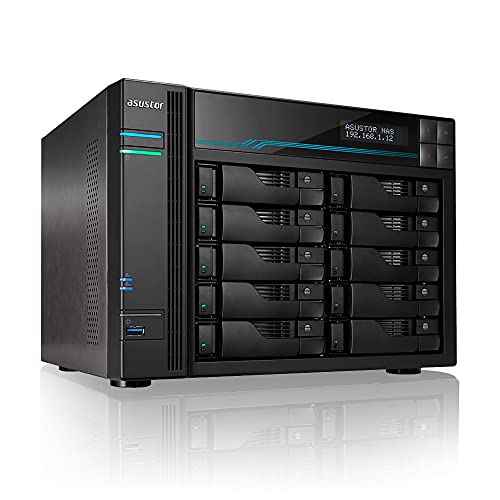
- 2 x M.2 NVMe slots for SSD caching
- 10-bay design supports up to 180TB
- 10GbE plus 3 x 2.5GbE networking
Best For: Power users and businesses needing high capacity and fast cache performance
Best SATA Cache SSD

- Purpose-built for NAS caching
- Up to 560 MB/s SATA performance
- High endurance for 24/7 workloads
Best For: Mac users who want a reliable SATA cache SSD for a compatible NAS
Best Entry-Level NAS
UGREEN DH2300 2-Bay Desktop NAS

- Beginner-friendly storage for photos and backups
- Automatic backup support for macOS and other platforms
- Up to 64TB capacity with installed drives
Best For: Beginners who want simple private storage and Mac backups
Best Value Cache Pair
Gigastone NAS Certified 1TB SSD 2-Pack

- NAS certified for 24/7 cache workloads
- TLC flash with SLC caching
- Up to 550 MB/s sequential speed
Best For: Users who want a matched SSD pair for NAS cache or RAID setups
All-SSD Speed Pick

- Eight M.2 NVMe bays
- 10GbE and up to 1024MB/s
- Quiet cooling with heat sinks
Best For: Users who want compact, high-speed all-SSD storage
Endurance Cache Drive
Gigastone 2TB High Endurance SSD

- NAS certified for 24/7 use
- TLC flash with SLC caching
- Up to 550MB/s SATA performance
Best For: Always-on NAS caching and RAID workloads
Beginner-Friendly NAS

- 2.5GbE for faster transfers
- Tool-free 2-bay installation
- Quad-core CPU for daily tasks
Best For: Home users starting a simple personal cloud
Starter Home Cloud
BUFFALO LinkStation 210 2TB 1-Bay NAS

- 2TB HDD included in a 1-bay NAS
- Automated backups with NAS Navigator 2 on supported Macs
- Subscription-free personal cloud for files and media
Best For: Budget users needing basic Mac-compatible network storage on supported macOS versions
Midrange Shared Storage
BUFFALO LinkStation 210 4TB 1-Bay NAS
- 4TB included for larger backup and media libraries
- Works with Windows and macOS 15 and earlier
- Automated backups and file sharing for home use
Best For: Home users who want more capacity for backups and sharing on supported Macs
High-Capacity Backup Vault
BUFFALO LinkStation 210 6TB 1-Bay NAS
- Largest included capacity at 6TB
- Works with Windows and macOS 15 and earlier
- NAS Navigator and backup software included
Best For: Users who want the most included storage for home backups and shared files
Best High-Capacity Pick – Asustor Lockerstor 10 Pro 10-Bay NAS
If you want a NAS with SSD caching for Mac and need a lot of room to grow, the Asustor Lockerstor 10 Pro is built for demanding workflows. Its 10-bay design, dual M.2 NVMe cache slots, and fast multi-gig networking make it a strong fit for large media libraries, backups, and shared team storage.
Best For: Power users, creative teams, and businesses that need high capacity with SSD caching.
Pros:
- 2 x M.2 NVMe PCIe Gen2 SSD ports for fast caching
- 10-bay enclosure supports up to 180TB total capacity
- 10GbE plus 3 x 2.5GbE ports for high-speed networking
- 8GB DDR4 RAM, expandable up to 64GB
Cons:
- Overkill for simple home file storage
- Drives are not included
- Large 10-bay chassis may be more than some Mac users need
Overall, this is a serious NAS platform for users who care about performance, expansion, and SSD cache responsiveness. If you need room for growth and faster access to frequently used data, it stands out as a premium choice.
Best SATA Cache SSD – WD Red SA500 1TB NAS SSD
For a NAS with SSD caching for Mac setup, the WD Red SA500 is a straightforward way to speed up frequently used data in a compatible NAS. It is purpose-built for caching in NAS systems, with SATA performance, high endurance, and a 24/7 design that suits busy home or business storage.
Best For: Users who want a dependable SATA SSD for NAS cache and everyday responsiveness.
Pros:
- Storage optimized for caching in NAS systems
- Up to 560 MB/s read speed over SATA III
- High endurance for heavy read/write loads
- 5-year manufacturer’s limited warranty
Cons:
- Single 1TB drive, so capacity is limited for primary storage
- 2.5-inch SATA SSD is slower than NVMe cache options
- Best value depends on NAS compatibility and cache use case
This is a practical caching drive rather than a flashy upgrade. If your NAS supports SATA cache and you want reliable performance gains for often-used files, the WD Red SA500 is an easy recommendation.
Best Entry-Level NAS – UGREEN DH2300 2-Bay Desktop NAS
If you are looking for a NAS with SSD caching for Mac but want something simple to start with, the UGREEN DH2300 is an entry-level 2-bay option aimed at personal storage and backups. It is designed for easy setup, remote access, and AI photo organization, though it does not support Docker or virtual machines.
Best For: Beginners and home users who want simple private storage and Mac backups.
Pros:
- Beginner-friendly system for personal files, photos, and backups
- Supports automatic backups across macOS and other platforms
- AI photo tagging helps organize and find images quickly
- Up to 64TB capacity with drives installed
Cons:
- No Docker or virtual machine support
- Uses a 1GbE port, so performance is limited compared with faster NAS models
- Drives are not included
For Mac users who mainly want private, centralized storage rather than advanced server features, this is a friendly entry point. It focuses on ease of use, privacy, and straightforward backup workflows.
Best Value Cache Pair – Gigastone NAS Certified 1TB SSD 2-Pack
If you need a NAS with SSD caching for Mac and want a matched pair for RAID or cache use, this Gigastone 1TB 2-pack is built for heavy workloads. The drives use TLC flash with SLC caching, and the listing emphasizes NAS certification, endurance, and compatibility with common NAS brands.
Best For: Users building a NAS cache or RAID set for creative work, backups, and multitasking.
Pros:
- NAS certified and designed for 24/7 cache workloads
- TLC flash with SLC caching for faster performance
- Up to 550 MB/s sequential transfer speed
- 2-pack is useful for RAID or paired cache setups
Cons:
- Not suggested for server models or SAN environments
- 2.5-inch SATA SSDs are not as fast as NVMe cache drives
- Drives are for internal use only, so install planning matters
This pack makes sense if you want a practical cache or mirrored storage option with endurance in mind. For Mac users who value responsive shared storage and long-term reliability, it offers a solid middle-ground choice.
All-SSD Speed Pick – TERRAMASTER F8 SSD 8-Bay NAS
If you want a NAS with SSD caching for Mac-style fast workflows, the TerraMaster F8 SSD is built for speed-first storage in a very compact footprint. With eight M.2 NVMe bays, a 10GbE port, and SSD-based design, it suits users who want quiet operation and high transfer performance for backups, media, and file sharing.
Best For: Small business or home users who need an all-SSD NAS with quiet operation and strong network performance.
Pros:
- Supports up to eight M.2 2280 NVMe SSDs for up to 64TB total capacity.
- 10Gbps Ethernet and up to 1024MB/s transfer speed for faster file movement.
- Whisper-quiet SSD design with standby noise below 19dB.
- Includes heat sinks and convection cooling to help keep SSDs stable.
Cons:
- Diskless design means you need to buy and install all SSDs separately.
- Best suited to users who specifically want NVMe storage rather than SATA drives.
This is a strong fit if your priority is a compact, quiet, high-speed NAS rather than a traditional hard-drive box. Its all-SSD architecture and 10GbE networking make it a practical pick for demanding Mac users who want responsive storage and easy expansion.
Endurance Cache Drive – Gigastone 2TB High Endurance SSD
For a NAS with SSD caching for Mac, this Gigastone 2TB drive is aimed at people who need a durable SATA SSD for always-on storage tasks. It is NAS certified, supports 24/7 workloads, and uses TLC flash with SLC caching to balance performance and endurance.
Best For: NAS owners who want a reliable 2.5-inch SATA SSD for caching, RAID, or always-on workloads.
Pros:
- NAS certified and verified with Synology, QNAP, Asustor, and more.
- Built for heavy workloads with endurance features like TBW reliability and power loss protection.
- TLC 3D NAND with SLC caching helps deliver up to 550MB/s sequential speeds.
- Includes a 5-year replacement warranty and lifetime free technical support.
Cons:
- 2.5-inch SATA design is slower than NVMe-based storage.
- Not suggested for server models or SAN environments.
This drive makes sense when stability matters more than peak speed. If you are setting up cache, RAID, or a personal cloud and want a NAS-focused SSD with broad compatibility, it offers a practical balance of endurance and value.
Beginner-Friendly NAS – Asustor Drivestor 2 Gen 2
If you are comparing a NAS with SSD caching for Mac and want a beginner-friendly box, the Asustor Drivestor 2 Gen 2 focuses on simple setup and solid everyday performance. Its 2.5GbE networking, quad-core processor, and tool-free drive installation make it a straightforward choice for personal cloud storage and backups.
Best For: Beginners who want a compact 2-bay NAS for personal cloud, backups, and faster-than-Gigabit networking.
Pros:
- 2.5GbE port offers faster transfers than standard Gigabit NAS models.
- Quad-core 1.7GHz CPU supports file storage, backup, and personal cloud tasks.
- Tool-free installation makes drive setup quick and easy.
- Compact 2-bay design is well suited to home use.
Cons:
- Includes only 1GB DDR4 memory, so multitasking is limited.
- Diskless model means you must supply your own drives.
This is a sensible starting point if you want to move into NAS storage without a complicated setup. It is not the most powerful option here, but its networking and ease of use make it a practical home NAS foundation.
Starter Home Cloud – BUFFALO LinkStation 210 2TB 1-Bay NAS
If you want a straightforward NAS with SSD caching for Mac-style home storage workflows, the BUFFALO LinkStation 210 2TB is a simple entry point for centralized backups and shared files. It works with Windows and macOS 15 and earlier, includes HDD storage, and is designed to serve as a subscription-free personal cloud for photos, music, videos, and everyday file access.
Best For: Budget-conscious users who want basic network storage, backup, and simple Mac compatibility on supported macOS versions.
Pros:
- Includes 2TB HDD storage in a 1-bay NAS design
- Supports automated backups with NAS Navigator 2 for macOS 15 and earlier
- Subscription-free personal cloud with no monthly fees
- Closed-system design and SSL encryption for secure file transfers
Cons:
- Mac support is limited to macOS 15 (Sequoia) and earlier
- Single-drive bay means no included RAID flexibility
- Not the model to choose for the faster LS 700 feature set
This is a practical pick if you mainly need a simple, low-maintenance network storage box for backups and family sharing. It keeps the focus on core NAS duties rather than advanced performance features.
Midrange Shared Storage – BUFFALO LinkStation 210 4TB 1-Bay NAS
The BUFFALO LinkStation 210 4TB is a practical NAS with SSD caching for Mac buyers who mainly want centralized storage, backup, and easy sharing on supported systems. It connects to your router, works with Windows and macOS 15 and earlier, and gives you more room than the 2TB version for photos, video, and routine file consolidation.
Best For: Home users who need a larger-capacity, subscription-free NAS for backups and shared storage on supported Macs.
Pros:
- 4TB included capacity gives more room for backups and media
- Compatible with Windows and macOS 15 and earlier
- Supports automated backups with included NAS Navigator management tools
- Closed system and SSL encryption help protect stored data
Cons:
- Only one drive bay, so expansion options are limited
- Mac support does not extend to macOS 26
- It is positioned as a value NAS, not a high-speed performance model
Choose this version if 2TB feels too small but you still want an uncomplicated home NAS setup. It is best viewed as a dependable storage hub rather than a feature-heavy prosumer appliance.
High-Capacity Backup Vault – BUFFALO LinkStation 210 6TB 1-Bay NAS
If your goal is a NAS with SSD caching for Mac-style backup and file access, the BUFFALO LinkStation 210 6TB offers the largest included capacity in this lineup. It is built as a centralized storage and backup location, supports Windows and macOS 15 and earlier, and includes the same subscription-free personal cloud approach for managing photos, music, and videos.
Best For: Users who want the most included storage in the LinkStation 210 line for home backups and file sharing.
Pros:
- 6TB included capacity for larger file libraries and backups
- Compatible with Windows and macOS 15 and earlier
- Includes NAS Navigator management software and PC backup tools
- Secure file transfers with SSL encryption and a closed system design
Cons:
- Still limited to a single drive bay
- Not compatible with macOS 26 based on the supplied notes
- Enclosure material is listed as plastic, unlike the metal-bodied 2TB model
This is the strongest storage-capacity pick among the three, especially if you want to consolidate a lot of data in one place. It remains a simple one-bay NAS, so the value is in capacity and ease of use rather than expansion.
How We Picked the Best NAS with SSD Caching for Mac
We focused on systems and drives that make sense for Mac users who want fast everyday access without overcomplicating setup. That means looking at SSD cache support, network speed, expandability, app ecosystem, and how well each option fits backups, media libraries, and shared file access.
We also considered whether a NAS is beginner-friendly or better suited to advanced users. For a NAS with SSD Caching for Mac, the best choice is not always the fastest hardware on paper; it is the one that delivers consistent performance, easy management, and the right storage format for your workflow.
Quick Comparison
Use SSD-capable NAS systems when you want faster responsiveness for frequently used files, photo catalogs, and project folders. All-SSD models prioritize speed and silence, while HDD-based NAS units with SSD caching often provide better value for larger capacity needs. If your Mac work is creative or collaborative, 2.5GbE or 10GbE support can matter as much as the cache itself.
Key Buying Factors for NAS with SSD Caching for Mac
Compatibility and Mac Workflow
Make sure the NAS supports SMB sharing, Time Machine backups, and easy folder permissions. Mac users should also check whether the setup app, web interface, and mobile tools are straightforward enough for their comfort level.
SSD Cache Support and Drive Type
Some NAS units include M.2 NVMe cache slots, while others rely on SATA SSDs for fast storage tiers. If you expect lots of small-file access, thumbnail browsing, or repeated project loads, cache can improve responsiveness. For large video files, network speed and overall drive layout may matter more than cache alone.
Network Speed and Expansion
For a NAS with SSD Caching for Mac, 1GbE can feel limiting, especially with modern Macs and larger files. Look for 2.5GbE or better if you want a more noticeable upgrade. More bays also give you better flexibility for RAID, capacity growth, and separating active data from archives.
Noise, Heat, and Reliability
All-SSD units tend to run cooler and quieter, while multi-bay NAS systems with HDDs need better airflow. If the NAS will sit near your desk, noise and thermals are worth checking alongside performance specs.
Who Should Buy Which NAS with SSD Caching for Mac?
If you want the simplest home cloud for Mac backups, choose a beginner-friendly 1-bay or 2-bay unit. If you need room for photo libraries, shared family storage, or multiple Macs, a 2-bay or 4-bay NAS with SSD caching is usually the sweet spot. Creative professionals and power users should look at higher-bay, faster-network models, especially if speed, uptime, and scalability matter more than initial cost.
In short, the best choice depends on whether you value ease, capacity, or performance most. Match the NAS to your Mac workflow, and you’ll get a system that feels fast now and stays useful as your storage needs grow.