Looking for an OLED monitor with 90W USB C charging that can power your laptop while delivering rich contrast, fast response times, and clean desktop setups? The best options now combine high-end panel performance with one-cable convenience.
This roundup focuses on models that balance image quality, charging capability, refresh rate, and practical connectivity so you can choose the right display for gaming, creative work, or everyday productivity.
Best 10 OLED Monitor with 90W USB C Charging Picks for 2026
Premium 4K QD-OLED Gaming Pick

- 32-inch 4K QD-OLED with 240Hz refresh
- USB-C powers devices up to 98W
- Glare Free panel with OLED Safeguard+
Best For: High-end gaming and a large USB-C setup
High-Refresh QD-OLED Value Pick

- 4K QD-OLED with 165Hz refresh
- USB-C provides 98W power delivery
- AI Care Sensor and OLED Care 2.0
Best For: Balanced gaming and USB-C laptop charging
Best Desk-Friendly Creator Choice
Dell 32 Plus 4K QD-OLED S3225QC

- USB-C supports up to 90W charging
- 31.6-inch 4K QD-OLED with 120Hz
- Built-in speakers and spatial audio
Best For: Workstations that need single-cable power
Elite 4K OLED Performance Pick

- 4K QD-OLED with 240Hz refresh
- USB-C offers 90W Power Delivery
- OLED Care Pro plus Neo Proximity Sensor
Best For: Enthusiasts wanting speed and USB-C docking
Ultra-Wide OLED Productivity Pick
INNOCN 49" 5K2K 144Hz Curved Ultrawide

- 49-inch QD-OLED with 5120 x 1440 resolution
- 90W USB-C, HDMI 2.1, DP 1.4, KVM, and PIP/PBP
- 144Hz, 0.03ms response, HDR 400, Adaptive-Sync
Best For: large-screen multitasking and single-cable laptop docking
Premium 4K OLED Gaming Upgrade
BenQ MOBIUZ EX321UZ 31.5" 4K 240Hz

- 4th Gen QD-OLED with 4K resolution and 240Hz
- USB-C 90W, HDMI 2.1, and DisplayPort 2.1a
- 99% DCI-P3, HDR 400 True Black, FreeSync Premium Pro
Best For: competitive gaming and color-focused 4K use
High-Refresh Ultrawide Value Choice
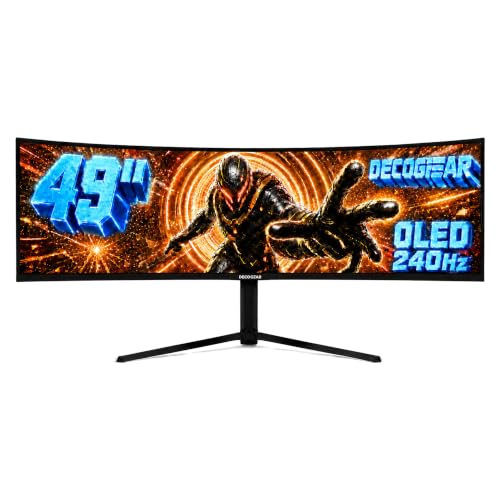
- 49-inch curved QD-OLED with 5120x1440 resolution
- USB-C 90W, KVM, PIP/PBP, HDMI 2.1, and DP 1.4
- 240Hz refresh, 0.03ms response, HDR400 True Black
Best For: fast ultrawide gaming with laptop charging
Premium Ultra-Wide Pick
ASUS ROG Swift 34" QD-OLED 360Hz USB-C

- 360Hz QD-OLED with 0.03ms response time
- USB-C delivers 90W Power Delivery
- OLED Care Pro and Neo Proximity Sensor
Best For: Competitive gamers and creators needing ultrawide OLED speed and 90W USB-C charging
Super-Ultrawide Multitasker
Samsung 49" Odyssey OLED G9 Dual QHD

- 49-inch 32:9 QD-OLED with Dual QHD resolution
- 144Hz and 0.03ms for fluid gameplay
- Picture-in-Picture plus burn-in prevention tools
Best For: Immersive gaming and multitasking on a giant super-ultrawide OLED
Fast Curved Value Pick
LG 34GX900A-B 34" OLED 240Hz USB-C

- 240Hz OLED with 0.03ms response time
- USB-C provides 65W Power Delivery
- 800R curve with True Black 400
Best For: Gamers wanting ultrafast OLED performance and moderate USB-C charging
Premium 4K QD-OLED Gaming Pick – Samsung 32" Odyssey OLED G8
If you want an OLED monitor with 90W USB C charging-class convenience and top-tier gaming specs, the Samsung 32" Odyssey OLED G8 is built for a premium desk setup. It pairs a 32-inch 4K QD-OLED panel with 240Hz smoothness, 0.03ms response time, and a USB-C port that powers connected devices with up to 98W.
Best For: Gamers who want a large 4K OLED display with powerful USB-C charging and a high-end ergonomic stand.
Pros:
- 32-inch 4K QD-OLED panel with 140 PPI for sharp detail
- 240Hz refresh rate and 0.03ms response time for fast motion
- USB-C delivers up to 98W, exceeding typical 90W charging needs
- Glare Free panel and OLED Safeguard+ help with everyday use
Cons:
- Designed primarily for gaming, so it may be more monitor than some office users need
- Premium feature set may push it into a higher price tier
This is the most performance-forward pick in the group, especially if you want a bigger 32-inch canvas and strong USB-C power delivery in one monitor. The combination of 4K clarity, 240Hz speed, and burn-in protection makes it a well-rounded flagship choice.
High-Refresh QD-OLED Value Pick – MSI MAG 272UP QD-OLED E16
The MSI MAG 272UP QD-OLED E16 is a strong OLED monitor with 90W USB C charging goals in mind, offering a 4K QD-OLED panel, 165Hz refresh rate, and a USB-C connection that delivers 98W. It is a practical option if you want sharp image quality, fast response times, and modern connectivity without moving all the way up to a 240Hz flagship.
Best For: Buyers who want a balanced 4K QD-OLED monitor with fast gaming specs and near-90W USB-C charging power.
Pros:
- 4K QD-OLED panel with 0.03ms response time
- 165Hz refresh rate for smooth gaming
- USB-C supplies 98W power delivery
- AI Care Sensor and OLED Care 2.0 add panel protection features
Cons:
- 27-inch size is smaller than some competing 32-inch models
- Glossy screen finish may not suit every lighting setup
For shoppers prioritizing speed, image quality, and USB-C charging in a more compact footprint, this MSI model hits a useful middle ground. It is especially appealing if you want QD-OLED features and strong power delivery without paying for the fastest refresh class.
Best Desk-Friendly Creator Choice – Dell 32 Plus 4K QD-OLED S3225QC
The Dell 32 Plus 4K QD-OLED Monitor S3225QC is a practical OLED monitor with 90W USB C charging for a cleaner desk and everyday productivity. Its 31.6-inch 4K QD-OLED panel, 120Hz refresh rate, and single-cable USB-C setup make it a compelling choice for work and entertainment in one display.
Best For: Desktop users and business buyers who want a 4K OLED monitor with 90W USB-C power and built-in audio.
Pros:
- USB-C supports up to 90W power delivery for laptop charging
- 4K QD-OLED panel with Dolby Vision and DisplayHDR True Black 400
- 120Hz refresh rate and 0.03ms response time
- Built-in speakers with AI-enhanced spatial audio
Cons:
- Only one HDMI port is listed
- Not focused on extreme gaming refresh rates
This Dell stands out if you want a monitor that does more than game, especially for a tidy workstation setup. The mix of 90W USB-C charging, built-in sound, and strong 4K QD-OLED image quality makes it a flexible all-rounder.
Elite 4K OLED Performance Pick – ASUS ROG Swift PG27UCDM
The ASUS ROG Swift PG27UCDM is a premium OLED monitor with 90W USB C charging support, aimed at buyers who want elite gaming performance and modern connectivity. It combines a 26.5-inch 4K QD-OLED panel, 240Hz refresh rate, 0.03ms response time, and USB-C with 90W Power Delivery in a feature-rich gaming package.
Best For: Enthusiasts who want a 4K 240Hz OLED with 90W USB-C charging and burn-in protection features.
Pros:
- 4K QD-OLED panel with 240Hz refresh rate
- USB-C supports 90W Power Delivery
- OLED Care Pro and Neo Proximity Sensor help reduce burn-in risk
- DisplayPort 2.1a UHBR20 and HDMI 2.1 provide strong connectivity
Cons:
- 26.5-inch size is smaller than many 32-inch alternatives
- Feature set is heavily geared toward gaming, not simple office use
If you want the most advanced gaming-oriented option here, ASUS delivers a compelling mix of speed, panel protection, and connectivity. The 90W USB-C port makes it more practical for laptop docking than many pure gaming displays, while the 3-year coverage adds peace of mind.
Ultra-Wide OLED Productivity Pick – INNOCN 49" 5K2K 144Hz Curved Ultrawide
If you want an OLED monitor with 90W USB C charging that also doubles as a serious productivity screen, this INNOCN 49-inch ultrawide makes a strong case. Its 5120 x 1440 QD-OLED panel, 32:9 aspect ratio, and 144Hz refresh rate give you a huge desktop for multitasking, gaming, and media, while the 90W USB-C port keeps laptop setups cleaner with one cable.
Best For: Users who want a massive ultrawide OLED for work, play, and single-cable laptop docking.
Pros:
- 49-inch curved QD-OLED panel with 5120 x 1440 resolution and 32:9 workspace.
- 90W USB-C power delivery plus HDMI 2.1, DisplayPort 1.4, USB-A, USB-B, and RJ45.
- 144Hz refresh rate, 0.03ms response time, Adaptive-Sync, and HDR 400 support.
- PIP/PBP, KVM, and an adjustable stand add flexibility for multi-device use.
Cons:
- The 49-inch 32:9 size will take up a lot of desk space.
- Black finish and ultrawide shape may not suit every setup.
This is a feature-packed ultrawide if you value screen real estate and dock-like connectivity. The OLED panel, fast response, and 90W USB-C make it especially appealing for users trying to simplify a laptop-and-desktop workspace.
Premium 4K OLED Gaming Upgrade – BenQ MOBIUZ EX321UZ 31.5" 4K 240Hz
If your search is for an OLED monitor with 90W USB C charging and top-tier gaming specs, the BenQ MOBIUZ EX321UZ stands out for its 4th Gen QD-OLED panel and 240Hz refresh rate. It pairs 4K resolution with HDMI 2.1, DisplayPort 2.1a, and USB-C 90W, making it a strong choice for fast PC play and tidy laptop connectivity.
Best For: Gamers who want a sharp 4K OLED with high refresh rate and premium color tuning.
Pros:
- 31.5-inch 4K 4th Gen QD-OLED panel with 240Hz refresh.
- USB-C with 90W charging plus HDMI 2.1 and DisplayPort 2.1a.
- 99% DCI-P3, DisplayHDR 400 True Black, and Delta E < 2 for strong color accuracy.
- FreeSync Premium Pro and a remote controller add convenience.
Cons:
- It is a premium-priced option by design, given the feature set.
- The 31.5-inch 16:9 format offers less horizontal workspace than ultrawide models.
For users who want a more traditional 4K gaming monitor with OLED contrast and fast motion handling, this BenQ is an easy fit. The 90W USB-C port is a nice bonus if you want one cable for a laptop and display.
High-Refresh Ultrawide Value Choice – Deco Gear 49" QD-OLED 240Hz
For buyers specifically looking for an OLED monitor with 90W USB C charging in a large ultrawide format, the Deco Gear 49-inch QD-OLED is built around speed and workspace. It combines 5120×1440 resolution, 240Hz refresh, and 0.03ms response time with USB-C 90W power delivery, so it can serve as both a gaming display and a cleaner laptop dock.
Best For: Gamers and multitaskers who want a fast 49-inch ultrawide with USB-C charging.
Pros:
- 49-inch curved QD-OLED panel with 5120×1440 dual-QHD resolution.
- 240Hz refresh rate and 0.03ms response time for smooth motion.
- USB-C 90W power delivery plus HDMI 2.1, DisplayPort 1.4, and KVM.
- HDR400 True Black, Adaptive Sync, and PIP/PBP support add versatility.
Cons:
- Only one HDMI port is listed, which may limit console switching.
- Warranty coverage is listed as 1 year.
This Deco Gear model is appealing if you want ultrawide immersion with very fast specs and laptop charging in the same monitor. The 90W USB-C port, KVM, and PIP/PBP features make it practical for mixed work-and-play setups.
Premium Ultra-Wide Pick – ASUS ROG Swift 34" QD-OLED 360Hz USB-C
If you want an OLED monitor with 90W USB C charging that also doubles as a high-end gaming and creator display, this ASUS ROG Swift 34-inch QD-OLED is an easy standout. It combines a 3440 x 1440 ultrawide panel, 360Hz refresh rate, and 0.03ms response time with OLED care features and a strong connectivity mix, including USB-C Power Delivery.
Best For: Competitive gamers and creators who want a fast ultrawide OLED with 90W USB-C charging.
Pros:
- 34-inch QD-OLED panel with 360Hz refresh rate and 0.03ms response time
- USB-C with 90W Power Delivery plus DisplayPort 2.1 and HDMI 2.1
- OLED Care Pro, Neo Proximity Sensor, and DisplayWidget Center for protection and management
- VESA DisplayHDR 500 True Black, 99% DCI-P3, and true 10-bit color
Cons:
- Premium spec sheet likely puts it at the high end of the market
- 34-inch ultrawide curved format may not suit users who prefer standard 16:9 displays
This is the most feature-rich pick here if speed, image quality, and USB-C charging all matter. It is especially compelling for users who want a fast OLED monitor that can also handle a laptop over one cable.
Super-Ultrawide Multitasker – Samsung 49" Odyssey OLED G9 Dual QHD
The Samsung Odyssey OLED G9 is a great fit if you want an OLED monitor with 90W USB C charging alternatives are not present here, but you do get a huge dual-QHD gaming workspace built around QD-OLED color and a 32:9 curved format. With 144Hz, 0.03ms response time, and built-in burn-in reduction tools, it targets users who value immersion and multitasking more than USB-C charging.
Best For: Ultrawide gamers and multitaskers who want a massive QD-OLED screen for immersive play and PiP workflows.
Pros:
- 49-inch Dual QHD QD-OLED panel with a wide 32:9 aspect ratio
- 144Hz refresh rate and 0.03ms response time for smooth gaming
- Picture-in-Picture helps replace a second monitor for multitasking
- Thermal modulation, logo/taskbar detection, and screen saver help reduce burn-in risk
Cons:
- Does not include USB-C charging in the supplied specs
- Very large 49-inch super-ultrawide size may be too much for compact desks
This monitor is all about scale and immersion. If you want a giant OLED canvas for gaming, streaming, and multitasking, it offers a lot of screen real estate and useful protection features.
Fast Curved Value Pick – LG 34GX900A-B 34" OLED 240Hz USB-C
If you are shopping for an OLED monitor with 90W USB C charging, this LG 34GX900A-B is not a match on wattage, but it does deliver a strong USB-C-powered ultrawide experience with 65W PD, 240Hz speed, and a steep 800R curve. It is aimed at buyers who want fast OLED gaming performance, HDR support, and enough USB-C convenience for many laptops.
Best For: Gamers who want a fast 34-inch OLED ultrawide with USB-C charging, but do not need 90W.
Pros:
- 34-inch WQHD OLED with 240Hz refresh rate and 0.03ms response time
- USB Type-C with 65W Power Delivery plus HDMI 2.1 and DisplayPort
- 800R curve and DisplayHDR True Black 400 for an immersive, punchy picture
- FreeSync Premium Pro and G-SYNC compatibility for tear-free gaming
Cons:
- USB-C charging tops out at 65W, below the 90W target keyword
- 2-year limited warranty is shorter than some competing premium displays
For shoppers who can live with 65W instead of 90W, this LG lands in a sweet spot of speed, OLED contrast, and desktop-friendly connectivity. It is a practical choice for gaming first, with enough USB-C support for lighter laptop charging.
How We Picked the Best OLED Monitor with 90W USB C Charging
We prioritized monitors that offer OLED or QD-OLED picture quality, strong USB-C power delivery, and a feature set that matches real-world use. For this roundup, that means looking beyond panel specs alone and weighing charging wattage, resolution, refresh rate, HDR support, text clarity, and port selection. An OLED Monitor with 90W USB C Charging should reduce cable clutter without forcing you to compromise on display performance.
Quick Comparison
In practical terms, the main differences come down to size, aspect ratio, and intended use. 27-inch 4K models tend to favor sharpness and competitive gaming, 32-inch 4K displays are better all-around picks for mixed work and play, and 34-inch to 49-inch ultrawides suit users who want more screen space for timelines, spreadsheets, or immersive gaming. If laptop charging matters most, confirm the USB-C output rating and whether it can support your device at full speed.
Key Buying Factors for an OLED Monitor with 90W USB C Charging
USB-C Power Delivery
Check whether the monitor actually delivers 90W or more over USB-C, and whether that power is enough for your laptop under load. Some ultrabooks run well at 65W, while creator laptops may benefit from the full 90W or higher.
Resolution and Size
Higher resolutions make OLED’s sharp contrast even more impressive, but scaling matters. A 27-inch 4K panel offers excellent pixel density, while 32-inch 4K is easier to live with for multitasking. Ultrawides provide more horizontal space, which is great for editing and side-by-side windows.
Refresh Rate and Response Time
Gamers should look for 120Hz to 240Hz or higher, plus the near-instant response times OLED is known for. If you mainly work with documents, a lower refresh rate can still be fine, but faster panels feel smoother everywhere.
Burn-In Protection and Ergonomics
OLED monitors increasingly include pixel shift, panel care, proximity sensors, and thermal management. These features are worth paying attention to if you expect long daily use. Adjustable stands, VESA support, and KVM switching can also make a big difference on a desk.
Who Should Buy Which OLED Monitor with 90W USB C Charging?
Choose a 27-inch 4K OLED if you want the sharpest desktop experience and fast gaming performance. Pick a 32-inch 4K model if you want the most balanced mix of productivity, content creation, and entertainment. Go ultrawide if you value immersion or multitasking space more than pure pixel density. And if your priority is simplicity, a model with strong USB-C power delivery, a built-in hub, and KVM support will make an OLED Monitor with 90W USB C Charging feel much more complete.