If you need accurate color, deep contrast, and dependable workflow consistency, an OLED monitor with hardware calibration can make a major difference. It is especially valuable for photographers, designers, editors, and creators who need repeatable results across projects.
This roundup focuses on monitors and calibration tools that help you get closer to true-to-source color, with options ranging from pro-grade displays to trusted calibration devices.
Best 10 OLED Monitor with Hardware Calibration Picks for 2026
Creator-Grade Reference OLED

- Built-in hardware calibration workflow
- 4K RGB OLED with 99% DCI-P3
- USB-C up to 80W PD
Best For: Color-critical editing and reference work
High-Refresh Color Pro
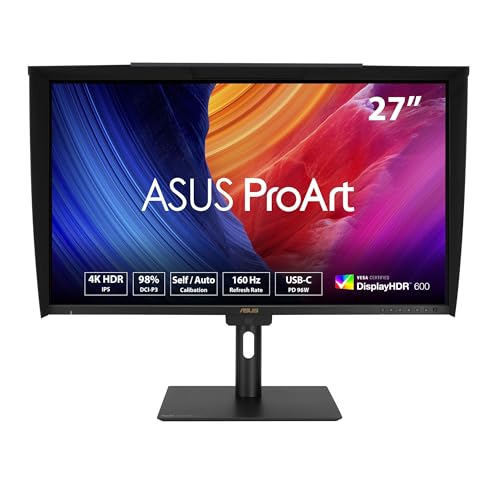
- Built-in motorized colorimeter
- 4K 160Hz with Delta E < 1
- USB-C 96W plus Auto KVM
Best For: Users wanting fast refresh with built-in calibration
QD-OLED Creator Hub

- 4K QD-OLED panel with strong contrast
- Delta E < 2 and Mac color match
- Dual USB-C with 98W PD
Best For: Mac and desktop creators wanting OLED convenience
Pro-grade mini-LED calibration
ASUS ProArt 32" 4K HDR Mini-LED Monitor

- Built-in motorized colorimeter with auto/self calibration
- 99% Adobe RGB and 97% DCI-P3 coverage
- 2,304-zone Mini-LED backlight with 1600 nits peak brightness
Best For: Color-critical editors needing built-in hardware calibration
QD-OLED entertainment pick
Dell 32 Plus 4K QD-OLED Monitor

- 31.6-inch QD-OLED panel with 4K resolution
- 120Hz refresh rate and 0.03ms response time
- USB-C with up to 90W power delivery
Best For: Premium OLED viewing with simple USB-C setup
Hardware calibrator accessory

- Integrated colorimeter for hardware/software calibration
- Measures up to 10,000 nits for HDR work
- Works with OLED, LED, and Mini-LED displays
Best For: Creators calibrating OLED or other high-end displays
ProArt Reference QD-OLED
ASUS ProArt Display 32” 4K HDR QD-OLED Professional Monitor

- 32-inch 4K QD-OLED with 240Hz and 0.1ms response
- Hardware calibration with Delta E < 1 and profile write-back
- Thunderbolt 4, Dolby Vision, and 1000-nit peak brightness
Best For: Color-critical editors and creators who want a flagship calibrated OLED monitor
Compact ProArt QD-OLED
ASUS ProArt Display 27” 4K UHD Professional Monitor

- 26.5-inch 4K QD-OLED with 240Hz and 0.1ms response
- Hardware calibration and Delta E < 1 color performance
- Dual Thunderbolt 4 with 96W Power Delivery
Best For: Creators who want a compact calibrated OLED with strong workstation connectivity
Creator-Grade Reference OLED – ASUS ProArt 27" 4K HDR OLED
If you want an OLED monitor with hardware calibration for photo and video work, the ASUS ProArt PA27DCE-K is built around accuracy first. It combines a 4K RGB OLED panel, 99% DCI-P3 coverage, true 10-bit color, and ASUS ProArt Hardware Calibration Technology for profile write-back and tight color control.
Best For: Color-critical creators who want a calibrated OLED reference display for editing, grading, and premium desktop work.
Pros:
- Hardware calibration with supplied X-rite i1 Display Pro Calibrator and Calman Ready support
- 4K OLED panel with 1,000,000:1 contrast and deep blacks
- USB-C with up to 80W Power Delivery simplifies single-cable laptop setups
- Includes multiple cables plus a color pre-calibration report and 5-year warranty
Cons:
- 60Hz refresh rate is not aimed at fast gaming
- 26.9-inch size may feel compact for some desktop workflows
Overall, this is the strongest fit in the group if hardware calibration is the priority and you want OLED contrast for accurate creative work. The bundled calibrator and ProArt workflow tools make it especially practical for users who need repeatable results.
Portable Calibration Tool – datacolor Spyder OLED Calibrator
The datacolor Spyder is the easiest way to add an OLED monitor with hardware calibration support to your workflow, especially if you already own the display. It calibrates OLED, mini-LED, and LCD screens, and the software is designed to get you to an accurate starting point in about 90 seconds.
Best For: Creators who need a simple external monitor calibrator for OLED and other modern displays.
Pros:
- Works with OLED, mini-LED, and Apple Liquid Retina XDR displays
- Fast calibration process takes about 90 seconds
- DevicePreview beta helps simulate how images may look on other devices
- Ambient light sensor can guide brightness, contrast, and recalibration timing
Cons:
- It is a calibration accessory, not a monitor
- Best results depend on the display you pair it with
This is the practical pick if you already have an OLED or other wide-gamut display and need a simple way to keep color consistent. It does not replace a monitor, but it makes hardware-style calibration much more accessible.
High-Refresh Color Pro – ASUS ProArt 27" 4K 160Hz IPS
If you are shopping for an OLED monitor with hardware calibration features but can also work with IPS, this ASUS ProArt model deserves attention for its built-in colorimeter and professional calibration support. It uses a 4K 160Hz IPS panel with Delta E < 1 accuracy, Auto calibration, and compatibility with Calman and ColourSpace CMS.
Best For: Creators who want a professionally calibrated 4K monitor with faster refresh and built-in measurement hardware.
Pros:
- Built-in motorized colorimeter supports self and auto calibration
- 4K 160Hz panel with Delta E < 1 color accuracy
- USB-C with 96W Power Delivery plus DisplayPort daisy-chaining
- Auto KVM is useful for switching between two connected computers
Cons:
- It is an IPS monitor, not OLED
- Calibrated accuracy features are the main draw rather than deep-black contrast
This model is a strong alternative if you want hardware calibration and professional color controls with a faster 160Hz panel. It is not OLED, but the built-in colorimeter and creator-focused workflow tools make it a standout for mixed productivity and content work.
QD-OLED Creator Hub – MSI PRO MAX 27" 4K QD-OLED
The MSI PRO MAX 271UPXW12G is a compelling OLED monitor with hardware calibration-adjacent color workflow support for creators who want a sharp 4K QD-OLED panel. It offers 98W USB-C power delivery, Mac color match support, and Delta E < 2 color accuracy for design and editing tasks.
Best For: Mac and desktop users who want a 4K QD-OLED monitor with strong color accuracy and one-cable connectivity.
Pros:
- 27-inch 4K QD-OLED panel with deep blacks and high contrast
- Delta E < 2 color accuracy and DisplayHDR True Black 400
- Dual USB-C plus 98W power delivery for laptop setups
- Mac optimization software supports color synchronization and shortcut keys
Cons:
- No built-in hardware colorimeter or true hardware calibration system listed
- 120Hz is good for smooth motion but not the fastest in class
For buyers who want OLED image quality with creator-friendly connectivity, this MSI offers a balanced mix of performance and convenience. It is less specialized than a dedicated hardware-calibrated reference monitor, but the QD-OLED panel and Mac support make it highly practical.
Pro-grade mini-LED calibration – ASUS ProArt 32" 4K HDR Mini-LED Monitor
If you want an OLED monitor with hardware calibration benefits but need a different kind of reference display, the ASUS ProArt PA32UCXR is built for color-critical work. It combines a built-in motorized colorimeter with self/auto calibration support and compatibility with Calman and Light Illusion ColourSpace CMS, making it a strong choice for maintaining consistent accuracy over time.
Best For: Photo and video editors who want a 32-inch 4K reference monitor with built-in hardware calibration.
Pros:
- Built-in motorized colorimeter supports self/auto calibration.
- Compatible with Calman and Light Illusion ColourSpace CMS.
- Wide color gamut with 99% Adobe RGB and 97% DCI-P3.
- Mini-LED backlight with 2,304 local dimming zones and up to 1600 nits peak brightness.
Cons:
- 60Hz refresh rate is aimed at creative work, not fast gaming.
- Larger 32-inch chassis may be more monitor than some desks need.
- Premium feature set makes sense mainly for color-managed workflows.
For creators who prioritize calibration, HDR support, and wide-gamut accuracy, this ProArt display is a serious desktop tool. It is especially compelling if you want built-in calibration hardware and broad professional connectivity, including dual Thunderbolt 4 ports with 90W power delivery.
QD-OLED entertainment pick – Dell 32 Plus 4K QD-OLED Monitor
The Dell 32 Plus 4K QD-OLED is a compelling OLED monitor with hardware calibration-style workflow appeal for users who want vivid imaging and easy desk setup. Its QD-OLED panel, 4K resolution, Dolby Vision support, and VESA DisplayHDR True Black 400 create a strong package for work and media, while the included USB-C connectivity keeps cabling simple.
Best For: Users who want a 32-inch QD-OLED monitor for sharp visuals, fast response, and simple USB-C connectivity.
Pros:
- QD-OLED panel with 4K resolution and 99% DCI-P3 color gamut.
- 120Hz refresh rate and 0.03ms response time.
- Dolby Vision and VESA DisplayHDR True Black 400 support.
- Single USB-C connection supports up to 90W power delivery.
Cons:
- No built-in hardware colorimeter or calibration system is listed.
- One HDMI port may limit some multi-device setups.
- Best suited to users who value image quality over advanced creator calibration tools.
As an everyday premium OLED display, this Dell stands out for picture quality, motion clarity, and practical connectivity. It is a strong fit if you want the OLED look and performance without the complexity of a full pro calibration monitor.
Hardware calibrator accessory – ASUS ProArt CaliContrO MCA02
If your goal is an OLED monitor with hardware calibration, the ASUS ProArt CaliContrO MCA02 is the kind of accessory that helps you keep that display accurate. This 3-in-1 device combines a colorimeter, Display OSD control, and ASUS Dial features, with hardware and software calibration support through ASUS’s exclusive software tools.
Best For: Creators who need a dedicated calibration device for OLED, LED, or Mini-LED monitors.
Pros:
- Integrated colorimeter supports hardware and software calibration.
- Measures up to 10,000 nits for HDR calibration.
- Compatible with OLED, LED, Mini-LED, and more.
- Also works as Display OSD control and includes ASUS Dial features.
Cons:
- It is a calibration accessory, not a monitor.
- Requires compatible software support for full workflow use.
- Best value is limited to users who actively calibrate displays.
This is the most direct fit for buyers who already own or plan to buy a calibrated OLED monitor. It adds hardware calibration capability in a compact, creator-focused tool that is built for precision and workflow control.
ProArt Reference QD-OLED – ASUS ProArt Display 32” 4K HDR QD-OLED Professional Monitor
If you want an OLED monitor with hardware calibration for serious creative work, the ASUS ProArt PA32UCDM is built around color accuracy first. Its 32-inch 4K QD-OLED panel adds 240Hz motion handling, 0.1ms response time, and 1000-nit peak brightness, while ASUS ProArt Hardware Calibration Technology helps optimize color and write profiles back to the display.
Best For: Photo/video editors, color-critical creators, and professionals who want a high-end 4K OLED with built-in calibration support.
Pros:
- True 10-bit QD-OLED panel with 100% sRGB, 99% DCI-P3, and BT.2020 coverage
- Hardware calibration support with Delta E < 1 color performance and profile write-back
- 240Hz refresh rate, 0.1ms response time, and VESA DisplayHDR True Black 400
- Dolby Vision, HLG, and HDR10 support plus Thunderbolt 4 connectivity
Cons:
- Premium professional display pricing is likely to be high
- Large 32-inch footprint may be more monitor than some desks need
This is the strongest choice here if calibration and image fidelity matter more than value. It pairs OLED contrast with workstation-friendly connectivity and a long warranty, making it a strong fit for demanding creative setups.
Calibration Tool Pick – Calibrite Display Pro HL Monitor Calibration Colorimeter
The Calibrite Display Pro HL is not a monitor, but it is the practical companion you need if you’re buying an OLED monitor with hardware calibration or any modern high-brightness display. Its HL sensor measures up to 3000 nits and supports OLED, mini-LED, LCD, and Apple XDR panels, giving you the tools to profile and validate your screen more accurately.
Best For: Creators and studios that need reliable calibration, profiling, and validation for OLED and other bright displays.
Pros:
- Measures up to 3000 nits for modern HDR and high-brightness displays
- Supports OLED, mini-LED, LCD, and Apple XDR calibration workflows
- Includes Calibrite PROFILER software for Mac and Windows
- Validation tools like Quick Check, uniformity check, and flare correction
Cons:
- It is a calibration device, not a display itself
- Requires time and setup to get the most from profiling workflows
If your priority is keeping an OLED monitor accurate over time, this is a sensible buy. It adds the measurement and verification side that many premium displays rely on for consistent results.
Compact ProArt QD-OLED – ASUS ProArt Display 27” 4K UHD Professional Monitor
The ASUS ProArt PA27UCDMR is a smaller OLED monitor with hardware calibration aimed at creators who still want flagship specs. It uses a 26.5-inch 4K QD-OLED panel with 240Hz refresh, 0.1ms response, and ASUS ProArt Hardware Calibration Technology, so it fits both color-sensitive work and smoother motion use cases.
Best For: Editors and designers who want a more compact calibrated 4K OLED with premium connectivity.
Pros:
- 26.5-inch 4K QD-OLED panel with 240Hz and 0.1ms response
- Hardware calibration support with Delta E < 1 color performance
- Dual Thunderbolt 4 ports with up to 96W Power Delivery
- Includes HDMI 2.1, DisplayPort 1.4 DSC, USB hub, and ergonomic stand adjustments
Cons:
- Smaller screen size than the 32-inch ProArt option
- Only one HDMI port and a limited built-in USB port count
This model makes sense if you want the ProArt calibration features but prefer a smaller desk-friendly footprint. It keeps the same professional OLED DNA while adding strong connectivity and ergonomic flexibility.
How We Picked the Best OLED Monitor with Hardware Calibration
We prioritized models and devices that make color management practical for real-world creative work. That means strong HDR performance, wide-gamut coverage, factory or user calibration support, and features that reduce setup friction such as built-in calibration, Calman readiness, or reliable external colorimeters.
For an OLED Monitor with Hardware Calibration, we also looked at panel quality, creator-focused connectivity, and how well each option fits different workflows, from studio editing to hybrid workstations.
Quick Comparison: What Matters Most
Some buyers will want a full monitor with internal calibration support, while others only need a capable external colorimeter to keep an existing display accurate. If you are choosing between OLED, QD-OLED, IPS, or Mini-LED, the key question is whether you value absolute black levels and contrast, higher sustained brightness, or a more flexible all-purpose panel.
As a simple rule: choose a monitor with built-in or supported calibration if you want a cleaner pro workflow; choose a dedicated calibrator if you already own a good display and need better accuracy.
Key Buying Factors for an OLED Monitor with Hardware Calibration
Color Accuracy and Gamut
Look for low Delta E claims, wide DCI-P3 coverage, and support for standards like sRGB, Rec.709, or HDR formats if you work across print, web, and video.
Calibration Method
Hardware calibration stores adjustments in the monitor itself, which is more stable than relying only on software profiling. Built-in motorized colorimeters and Calman support can save time, while external tools offer more flexibility across multiple displays.
Brightness and HDR Performance
OLED excels at contrast, but peak brightness and ABL behavior still matter. If you do HDR grading or work in bright rooms, check real-world brightness expectations and HDR certification.
Connectivity and Workflow Fit
USB-C with power delivery, KVM features, and dual-input setups can simplify desk management. Creators using laptops should pay attention to charging wattage and compatibility with Mac or Windows workflows.
Who Should Buy Which OLED Monitor with Hardware Calibration?
If you are a photographer or designer, prioritize accurate color, calibration support, and stable SDR performance. Video editors should focus on HDR handling, gamut coverage, and monitor uniformity. Gamers who also create content may prefer high refresh rates and fast response times, but should still choose a model with dependable color controls. If your current monitor is already strong, a dedicated calibrator may be the smartest upgrade.
In short, the best OLED Monitor with Hardware Calibration is the one that matches your workflow, not just the one with the biggest spec sheet. Choose for the type of content you make, the room you work in, and how often you need to recalibrate.