If you want a display that makes the Mac Studio feel bigger, faster, and more premium to use, an OLED ultrawide can be a smart upgrade. You get expansive screen real estate for timelines, code, spreadsheets, and side-by-side apps, plus the contrast and color pop OLED is known for.
The best choices also need to play nicely with macOS, so this guide focuses on resolution, scaling, USB-C support, and practical features that matter on a Mac Studio desk setup.
Best 10 OLED Ultrawide Monitor for Mac Studio Picks for 2026
Samsung Pick
49" Odyssey G93SC QD-OLED Ultrawide

- QD-OLED panel with deep blacks and bright color
- 5120 x 1440 32:9 workspace feels like dual monitors
- 240Hz refresh and 0.03ms response for speed
Best For: Large ultrawide setups for gaming and creative desktop work
INNOCN Value Pick
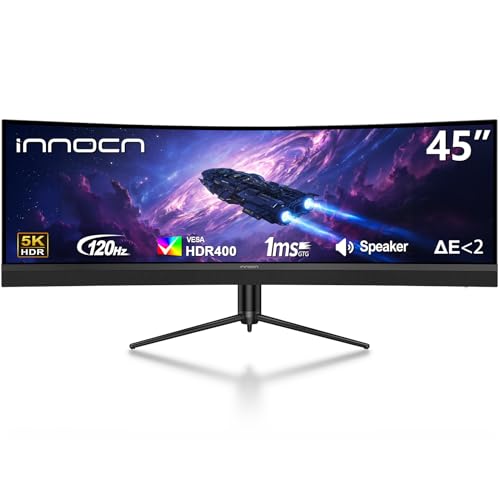
- 5120 x 1440 ultrawide format for multitasking
- USB-C 65W makes setup simpler
- 120Hz panel with PIP/PBP support
Best For: Productivity-focused users who want a big, flexible ultrawide
ASUS Creator Pick

- QD-OLED panel with HDR-focused color and contrast
- OLED Care Pro adds burn-in protection features
- 3-year warranty includes burn-in coverage
Best For: Creators who want a smaller OLED ultrawide with strong panel protection
INNOCN Gaming Pick

- 49-inch 32:9 format for a huge workspace
- 240Hz and 1ms aim for smooth gaming
- USB-C 65W plus PIP/PBP improve versatility
Best For: Big-desk users who want speed and multitasking over OLED
QD-OLED Speed Pick

- 34-inch 21:9 QD-OLED with deep blacks and wide color
- Creator Mode supports DCI-P3 or sRGB workflows
- 165Hz refresh and 0.1ms response with 3-year burn-in coverage
Best For: A compact ultrawide OLED for mixed gaming and creator use
Super-Ultrawide Productivity Pick
Deco Gear 49 QD-OLED Ultrawide

- 49-inch 32:9 panel gives you a massive dual-QHD workspace
- USB-C with 90W power delivery and KVM support
- QD-OLED contrast with strong sRGB, Adobe RGB, and DCI-P3 coverage
Best For: Big-desktop multitasking and one-cable productivity setups
Fastest OLED Option

- 39-inch 21:9 OLED with a large 3440 x 1440 workspace
- 240Hz refresh and 0.03ms response for very smooth motion
- USB-C, HDMI 2.1, and DisplayPort 1.4 add flexible connectivity
Best For: High-refresh users who want a large curved OLED ultrawide
Ultra-Wide Productivity Pick
INNOCN 49-inch QD-OLED 5K2K Curved Monitor

- 49-inch QD-OLED with 5120 x 1440 resolution
- USB-C 90W plus HDMI 2.1, DisplayPort, USB hub, and RJ45
- PIP/PBP, 144Hz, and 0.03ms response time
Best For: Huge single-screen ultrawide setups with strong connectivity
Samsung Pick – 49" Odyssey G93SC QD-OLED Ultrawide
If you want an OLED ultrawide monitor for Mac Studio with maximum screen space, the Samsung 49-inch Odyssey G93SC stands out for its 32:9 QD-OLED panel, 5120 x 1440 resolution, and very fast 240Hz refresh rate. It is built for immersive desktop use, gaming, and photo/video editing, with deep contrast and an ultrawide format that can replace a multi-monitor setup.
Best For: Users who want a giant, high-contrast ultrawide for gaming and creative work.
Pros:
- QD-OLED panel delivers bright color, deep blacks, and infinite contrast.
- 32:9 ultrawide layout with 5120 x 1440 resolution gives huge desktop space.
- 240Hz refresh rate and 0.03ms response time suit fast motion.
- HDMI 2.1, DisplayPort, and USB hub add flexible connectivity.
Cons:
- 49-inch 32:9 sizing is physically large and needs plenty of desk space.
- Curved gaming-first design may be more than some Mac Studio users need.
For buyers prioritizing OLED image quality and a true super-ultrawide workspace, this Samsung is one of the strongest options in the roundup. It is especially compelling if you want both high refresh performance and the rich contrast that makes OLED desktop use feel premium.
INNOCN Value Pick – 45" 5K2K Ultrawide with USB-C
If you are comparing an OLED ultrawide monitor for Mac Studio alternatives and want a big productivity screen with modern inputs, the INNOCN 45-inch ultrawide is a practical option. It offers 5120 x 1440 resolution, a 120Hz refresh rate, and USB-C with 65W power delivery, making it easy to connect a laptop-style workflow or a Mac-compatible desk setup.
Best For: Users who want a large ultrawide with USB-C and strong multitasking features.
Pros:
- 45-inch 32:9 panel provides a wide multitasking canvas.
- USB-C with 65W power delivery supports simple single-cable setups.
- 120Hz refresh rate is smooth for work and casual gaming.
- PIP/PBP support helps when using two sources at once.
Cons:
- It uses a VA LCD panel, not OLED.
- HDR 400 and 250-nit brightness are more basic than premium OLED displays.
This model makes sense if connectivity and desk versatility matter more than OLED contrast. For Mac Studio users, the USB-C input and ultrawide size can be the deciding factors, especially when the goal is a clean, productive workspace rather than an all-out gaming monitor.
ASUS Creator Pick – 34" ROG Strix QD-OLED
For buyers who want an OLED ultrawide monitor for Mac Studio in a more desk-friendly size, the ASUS ROG Strix 34-inch QD-OLED is an appealing middle ground. Its 3440 x 1440 resolution, 175Hz refresh rate, and 0.03ms response time give you sharp ultrawide workspace performance along with the contrast benefits of QD-OLED.
Best For: Creators and gamers who want OLED quality without jumping to a 49-inch screen.
Pros:
- QD-OLED panel delivers strong HDR contrast and vivid color.
- 3440 x 1440 resolution is easier to fit on many desks.
- OLED Care Pro with proximity sensor helps reduce burn-in risk.
- 3-year warranty includes ARR and burn-in coverage.
Cons:
- 34 inches is smaller than super-ultrawide 49-inch alternatives.
- USB and connectivity options are more limited than some productivity models.
This ASUS makes a lot of sense if you want OLED benefits but do not need the massive width of a 49-inch display. The added OLED protection features and burn-in coverage are especially valuable for long desktop sessions on a Mac Studio.
INNOCN Gaming Pick – 49" 240Hz Super Ultrawide
If you are shopping for an OLED ultrawide monitor for Mac Studio but can accept LCD instead of OLED, the INNOCN 49C1S offers a very large 49-inch 32:9 workspace with 5120 x 1440 resolution and a fast 240Hz refresh rate. It is designed for gaming and productivity, with USB-C, HDMI, and DisplayPort inputs plus PIP/PBP support for handling multiple devices.
Best For: Users who want a huge, fast ultrawide for multitasking and gaming.
Pros:
- 49-inch 32:9 panel creates a wide, immersive desktop.
- 240Hz refresh rate and 1ms response time support smooth motion.
- USB-C 65W plus HDMI and DisplayPort make it easy to connect devices.
- PIP/PBP support is useful for split-source workflows.
Cons:
- It uses LCD/VA technology rather than OLED.
- Its large 49-inch size may overwhelm smaller desks.
The 49C1S is a strong value play if size, speed, and connectivity matter more than OLED purity. Mac Studio users who want a giant ultrawide workspace can appreciate the broad desk coverage and the built-in flexibility for multiple sources.
QD-OLED Speed Pick – Alienware 34 Curved QD-OLED
If you want an OLED ultrawide monitor for Mac Studio-style desktop use, the Alienware AW3423DWF is built around a 34-inch 21:9 QD-OLED panel with deep contrast, wide color, and a sharp 3440 x 1440 workspace. It leans hard into gaming performance, but the Creator Mode and color space options make it a practical pick when you need the same monitor to handle both immersive visuals and creative tasks.
Best For: Users who want a compact ultrawide OLED with strong color controls and fast response.
Pros:
- QD-OLED panel delivers true blacks, high contrast, and wide color coverage.
- Creator Mode lets you switch between DCI-P3 and sRGB with gamma adjustments.
- 165Hz refresh rate and 0.1ms response suit fast motion and smooth desktop use.
- 3-year warranty includes OLED burn-in coverage for added peace of mind.
Cons:
- 3440 x 1440 resolution is great for ultrawide use, but not as expansive as 49-inch super-ultrawides.
- Primary focus is gaming, so creator-friendly features are useful but limited.
This is the most balanced option here if you want an OLED ultrawide monitor for Mac Studio setups without jumping to a huge desk footprint. It offers a strong mix of speed, color flexibility, and warranty support.
Super-Ultrawide Productivity Pick – Deco Gear 49 QD-OLED Ultrawide
The Deco Gear 49-inch QD-OLED is the most expansive OLED ultrawide monitor for Mac Studio buyers in this group, with a 32:9 5120 x 1440 panel that behaves like two QHD displays side by side. Its USB-C input with 90W power delivery, KVM switch, and picture modes make it especially useful when you want one display to cover work, multitasking, and media.
Best For: Users who want maximum screen space for productivity, multitasking, and a clean USB-C setup.
Pros:
- 49-inch 32:9 QD-OLED creates a huge dual-QHD workspace.
- 90W USB-C makes it practical for single-cable laptop-style setups.
- KVM switch helps manage multiple computers with one keyboard and mouse.
- Strong color specs include 100% sRGB, 95% Adobe RGB, and 99% DCI-P3.
Cons:
- Very large footprint may overwhelm smaller desks.
- 144Hz is fast, but not as high as some gaming-first OLED monitors.
If your priority is workspace instead of sheer gaming speed, this model is the standout. The combination of size, USB-C power, and multitasking features makes it especially compelling for a Mac Studio desk.
Fastest OLED Option – LG UltraGear 39GX900A-B
The LG UltraGear 39GX900A-B is the speed-focused OLED ultrawide monitor for Mac Studio users who also care about a premium desktop image. Its 39-inch 3440 x 1440 OLED panel, 240Hz refresh rate, and 0.03ms response time deliver a very fluid experience, while HDMI 2.1, DisplayPort 1.4, and USB-C make it easy to connect modern devices.
Best For: Buyers who want a large 21:9 OLED with top-tier motion performance and modern connectivity.
Pros:
- 240Hz refresh rate and 0.03ms response deliver extremely smooth motion.
- 39-inch 21:9 OLED panel offers a large, immersive workspace.
- USB-C, HDMI 2.1, and DisplayPort 1.4 cover flexible connections.
- Anti-glare surface and OLED Care tools help with everyday use.
Cons:
- 800R curve is very aggressive and may feel too immersive for some desktop work.
- Designed mainly for gaming, so it is less work-focused than some alternatives.
For users who want the fastest-feeling OLED ultrawide monitor for Mac Studio use, this is the most performance-forward choice. It pairs a large panel with excellent connectivity and a strong protective feature set.
Ultra-Wide Productivity Pick – INNOCN 49-inch QD-OLED 5K2K Curved Monitor
If you want an OLED ultrawide monitor for Mac Studio with huge desktop space, this INNOCN 49-inch 32:9 display is built for exactly that style of setup. Its 5120 x 1440 resolution, USB-C 90W power delivery, and wide port selection make it a practical single-screen option for multitasking, creative work, and play.
Best For: Users who want a massive 49-inch ultrawide for multitasking, USB-C connectivity, and a curved OLED workspace.
Pros:
- 49-inch QD-OLED panel with 5120 x 1440 resolution and 32:9 aspect ratio
- USB-C with 90W power delivery plus HDMI 2.1, DisplayPort, USB hub, and RJ45
- PIP/PBP support for working from two input sources on one screen
- 144Hz refresh rate, 0.03ms response time, and HDR 400 support
Cons:
- Very large 49-inch size may overwhelm smaller desks
- 5120 x 1440 is ultrawide, not a true 4K panel
- Curved 32:9 format is specialized and not ideal for every workflow
This is the most desktop-expansive option in the group, and its strength is breadth rather than simplicity. If your Mac Studio setup benefits from one screen that can handle work windows, media, and occasional gaming, the INNOCN offers a very feature-rich package.
Compact OLED Smart Choice – LG 34-inch Ultragear OLED 240Hz
For a more manageable OLED ultrawide monitor for Mac Studio, this LG 34-inch model keeps the desktop footprint smaller while still delivering a premium OLED experience. It pairs a WQHD 3440 x 1440 panel with USB-C, strong gaming specs, and webOS smart features for users who want one screen that can handle work, entertainment, and play.
Best For: Mac Studio users who want a smaller ultrawide OLED with smart TV features and fast gaming performance.
Pros:
- 34-inch WQHD OLED panel with 3440 x 1440 resolution
- 240Hz refresh rate and 0.03ms response time
- USB-C connectivity plus HDMI 2.1 and DisplayPort 1.4
- webOS support for streaming and cloud gaming without a PC or console
Cons:
- 800R curve is very aggressive and may not suit everyone
- USB-C power delivery is 65W, which is less than larger productivity-focused monitors
- 34-inch size offers less workspace than 39-inch or 49-inch options
This LG stands out if you want OLED performance without jumping to an oversized panel. It is the most balanced pick here for users who care about speed, smart features, and a more desk-friendly width.
Wide-Screen Sweet Spot – LG 39-inch Ultragear OLED 240Hz
If you want an OLED ultrawide monitor for Mac Studio that feels larger than a 34-inch but is still easier to live with than a 49-inch superwide, this LG 39-inch option lands in the middle. It uses the same WQHD 3440 x 1440 OLED platform, adds USB-C, and brings webOS smart features for people who want a single premium screen for work and entertainment.
Best For: Buyers who want a larger ultrawide OLED than 34 inches but do not want to commit to a 49-inch superwide.
Pros:
- 39-inch WQHD OLED display with 3440 x 1440 resolution
- 240Hz refresh rate and 0.03ms response time for smooth motion
- USB-C connectivity alongside HDMI 2.1 and DisplayPort 1.4
- webOS support for streaming, cloud gaming, and built-in AI picture tools
Cons:
- 800R curve is steep and may feel too immersive for some users
- Does not offer the extreme horizontal workspace of a 49-inch 32:9 display
- USB-C power delivery is 65W, not a high-output docking solution
The 39-inch size is the most versatile middle ground in this roundup. It gives you more immersion and screen real estate than a 34-inch model while staying less imposing than the giant 49-inch INNOCN.
How We Picked the Best OLED Ultrawide Monitor for Mac Studio
We focused on OLED Ultrawide Monitor for Mac Studio options that balance image quality, screen size, resolution, and connection flexibility. Since Mac Studio users often care about work first and gaming second, we favored displays with strong text clarity, wide color gamut support, and useful ports like USB-C, HDMI, or DisplayPort. We also considered refresh rate, burn-in protection tools, and whether the aspect ratio feels productive for everyday multitasking.
Quick Comparison
In this roundup, 34-inch models are the easiest fit for smaller desks and users who want sharper text at standard scaling. 39-inch and 45-inch options give you more horizontal space and a more immersive curve, while 49-inch super-ultrawides are best for replacing dual monitors with one continuous canvas. If you want the most Mac-friendly balance, look for 5120 x 1440 or similar high-resolution panels, since they offer more usable workspace than lower-resolution ultrawides.
Key Buying Factors for an OLED Ultrawide Monitor for Mac Studio
Resolution and Scaling
For macOS, resolution matters as much as panel quality. A 3440 x 1440 display can look good, but 5120 x 1440 models usually provide a better balance of workspace and clarity on larger ultrawides. If you plan to sit close to the screen or do text-heavy work, higher pixel density is worth prioritizing.
USB-C, HDMI, and Hub Features
Mac Studio does not rely on USB-C video the way a MacBook does, but USB-C can still be useful for connecting accessories, charging devices, or simplifying a docked workflow. HDMI 2.1 and DisplayPort are often the primary video inputs on these monitors, so make sure the monitor supports the resolution and refresh rate you want over the port you will actually use.
Burn-In Protection and Panel Care
OLED delivers excellent contrast, but static UI elements can increase burn-in risk over time. Features such as pixel shifting, logo dimming, panel refresh, and screen savers are worth having, especially if you spend long hours in Finder, Final Cut, Logic, Adobe apps, or code editors.
Curvature, Size, and Desk Depth
A deeper curve can improve immersion on 49-inch models, while flatter or moderately curved screens may feel more natural for design work. Before buying, check your desk depth and viewing distance so the edges of a large ultrawide remain comfortable to see without constant head movement.
Who Should Buy Which OLED Ultrawide Monitor for Mac Studio?
If you want the most versatile choice for mixed work and entertainment, a 34-inch OLED ultrawide is usually the safest starting point. If your priority is maximum productivity, choose a 49-inch model with high resolution and strong connectivity. If you edit media or want a more cinematic workspace, a 39-inch or 45-inch screen can be the sweet spot, giving you extra width without going all the way to super-ultrawide scale.
For most Mac Studio buyers, the best option is the one that matches your desk space, viewing distance, and how much screen real estate you truly need. OLED ultrawide monitors are excellent when you want fewer bezels, richer contrast, and a more streamlined desktop workflow.