Schools still need dependable ways to copy CDs and DVDs for lessons, media projects, testing materials, and archival content. The right duplicator saves time, reduces bottlenecks, and helps staff produce consistent results without relying on a computer for every burn.
In this roundup, we focus on optical disc duplicators for schools that balance speed, ease of use, capacity, and long-term reliability—so you can match the right system to your budget and workload.
Best 10 Optical Disc Duplicators for Schools Picks for 2026
School-Ready 1:1 Burner Tower
24X 1 to 1 CD DVD M-Disc Supported Duplicator Copier Tower

- Standalone operation with no PC required
- Up to 24x DVD and 52x CD-R speeds
- Supports M-Disc archival recording
Best For: Media labs and staff handling routine disc copying
Managed 1-to-3 Copier
1 to 3 Target DVD/CD Multiple Disc Duplicator with Built-In Burners

- Duplicates to 3 targets at once
- Verify, compare, and test functions included
- Password protection adds usage control
Best For: Small school offices and libraries
Simple Standalone Tower
AutoDupe Easy to USE STANDALONE 24X 1 to 1 CD DVD Burner Writer Drive Duplicator Tower

- Auto-start copying when discs are detected
- No PC required for operation
- Supports M-Disc and 24x/52x speeds
Best For: Schools wanting simple, low-friction duplication
Automated High-Capacity Robot
Aero 4 Target Robotic Automated CD DVD Disc Duplicator with 660 Disc Capacity & 500GB HDD
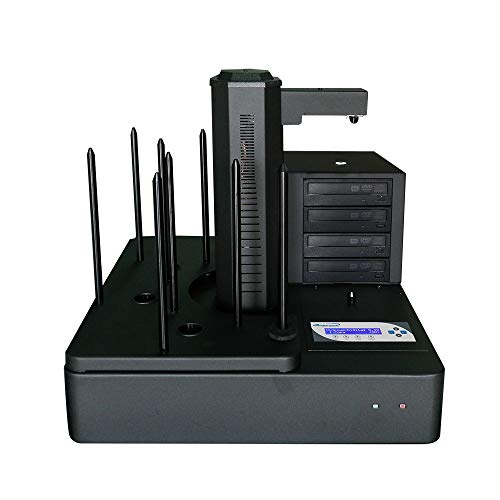
- Robotic automated duplication for batch jobs
- Standalone operation with multi-master support
- 500GB HDD with efficient partitioning
Best For: High-volume school media and IT teams
Best for Easy Setup
24X 1-to-5 Standalone CD/DVD Duplicator

- No computer or software required
- Automatic master disc recognition
- Supports many CD/DVD formats
Best For: Small school offices and teachers needing easy on-demand duplication
Archival Standalone Choice
24X 1-to-5 M-Disc Duplicator Tower

- Standalone operation with no PC required
- Supports M-Disc DVD archival media
- Includes free DVD video copy protection feature
Best For: School media teams and admins needing archival-friendly disc copying
High-Capacity Batch Copier
1-to-10 Fast DVD/CD Duplicator Tower

- Copies up to 10 discs at once
- One-touch operation with no training needed
- Supports a wide range of CD/DVD formats
Best For: Departments and media centers that need larger batch runs
Compact Classroom Duplicator
24X 1-to-3 Tower with M-Disc Support

- Standalone operation with no PC required
- Up to 24x DVD and 52x CD-R speeds
- Supports M-Disc and free DVD video copy protection
Best For: Small school offices and low-volume classroom duplication
High-Capacity School Copier

- 8-target duplication for larger batch jobs
- 2 TB hard drive for saving and recalling masters
- USB 3.0 file transfer and true CD audio compare
Best For: School media centers and repeat duplication workflows
Mid-Size Campus Tower
1-to-7 CD/DVD Duplicator with M-Disc

- 1-to-7 output for medium-sized jobs
- Standalone operation with no PC required
- Supports M-Disc and multiple operating systems
Best For: Departments needing medium-run duplication with archival support
School-Ready 1:1 Burner Tower – 24X 1 to 1 CD DVD M-Disc Supported Duplicator Copier Tower
PlexCopier 24X 1 to 1 CD DVD M-Disc Supported Duplicator Copier Tower with Free Copy Protection
Check Price On AmazonFor schools that need a straightforward way to make CD and DVD copies, this optical disc duplicators for schools option keeps the process simple with complete standalone operation. It supports up to 24x DVD and 52x CD-R speeds, includes free copy protection for DVD video using OptoDisc MID media, and can record on M-Disc media for archival use.
Best For: School media labs and staff who want a standalone tower for routine CD/DVD duplication and archival projects.
Pros:
- Complete standalone operation with no PC required
- Up to 24x DVD and 52x CD-R write speeds
- Supports M-Disc DVD media for archival recording
- Includes free copy protection for DVD video with OptoDisc media
Cons:
- Will not copy encrypted discs
- Best copy protection feature depends on OptoDisc MID media
This is a practical pick if you want a self-contained duplicator with strong speed, archival support, and tech support included. It is best suited to controlled school duplication tasks rather than protected commercial media.
Managed 1-to-3 Copier – 1 to 3 Target DVD/CD Multiple Disc Duplicator with Built-In Burners
This optical disc duplicators for schools pick is built for small duplication jobs where staff need multiple copies from one master without extra setup. It supports a wide range of DVD and CD blank media, offers copy, test, verify, and compare functions, and includes password protection to help prevent unauthorized use.
Best For: School offices, libraries, and lab staff needing a simple 1-to-3 disc copying workflow.
Pros:
- Copies to 3 targets at once
- Supports DVD and CD blank media standards
- Includes copy, test, verify, and compare functions
- Password protection helps limit unauthorized use
Cons:
- Lower target count than larger tower and robotic systems
- Uses built-in burners, so it is geared to smaller jobs
It is a solid fit for schools that need dependable but modest duplication capacity. The diagnostic and verification tools make it easier to keep disc runs controlled and consistent.
Simple Standalone Tower – AutoDupe Easy to USE STANDALONE 24X 1 to 1 CD DVD Burner Writer Drive Duplicator Tower
PlexCopier AutoDupe Easy to USE STANDALONE 24X 1 to 1 CD DVD Burner Writer Drive Duplicator Tower
Check Price On AmazonFor schools that want an easy-to-run optical disc duplicators for schools setup, this standalone tower starts copying automatically when it detects a master and blank disc. It supports up to 24x DVD and 52x CD-R speeds, works without a PC, and also supports M-Disc DVD media for long-term storage.
Best For: Staff who want a low-friction standalone duplicator for quick school disc runs and archiving.
Pros:
- Complete standalone operation with no PC required
- AutoDupe feature starts duplication automatically
- Up to 24x DVD and 52x CD-R write speeds
- Supports M-Disc DVD media for archival recording
Cons:
- Will not copy encrypted discs
- Plastic enclosure may be less rugged than metal-built units
This is a good choice when ease of use matters more than advanced controls. The automatic start behavior can save time for school staff handling repeat copy jobs.
Automated High-Capacity Robot – Aero 4 Target Robotic Automated CD DVD Disc Duplicator with 660 Disc Capacity & 500GB HDD
Aero 4 Target Robotic Automated CD DVD Disc Duplicator with 660 Disc Capacity & 500GB HDD
Check Price On AmazonIf your school needs a higher-capacity optical disc duplicators for schools solution, this robotic system is designed for automated batch work. It runs standalone, supports multi-master recognition for successive jobs, includes auto-copy behavior, and uses a 500GB hard drive with continuous partitioning so storage is allocated only as needed.
Best For: School media departments or IT teams that need automated, high-volume disc duplication.
Pros:
- Complete standalone operation with no PC required
- Multi-Master Recognition Technology supports multiple jobs in succession
- Auto-Copy feature simplifies unattended duplication
- 500GB HDD with continuous partitioning for efficient storage use
Cons:
- Larger and heavier than tower-style duplicators
- More complex than basic single-job systems
This robotic unit is the strongest fit when a school expects repeated, automated disc runs and wants to reduce hands-on supervision. Its capacity-focused design makes sense for heavier duplication workloads.
Best for Easy Setup – 24X 1-to-5 Standalone CD/DVD Duplicator
Produplicator 1 to 5 24X Burner CD DVD Duplicator - Standalone Copier Duplication Tower
Check Price On AmazonIf you need optical disc duplicators for schools that can handle everyday copying without tying up a computer, this standalone 1-to-5 tower is a practical fit. It supports CD and DVD formats, recognizes master discs automatically, and works as an all-in-one copier for small production runs of handouts, lesson media, or event discs.
Best For: Small school offices, media labs, and teachers who want a simple no-computer duplication setup.
Pros:
- Complete standalone operation with no computer or software needed
- Automatic master disc recognition helps simplify the copy process
- Supports a wide range of CD and DVD formats, including dual-layer media and mini discs
- Includes warranty coverage and lifetime technical support
Cons:
- 1-to-5 capacity may be limited for larger batch jobs
- Designed for personal use rather than a high-volume business environment
- Plastic enclosure may feel less rugged than metal tower designs
For schools that mainly need dependable, low-friction disc copying, this model keeps the workflow straightforward. It is strongest when the goal is quick classroom or office duplication rather than large-scale production.
Archival Standalone Choice – 24X 1-to-5 M-Disc Duplicator Tower
When optical disc duplicators for schools need to focus on long-life media and simple standalone operation, this 1-to-5 tower is worth a look. It copies CDs and DVDs without a PC, supports M-Disc DVD media, and includes a free DVD video copy protection feature for compatible OptoDisc MID media.
Best For: School media teams or administrative users who want standalone duplication with archival-media support.
Pros:
- Complete standalone operation with no PC required
- Supports M-Disc DVD format for archival-grade media
- Up to 24x DVD and 52x CD-R write speeds
- Includes a free DVD video copy protection feature for supported media
Cons:
- Won’t copy discs that are encrypted with copy protection
- 1-to-5 configuration is modest for large batch needs
- Focused on business use, so it may be more than some classrooms require
This model makes sense if your school values durability and media compatibility over maximum throughput. It combines standalone convenience with archival support, which can be useful for master copies and longer-term storage.
High-Capacity Batch Copier – 1-to-10 Fast DVD/CD Duplicator Tower
For schools that need optical disc duplicators for schools in larger quantities, this 1-to-10 tower is built for more serious batch copying. It operates without software or training, supports a broad mix of CD and DVD formats, and is designed for quick one-touch duplication when repeated runs are part of the job.
Best For: School departments, media centers, or campus offices that regularly copy multiple discs at once.
Pros:
- 1-to-10 capacity supports larger duplication batches
- Easy operation without software and training
- One-touch copy workflow helps speed up routine jobs
- Supports dual-layer, DVD+-R, DVD+-RW, CD-R, CD-RW, business card, and 8cm mini CDs
Cons:
- Larger 66-pound unit may be cumbersome to move
- USB 2.0 port is only available as an option
- More capacity than many small classrooms need
This is the strongest pick here for higher-volume school copying needs. If your workload regularly involves multiple copies of the same disc, the larger tower format can save time and simplify production.
Compact Classroom Duplicator – 24X 1-to-3 Tower with M-Disc Support
PlexCopier 24X 1 to 3 CD DVD M-Disc Supported Duplicator Copier Tower with Free Copy Protection
Check Price On AmazonIf you need optical disc duplicators for schools, this 1-to-3 tower is a practical choice for small-volume classroom or staff distribution jobs. It runs standalone with no PC required, supports up to 24x DVD and 52x CD-R speeds, and can also write to M-Disc media for archival use.
Best For: Small school offices, media labs, or teachers who need occasional duplication without tying up a computer.
Pros:
- Standalone operation keeps setup simple and avoids needing a connected PC.
- Fast duplication support up to 24x DVD and 52x CD-R.
- Supports M-Disc DVD media for long-term archiving.
- Includes free copy protection for DVD video projects using OptoDisc MID media.
Cons:
- Copies encrypted discs are not supported.
- Only 1-to-3 output, so it is not ideal for larger school runs.
For schools that only need a few reliable copies at a time, this model offers a straightforward, standalone workflow with useful archival support. Its smaller target count makes it better for occasional use than high-volume duplication.
High-Capacity School Copier – 8-Target Tower with 2TB Drive
For optical disc duplicators for schools that need higher throughput, this 8-target tower is built for batch jobs. It operates standalone, includes a 2 TB hard drive for storing master projects, and adds USB 3.0 file transfer for bringing content in from a PC without rebuilding a master disc each time.
Best For: School media centers, IT departments, or departments that duplicate the same discs repeatedly.
Pros:
- 8-target design lets you make more copies per run than smaller towers.
- 2 TB hard drive stores master projects for quick recall on future jobs.
- USB 3.0 CopyConnect lets you transfer folder files from a PC to the tower.
- Supports true compare for CD audio content and recognizes common CD/DVD formats.
Cons:
- Heavier unit at 29 pounds, so it is less portable.
- It will not copy discs with copy protection features.
This model is geared toward schools that value repeatability and speed over portability. The hard drive workflow and 8-target setup make it a better fit for recurring distribution tasks than one-off copying.
Mid-Size Campus Tower – 1-to-7 CD/DVD Duplicator with M-Disc
This 1-to-7 tower is a balanced option for schools that want more output than a small copier but do not need a full high-capacity system. It runs standalone, supports up to 24x DVD and 52x CD-R speeds, and can write to M-Disc media for long-term storage.
Best For: School departments that need dependable medium-run disc copying with archival support.
Pros:
- 1-to-7 output is a good middle ground for school duplication jobs.
- Standalone operation keeps the workflow simple.
- Supports M-Disc DVD media for archival recording.
- Compatible with Windows, macOS, and Linux according to the supplied details.
Cons:
- Does not copy encrypted discs.
- Not as high-capacity as 8-target duplicators for larger school batches.
For schools that need a practical step up in output without overbuying, this tower lands in a useful middle range. It combines standalone convenience with archival media support and broad operating system compatibility.
How We Picked Optical Disc Duplicators for Schools
We prioritized standalone operation, target count, burn speed, media support, and workflow features that matter in school settings. That means looking for systems that can handle repeated duplication jobs, support CD/DVD media commonly used in classrooms, and offer controls that are straightforward for staff to manage.
We also favored models with practical durability features such as M-DISC support, copy protection options, and, where relevant, hard-drive or robotic automation for higher-volume environments.
Quick Comparison: Which Type Fits Your School?
For small departments, 1-to-1 or 1-to-3 towers are usually the most affordable and easiest to store. Mid-size programs often do well with 1-to-5 or 1-to-7 systems because they improve throughput without adding much complexity. For districts, media centers, and production labs, 1-to-8, 1-to-10, or robotic duplicators make more sense when you need repeatable high-volume output.
Key Buying Factors for Optical Disc Duplicators for Schools
Target Count and Volume
The number of simultaneous copies determines how quickly you can finish jobs. If your staff duplicates discs occasionally, a smaller tower may be enough. If you create materials for multiple classrooms, choose a larger target count to reduce turnaround time.
Standalone Workflow
Many Optical Disc Duplicators for Schools are standalone units, which is ideal when you want to avoid tying up a staff computer. This also simplifies operation for nontechnical users and reduces workflow interruptions.
Media Compatibility and Protection
Look for support for CD and DVD formats your school actually uses. M-DISC compatibility can help with longer-term storage, while copy protection features are useful when distributing licensed or sensitive content.
Capacity, Automation, and Storage
Robotic duplicators and systems with internal hard drives are best for larger batches and recurring jobs. They can improve efficiency in media labs, district offices, and schools that produce repeated instructional content.
Ease of Use and Reliability
Simple controls, clear status indicators, and a proven duplication controller matter more in schools than flashy extras. The best units are easy to train on, dependable over time, and consistent across many disc runs.
Who Should Buy Which Optical Disc Duplicators for Schools?
If you only duplicate discs occasionally, choose a smaller tower with straightforward operation. If your school handles regular classroom distribution or archive work, a mid-range multi-target unit offers the best balance of speed and cost. For media departments, libraries, and district production teams, larger towers or robotic systems are the smartest fit because they scale better and reduce manual labor.
In short, the best Optical Disc Duplicators for Schools are the ones that match your output, staffing, and storage needs—not just the biggest model available.