If you need a clean, Mac-friendly way to digitize books, notebooks, and bound documents, an overhead book scanner can save serious time.
The best models balance image quality, OCR accuracy, page-flattening, and simple workflow so you can scan without damaging the original.
Best 10 Overhead Book Scanner for Mac Picks for 2026
Flagship Overhead Scanner
ScanSnap SV600 Overhead Book and Document Scanner

- Overhead design scans books and magazines without cutting pages
- Auto Book Correction helps reduce curve distortion
- Page Turning Detection and Point Retouch add convenience
Best For: Mac users scanning books and mixed documents
Portable Teaching Scanner
NetumScan 13MP Book Document Camera

- macOS support with simple USB connection
- OCR converts scans to editable text
- Also works for live projection and video recording
Best For: Teachers and presenters needing a portable OCR camera
Best Book-Focused Bundle
CZUR Aura Book Scanner with Assistive Cover

- Assistive Cover helps flatten curved book pages
- Overhead scanning is fast and simple to use
- Software can convert scans to Word, PDF, and Excel
Best For: Mac users digitizing books with cleaner page flattening
Compact Visual Scanner
NetumScan 13MP Book Document Camera

- Mac-compatible USB book camera with foldable design
- One-key correction and stepless dimming improve usability
- Supports projection, video recording, and OCR-style workflows
Best For: Mac users wanting a compact desk camera for books and docs
Portable Sheetfed Scanner
HP Small USB Document & Photo Scanner for Mac

- Mac compatible with HP WorkScan software
- USB-powered and extremely lightweight
- 15 ppm simplex scanning for loose pages
Best For: Mac users needing a compact scanner for everyday documents and photos
Professional Overhead Book Scanner
CZUR ET MAX Professional Book Scanner for Mac

- 38MP sensor with A3 overhead capture
- Curve-flattening technology for bound books
- Works with macOS, Windows, and Linux
Best For: High-resolution book and archive scanning on Mac
A3 Overhead Archive Scanner
VIISAN DL16 Book Scanner for Mac

- A3 overhead scanning for books and artwork
- Anti-glare LED lighting and page flattening
- Windows and Mac compatible desktop scanner
Best For: Mac users archiving books, artwork, and large documents
Large-Format A2 Pick
VIISAN S21 Overhead Book Scanner for Mac

- A2 capture area for large books and documents
- 26MP scans with auto-flatten and OCR
- Compatible with Windows and macOS, but not ARM-based devices
Best For: A2-size books, journals, manuscripts, and maps on compatible Macs
High-Detail Archiving Pick
CZUR ET MAX Overhead Book Scanner for Mac
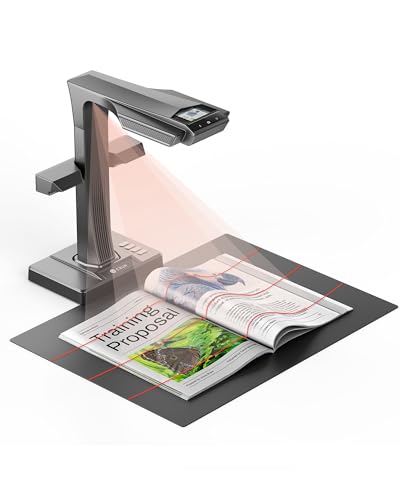
- 38MP overhead scanning with curve-flattening
- 1.5-second auto page detection and OCR
- Works with Windows, macOS, and Linux
Best For: Fragile books, archives, and high-volume scanning on Mac and beyond
Fast Teaching Scanner
VIISAN K48 Overhead Book Scanner for Mac

- 48MP overhead scans with up to 600 DPI
- AI flattening and automatic page splitting
- Also works as a 4K USB document camera
Best For: Mac users who need scanning plus live teaching or presentation features
Flagship Overhead Scanner – ScanSnap SV600 Overhead Book and Document Scanner
If you want an overhead book scanner for Mac that can handle books, magazines, and loose papers without cutting pages apart, the ScanSnap SV600 is built for that job. It scans from above, includes Auto Book Correction to reduce curve distortion, and can detect page turns automatically so you can move through a book more naturally.
Best For: Mac users who need a dedicated overhead scanner for books and mixed documents.
Pros:
- Scans books, newspapers, magazines, and documents without damaging originals
- Auto Book Correction helps flatten curve distortion in curved pages
- Page Turning Detection and Time Mode support faster, more flexible scanning
- Point Retouch can remove fingers captured during the scan
Cons:
- Requires USB connection and a supported Mac setup
- Single-sheet-style overhead capture may be less convenient than an auto-feeding scanner for stacks
The SV600 is a strong fit if your priority is preserving bound material while still getting practical book scans on macOS Monterey 12 or later. It is less about raw office throughput and more about clean overhead capture with helpful correction tools.
Portable Teaching Scanner – NetumScan 13MP Book Document Camera
This overhead book scanner for Mac is geared toward flexible scanning, real-time projection, and OCR rather than a traditional desktop scanner workflow. The NetumScan 13MP book document camera supports macOS, uses a USB connection, and can capture A3/A4-sized material with one-key automatic correction.
Best For: Teachers, presenters, and Mac users who want a portable book camera with OCR.
Pros:
- Supports Windows, macOS, and Linux with simple USB setup
- Built-in LED lighting helps capture clearer images in different light conditions
- OCR can convert scans to editable text with 98% or more accuracy
- Also supports live projection and video recording for teaching or meetings
Cons:
- More of a document camera workflow than a traditional flatbed-style scanner
- Capture size is listed for A3/A4 material, so it may not suit oversized books as well as some overhead scanners
For Mac users who need portability, OCR, and presentation features in one device, this model offers a broad feature set. It makes the most sense when scanning is only one part of a teaching or office workflow.
Best Book-Focused Bundle – CZUR Aura Book Scanner with Assistive Cover
If your main goal is an overhead book scanner for Mac that prioritizes cleaner page capture, the CZUR Aura bundle adds an Assistive Cover to help press pages flatter. That matters for books, because the overhead design works with CZUR software to flatten pages digitally and convert scans into editable formats.
Best For: Mac users digitizing books who want better page flattening and OCR conversion.
Pros:
- Assistive Cover helps reduce curvature and shadow on book pages
- Overhead design supports quick page-by-page scanning
- CZUR software can flatten pages and export to Word, PDF, and Excel
- USB connection keeps setup straightforward
Cons:
- Best suited to book and document digitizing rather than general scanning tasks
- Relies on computer software for page processing and file conversion
This is a smart pick when book scanning quality matters more than having a general-purpose office scanner. The included cover gives it a practical edge for curved pages, which is exactly where overhead scanners often need help.
Compact Visual Scanner – NetumScan 13MP Book Document Camera
For shoppers comparing an overhead book scanner for Mac with a more portable camera-style option, this NetumScan model is built for easy desk-side capture. It supports Windows, Mac OS, and Linux, includes one-key automatic correction, and uses a foldable aluminum alloy body with a retractable bracket for positioning.
Best For: Mac users who want a compact book camera for scanning, projection, and recording.
Pros:
- Works with Mac OS, Windows, and Linux over USB
- One-key automatic correction helps fix skewed images quickly
- Built-in LED light and stepless dimming add lighting control
- Foldable aluminum body makes it easy to carry and store
Cons:
- Capture size is limited to A4 according to the product notes
- Better suited to desk scanning and projection than high-volume book digitizing
This model is a practical pick if you need a lightweight Mac-compatible scanner that can also double as a teaching or presentation camera. The A4 limit and camera-style workflow make it most useful for everyday documents and smaller book pages.
Portable Sheetfed Scanner – HP Small USB Document & Photo Scanner for Mac
If you want an overhead book scanner for Mac but mostly need a compact way to digitize loose pages, receipts, photos, and cards, the HPPS100 is a simple portable option. It is a one-sided sheetfed scanner that connects by USB, works with MacOS through HP WorkScan, and keeps the setup light for home, office, or travel use.
Best For: Mac users who want a lightweight, USB-powered scanner for everyday documents rather than bound books.
Pros:
- Mac compatible with HP WorkScan software included
- Very lightweight and USB 2.0 powered for easy portability
- 15 ppm simplex scanning for small to medium batches
- Supports up to 1200 dpi and output formats like PDF and JPG
Cons:
- Single-sided scanning only, so it is not a true book scanner
- 10-sheet capacity limits larger jobs
- Best suited to loose documents rather than bound pages
This is a practical pick if your main goal is fast, portable document capture on a Mac. It is less specialized than an overhead book scanner for Mac, but it covers everyday scanning tasks efficiently and without a bulky footprint.
Professional Overhead Book Scanner – CZUR ET MAX Professional Book Scanner for Mac
The CZUR ET MAX is a strong overhead book scanner for Mac if you need to digitize bound books, large pages, or mixed document stacks. Its 38MP sensor, curve-flattening technology, and A3 capture area make it well suited to cleaner overhead scanning without unbinding your materials.
Best For: Mac users who need a high-resolution overhead scanner for books, archives, and large-format documents.
Pros:
- 38MP sensor with 7168 × 5376 capture and 410 DPI
- Patented curve-flattening helps reduce distortion on bound pages
- Supports A3 documents and scans a page in about 1.5 seconds
- Compatible with macOS, Windows, and Linux
Cons:
- Not recommended for glossy or highly reflective materials
- OCR language support has some operating-system limitations
- More specialized than a basic office scanner
For people who want an overhead book scanner for Mac with serious image quality and book-friendly features, this model stands out. It is especially useful when you need fast capture, large-format support, and OCR-based file workflows.
A3 Overhead Archive Scanner – VIISAN DL16 Book Scanner for Mac
The VIISAN DL16 is an A3 overhead book scanner for Mac aimed at books, oversized pages, artwork, and archive work. With a 16MP camera, 300 DPI capture, auto page flattening, and anti-glare LED lighting, it is built for users who need straightforward overhead digitizing in a desktop setup.
Best For: Mac users who want a practical overhead scanner for books, large documents, and personal archiving.
Pros:
- A3 overhead scanning handles books and large-format pages
- Anti-glare LED lighting helps reduce shadows and reflections
- Auto page flattening improves curved page capture
- Compatible with Windows and Mac for flexible desktop use
Cons:
- 300 DPI is lower than some higher-end book scanners
- Not as fast or high-resolution as premium 38MP alternatives
- Best for desktop archiving rather than portable scanning
If you want an overhead book scanner for Mac that focuses on large documents and cleaner page visibility, the DL16 is a balanced option. It is a sensible choice for libraries, home archives, and office materials where A3 support matters more than portable design.
Large-Format A2 Pick – VIISAN S21 Overhead Book Scanner for Mac
If you need an overhead book scanner for Mac that can handle oversized pages, the VIISAN S21 is built for large-format digitizing rather than casual desktop scanning. Its A2 capture area, adjustable overhead height, and bundled software features make it a practical fit for books, journals, newspapers, and other wide documents.
Best For: Scanning A2-size books, journals, manuscripts, newspapers, and maps on compatible Mac systems.
Pros:
- A2 large-format capture size with an adjustable A2/A3 overhead design.
- 26MP imaging with software-enhanced up to 600 DPI for detailed scans.
- Auto-flatten, finger removal, page splitting, and OCR for PDF or editable files.
- Built-in 3-level LED lighting and support for books, documents, and 3D objects.
Cons:
- Bundled OfficeCam software is not compatible with ARM-based devices.
- Bright light and very glossy paper are not recommended.
- More specialized than a basic document scanner if you only need occasional scans.
The S21 stands out when your priority is size and capture flexibility, especially for wider originals that standard scanners can’t handle well. For Mac users with compatible hardware, it offers a feature-rich overhead workflow for books and archive materials.
High-Detail Archiving Pick – CZUR ET MAX Overhead Book Scanner for Mac
For anyone comparing an overhead book scanner for Mac and wanting high resolution plus fast workflow tools, the CZUR ET MAX is aimed at serious digitizing tasks. It combines contact-free scanning with curve-flattening, auto page detection, and broad system support, making it well suited to books that need careful handling.
Best For: Digitizing bound or fragile books, archives, and high-volume documents on Mac, Windows, or Linux systems.
Pros:
- Up to 38MP imaging with laser-assisted curve correction.
- 1.5-second intelligent scanning with auto page detection, auto-cropping, and auto-tilt correction.
- Built-in OCR in 180+ languages with export to PDF, searchable PDF, JPEG, Word, or Excel.
- HDMI output for live projection and classroom or demo use.
Cons:
- OCR does not support Thai, Arabic, or Hebrew.
- Best experience depends on matching the listed OS requirements for Mac and Linux.
- May be more scanner than needed for simple one-off document capture.
The ET MAX is the strongest choice here if you care about careful book handling and a fast, automated scanning pipeline. Its combination of high-resolution capture and broad compatibility makes it a strong fit for archiving and professional use.
Fast Teaching Scanner – VIISAN K48 Overhead Book Scanner for Mac
If you want an overhead book scanner for Mac that doubles as a document camera, the VIISAN K48 is designed around clarity and speed. Its 48MP capture, AI-assisted page flattening, and 4K USB camera mode make it a practical desktop tool for books, worksheets, teaching, and archiving.
Best For: Users who want a Mac-compatible overhead scanner for books, classroom demos, and document sharing.
Pros:
- 48MP capture with up to 600 DPI for text, diagrams, and printed pages.
- AI-assisted page flattening and automatic page splitting to reduce cleanup.
- OCR support for searchable PDFs and editable digital documents.
- Works as a 4K@30fps USB document camera for live teaching and presentations.
Cons:
- Product notes emphasize Windows and Mac compatibility, but don’t list Linux support.
- More desktop-oriented than portable.
- As a multifunction device, it may be more than you need for basic scanning only.
The K48 is a good fit when scanning is only part of the job and you also need real-time document presentation. It combines strong image quality with classroom-friendly flexibility in a single overhead setup.
How We Picked the Best Overhead Book Scanner for Mac
For this Overhead Book Scanner for Mac roundup, we prioritized Mac compatibility, scan quality, OCR support, flattening tools, and overall ease of use. We also weighed lighting quality, camera resolution, capture size, and whether the scanner is better suited to books, receipts, or large-format pages.
Quick Comparison
Some models are built for casual home scanning, while others are more appropriate for teachers, offices, libraries, and heavy document workflows. If you mainly want simple book digitizing on macOS, a compact overhead scanner with solid OCR may be enough. If you need large-page capture, faster workflow tools, or better curve correction, choose a higher-end unit with stronger software and a larger capture area.
Key Buying Factors for an Overhead Book Scanner for Mac
Mac Compatibility
Look for native macOS support or reliable cross-platform software. Even the best hardware can be frustrating if the capture app or OCR tools are limited on Mac.
Resolution and Capture Size
Higher megapixel counts help with text clarity, small fonts, and detailed illustrations. Bigger capture areas matter if you scan textbooks, legal pages, or oversized archives.
Page Flattening and Glare Reduction
Book pages naturally curve near the spine, so curve-flattening and anti-glare lighting make a major difference in readability. These features are especially important for thick books and glossy pages.
OCR and Export Workflow
If you need editable text, make sure OCR is accurate and supports the languages you use most. Also check whether exports are easy to save as searchable PDFs or image files on macOS.
Speed and Ease of Setup
Teachers, offices, and frequent users should value fast capture, auto page detection, and simple positioning tools. For occasional use, a straightforward, portable scanner may be the better choice.
Who Should Buy Which Overhead Book Scanner for Mac?
Casual home users should focus on a compact, easy-to-run model that handles books and documents without much setup. Teachers and shared workspaces often benefit from a faster scanner with strong OCR and broad platform support. If you work with large books, art pages, or archival material, choose a higher-resolution overhead scanner with a larger capture field and robust flattening tools. For Mac users, the best choice is usually the model that combines dependable software, clean output, and the least friction in your daily workflow.