Choosing a pen tablet for Mac photo editing can make brushwork, masking, and fine retouching feel far more precise than a trackpad or mouse.
Below, we’ve narrowed the field to 10 standout options with a focus on Mac compatibility, control, comfort, and features that help you edit faster.
Best 10 Pen Tablet for Mac Photo Editing Picks for 2026
Top Professional Pick
Wacom Intuos Pro Medium Bluetooth Tablet

- 8192-pressure Pro Pen 3 with tilt support
- 10 ExpressKeys plus 2 mechanical dials
- Bluetooth or USB connection for Mac and PC
Best For: Serious Mac editors who want pro-level control
Best Screen Tablet
GAOMON PD1161 11.6-inch Pen Display

- Full HD 11.6-inch screen for direct on-screen editing
- 8192-level battery-free stylus with tilt support
- 8 shortcut keys and 2 pen buttons for workflow control
Best For: Mac users who want an affordable pen display
Best Budget Choice
Wacom Intuos Small Graphics Drawing Tablet

- Battery-free EMR pen with a pen-on-paper feel
- 4 customizable ExpressKeys for quick edits
- Includes software and training for beginners
Best For: Budget-minded Mac users who need a compact editor
Best Wireless Value
XPPen Deco Pro LW 2nd Wireless Tablet

- Bluetooth, USB receiver, and wired connection options
- X3 Pro stylus with 16K pressure levels and tilt
- Includes shortcut remote plus 10 customizable keys
Best For: Mac editors who want wireless flexibility and shortcuts
Color-Accurate Pen Display
UGEE UE12 Plus for Mac Photo Editing

- 11.9-inch fully laminated FHD display
- 147% sRGB with Adobe RGB/DCI-P3 modes
- Battery-free stylus with shortcut keys
Best For: Mac users editing photos who want a color-conscious pen display
Beginner-Friendly Large Tablet
XP-Pen Deco 01 V3 for Mac Photo Editing

- Large 10 x 6.25-inch active area
- 16,384 pressure levels with tilt support
- 8 hotkeys and battery-free stylus
Best For: Beginners and budget shoppers editing photos on Mac
High-Detail QHD Pen Display
HUION Kamvas Pro 13 for Mac Photo Editing
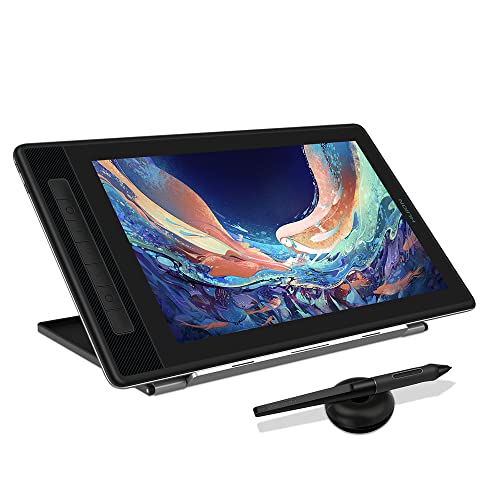
- 2560 x 1600 QHD+ screen with 226 ppi
- 99% sRGB and 16.7 million colors
- Full lamination, anti-glare glass, tilt stylus
Best For: Mac users who want sharper, color-aware photo editing on a pen display
Compact Starter Pick
XP-Pen Star G640 for Mac photo editing

- Battery-free pen with no charging needed
- 8192 levels of pressure sensitivity
- Ultra-slim, portable 6 x 4 inch design
Best For: Mac users needing a compact, no-fuss editing tablet
Wireless Workflow Pick
XP-Pen Deco MW for Mac photo editing

- Bluetooth 5.0 wireless connection
- 8 customizable shortcut keys
- 8192 levels of pressure with tilt support
Best For: Mac users who want wireless editing and faster shortcuts
Large Surface Pick
HUION HS610 for Mac photo editing

- Large 10 x 6.25 inch active area
- 12 express keys plus touch ring
- Battery-free pen with tilt support
Best For: Mac users who want a larger, shortcut-rich editing tablet
Top Professional Pick – Wacom Intuos Pro Medium Bluetooth Tablet
If you want a pen tablet for Mac photo editing with a premium feel, the Wacom Intuos Pro Medium is built for speed, comfort, and precision. Its Pro Pen 3, 10 ExpressKeys, and 2 mechanical dials make it easy to move through retouching tasks without constantly reaching for your keyboard.
Best For: Mac users who want a professional-grade pen tablet for efficient photo editing and precision work.
Pros:
- Pro Pen 3 offers 8192 pressure levels and tilt support for precise editing control
- 10 customizable ExpressKeys and 2 mechanical dials support faster workflows
- Bluetooth and USB connectivity make it flexible for desk or mobile use
- Medium 16:9 active area suits modern monitors and multi-display setups
Cons:
- No built-in screen, so you edit on your Mac display rather than directly on the tablet
- Best suited to users who will take advantage of the extra controls and pro features
Overall, this is the most polished option here for Mac photo editing if you value precision and workflow shortcuts over simplicity. It is a strong fit for serious creatives who want a durable, wireless-ready tablet with a desktop-friendly footprint.
Best Screen Tablet – GAOMON PD1161 11.6-inch Pen Display
If you prefer a pen tablet for Mac photo editing that lets you work directly on the display, the GAOMON PD1161 is the most straightforward choice in this group. Its 11.6-inch full HD IPS screen, matte film, and battery-free stylus make it feel closer to sketching and retouching on paper.
Best For: Mac users who want an entry-friendly pen display for hands-on photo editing and illustration.
Pros:
- Full HD 11.6-inch IPS screen lets you edit directly on the tablet
- Matte film reduces glare and creates a paper-like drawing feel
- Battery-free pen includes 8192 pressure levels and tilt function
- 8 shortcut keys plus 2 pen buttons help streamline editing tasks
Cons:
- Requires connection to a laptop or desktop; it is not a standalone tablet
- Needs HDMI and USB ports, and some setups may require an extra converter
This is a practical pick if you want on-screen control without stepping up to a larger or more expensive pen display. It is especially appealing for editors who like the directness of drawing and retouching on the same surface they see.
Best Budget Choice – Wacom Intuos Small Graphics Drawing Tablet
For a compact pen tablet for Mac photo editing, the Wacom Intuos Small keeps things simple and dependable. It uses Wacom’s battery-free EMR pen technology, works with major creative software, and gives you enough control for basic retouching and image markup.
Best For: Mac users who want an affordable, compact tablet for photo editing and everyday creative tasks.
Pros:
- Battery-free EMR pen offers a natural pen-on-paper feel
- Compatible with Mac, Windows, Android, and Chromebook workflows
- 4 customizable ExpressKeys add quick access to common actions
- Includes software and training, which is helpful for beginners
Cons:
- 4096 pressure levels are lower than the more advanced tablets here
- Small active area may feel limited for larger edits or wide monitors
In practice, this is the easiest low-cost entry into tablet-based photo editing on a Mac. It is best for users who want Wacom reliability and don’t need a large surface or pro-level customization.
Best Wireless Value – XPPen Deco Pro LW 2nd Wireless Tablet
If wireless convenience matters in a pen tablet for Mac photo editing, the XPPen Deco Pro LW 2nd offers a strong mix of portability, shortcuts, and pen performance. It pairs via Bluetooth or cable, includes a shortcut remote, and uses the X3 Pro stylus for detailed work.
Best For: Mac users who want a wireless tablet with strong shortcut support and a larger work area.
Pros:
- Bluetooth, USB receiver, and wired connection options add flexibility
- X3 Pro batteryless stylus offers 16K pressure levels and 60-degree tilt
- Includes a wireless shortcut remote and 10 keys for faster editing
- Large 9 x 6-inch active area and slim design suit longer sessions
Cons:
- Bluetooth wireless is not compatible with Android and Linux
- Some users may not need the extra remote and shortcut setup
This is a compelling choice if you want more workspace and wireless freedom without moving to a pen display. For Mac photo editing, it stands out by combining strong pen specs with a feature-rich control setup.
Color-Accurate Pen Display – UGEE UE12 Plus for Mac Photo Editing
If you want a pen tablet for Mac photo editing with a built-in screen, the UGEE UE12 Plus is aimed at creators who care about color and direct-on-screen workflow. Its 11.9-inch fully laminated display, 147% sRGB coverage, and support for sRGB, Adobe RGB, and DCI-P3 make it a practical pick for editing photos where color judgment matters.
Best For: Mac users who want an affordable pen display for photo retouching, color-aware edits, and general creative work.
Pros:
- 11.9-inch fully laminated, anti-glare FHD screen helps reduce parallax while editing.
- 147% sRGB color gamut with switchable color spaces, including Adobe RGB and DCI-P3.
- Battery-free stylus with two programmable shortcut keys for quicker edits.
- USB-C connection support for Mac, with compatibility listed for macOS 10.10 or higher.
Cons:
- Smaller 11.9-inch screen may feel tight for more demanding editing workflows.
- 3-in-1 cable is optional and not included in the package.
- Best suited to drawing-display use rather than a standalone tablet setup.
For Mac photo editing, this model stands out more for display quality than raw portability. If you want a screen tablet that keeps the workflow visual and color-focused, it offers a strong mix of features for the price.
Beginner-Friendly Large Tablet – XP-Pen Deco 01 V3 for Mac Photo Editing
The XP-Pen Deco 01 V3 is a straightforward pen tablet for Mac photo editing if you prefer working without a screen. Its large 10 x 6.25-inch active area, 16,384 pressure levels, and battery-free stylus make it easy to use for brushwork, masking, and retouching in Photoshop or similar software.
Best For: Beginners and budget-conscious Mac users who want a roomy non-screen tablet for photo editing and digital art.
Pros:
- Large 10 x 6.25-inch drawing area gives you plenty of room for detailed edits.
- 16,384 pressure levels and 60-degree tilt support help create natural strokes.
- Battery-free stylus and 8 customizable hotkeys keep the workflow simple.
- Compatible with macOS 10.13 or later and major software such as Photoshop and Illustrator.
Cons:
- No built-in display, so you’ll edit by looking at your Mac screen instead of directly on the tablet.
- Mac OS 12 update is recommended in the notes, which may matter for setup.
- Best for users who value size and control over a screen-based workflow.
If you want a reliable entry-level tablet for photo editing on Mac, this one covers the basics well. The large surface and strong pen specs make it especially appealing if you do a lot of brush-based retouching.
High-Detail QHD Pen Display – HUION Kamvas Pro 13 for Mac Photo Editing
The HUION Kamvas Pro 13 (2.5K) is a strong pen tablet for Mac photo editing when you want a sharper screen and more precise color presentation. Its 13.3-inch QHD+ display, 99% sRGB coverage, and full lamination with anti-glare glass make it well suited for detailed retouching and image work.
Best For: Mac users who want a higher-resolution pen display for detailed photo editing and color-sensitive creative work.
Pros:
- 2560 x 1600 QHD+ panel delivers very fine detail for photo work.
- 99% sRGB coverage and 16.7 million colors support more accurate editing.
- Full lamination and anti-glare glass help reduce parallax and reflections.
- PW517 battery-free stylus with tilt support and 7 express keys boosts efficiency.
Cons:
- Must be connected to a computer or laptop; it is not a standalone device.
- Mac compatibility starts at macOS 10.12 or above, so older systems are not covered.
- Uses a smaller 13-inch class screen, which may still feel compact for some editors.
For Mac photo editing, this model is the most resolution-focused option in the group. It’s a good fit if you want a pen display that emphasizes clarity, color accuracy, and a more polished editing surface.
Compact Starter Pick – XP-Pen Star G640 for Mac photo editing
If you want a simple pen tablet for Mac photo editing, the XP-Pen Star G640 keeps the setup small and straightforward. Its 6 x 4 inch active area, battery-free stylus, and 8192 levels of pressure make it a practical mouse replacement for quick retouching, signatures, and precise edits.
Best For: Mac users who want an ultra-portable, no-charge tablet for light photo editing and everyday creative tasks.
Pros:
- Battery-free PN01 stylus means no charging interruptions.
- 8192 levels of pressure sensitivity for controlled input.
- Very compact and slim at 2 mm thick for easy portability.
- Compatible with Mac OS X 10.10 or later.
Cons:
- Small 6 x 4 inch surface may feel tight for larger editing motions.
- USB connection only, so no wireless option.
- Designed more as a basic utility tablet than a feature-heavy model.
For Mac photo editing where portability and simplicity matter most, the Star G640 is a solid entry-level choice. It is especially appealing if you mainly want precise cursor control, annotation, and light editing without extra setup fuss.
Wireless Workflow Pick – XP-Pen Deco MW for Mac photo editing
The XP-Pen Deco MW is a flexible pen tablet for Mac photo editing if you want more workspace and a cleaner desk setup. Bluetooth 5.0 wireless connectivity, an 8 x 5 inch area, and customizable shortcut keys help streamline common editing tasks in Photoshop-style workflows.
Best For: Mac editors who want a wireless tablet with shortcut keys for faster everyday retouching and creative work.
Pros:
- Bluetooth 5.0 support reduces cable clutter.
- X3 Smart-Chip stylus offers 8192 pressure levels and tilt support.
- Eight customizable shortcut keys can speed up editing.
- Compatible with Mac OS X 10.10 or later and major art software.
Cons:
- Wireless use depends on Bluetooth pairing and setup.
- 8 x 5 inch surface is larger than a basic travel tablet.
- Best suited to users who will take advantage of the shortcut keys.
If you want a more efficient pen tablet for Mac photo editing, the Deco MW stands out for convenience and workflow speed. It balances wireless freedom with enough surface area and controls to handle regular editing tasks comfortably.
Large Surface Pick – HUION HS610 for Mac photo editing
For Mac photo editing that benefits from a bigger canvas, the HUION HS610 offers a roomy 10 x 6.25 inch active area, a battery-free stylus, and tilt support. The larger surface and 12 express keys make it a strong fit for users who want more room for detailed brush control and efficient navigation.
Best For: Mac editors who prefer a larger drawing area and more physical shortcuts for detailed photo work.
Pros:
- Large 10 x 6.25 inch active area gives more room for precise edits.
- Battery-free stylus with 8192 pressure levels and 60° tilt support.
- 12 express keys and a touch ring can speed up zooming and scrolling.
- Compatible with macOS 10.12 and above.
Cons:
- Larger size is less portable than compact tablets.
- USB connection only, with no wireless option listed.
- May be more tablet than needed for very basic editing jobs.
The HS610 is a practical pick if you want more room to work on Mac photo editing without constantly hitting the edges of a smaller tablet. Its shortcut controls and larger drawing area make it especially appealing for more hands-on creative workflows.
How We Picked the Best Pen Tablet for Mac Photo Editing
For this roundup, we prioritized models that are practical for real-world photo work on macOS: reliable driver support, responsive pen tracking, pressure sensitivity, and layout features that improve workflow. We also looked at size, portability, and whether the tablet suits detailed editing or broader desktop use.
Quick Comparison
For most editors, a medium-sized tablet offers the best balance of hand movement and precision. Smaller models are easier to carry and great for light retouching, while pen-display tablets are best if you want to draw or edit directly on the screen. Wireless support and customizable buttons can also save time during repetitive edits.
Key Buying Factors for Pen Tablet for Mac Photo Editing
Pressure Sensitivity and Pen Control
Look for strong pressure response and low lag so brush opacity, mask refinement, and edge cleanup feel natural. A battery-free stylus is usually preferable for convenience and lighter weight.
Size and Workspace
A 10-inch-to-medium active area is often ideal for photo editing on a Mac. Smaller tablets work well for travel or tight desks, but may feel less comfortable for long sessions.
Shortcut Keys and Navigation
ExpressKeys, touch strips, and dial controls can speed up zooming, brush size changes, undo actions, and layer navigation. If you edit daily, these controls can matter as much as pen specs.
Display Type
If you prefer editing directly where you paint, a pen display may be worth it. If you value simplicity, a standard tablet is usually lighter, cheaper, and easier to set up.
Mac Compatibility
Always confirm driver support for your macOS version before buying. For a Pen Tablet for Mac Photo Editing, stable software and smooth Apple Silicon compatibility are especially important.
Who Should Buy Which Pen Tablet for Mac Photo Editing?
If you want the most precise and comfortable long-term setup, choose a mid-size professional tablet. If you’re a student, hobbyist, or occasional editor, a compact model may be the better value. Creators who want a more immersive workflow should consider a pen-display model, while frequent travelers will benefit from a slim wireless option.
In short, the best choice depends on your editing style, desk space, and how often you work. Prioritize dependable Mac support, a responsive pen, and the controls you’ll actually use every day.