Choosing a podcast recording bundle for MacBook is easier when you know what actually matters: plug-and-play compatibility, clean voice capture, and the right inputs for your show format.
This roundup focuses on creator-friendly bundles that can work well with MacBook setups, whether you want a simple USB mic kit or a more flexible interface-based package.
Best 10 Podcast Recording Bundle for MacBook Picks for 2026
Starter Podcast Bundle for MacBook
MAONO USB Mic Kit with Headphones
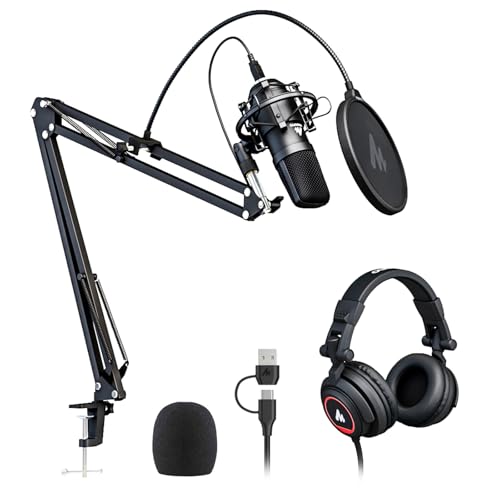
- USB plug-and-play with Mac compatibility
- Includes headphones and core recording accessories
- 192kHz/24Bit condenser mic with cardioid pickup
Best For: Beginners and solo podcasters who want an all-in-one Mac USB kit
Two-Host Mobile Podcast Bundle

- Dual XLR mics and dual-channel interface
- Works with Mac, iPhone, iPad, and Android
- Battery-powered and travel-ready with case
Best For: Two-person podcasts and portable interview recording
Simple USB Podcast Pickup

- Plug-and-play USB mic for Mac
- Noise reduction and zero-latency monitoring
- Gain, volume, and echo controls onboard
Best For: Solo creators who want an easy Mac USB mic with direct controls
Dual Mic Studio Bundle for MacBook
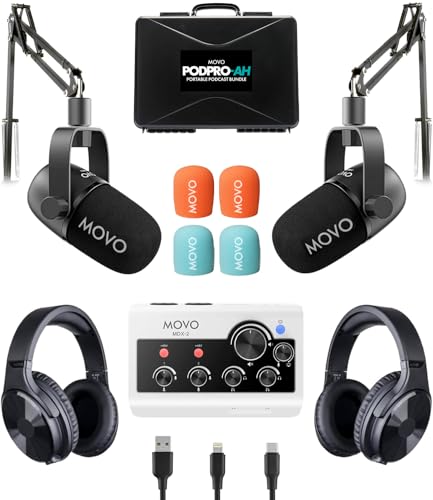
- Two XLR dynamic mics with dual-channel interface
- Boom arms improve desk mic positioning
- Mac-compatible with USB-A, USB-C, and Lightning
Best For: Home podcasters who want a fixed two-mic Mac desk setup
Flexible two-mic bundle
MAONO PD200W Hybrid Wireless Podcast Bundle

- Wireless, USB, and XLR support
- Two mics with separate-track recording
- Mac-compatible MAONO Link controls
Best For: Two-host podcasts and flexible MacBook recording
Feature-packed mixer setup
Brvomussy Podcast Equipment Bundle for 2

- Two mics, two boom arms, and a live sound card
- Built-in effects like voice change, echo, and noise reduction
- Works with Mac OS, PCs, smartphones, and more
Best For: Beginners who want an effect-heavy MacBook podcast kit
Dual-Mic Streaming Kit
All-Metal Podcast Bundle with Mixer

- Two condenser mics and full accessory set
- 48V phantom power with cardioid pickup
- Works with Mac, PC, phones, and tablets
Best For: Two-person podcasting and beginner MacBook creators
Cross-Platform Live Audio Kit

- Smart noise reduction with DSP processing
- Two mics plus anti-vibration suspension arms
- USB-C plug-and-play for Mac and other devices
Best For: Live streaming and multi-device creators on MacBook
Starter Studio Podcast Kit
BM-800 Bundle with Voice Changer

- Includes mic, arm stand, shock mount, and pop filter
- Cardioid mic with professional sound chipset
- Works with Mac OS plus phones and game consoles
Best For: Budget beginners building a solo MacBook podcast setup
Starter Podcast Bundle for MacBook – MAONO USB Mic Kit with Headphones
If you want a podcast recording bundle for MacBook that keeps setup simple, this MAONO kit is an easy place to start. It pairs a USB condenser mic with studio headphones, and the included shock mount, pop filter, windscreen, stand, and clamp cover the basics for recording, monitoring, and reducing handling noise.
Best For: Solo creators, beginners, and Mac users who want an all-in-one USB podcast setup with monitoring headphones.
Pros:
- USB plug-and-play connection with Mac compatibility and no external sound card needed.
- 192kHz/24Bit chipset and cardioid pickup are built for clear vocal recording.
- Includes headphones plus a full accessory kit: stand, shock mount, pop filter, windscreen, and table clamp.
- Foldable monitoring headphones add single-side monitoring and a long retractable cable.
Cons:
- It is a single-mic setup, so it is not built for two-host recordings.
- Uses a condenser mic, which may be less ideal in noisy rooms than a dynamic mic.
This is a practical bundle if you want a straightforward MacBook podcast setup without assembling separate accessories. It gives you the essentials in one box and is especially appealing when convenience matters more than studio expandability.
Two-Host Mobile Podcast Bundle – Movo PodPro-TH Dual Mic Kit
This podcast recording bundle for MacBook is built for two-person shows, interviews, and mobile sessions. The Movo PodPro-TH combines a dual-channel USB audio interface, two XLR dynamic mics, two tabletop stands, and two pairs of studio headphones, so you can record a complete conversation setup with fewer add-ons.
Best For: Two-host podcasts, interviews, and creators who want a portable dual-mic Mac setup.
Pros:
- Includes two CastMic XLR dynamic microphones for a true two-person recording setup.
- MDX-2 interface connects to Mac, PC, iPhone, iPad, and Android with USB-A, USB-C, and Lightning cables.
- Battery-powered interface adds portability for recording away from the desk.
- Comes with two headphones, two stands, XLR cables, and a travel case.
Cons:
- Designed around an XLR interface, so it is less plug-and-play than a simple USB mic.
- Best suited to two-person setups rather than solo creators.
If you need a more flexible recording rig than a basic single-mic package, this Movo bundle stands out for portability and dual-host use. It is a strong fit when you want a Mac-friendly setup that can move between studio, home, and travel recording.
Simple USB Podcast Pickup – ZealSound K66 Mac Mic
If you are building a compact podcast recording bundle for MacBook, this ZealSound USB mic is a straightforward option centered on voice clarity. It focuses on easy setup, onboard controls, and real-time monitoring, which makes it useful for podcasting, streaming, classes, and voice work without extra interface gear.
Best For: Solo podcasters and Mac users who want a simple USB mic with built-in controls and monitoring.
Pros:
- True plug-and-play USB operation with Mac compatibility and no drivers required.
- Noise reduction mode helps cut keyboard, fan, and room noise in busy environments.
- Includes zero-latency monitoring plus dedicated gain, volume, and echo controls.
- USB-C and Lightning adapters expand use across Macs, phones, and tablets.
Cons:
- It is a microphone-only option, so you must supply your own headphones and accessories.
- Not a multi-mic kit, so it is less suited to two-host podcasting.
For MacBook users who want a low-friction podcast mic with useful onboard adjustments, the ZealSound K66 keeps things simple. It is a practical choice when you want fast setup and direct control rather than a larger bundle.
Dual Mic Studio Bundle for MacBook – Movo PodPro-AH Boom Arm Kit
This podcast recording bundle for MacBook is aimed at creators who want a more desk-ready two-mic setup. The Movo PodPro-AH includes the same dual-channel interface and dynamic mics as the other PodPro package, but swaps in boom arms, making it a better fit for a fixed recording space where positioning matters.
Best For: Home podcasters and Mac users who want a two-mic desk setup with boom arms.
Pros:
- Includes two CastMic XLR dynamic microphones for interviews and co-hosted shows.
- Dual-channel MDX-2 interface works with Mac and multiple other devices using USB-A, USB-C, or Lightning.
- Boom arms help position microphones more precisely at a desk.
- Comes with headphones, cables, and a travel case for a complete bundle.
Cons:
- Heavier and more setup-oriented than a single USB mic.
- More appropriate for fixed desk recording than ultra-portable use.
If your priority is a more polished desktop podcast rig, this Movo bundle gives you the structure to place each mic cleanly. It is especially useful for MacBook users who want a two-person setup with more control over mic placement.
Flexible two-mic bundle – MAONO PD200W Hybrid Wireless Podcast Bundle
If you want a podcast recording bundle for MacBook that can scale from a simple USB setup to a more flexible wireless or XLR rig, this MAONO kit is built for that kind of workflow. It includes two wireless desktop mics, desktop stands, and Mac-compatible MAONO Link support, so you can record co-hosted episodes, interviews, or vocal takes without building a setup from scratch.
Best For: Two-person podcasts, co-host interviews, and creators who want USB, wireless, and XLR options in one kit.
Pros:
- Supports wireless, USB, and XLR recording for flexible MacBook-friendly setups.
- Two mics can connect to one receiver and record to separate tracks for easier editing.
- Cardioid pickup, three-stage noise cancellation, and 82dB SNR help keep voice capture clean.
- Includes two desktop stands plus MAONO Link app control for EQ and reverb adjustments.
Cons:
- Camera and Lightning accessories are sold separately.
- Better suited to two-person setups than solo creators.
Overall, this is a strong choice if you want one bundle that can grow with your podcast setup. The mix of wireless freedom, plug-and-play USB use, and XLR compatibility makes it especially practical for MacBook users who want fewer upgrade decisions later.
Feature-packed mixer setup – Brvomussy Podcast Equipment Bundle for 2
This podcast recording bundle for MacBook is aimed at creators who want an all-in-one mixer style setup with minimal assembly. The Brvomussy kit includes two condenser microphones, two boom arms, and a live sound card, plus broad compatibility with Mac OS, PC, smartphones, and more for plug-and-play streaming or recording.
Best For: Beginner-friendly two-person podcasts, livestreams, and creators who want built-in effects and mixer controls.
Pros:
- All-in-one bundle includes two microphones, two boom arms, and a live sound card.
- Built-in sound effects, voice variations, noise reduction, and other mixer functions.
- Compatible with Mac OS, Windows, iOS, Android, Chrome OS, and more.
- Supports instruments like guitar and bass for mixed-content streams.
Cons:
- Microphones are condenser-style handheld units rather than desktop broadcast mics.
- Feature-heavy mixer design may be more than some users need for simple voice-only recording.
If you want lots of onboard controls and effects in one package, this bundle delivers a lot of tools for the price of a single kit. It makes sense for creators who plan to stream, chat, sing, or record on a MacBook and want extra processing options without adding separate gear.
Simple wireless podcast kit – ZealSound Dual Wireless Podcast Microphone Bundle
If you’re looking for a podcast recording bundle for MacBook that keeps things simple, this ZealSound dual wireless mic kit focuses on quick setup and clean voice capture. The included receiver, USB connectivity, and Mac compatibility make it easy to start a two-person show, while onboard gain, echo, and mute controls give you basic sound shaping without extra gear.
Best For: Co-host podcasts, interviews, and mobile creators who want a simple wireless setup with direct monitoring.
Pros:
- Dual 2.4GHz wireless mics connect through one receiver for easy co-host recording.
- Compatible with PC, Mac, PS4, PS5, iPhone, iPad, and USB-C Android devices.
- Onboard gain, echo, reverb, mute, and zero-latency monitoring add useful control.
- 48kHz/24-bit recording and cardioid pickup are tuned for clear voice capture.
Cons:
- Wired mode supports only one mic at a time.
- Best suited to voice recording rather than a fully modular studio workflow.
This is a practical pick if you want an easy wireless podcast setup on a MacBook without relying on a mixer or audio interface. It emphasizes convenience, monitoring, and straightforward controls, which can be especially helpful for home studios, travel recording, and quick interview sessions.
Dual-Mic Streaming Kit – All-Metal Podcast Bundle with Mixer
If you want a podcast recording bundle for MacBook that’s ready for two-person shows, this all-in-one kit combines two condenser microphones with a full metal audio interface and boom-arm setup. It’s built for podcasting, streaming, gaming, interviews, and short-form content, with plug-and-play compatibility for Mac, plus support for phones, tablets, and PCs.
Best For: Two-person podcasting, beginner creators, and MacBook users who want an all-in-one setup with live monitoring and sound effects.
Pros:
- Includes two condenser mics, two boom arms, shock mounts, pop filters, and cables for a complete starter package.
- 48V phantom power, cardioid pickup, and smart chipset processing are designed to capture clearer vocals and reduce background noise.
- One-click mute, zero-latency monitoring, voice change modes, and custom effects add control for live recording.
- Compatible with Mac, PC, Android, and common apps like OBS, iMovie, TikTok, and YouTube.
Cons:
- The feature set is broad, so beginners may need time to learn the mixer controls.
- Best suited to dual-host or small-group setups rather than a solo minimalist desk rig.
This is a strong pick if you want a feature-rich podcast recording bundle for MacBook that can handle both voice capture and live-style production in one box.
Cross-Platform Live Audio Kit – DSP Sound Card Podcast Bundle
This podcast recording bundle for MacBook leans into live production, with a smart noise reduction system, 360° capture, and a DSP audio processing chip for studio-style vocal optimization. It also ships with two condenser microphones and suspension arms, making it a practical all-in-one option for streaming, podcasting, and mobile recording.
Best For: Creators who want a MacBook-compatible bundle with live sound effects, cross-platform support, and instrument input options.
Pros:
- Smart noise reduction, metal mesh filtering, and windproof foam are designed to clean up voice recordings.
- Includes two broadcast-grade condenser mics with anti-vibration suspension arms.
- USB-C connectivity supports quick use across PC, smartphones, and iPad.
- Works with Mac OS, Windows, Android, iOS, and Chrome OS, with plug-and-play setup.
Cons:
- The battery-powered design means you’ll need to keep it charged for best results.
- Its live-mixer feature set may be more than casual users need.
Overall, this is a flexible podcast recording bundle for MacBook users who want strong compatibility, real-time effects, and room to expand into music or multi-device content.
Starter Studio Podcast Kit – BM-800 Bundle with Voice Changer
If you need a straightforward podcast recording bundle for MacBook, this BM-800 package covers the essentials: microphone, scissor arm, shock mount, pop filter, foam cap, and a live sound card. It’s positioned for podcasting, streaming, and recording music or short videos, with compatibility for Mac OS plus phones, tablets, and game platforms.
Best For: Budget-minded beginners who want a complete starter kit for podcasting and content creation on MacBook.
Pros:
- Includes the core accessories most beginners need: mic, arm stand, shock mount, pop filter, and cables.
- Cardioid pickup and professional sound chipset are intended to capture voice clearly and directly.
- Compatible with Windows, Mac OS, smartphones, tablets, PS4, Xbox, and Switch.
- Voice changer and multiple sound effects add variety for live chats and social content.
Cons:
- Only one channel is listed, so it’s less ideal for multi-host recording setups.
- The bundle is more basic than higher-end kits with expanded mixer controls.
For solo creators who want an easy-entry podcast recording bundle for MacBook without buying each accessory separately, this package delivers a practical starter path.
How We Picked the Best Podcast Recording Bundle for MacBook
We looked for bundles that make recording on a MacBook practical for beginners and growing podcasters alike. Priority went to straightforward Mac compatibility, dependable microphone quality, useful accessories like stands and headphones, and bundle value that helps you start recording faster.
We also favored options that suit common podcast formats, including solo voice work, remote interviews, and two-host setups, so you can match the gear to your workflow instead of overbuying.
Quick Comparison
For the simplest setup, USB microphone kits are usually the easiest path on a MacBook. If you want more control, look for bundles with an audio interface, XLR microphones, or monitoring features. Wireless options may be convenient for flexible desk setups, but wired kits often offer more predictable recording results.
Key Buying Factors for a Podcast Recording Bundle for MacBook
Connection Type
USB bundles are the most beginner-friendly because they connect directly to your MacBook. XLR or hybrid USB/XLR bundles are better if you want to upgrade later or record with multiple microphones.
Mic Type and Voice Handling
Dynamic microphones are often a smart choice for untreated rooms because they can help reduce background noise. Condenser mics can sound more detailed, but they usually pick up more room sound.
Monitoring and Controls
Headphone monitoring, gain adjustment, mute buttons, and simple level controls can make a big difference when recording on a laptop. These features help you catch problems early and keep sessions smooth.
Included Accessories
Check whether the bundle includes stands, pop filters, cables, and headphones. A complete package can save money and reduce compatibility headaches, especially if you are setting up your first home studio.
Software and Mac Support
Make sure the bundle works cleanly with your recording app and macOS version. A good Podcast Recording Bundle for MacBook should feel easy to connect, easy to monitor, and easy to use without extra adapters.
Who Should Buy Which Podcast Recording Bundle for MacBook?
Solo creators and YouTubers should lean toward simple USB kits with direct monitoring and a compact footprint. Two-person podcasts are usually better served by bundles with dual mics and an interface or mixer. If you want flexibility for future expansion, choose a hybrid USB/XLR setup. If you want the fastest setup with the least learning curve, a straightforward USB bundle is the safest pick.