Portable RAID enclosures let you turn bare drives into flexible, high-capacity storage with the speed and redundancy many creators, backups, and pros need.
Whether you want simple mirror protection, faster striped performance, or a compact multi-bay setup, the right enclosure can make your workflow smoother and safer.
Best 10 Portable Raid Enclosures Picks for 2026
Desktop RAID Backup
TERRAMASTER D2-320 USB RAID Enclosure

- 10Gbps USB 3.2 Gen 2 connection
- RAID 0, RAID 1, JBOD, and Single support
- Tool-free trays with smart fan cooling
Best For: fast dual-bay local backups and mirrored storage
NVMe Clone Dock
Dual Bay M.2 RAID SSD Enclosure

- 20Gbps support for fast SSD transfers
- RAID 0/1, JBOD, and Clone modes
- Tool-free aluminum enclosure design
Best For: NVMe owners who need cloning plus portable RAID options
High-Capacity 4-Bay RAID
ORICO 4 Bay RAID Hard Drive Enclosure

- 8 RAID modes including RAID 5 and 10
- Up to 88TB total capacity
- Built-in 150W PSU with silent cooling fan
Best For: large backup and expansion setups that need advanced RAID choices
Compact Dual-Bay RAID
Vantec 2.5" USB 3.0 SSD/HDD Enclosure

- Supports individual mode, RAID 0, and RAID 1
- Auto RAID 1 rebuild for mirrored arrays
- Aluminum housing with front vents
Best For: Laptop users needing a compact 2.5-inch dual-bay RAID enclosure
Fan-Cooled 3.5" RAID Dock
CENMATE Dual-Bay 4-Mode Enclosure

- Supports 2.5-inch and 3.5-inch SATA drives
- RAID 0, RAID 1, Normal, and JBOD modes
- Built-in fan and aluminum-alloy cooling
Best For: Users who need a cooled dual-bay enclosure for larger drives and multiple RAID modes
High-Speed Mini RAID
MAIWO Dual-Bay 10Gbps Enclosure
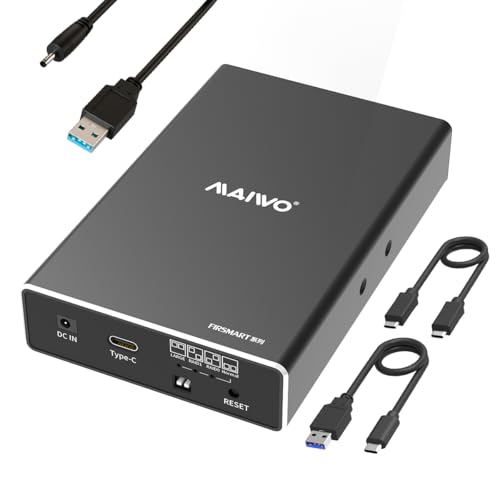
- USB 3.1 Gen 2 with up to 10Gbps speed
- Supports RAID 0, RAID 1, JBOD, and PM
- Compact, lightweight aluminum-alloy build
Best For: Users wanting a compact, fast 2.5-inch RAID enclosure for travel
Dual-Unit 4-Bay RAID Value
CENMATE Aluminum 2x2 Bay RAID Enclosure

- Two 2-bay RAID units in one enclosure
- Supports 2.5/3.5-inch SATA HDDs and SSDs
- USB 3.0, aluminum body, built-in cooling fans
Best For: Users who want a compact dual-unit RAID enclosure with flexible RAID modes
Portable Dual-Bay RAID Pick

- Dual-bay enclosure with RAID 0/1, JBOD, and PM
- USB 3.0 up to 5Gbps with UASP support
- Aluminum case plus built-in two-speed fan
Best For: Users who want a compact dual-bay RAID enclosure for backup and fast transfers
Most Flexible 4-Bay RAID Option
- Four-bay DAS with USB 3.0 and eSATA
- Eight modes including RAID 5 and RAID 10
- Up to 80TB with aluminum body and dual fans
Best For: Users who need a portable 4-bay RAID enclosure with broad mode and connection options
Desktop RAID Backup – TERRAMASTER D2-320 USB RAID Enclosure
If you’re comparing portable raid enclosures for fast desktop backup, the TERRAMASTER D2-320 is built around USB 3.2 Gen 2 and a 2-bay hardware RAID design. It supports RAID 0, RAID 1, JBOD, and Single, so it can be tuned for speed, mirroring, or simple expansion depending on your workflow.
Best For: Users who want a dual-bay DAS with fast USB-C connectivity and hardware RAID options for backups or performance.
Pros:
- USB 3.2 Gen 2 interface with up to 10Gbps transfer speeds
- Supports RAID 0, RAID 1, JBOD, and Single modes
- Tool-free tray design with automatic push-lock retention
- Intelligent temperature-controlled fan for quieter cooling
Cons:
- Diskless enclosure, so drives must be purchased separately
- Limited to two drives, which may not suit larger arrays
- Designed as a DAS, not a NAS
The D2-320 is a solid fit if you want a straightforward, high-speed enclosure for local storage and mirroring. Its main strengths are the fast USB connection, flexible RAID support, and easy drive installation.
NVMe Clone Dock – Dual Bay M.2 RAID SSD Enclosure
For portable raid enclosures built around NVMe SSDs, this dual-bay M.2 2280 enclosure combines RAID modes with clone mode in one compact unit. With 20Gbps transfer speed and tool-free access, it’s aimed at users who need quick file transfers, duplication, or redundant storage in a lightweight metal body.
Best For: NVMe users who want a dual-drive enclosure for RAID, cloning, and on-the-go storage.
Pros:
- Supports RAID 0, RAID 1, JBOD, and Clone mode
- 20Gbps transfer rate for demanding SSD workloads
- Tool-free design makes drive swaps and cloning easier
- Compact aluminum construction for portability and heat dissipation
Cons:
- Only supports M.2 2280 NVMe SSDs
- PC-focused hardware platform
- Best results depend on using compatible high-capacity drives and stable power
This enclosure stands out for users who need more than basic storage, especially if cloning and RAID 1 redundancy are part of the plan. Its speed and compact metal build make it a practical travel-friendly SSD solution.
Budget HDD RAID Box – MAIWO 2 Bay 3.5" RAID Enclosure
If you need portable raid enclosures for larger 3.5-inch drives, the MAIWO 2-bay model focuses on simple RAID storage with steady operation. It supports RAID 0, RAID 1, JBOD, and Normal mode, and pairs that with a 5Gbps USB connection, independent power supply, and temperature-controlled fan.
Best For: Users who want a straightforward dual-bay enclosure for 3.5-inch SATA drives with basic RAID flexibility.
Pros:
- Supports RAID 0, RAID 1, JBOD, and Normal modes
- Independent 12V/4A power supply for stable operation
- Smart temperature-controlled fan for cooling
- Up to 60TB capacity with 3.5-inch SATA drives
Cons:
- 5Gbps interface is slower than newer 10Gbps or 20Gbps options
- 2.5-inch drives require a mounting bracket that is not included
- Bulkier than compact SSD-focused enclosures
The MAIWO enclosure makes sense if you prioritize drive capacity and dependable cooling over top-end speed. It is a practical choice for users who want a simple dual-bay RAID box for HDD-based storage.
High-Capacity 4-Bay RAID – ORICO 4 Bay RAID Hard Drive Enclosure
For portable raid enclosures that need more bays and more RAID choices, the ORICO 4-bay unit offers a wide range of configurations for backup and expansion. It supports RAID 0, 1, 3, 5, 10, JBOD, CLONE, and CLEAR, and is built for 3.5-inch SATA disks with up to 88TB total capacity.
Best For: Users who need a 4-bay direct-attached storage enclosure with flexible RAID modes and high total capacity.
Pros:
- Supports 8 RAID modes, including RAID 5 and RAID 10
- Up to 88TB total capacity with 22TB single drives
- Built-in 150W power supply for multi-disk operation
- Aluminum body with 80mm silent cooling fan and vents
Cons:
- Uses USB 3.0 / 5Gbps, so it is not the fastest option here
- Designed for 3.5-inch drives only
- Four-bay size is less compact for travel
This ORICO enclosure is the strongest choice in the group when capacity and RAID flexibility matter more than compact size. It is especially useful for large backups, centralized storage, and users who want advanced RAID options in one box.
Compact Dual-Bay RAID – Vantec 2.5" USB 3.0 SSD/HDD Enclosure
Vantec Nexstar GX USB 3.0 Dual 2.5" SATA SSD/HDD RAID Enclosure, Black (NST-272S3-BK)
Check Price On AmazonIf you want portable raid enclosures for two 2.5-inch drives, the Vantec Nexstar GX is a practical pick for compact SSD or HDD storage. It supports individual mode plus RAID 0 and RAID 1, and it includes auto RAID 1 rebuild for users who want a simple mirrored setup.
Best For: Laptop users and travelers who need a small dual-bay enclosure for 2.5-inch drives with RAID 0/1 support.
Pros:
- Supports individual mode, RAID 0, and RAID 1
- Auto RAID 1 rebuild adds convenience for mirrored arrays
- USB 3.0 with UASP support for faster compatible transfers
- Aluminum housing with front vents for heat dissipation
Cons:
- Only supports 2.5-inch SATA drives
- Requires the included AC adapter for power
This enclosure makes sense if you want a small, bus-friendly RAID option for portable SSDs or laptop drives. Its strength is straightforward dual-drive storage in a compact aluminum body, but it is best matched to 2.5-inch use cases rather than mixed-drive flexibility.
Fan-Cooled 3.5" RAID Dock – CENMATE Dual-Bay 4-Mode Enclosure
For portable raid enclosures that can handle larger desktop drives, the CENMATE dual-bay model is built around 2.5-inch and 3.5-inch SATA HDDs and SSDs. It offers four modes, including RAID 0, RAID 1, Normal, and JBOD, plus a built-in fan to help manage heat during extended use.
Best For: Home or office users who need a dual-bay enclosure for 3.5-inch drives, frequent capacity, and multiple RAID modes.
Pros:
- Supports both 2.5-inch and 3.5-inch SATA HDD/SSD
- Offers RAID 0, RAID 1, Normal, and JBOD modes
- Built-in fan and aluminum-alloy body for cooling
- USB 3.0 interface with up to 5Gbps transfer speed
Cons:
- Fan noise is noted around 40–50 decibels
- MAC OS has no RAID software
- RAID configuration requires a reset step after changes
This is a better fit when drive capacity and cooling matter more than ultra-quiet operation. Its support for larger 3.5-inch drives makes it more of a desktop-style RAID enclosure than a pocket-sized portable unit, but it still remains easy to plug in and use.
High-Speed Mini RAID – MAIWO Dual-Bay 10Gbps Enclosure
If speed is the priority in portable raid enclosures, the MAIWO dual-bay enclosure stands out with USB 3.1 Gen 2 and up to 10Gbps transfer rates. It is designed for 2.5-inch SATA SSDs and HDDs, supports RAID 0, RAID 1, JBOD, and PM modes, and keeps the footprint small enough for travel.
Best For: Users who want a compact 2.5-inch RAID enclosure with faster USB 3.1 Gen 2 performance.
Pros:
- USB 3.1 Gen 2 interface with up to 10Gbps speed
- Supports RAID 0, RAID 1, JBOD, and PM modes
- Tool-free installation and hot swapping
- Very small, lightweight aluminum-alloy design
Cons:
- Only supports 2.5-inch SATA drives
- Needs external power, even though a cable is included
This enclosure is the strongest choice here for users who want faster connectivity in a truly compact package. It trades away 3.5-inch compatibility, but the speed, size, and flexible RAID modes make it a solid portable storage option for laptop-based workflows.
Dual-Unit 4-Bay RAID Value – CENMATE Aluminum 2×2 Bay RAID Enclosure
If you want portable raid enclosures for a desktop-style storage setup, this CENMATE model is built around two 2-bay RAID units in one enclosure. It supports 2.5-inch and 3.5-inch SATA HDDs and SSDs, offers four RAID modes, and uses an aluminum body with cooling fans to help manage heat during heavier workloads.
Best For: Users who want a compact dual-unit RAID enclosure with flexible RAID 0, RAID 1, JBOD, and normal modes.
Pros:
- Two 2-bay RAID units combined into one enclosure
- Supports 2.5/3.5-inch HDDs and SSDs up to 80TB total
- USB 3.0 with up to 5Gbps and USB A/C cables included
- Aluminum-alloy build with built-in fans for heat control
Cons:
- Fan noise is stated at around 40-50 decibels
- RAID setup notes warn that changing modes may cause data loss
- Mac OS does not have RAID software support listed
This is a practical pick if you want a portable RAID enclosure with multiple mode options and broad drive support, but it makes the most sense for users comfortable with RAID setup steps and fan noise.
Portable Dual-Bay RAID Pick – MAIWO Dual Bay RAID Enclosure
This MAIWO model is a straightforward choice among portable raid enclosures if you want a dual-bay setup with simple RAID switching and broad OS compatibility. It supports 2.5-inch and 3.5-inch SATA drives, includes a cooling fan, and uses USB 3.0 for up to 5Gbps transfer speeds.
Best For: Users who want a compact dual-bay RAID enclosure for backup, fast transfers, and everyday storage.
Pros:
- Supports RAID 0, RAID 1, LARGE/JBOD, and NORMAL/PM modes
- Compatible with Windows, Mac OS, and Linux
- Built-in two-speed cooling fan and aluminum body for heat dissipation
- 48TB total capacity with 18TB supported per slot
Cons:
- 2.5-inch drives need an additional 2.5 to 3.5 mounting bracket
- RAID mode changes require backup and initial formatting
- Type-A to Type-A USB cable may be less convenient for some systems
Overall, this is a practical portable RAID enclosure if you want a balanced mix of speed, capacity, and easy RAID mode selection without moving up to a larger multi-bay unit.
Most Flexible 4-Bay RAID Option – CENMATE 4-Bay RAID Enclosure
For buyers comparing portable raid enclosures with more storage flexibility, this CENMATE 4-bay unit stands out for its mix of USB 3.0 and eSATA connectivity plus eight RAID-related modes. It supports 2.5-inch and 3.5-inch SATA HDDs and SSDs, uses an aluminum case with fans, and is positioned as a DAS rather than a NAS.
Best For: Users who need a portable 4-bay RAID enclosure with multiple mode options and both USB and eSATA connections.
Pros:
- Supports 8 RAID modes including RAID 0, 1, 3, 5, 10, CLONE, LARGE, and NORMAL
- Up to 80TB capacity across four drives
- USB A/C 3.0 and eSATA cables included
- Aluminum body with two fans and a stable 12V power adapter
Cons:
- eSATA has compatibility restrictions and may only access one bay on unsupported ports
- Hot-swapping is not supported
- Mode switching is more involved and may require careful reset steps
This is the strongest fit if you want a feature-rich portable RAID enclosure and are comfortable with more setup detail to unlock its broader RAID and connection options.
How We Picked These Portable Raid Enclosures
We focused on enclosure designs that balance compatibility, RAID flexibility, cooling, connection speed, and ease of setup. For this roundup, the most important factors were drive type support, bay count, RAID mode options, interface performance, and whether the enclosure is practical for everyday transport or desk use.
We also looked for options that suit different buying needs, from compact dual-bay models for SSDs to larger multi-bay units for bulk storage and backup.
Quick Comparison: What Matters Most
If you want speed, look for NVMe or USB 3.1/3.2 Gen 2-class connectivity. If you want data protection, choose RAID 1 or a similar mirrored configuration. If you want maximum usable capacity, higher-bay enclosures with JBOD or RAID 0 can be better, but they do not protect against drive failure.
For mixed-use buyers, the best Portable Raid Enclosures usually offer good cooling, tool-free access, and support for both SSDs and HDDs where possible.
Key Buying Factors for Portable Raid Enclosures
Drive Type and Form Factor
Make sure the enclosure matches your drives. Some models are designed for 2.5-inch SSDs, others for 3.5-inch HDDs, and some support both. NVMe-only enclosures are ideal for speed, while SATA enclosures are often better for larger, cheaper storage.
RAID Modes
Common options include RAID 0 for performance, RAID 1 for redundancy, JBOD for flexible expansion, and “normal” mode for independent drive access. Choose the mode that fits your use case, not just the one with the longest list of features.
Cooling and Build Quality
Multi-drive storage generates heat, especially with larger HDDs. Aluminum housings, built-in fans, and sensible airflow help maintain stable performance and longer drive life.
Connection Speed
USB 3.0 is fine for general storage, but USB 10Gbps or faster is better if you plan to move large files often. eSATA may still appeal to some desktop users, though USB is more universal.
Who Should Buy Which Portable Raid Enclosures?
Choose a compact dual-bay SSD enclosure if you want a portable editing drive, fast scratch storage, or a backup mirror for laptops. Choose a larger 3.5-inch HDD enclosure if your priority is cheap, high-capacity archival storage.
If you need a balanced all-purpose solution, look for Portable Raid Enclosures with multiple modes, strong cooling, and broad drive support. That gives you the most flexibility as your storage needs change.