Choosing a PTZ conference camera for Mac is easier when you know what matters most: plug-and-play compatibility, clean video, and smooth control. The right model should work well with macOS without extra hassle.
Below, we focus on cameras that balance image quality, zoom, tracking, and connection options so you can match the setup to your room, workflow, and budget.
Best 10 PTZ Conference Camera for Mac Picks for 2026
Pro-Grade Conference Zoom
- 1080p video with sharp color reproduction
- 3x optical zoom and wide 90-degree view
- USB camera with macOS support
Best For: Conference rooms and training spaces on Mac
All-in-One AI Meeting Cam

- 4K video with dual mics and a 3W speaker
- AI auto-framing and voice tracking
- Remote-controlled 5x digital zoom
Best For: Mac meetings that need camera, audio, and tracking in one device
Mid-Room PTZ Value Pick
Monoprice USB Conference Camera

- 1080p video with 3x optical zoom
- Driver-free Mac OS X support over USB
- Wireless remote with preset angles
Best For: Mid-sized conference rooms with Mac compatibility
Premium all-in-one room system
20x Zoom AI Auto-Tracking Conference System

- 4K/30fps video with 20x optical zoom
- AI face and humanoid tracking
- Includes Bluetooth speakerphone with 4 mics
Best For: Large meeting rooms and all-in-one conferencing
Compact AI webcam pick

- Compact 4K USB webcam with AI tracking
- Voice and gesture control for hands-free use
- Tri-mic array with spatial audio modes
Best For: Mac meetings, streaming, and small workspaces
Value conference bundle
1080P AI Auto-Tracking PTZ System

- 1080p/60fps camera with USB 3.0 and HDMI
- 3x optical zoom with AI speaker tracking
- Includes Bluetooth conference speakerphone
Best For: Small to medium Mac meeting rooms
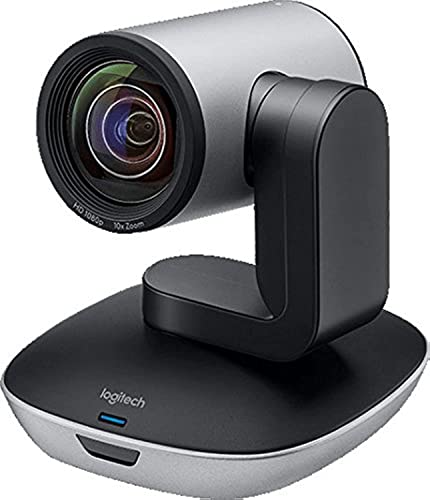
Pro-Grade Conference Zoom – Logitech PTZ Pro 2 Camera
Logitech PTZ Pro 2 Camera – USB HD 1080P Video Camera for Conference Rooms | Conference Rooms
Check Price On AmazonIf you want a PTZ conference camera for Mac that feels built for serious meeting rooms, the Logitech PTZ Pro 2 is a straightforward option. It delivers 1080p video, 3x optical zoom, smooth pan/tilt movement, and a wide 90-degree field of view, so it works well when you need to show both the room and close-up details.
Best For: Conference rooms, training spaces, and larger group meetings on Mac or Windows.
Pros:
- 1080p capture with sharp color reproduction and optical accuracy
- 3x optical zoom plus 10x digital zoom for room shots or close-ups
- Smoother preset-to-preset movement thanks to enhanced PTZ motors
- USB connection and macOS support for simple setup
Cons:
- Built for rooms, so it may be more camera than a small desk setup needs
- No built-in speaker or microphone system listed
Overall, this is a practical pick if your priority is dependable room coverage and controlled PTZ movement rather than all-in-one conferencing extras. It is especially appealing for teams that want a camera optimized for professional video calls and presentation-style meetings.
All-in-One AI Meeting Cam – TONGVEO 4K Webcam
If you are shopping for a PTZ conference camera for Mac with built-in audio, the TONGVEO 3-in-1 4K webcam is designed to simplify the setup. It combines 4K video, dual microphones, a 3W speaker, AI auto-framing, voice tracking, and remote-controlled zoom, making it useful for meetings where you want fewer separate accessories.
Best For: Mac users who want an all-in-one conferencing webcam with camera, mics, and speaker.
Pros:
- 4K resolution at 30fps for crisp meeting video
- Built-in dual mics and a 3W speaker reduce the need for extra gear
- AI auto-framing and voice tracking help keep speakers centered
- Remote control offers 5x digital zoom and adjustable field-of-view modes
Cons:
- Digital zoom only, not optical zoom
- Compact webcam design may suit smaller rooms better than large boardrooms
This is a strong convenience-first choice for people who want one device to handle video and audio for calls. The Mac compatibility and plug-and-play USB setup make it easy to drop into a home office or small conference space.
Mid-Room PTZ Value Pick – Monoprice USB Conference Camera
For buyers comparing a PTZ conference camera for Mac, the Monoprice USB Conference Room Camera is a practical mid-sized room option. It offers 1080p video, 3x optical zoom, PTZ control with a wireless remote, and a USB 2.0 connection that works without drivers on Mac OS X, so setup stays simple.
Best For: Mid-sized meeting rooms with 6-10 participants using Mac or other major operating systems.
Pros:
- 3x optical zoom with pan and tilt for flexible framing
- Driver-free USB compatibility with Mac OS X and other major systems
- Wireless remote supports preset angles and zooms
- Mounting hardware included for room installation
Cons:
- External mic and speaker are recommended for best results
- Video is listed as optimized for web meetings rather than advanced production use
In practice, this camera makes sense when you need solid PTZ control without overpaying for features you may not use. It is a dependable fit for standard video conferencing rooms where a separate audio setup is already planned.
AI PTZ Creator Camera – EMEET PIXY Dual-Camera 4K
If your priority is a PTZ conference camera for Mac that can also handle streaming-style use, the EMEET PIXY brings a lot into one compact unit. It combines a dual-camera 4K design, AI tracking, PDAF and AI autofocus, three microphones, and PTZ movement, so it is aimed at people who want smarter framing and faster focus.
Best For: Mac users who need AI tracking, fast autofocus, and creator-friendly conferencing in one camera.
Pros:
- Dual-camera 4K design with AI-assisted autofocus and exposure control
- PTZ movement with 310-degree pan and 180-degree tilt
- Three-mic array with multiple sound modes for different recording needs
- Works with macOS 10.14+ and supports presets and gesture control
Cons:
- Some FOV options are limited depending on resolution and mode
- Remote is sold separately if you want that control method
This model stands out if you want a camera that is equally comfortable in meetings, teaching, and content creation. The AI tools and software controls make it more flexible than a basic conference-room camera, especially for users who value framing automation.
Premium all-in-one room system – 20x Zoom AI Auto-Tracking Conference System
If you want a PTZ conference camera for Mac that does more than just capture video, this TONGVEO system is built as a full meeting-room setup. It pairs a 4K/30fps AI auto-tracking PTZ camera with a Bluetooth speakerphone, so it is aimed at users who want clear visuals and room-filling audio in one package.
Best For: Large remote meetings, live streaming, and conference rooms that need integrated video and audio.
Pros:
- 4K/30fps camera output with 20x optical zoom for detailed, flexible framing
- AI humanoid and face tracking helps keep the speaker centered
- USB 3.0, HDMI, and LAN outputs add setup flexibility
- Speakerphone includes 4 microphone arrays, Bluetooth 5.0, and dongle/USB options
Cons:
- Built for larger meeting spaces, so it may be more than some small desks need
- Full system approach can be less compact than a standalone webcam
This is a strong fit when you want a single bundled solution for both camera and audio, especially for bigger rooms and mixed-use conferencing. Mac compatibility is supported in the listed system requirements, making it a practical option for Apple-based meeting setups.
Compact AI webcam pick – Tiny 3 Lite 4K PTZ Webcam
The OBSBOT Tiny 3 Lite is a compact PTZ conference camera for Mac users who want a smarter webcam-style setup rather than a full room system. It combines 4K video, AI tracking, and voice or gesture controls in a small USB camera that is meant for meetings, streaming, and everyday content creation.
Best For: Mac users who want a compact AI-tracking webcam for meetings, streaming, and solo or small-group use.
Pros:
- 4K@30FPS and 1080P@120FPS options for detailed or smoother video
- AI Tracking 2.0 can follow people, groups, and many object types
- Voice and gesture control make hands-free operation easier
- Tri-mic array and spatial audio modes support clearer voice pickup
Cons:
- USB-only design may be less suited to larger room AV setups
- Some advanced controls may be unnecessary for basic video calls
For Mac users who need a modern, compact camera that can track movement without extra hardware, this model offers a lot of flexibility. It is especially appealing if you want strong image quality, built-in audio features, and software-driven control in a small footprint.
Value conference bundle – 1080P AI Auto-Tracking PTZ System
If you need a PTZ conference camera for Mac without moving up to a full 4K room package, this TONGVEO bundle focuses on practical meeting-room essentials. It combines a 1080p AI auto-tracking PTZ camera with a Bluetooth speakerphone, making it a straightforward option for everyday conferencing, classes, and training sessions.
Best For: Small-to-medium conference rooms and budget-conscious Mac-based video meetings.
Pros:
- 1080p at 60fps over HDMI and USB 3.0 for smooth video
- 3x optical zoom and 350°/180° movement support flexible framing
- AI tracking with face and humanoid recognition helps follow speakers
- Speakerphone supports USB, Bluetooth 5.0, and wireless dongle connections
Cons:
- 1080p resolution is lower than 4K options in the roundup
- Best suited to smaller spaces rather than larger conference rooms
This bundle is a solid middle-ground choice if you want the convenience of bundled audio and video, but do not need ultra-high-resolution capture. Its listed Mac compatibility and plug-and-play style connections make it easy to consider for routine meetings and remote collaboration.
Wireless Auto-Tracking PTZ – TONGVEO 1080P 60fps 3X Zoom
If you need a PTZ conference camera for Mac with simple setup and hands-free framing, this TONGVEO wireless model is built for easy meetings, classes, and live presentations. Its built-in AI human detection tracks the speaker automatically, while the 5.8GHz wireless system helps reduce cable clutter in rooms where running USB lines is inconvenient.
Best For: Churches, classrooms, and Mac-based meeting spaces that want wireless auto-tracking.
Pros:
- AI auto-tracking keeps the speaker centered without manual control.
- Wireless 5.8GHz setup uses a USB dongle and is designed for plug-and-play use.
- 1080P at 60fps with 3X optical zoom gives smooth, clear presentation video.
- Compatible with macOS, Zoom, OBS, WebEx, and Teams.
Cons:
- Wireless range is limited compared with wired conference cameras.
- Only 3X optical zoom, so it is less suited to very large rooms.
This is a practical pick if you want an easier wireless setup and automatic speaker tracking more than advanced pro-grade zoom. It fits best in smaller rooms, hybrid classrooms, and worship spaces where convenience matters as much as video quality.
4K AI PTZ Conference Camera – TONGVEO 4K 20X Optical Zoom
For a PTZ conference camera for Mac that prioritizes detail, this 4K TONGVEO model offers a major step up in resolution and zoom. It supports HDMI, USB 3.0, LAN, and PoE connections, and its AI tracking plus multiple control options make it a flexible choice for meetings, worship, and live production.
Best For: Mac users who want 4K clarity, long zoom reach, and wired connection flexibility.
Pros:
- 4K video with 20X optical zoom for capturing speakers from farther away.
- AI auto-tracking with face and body recognition helps keep presenters framed.
- HDMI, USB3.0, LAN, and PoE output options support flexible installation.
- Compatible with OBS, Zoom, Teams, and Facebook Live.
Cons:
- Default HDMI output is 4K@30Hz, which may need a resolution change for some displays.
- It is a stationary/fixed-mount camera, so portability is limited.
This is the strongest option here if your priority is image quality and room coverage rather than the simplest possible setup. The combination of 4K output and 20X zoom makes it well suited to larger conference rooms and stage-style presentations.
Pro PTZ Conference System – TONGVEO 1080P 60fps 20X Zoom
This TONGVEO PTZ conference camera for Mac is aimed at users who want smooth 1080P video, strong zoom, and reliable control in one package. With AI tracking, 20X optical zoom, and HDMI plus USB 3.0 plug-and-play connectivity, it is designed for streaming, conferencing, and multi-angle room setups.
Best For: Mac-based conference rooms, streaming setups, and hybrid events that need long zoom reach.
Pros:
- 1080P at 60fps delivers smooth motion for meetings and live video.
- 20X optical zoom keeps distant subjects clear without relying on digital zoom.
- Supports AI auto tracking and multi-person auto framing.
- Offers HDMI and USB 3.0 plug-and-play compatibility with Zoom, OBS, Teams, and more.
Cons:
- It is a 1080P camera, so it does not offer 4K output.
- No wireless option, which may matter if you want a cable-free install.
This model balances strong zoom, smooth frame rates, and broad Mac-friendly compatibility. It is a good fit when you need dependable conference-room performance and preset-based operation more than ultra-high-resolution capture.
How We Picked the Best PTZ Conference Camera for Mac
We prioritized models that make sense for Mac users first: USB connectivity, dependable macOS compatibility, easy setup, and controls that do not depend on clunky software. We also looked at video resolution, zoom range, auto-tracking behavior, audio support, and whether the camera can handle small huddle rooms or larger conference spaces.
Quick Comparison: What Matters Most
If you want the simplest setup, a USB PTZ Conference Camera for Mac is usually the safest choice. If you need more flexibility for streaming, larger rooms, or AV installs, look for HDMI, LAN, or PoE support. For polished presentations, 4K and optical zoom help maintain detail when the speaker moves. For fast-moving meetings, AI tracking and presets can save time and keep the frame centered.
Key Buying Factors for PTZ Conference Camera for Mac
Mac Compatibility and Connection Type
Start with plug-and-play support. Many Mac buyers will be happiest with a USB camera that behaves like a standard webcam. If you use Zoom, Teams, Google Meet, OBS, or conferencing software on macOS, verify that the camera works as a UVC device or has reliable Mac software support.
Resolution and Zoom
1080p is still fine for everyday meetings, but 4K gives you more detail and better cropping flexibility. Optical zoom is preferable to digital zoom because it keeps faces and gestures clearer when the camera pans across a room.
Tracking and Presets
Auto-tracking is useful for solo presenters, teachers, and hybrid meetings, while presets are ideal for fixed speaking positions or multi-seat conference rooms. If your room has repeated presentation formats, presets can make operation much faster.
Audio and Room Size
Some all-in-one options include microphones or speakerphones, which can simplify small setups. For larger rooms, you may still want dedicated audio. Match the camera’s field of view and zoom to the distance between the camera and the speaker.
Who Should Buy Which PTZ Conference Camera for Mac?
Buy a straightforward USB PTZ camera if you want a reliable Mac-friendly setup for everyday meetings. Choose a 4K AI-tracking model if you present often and want a more professional on-camera look. Go with a room system that adds HDMI, LAN, or speakerphone features if you are outfitting a larger conference space, church, classroom, or streaming setup. If portability and minimal cabling matter most, look for a compact PTZ Conference Camera for Mac with simple controls and auto-framing.
In short, the best choice is the one that fits your room, your software, and how often you need to move the camera during a session.