A quieter PC starts with the right fan—not simply the slowest one. The best quiet computer cooling fans balance motor noise, airflow, static pressure, size, and control options for your specific build.
This roundup covers 120mm and 140mm case fans, compact 80mm models, USB-powered desk and network-device fans, and multi-packs for upgrading several mounting points at once.
Best 10 Quiet Computer Cooling Fans Picks for 2026
Performance Quiet Pick

- 1700 RPM maximum speed and up to 120.2 m³/h airflow
- Pressure-optimized for coolers, radiators, and cases
- 4-pin PWM supports automatic speed control
Best For: Performance-focused desktop cooling
Ultra-Silent Value Pick

- Low 0.08-sone noise rating
- Pressure-optimized for heatsinks and radiators
- Simple 3-pin design with a six-year warranty
Best For: Low-noise desktop and radiator ventilation
Flexible USB Cooling Pick
AC Infinity MULTIFAN S7 Dual 120mm

- Two fans deliver 104 CFM combined airflow
- 19 dBA total noise with a multi-speed controller
- USB powered for consoles, AV gear, and cabinets
Best For: External and USB-powered electronics cooling
Compact Budget Pick
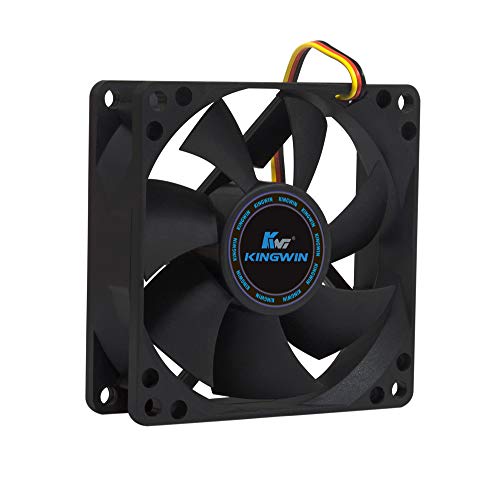
- Compact 80mm size for smaller mounts
- Up to 30 CFM airflow at 1700 RPM
- Long-life bearing and 3-pin connection
Best For: Compact cases, home servers, and 80mm replacements
USB Quiet Cooling Pick

- 18 dBA rating and 52 CFM airflow
- Adjustable multi-speed controller
- USB-powered, upright or flat placement
Best For: USB cooling for computers, consoles, AV equipment, and cabinets
PC Case Fan Pick

- 4-pin PWM control for desktop PCs
- Up to 49.9 CFM airflow
- 80,000-hour rifle-bearing rating
Best For: PWM-controlled desktop case or radiator cooling
Large USB Cooling Pick

- 57 CFM airflow from a 140mm fan
- 18 dBA rated noise level
- Speed controller and flexible placement
Best For: Larger USB cooling setups for computers, consoles, and AV cabinets
Best Value Quiet Cooling Pack

- Five 120mm fans for multi-fan builds
- Pressure-optimised airflow for radiators and heatsinks
- Quiet Fluid Dynamic Bearing design
Best For: Whole-case upgrades and value-focused PC builders
Premium High-Airflow Pick
be quiet! Silent Wings Pro 4 140mm

- High airflow for demanding cooling setups
- Three selectable maximum-speed levels
- Smooth, low-vibration fluid-dynamic bearing
Best For: Gaming PCs, radiators, and heatsinks
Compact PWM Choice

- PWM speed control responds to motherboard temperature
- Vibration-damping pads help reduce noise
- Compact 92mm design reaches 2,200 RPM
Best For: Small cases and PWM-controlled CPU or case cooling
Performance Quiet Pick – Noctua NF-P12 redux-1700 PWM
For builders who want quiet computer cooling fans without giving up airflow, the Noctua NF-P12 redux-1700 PWM offers a strong balance of performance and noise control. Its pressure-optimized design suits CPU coolers, radiators, and case ventilation, while the 4-pin PWM connection allows compatible motherboards to adjust speed automatically.
Best For: Performance-focused desktop builds, CPU coolers, radiators, and users who want automatic fan-speed control.
Pros:
- 1700 RPM maximum speed with up to 120.2 m³/h airflow
- Pressure-optimized design for heatsinks, radiators, and case ventilation
- 4-pin PWM control can provide stronger cooling under load and quieter operation at idle
- Backed by a six-year manufacturer’s warranty
Cons:
- Maximum noise rating of 25.1 dB(A) is higher than slower silent-focused fans
- Single-fan package does not include optional mounting or cable accessories
The NF-P12 redux-1700 PWM is a versatile choice when cooling headroom matters as much as quiet operation. Its 120mm size and PWM support make it especially practical for modern desktop cooling setups.
Ultra-Silent Value Pick – ARCTIC P12 Silent 120mm
The ARCTIC P12 Silent is a good fit for quiet computer cooling fans in systems where low operating noise takes priority. Its pressure-optimized blade design is intended for heatsinks and radiators, while the 1050 RPM maximum speed keeps airflow and acoustic output modest.
Best For: Quiet desktop builds, heatsink or radiator ventilation, and users who prefer a simple 3-pin fan.
Pros:
- Low 0.08-sone noise rating
- Pressure-optimized design helps maintain cooling through air resistance
- Developed bearing and motor design aims to reduce friction and motor noise
- Six-year warranty
Cons:
- 3-pin connector does not offer the same PWM control as a 4-pin fan
- 1050 RPM speed and 24.1 CFM airflow provide less cooling capacity than faster models
Choose the P12 Silent when a quieter, lower-speed 120mm fan is more important than maximum airflow. It is particularly suitable for applications where the fan works against resistance but extreme cooling performance is unnecessary.
Flexible USB Cooling Pick – AC Infinity MULTIFAN S7 Dual 120mm
The AC Infinity MULTIFAN S7 brings quiet computer cooling fans to electronics that may not have a standard motherboard fan header. This two-fan USB system includes a multi-speed controller, noise-absorption pads, and dual-ball bearings, making it useful for computers, consoles, AV equipment, and cabinets.
Best For: USB-powered cooling for gaming consoles, AV equipment, receivers, DVRs, computers, and enclosed cabinets.
Pros:
- Two 120mm fans provide a combined 104 CFM of airflow
- 19 dBA total noise rating
- Multi-speed controller lets users balance airflow and noise
- USB power and dual-ball bearings support flexible placement, including flat or upright use
Cons:
- USB-based design may not integrate with a motherboard’s fan-speed controls
- Designed as an external or general electronics cooler rather than a standard internal PC case fan
The MULTIFAN S7 is the most flexible option here for cooling devices beyond a conventional PC chassis. Its controller and USB plug make installation straightforward when adjustable, low-noise airflow is needed around electronics.
Compact Budget Pick – Kingwin 80mm Silent Fan
The Kingwin 80mm Silent Fan is a compact option for quiet computer cooling fans in cases or systems designed for smaller mounts. It uses a standard 3-pin connector, reaches up to 1700 RPM, and is positioned for case ventilation, CPU cooler replacement, home servers, and mining-rig airflow.
Best For: Older or compact desktop cases, 80mm CPU cooler replacements, home servers, and mining-rig ventilation.
Pros:
- Compact 80mm form factor fits standard 80mm mounts
- 30 CFM airflow at up to 1700 RPM
- Long-life bearing and durable black frame
- Suitable for cases, CPU coolers, radiators, and mining rigs
Cons:
- 25 dB noise rating is not as quiet as the lowest-noise options in this roundup
- 3-pin connector provides less control flexibility than PWM models
- Lower airflow capacity than the larger 120mm fans listed here
The Kingwin is a practical replacement when an 80mm mounting size is required. It offers useful airflow for compact systems and demanding environments, but larger 120mm fans may be preferable when your case supports them.
USB Quiet Cooling Pick – AC Infinity MULTIFAN S3 120mm
If you need quiet computer cooling fans for a desktop accessory, game console, receiver, or cabinet, the AC Infinity MULTIFAN S3 is a flexible USB-powered option. Its 120mm fan moves up to 52 CFM while producing a rated 18 dBA, and the included speed controller lets you adjust the balance between airflow and noise.
Best For: USB-powered cooling for computers, AV equipment, game consoles, and enclosed cabinets.
Pros:
- Rated at 18 dBA with up to 52 CFM of airflow.
- Multi-speed controller supports customized cooling and noise levels.
- Dual-ball bearings are rated for a 67,000-hour lifespan.
- Can stand upright or lie flat, with noise-absorption pads included.
Cons:
- USB power and a 5-volt design may not suit standard 12-volt PC fan replacements.
- Its 120mm size may be too small for users specifically needing a 140mm fan.
The S3 is a practical choice when easy USB connectivity and adjustable, low-noise cooling matter more than installing a conventional case fan. Its flexible placement also makes it useful beyond a desktop tower.
PC Case Fan Pick – be quiet! Pure Wings 3 120mm
The be quiet! Pure Wings 3 is a 120mm PWM case fan for desktop builders who want quiet computer cooling fans with conventional PC connectivity. Its 4-pin connector supports PWM control, while the low minimum RPM and seven airflow-optimized blades are designed to reduce noise without giving up useful airflow.
Best For: Desktop PC case or radiator configurations needing a 4-pin PWM fan.
Pros:
- 4-pin PWM connection enables compatible motherboard fan control.
- Seven airflow-optimized blades provide up to 49.9 CFM of airflow.
- Low minimum RPM supports very quiet operation.
- Rifle bearing is rated for an 80,000-hour operating life.
Cons:
- Its rated noise level of 25.5 dB is higher than the 18 dBA rating of the AC Infinity options.
- Requires a compatible 12-volt, 4-pin desktop setup rather than USB power.
Choose Pure Wings 3 when you are upgrading a desktop PC and want motherboard-controlled PWM operation, long bearing life, and a design suited to demanding case or radiator configurations.
Large USB Cooling Pick – AC Infinity MULTIFAN S4 140mm
For quiet computer cooling fans with a larger footprint, the AC Infinity MULTIFAN S4 combines a 140mm frame with USB-powered convenience. It is rated for 57 CFM at 18 dBA, and its multi-speed controller lets you tune airflow for electronics, consoles, computers, or cabinets.
Best For: USB cooling setups where a larger 140mm fan and flexible placement are preferred.
Pros:
- 140mm fan provides up to 57 CFM of airflow.
- Rated at 18 dBA for quiet operation.
- Multi-speed controller helps tailor airflow and noise.
- Dual-ball bearings are rated for 67,000 hours, and the fan can stand or lie flat.
Cons:
- The larger 140mm footprint requires more installation space than a 120mm fan.
- The supplied details list USB power in the product description but specify a 4-pin connector in the technical details, so buyers should verify the connection for their setup.
The S4 is the stronger fit when you have room for a 140mm fan and want slightly more airflow than the S3 without changing to a louder cooling solution. Its controller and placement options add versatility for nonstandard cooling locations.
Best Value Quiet Cooling Pack – ARCTIC P12 120mm 5-Pack
For builders needing several quiet computer cooling fans, the ARCTIC P12 five-pack combines pressure-optimised airflow with a quiet motor and durable Fluid Dynamic Bearing. Its 120mm design and 1,800 RPM maximum speed make it suitable for case ventilation, heatsinks, and radiators.
Best For: Multi-fan PC builds and buyers who want quiet, pressure-focused cooling in a five-pack.
Pros:
- Five 120mm fans provide strong value for whole-case upgrades.
- Pressure-optimised design delivers up to 56.3 CFM and 2.2 mmH₂O static pressure.
- Fluid Dynamic Bearing is designed for quiet operation and long service life.
Cons:
- Uses a 3-pin connector rather than PWM speed control.
- Maximum speed is lower than some performance-focused alternatives.
The P12 is a practical choice when you need multiple fans that can handle airflow resistance without making noise a primary concern. Check your motherboard or hub connections before buying because these are 3-pin fans.
Premium High-Airflow Pick – be quiet! Silent Wings Pro 4 140mm
The be quiet! Silent Wings Pro 4 is a premium 140mm option for quiet computer cooling fans where airflow and radiator performance both matter. Its six-pole motor, fluid-dynamic bearing, and vibration-conscious construction support smooth operation, while the speed switch provides three performance levels.
Best For: High-performance gaming PCs, radiators, and heatsinks that need substantial airflow with quieter regular-speed operation.
Pros:
- 140mm frame and airflow capacity up to 97.4 CFM support strong cooling.
- Optimised blades and funnel-shaped outlet are designed for high air pressure.
- Speed switch offers medium, high, and ultra-high-speed settings up to 3,000 RPM.
- Six-pole motor and fluid-dynamic bearing help reduce vibration and smooth operation.
Cons:
- It is a single fan, so outfitting a case may require multiple purchases.
- Reported noise reaches 36.8 dB at higher operating levels.
- The 140mm size may not fit cases designed only for 120mm fans.
This fan suits users who want to balance low-noise everyday cooling with extra performance when temperatures rise. Confirm your case or radiator supports 140mm mounting and 4-pin PWM control.
Compact PWM Choice – Thermalright TL-P9 92mm
The Thermalright TL-P9 is a compact option for quiet computer cooling fans in smaller cases or CPU-cooling layouts. Its 92mm frame, 4-pin PWM connection, vibration-damping pads, and S-FDB bearing are designed to provide temperature-responsive control with low operating noise.
Best For: Compact desktops, CPU coolers, radiators, and builds needing PWM-controlled 92mm cooling.
Pros:
- 4-pin PWM control lets the motherboard adjust speed according to temperature.
- Vibration-damping pads and a seven-blade design support quieter operation.
- S-FDB bearing is designed to reduce noise while extending fan life.
- Compact 92mm size works where standard 120mm fans may not fit.
Cons:
- Maximum airflow is 32.77 CFM, below the larger fans in this roundup.
- It is supplied as a single fan.
- The 92mm format has more limited mounting compatibility than 120mm or 140mm fans.
Choose the TL-P9 when space is limited and automatic PWM control matters more than maximum airflow. It is also flexible enough for case use, radiators, and compatible downward CPU coolers.
How We Picked These Quiet Computer Cooling Fans
We selected models based on the needs of common PC and electronics cooling setups. Key considerations included fan diameter, PWM or manual speed control, airflow and static-pressure design, bearing and motor noise, installation flexibility, and the type of device each fan can realistically cool.
The list includes individual fans for targeted upgrades, multi-packs for complete case refreshes, USB-powered units for consoles or networking equipment, and compact options for older cases or tight spaces. Product specifications and intended use matter more than a single advertised noise figure, since perceived noise also depends on fan speed, case restrictions, vibration, and distance from the listener.
Quick Comparison
| Best For | Recommended Type | What to Look For |
|---|---|---|
| Quiet general-purpose case airflow | 120mm PWM fan | Low-noise motor, balanced airflow, motherboard control |
| Radiators and restrictive filters | Pressure-optimized 120mm or 140mm fan | Static pressure and a broad controllable RPM range |
| Several case positions | 120mm multi-pack | Matching fans, affordable per-fan cost, PWM headers |
| USB-powered electronics | USB fan with speed controller | USB compatibility, adjustable speed, suitable fan size |
| Small cases or specialty builds | 80mm or 92mm fan | Correct mounting pattern and connector type |
| High-performance gaming PCs | Premium high-speed PWM fan | Higher airflow, durable construction, custom fan curves |
Key Buying Factors for Quiet Computer Cooling Fans
Size and Mounting Compatibility
Confirm the available mounting pattern before shopping. A 120mm fan is a common case standard, while 140mm models can move more air at lower rotational speeds when the case supports them. Compact 80mm and 92mm fans are useful for older cases, CPU coolers, and tight enclosures, but they often need to spin faster to deliver comparable airflow.
Airflow Versus Static Pressure
Choose an airflow-focused fan for an unobstructed exhaust or intake position. For radiators, dense dust filters, mesh restrictions, or heatsinks, prioritize a pressure-optimized design. A fan with a high maximum airflow rating is not automatically the best choice for a restricted mounting location.
Noise, Speed, and Control
PWM fans use a four-pin motherboard header to adjust speed through BIOS or software, making them easier to tune for silence at idle and stronger cooling under load. Three-pin fans may use voltage control, while USB models typically rely on an inline speed controller. Check both the rated noise and the maximum RPM; a fast fan can be quiet at a reduced setting but loud when run at full speed.
Connector, Power, and Installation
Verify the connector, cable length, included accessories, and available motherboard headers. If you are installing several fans, a splitter or powered hub may be required. Rubber corners, quality bearings, and secure mounting can also reduce vibration-related noise.
Who Should Buy Which Quiet Computer Cooling Fans?
Choose a 120mm PWM model for a balanced everyday desktop or gaming PC. A pressure-optimized model is better for a radiator, restrictive front panel, or dust-filtered intake. Multi-packs make sense when replacing several stock fans, especially when you want consistent acoustics and matching control behavior.
USB-powered AC Infinity models suit consoles, routers, AV equipment, cabinets, and other devices without open motherboard fan headers. A compact Kingwin or Thermalright option is appropriate when the case requires an 80mm or 92mm mounting size. For demanding gaming or workstation builds, a premium 140mm high-speed PWM fan can provide substantial cooling headroom, provided you create a sensible fan curve rather than running it at maximum continuously.